

A membership plugin can be a life saver when you offer multiple plans and have a lot of users. ARMember reviews like this and other can help figure out which plugin solves complex problems like payment gateways, access control and content protection. Get one setting wrong, and you could have angry members who can’t log in or, worse, non-members accessing content they didn’t pay for. Thankfully, ARMember claims to solve those problems and more.
We’ve tested the plugin to see if it truly simplifies this process or just adds another layer of complexity. We’ll break down its features, ease of use, and potential pitfalls to help you decide if it’s the solution for you.
To be safe, I created a test site to try ARMember. I found the plugin to be incredibly powerful and budget-friendly, packed with features that rival more expensive options. While it has a few minor bugs, it’s a strong contender for any membership site.
ARMember is a WordPress membership plugin developed by Repute Infosystems. It’s known for packing an impressive number of premium features into a surprisingly affordable package. When we were testing the plugin, we were looking for the following features:
- Ease of Use: How simple is it to set up and manage daily? A complicated plugin can quickly eat up your time.
- Core Features: Does it have all the essential tools you need, like robust content restriction, payment gateways, and member management?
- Pricing and Value: Is it affordable, and does the price justify the features? What’s the true cost over time?
- Security and Reliability: How well does it protect your site and your members’ sensitive data? Is the plugin regularly updated and maintained?
- Customization: Can you make it match your brand’s look and feel without needing to be a professional developer?
Expert Advice: We recommend you install a backup plugin before you get started.
Let’s dive into our ARMember Plugin review:
Manage Membership Plans and Access Control

When looking for the best WordPress membership plugin, the absolute core of its job is to protect your premium content. If it can’t do that reliably, nothing else matters. I wanted to see how easy it was to create different membership tiers and, more importantly, how granularly I could lock down specific pages and posts.
- Unlimited Plans: As soon as the setup wizard is triggered, it became obvious that you can create as many membership plans as you need. I found it straightforward to set up free plans, one-time payment plans, or recurring subscriptions right from the wizard. The dashboard makes it easy to go back and edit these plans at any time.
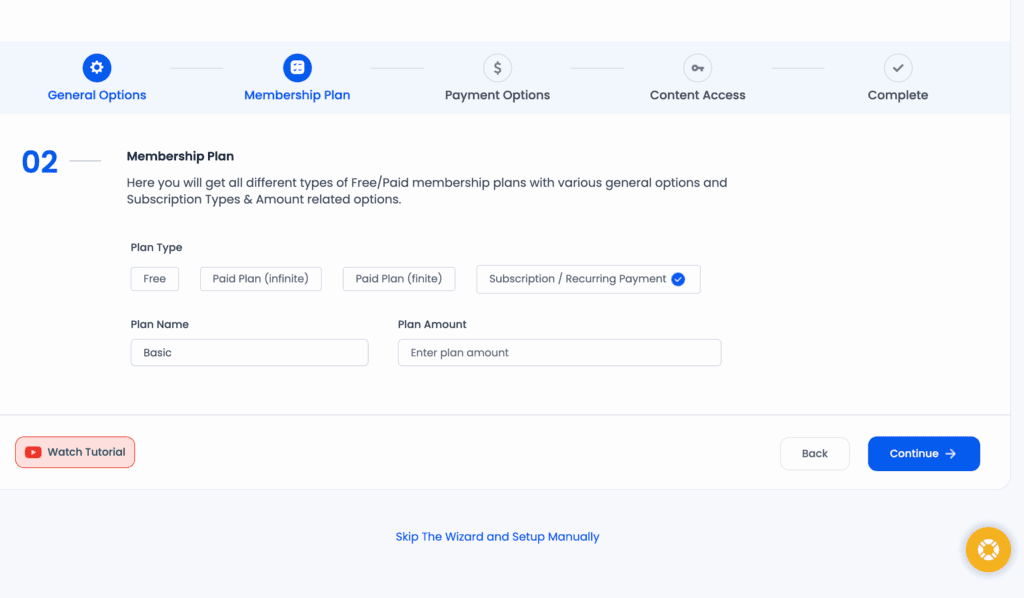
- Flexible Plan Types: The plugin supports all the essential models: free access, paid plans with a set duration (like a 1-year pass), and ongoing subscriptions.
- Content Restriction: This is where ARMember really shines. You can restrict access to posts, pages, categories, or even specific URLs. I was also able to easily hide parts of a post using a simple shortcode, which is great for creating “teaser” content.
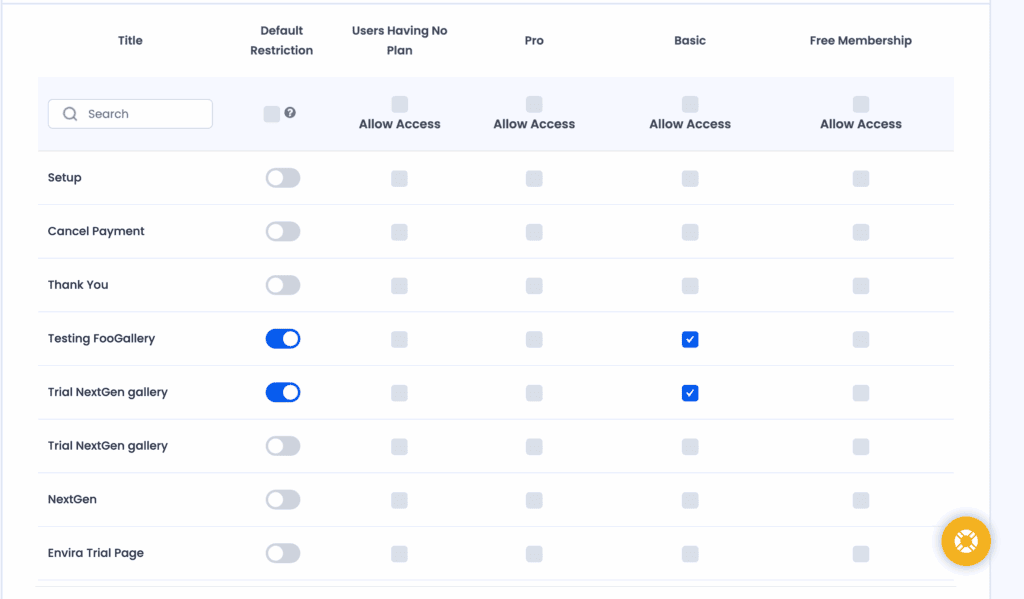
- Pay Per Post (PPP): A great feature for selling access to a single high-value article or course without forcing users into a full membership.
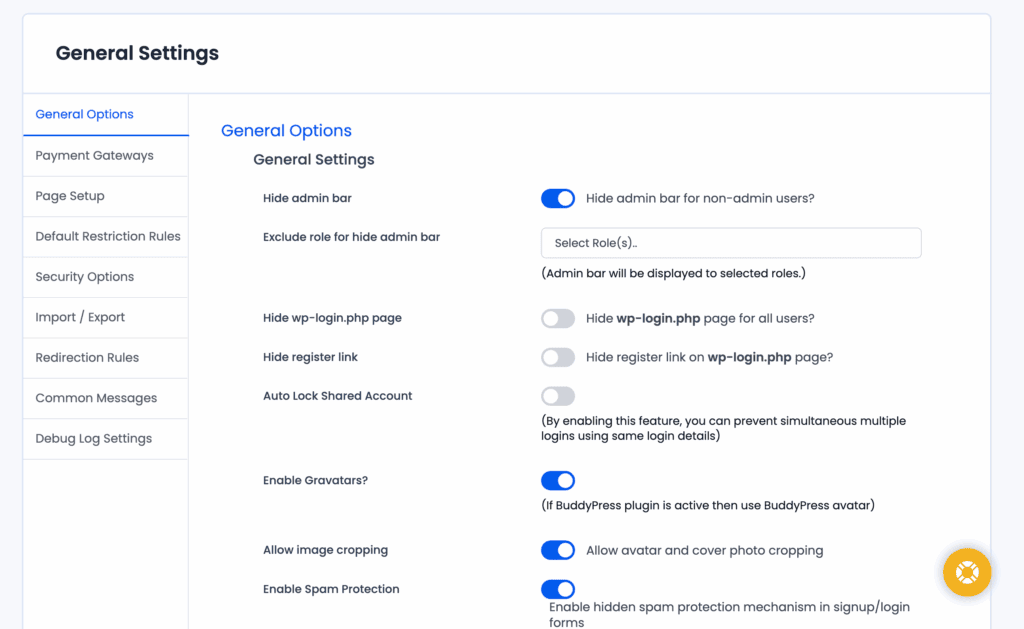
- Hide Admin Bar/Panel: You can easily hide the top WordPress admin bar from members, giving your site a more professional, less “WordPress-y” feel for your users.
Manage Members
Once people start signing up, you need a central hub to manage them. A messy member list can quickly become a customer service nightmare. I was looking for a clean, intuitive dashboard in ARMember that wouldn’t require a user manual to figure out, and it largely delivered. Having all member management tools in one place is a significant time-saver.
- Centralized Management: The admin dashboard gives you a single screen to view, search, and manage all your members.
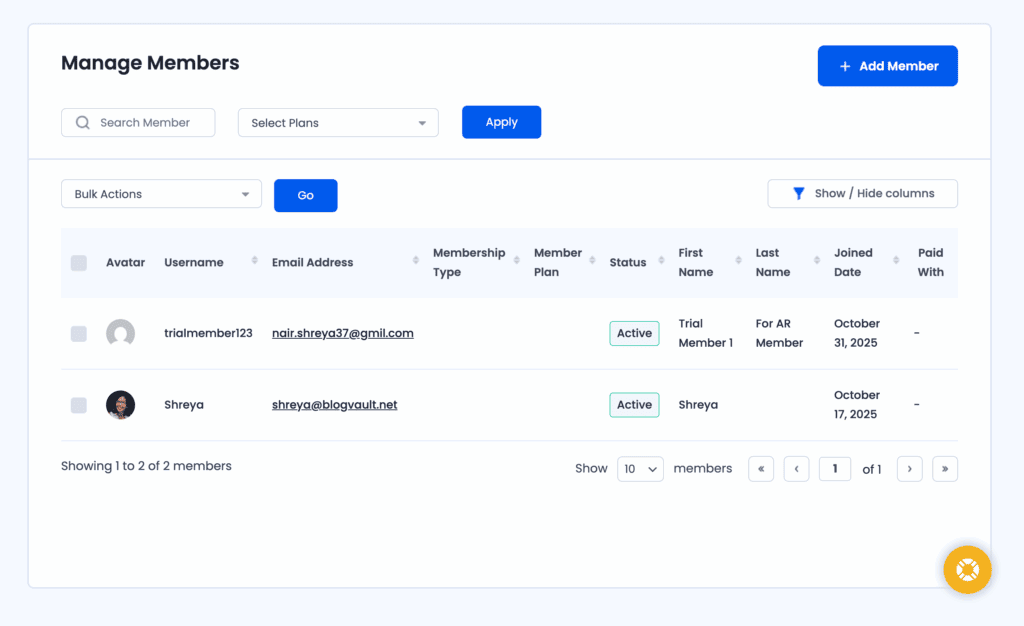
- Member Actions: As an admin, you have full control. I could manually add new users, edit their profiles, change their membership level, or cancel a subscription directly.
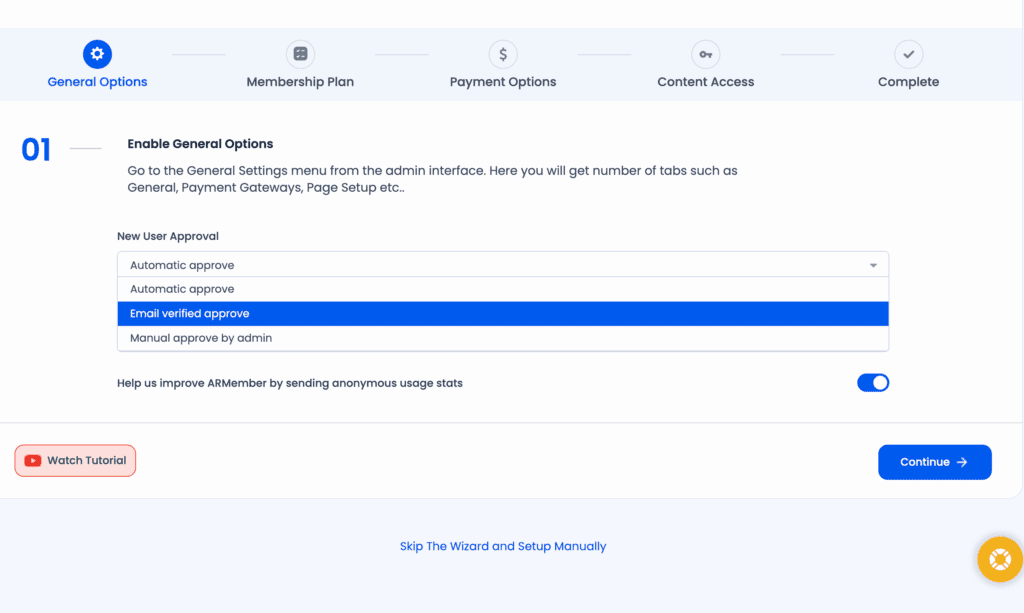
- User Approval Options: During the setup wizard, you can decide how new members are approved: automatically, after they verify their email, or only after you manually approve them. For security, we always recommend using email verification to reduce spam sign-ups.
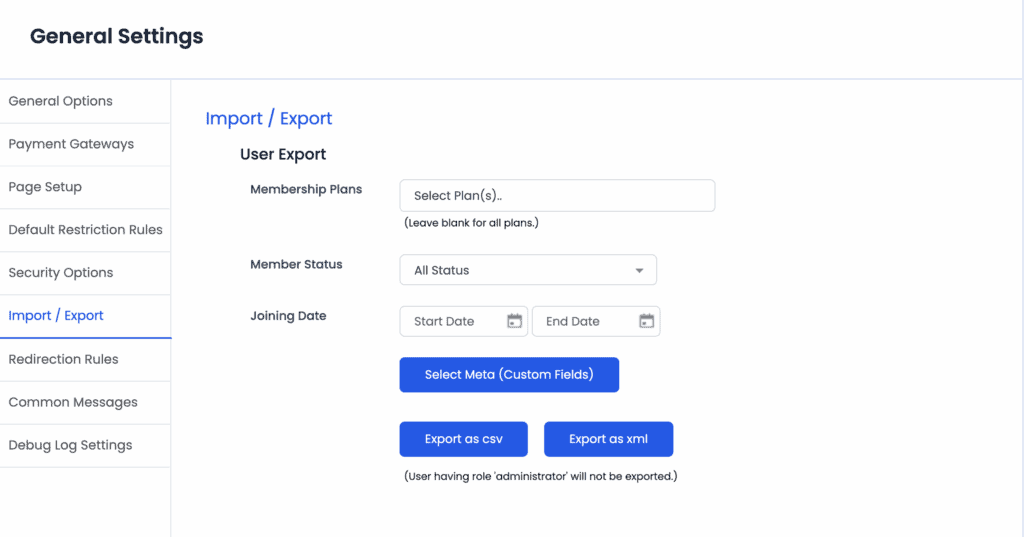
- Import/Export: This is a lifesaver if you’re migrating from another plugin. You can easily import or export member data.
- Member Directory: ARMember includes tools to create a public or private member directory. It’s a nice touch for building a community feel.
- Membership Cards: A bit of a novelty, but you can generate virtual membership cards for your users.
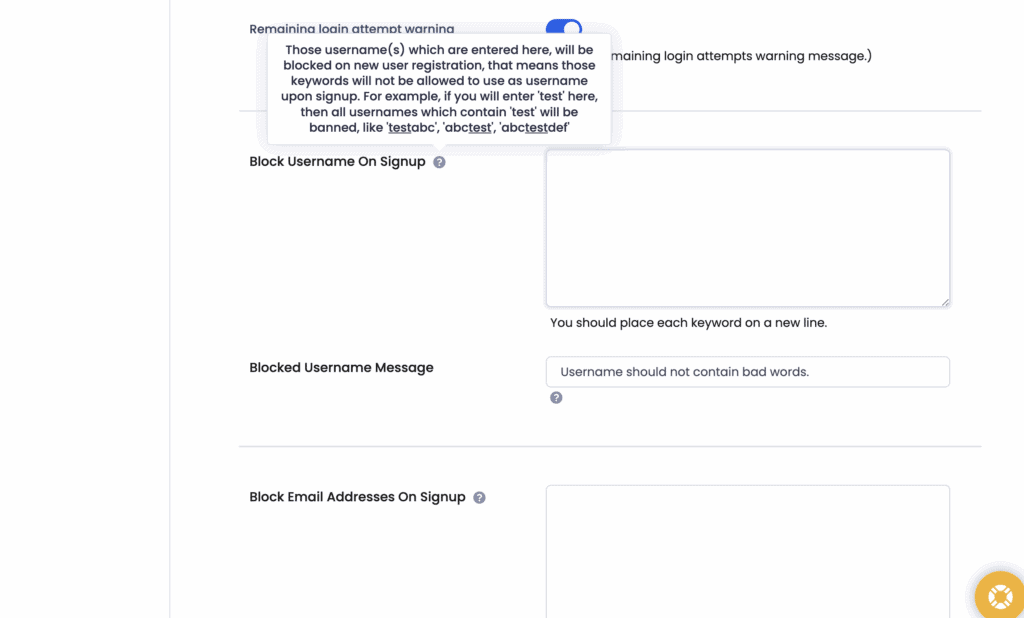
- Block Members: If you have a problematic user, you can block them by their IP address, username, or email.
Content Dripping
I’ve seen it happen: a new member joins, downloads every single piece of content, and cancels their subscription for a refund the next day. Content dripping is your best defense against this. It’s a paid feature that allows you to release content to members on a schedule, keeping them engaged and subscribed longer. ARMember includes this powerful feature, which is often reserved for more expensive plugins.
- Scheduled Content Delivery: You can set rules to “drip” content over time. For example, a new member might get access to Module 1 immediately, Module 2 after seven days, and so on.
- Flexible Scheduling: I was impressed by the flexibility here. You can release content based on a member’s sign-up date, on a specific calendar date, or after a certain post is published.
- Partial Content Dripping: Just like restricting content, you can use shortcodes to drip-feed specific sections within a single page or post.
- Configurable Rules: It’s easy to set up different drip rules for each membership plan you offer.
Payments and Subscription
Let’s talk about payment gateway plugins. A membership plugin is useless if it can’t reliably and securely handle transactions.
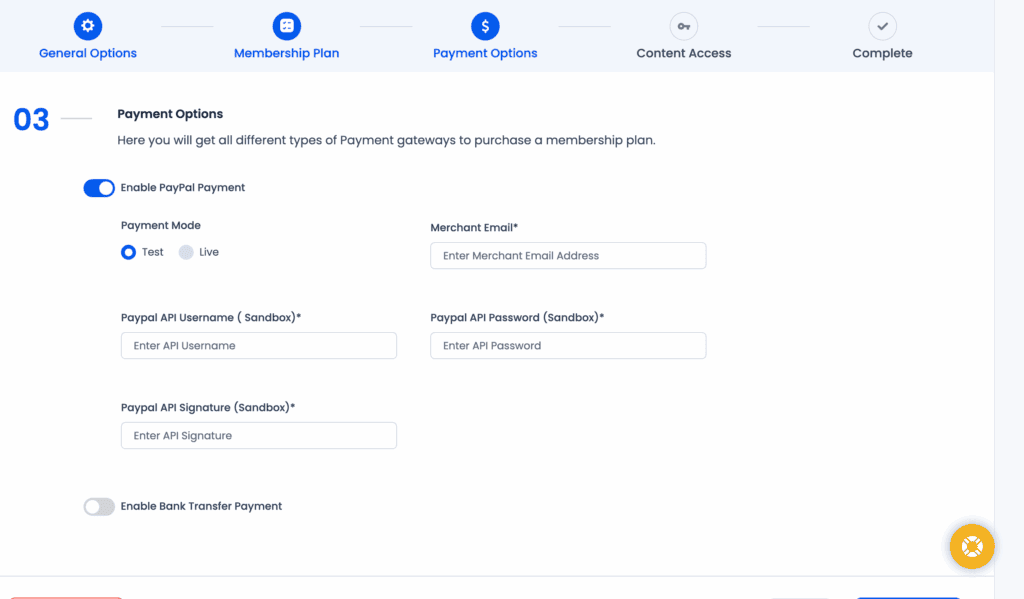
During the setup wizard, ARMember makes you configure a payment gateway – either bank transfer or PayPal. The paid subscriptions offer more options. However, for this test, I chose the bank transfer option, which lets you define instructions for direct transfers, cheques, or cash payments. It’s functional, but for a real business, you’ll need more.
Here’s a breakdown of all their features for this category:
- Multiple Payment Gateways: The premium plans support over 20 gateways, including essentials like PayPal, Stripe, and Authorize.Net. The free version is limited to PayPal and Bank Transfer.
- Automatic & Manual Payments: The plugin handles both automatic recurring payments for subscriptions and one-off manual payments.
- Proration: If a member upgrades or downgrades their plan mid-cycle, ARMember automatically calculates the pro-rata difference. This is a critical feature for flexible membership sites and prevents billing headaches.
- Coupon Management: You can easily create discount codes to run promotions, a must-have for marketing your membership.
- Trial Periods: I was able to set up free or paid trial periods to let potential customers try before they buy.
- Tax and Invoicing: The plugin has built-in tools for calculating taxes and allowing members to download PDF invoices for their records.
Design and Customization
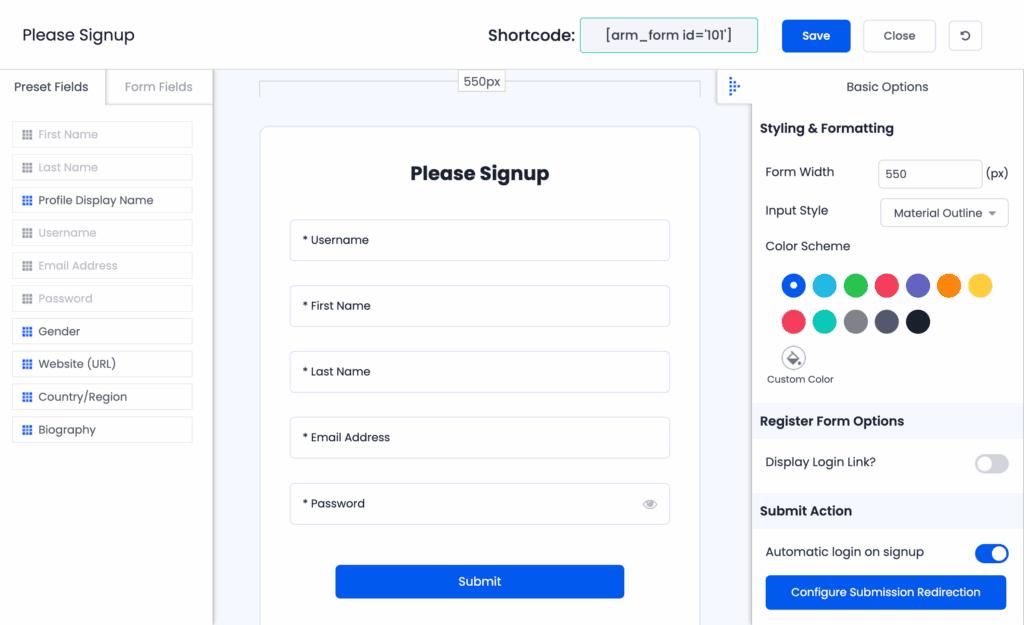
Your login forms, registration pages, and member profiles shouldn’t look like generic, out-of-the-box templates. They need to match your brand. I spent some time in ARMember’s form builder to see how much control it offers. It provides a solid set of tools to create a seamless user experience without needing to hire a developer.
- Built-in Form Builder: This was a highlight for me. It’s a drag-and-drop tool that lets you create custom registration, login, and profile forms with all the fields you need.
- Templates: The plugin comes with pre-designed templates for forms and member profiles. They look good to start with, but you can customize them further.
- Custom CSS: For those who are more technical, you can add your own custom CSS to get the styling just right.
- Pop-up Forms: You can easily create modal login and sign-up forms that appear in a pop-up window.
- Email Customization: It’s easy to edit the automated emails for things like new registrations, payment reminders, and password resets to match your brand’s voice.
Privacy, Security and Compliance
When you’re handling user data and payments, you are responsible for keeping that information safe. Overall, ARMember provides a good baseline of security and compliance features essential for any membership site.
- GDPR Compliant: The plugin includes features to help you comply with GDPR regulations. Remember, you’ll likely still need a good cookie consent plugin to cover all your bases.
- PCI-Compliant Security: ARMember doesn’t store credit card data on your server. It integrates with secure, PCI-compliant payment gateways to handle sensitive financial information safely.
- Anti-Spam Security: It has built-in mechanisms to fight spam registrations without making users solve a CAPTCHA.
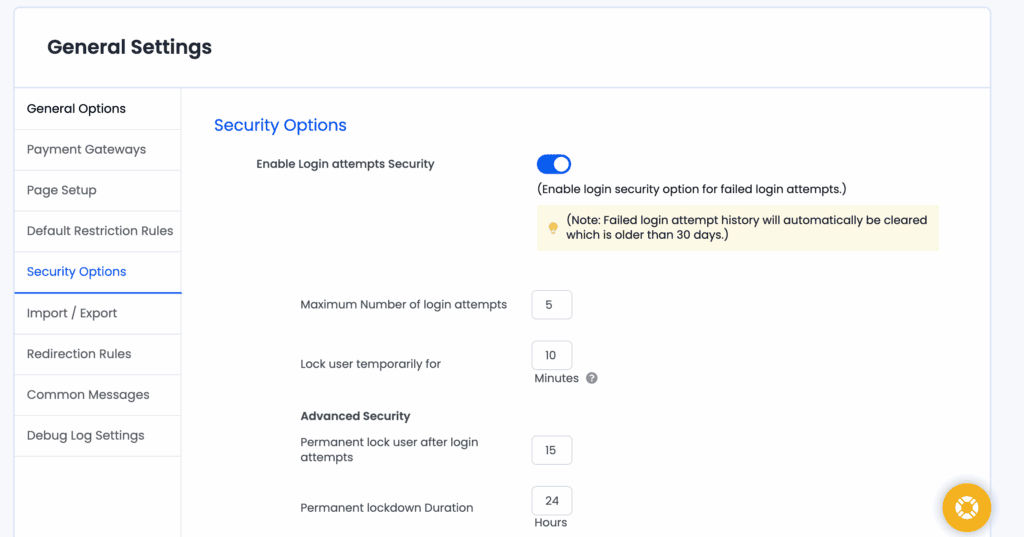
- Login Security: The plugin tracks failed login attempts and allows you to ban IPs automatically. This is a crucial defense against brute-force attacks.
- HTTPS Support: It works perfectly with sites running on secure HTTPS, which is a must-have today.
Usability
First things first, ARMember is not on the official WordPress repository; you have to download it from their website and upload the file manually. However, once installed, the plugin does an excellent job of holding your hand with a setup wizard. This wizard is a huge help for beginners, as it guides you through all the essential initial configurations, like setting up user approval rules, choosing your currency, and creating your first membership plan.
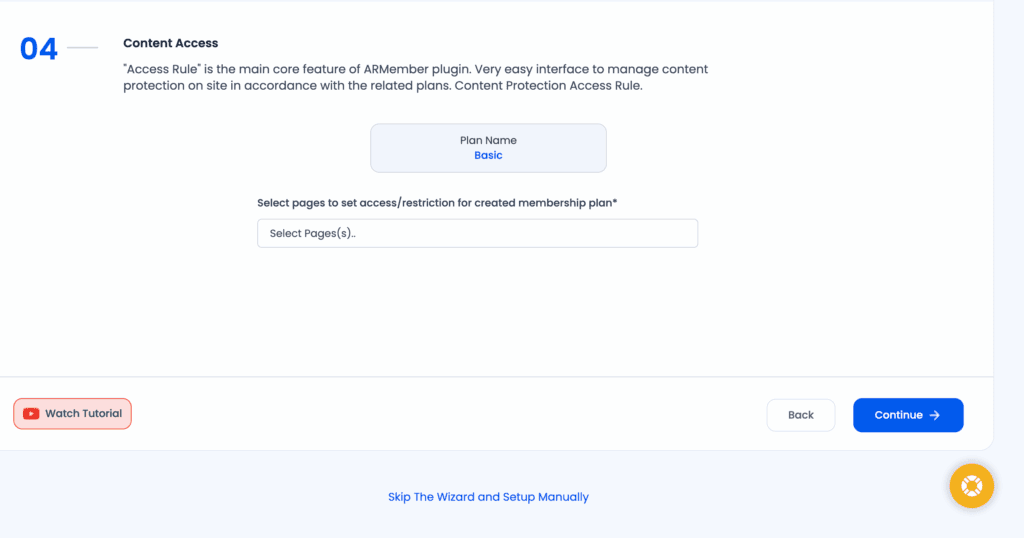
Beyond the initial setup, I found the day-to-day management to be quite logical. Adding new members, customizing forms, and restricting content are all straightforward tasks handled from the main dashboard. However, I did encounter a form submission bug. Once I submitted a form to create a new account or plan, it would reload the same page with all the same details filled in. Initially, I thought there was an error in the form that was being triggered but I saw no error messages. I learnt very quickly that it was a bug and had successfully submitted the form.
ARMember Pricing
The next factor to consider is ARMember’s pricing. The free plan is very basic and you may need the upgrade for your membership plans.
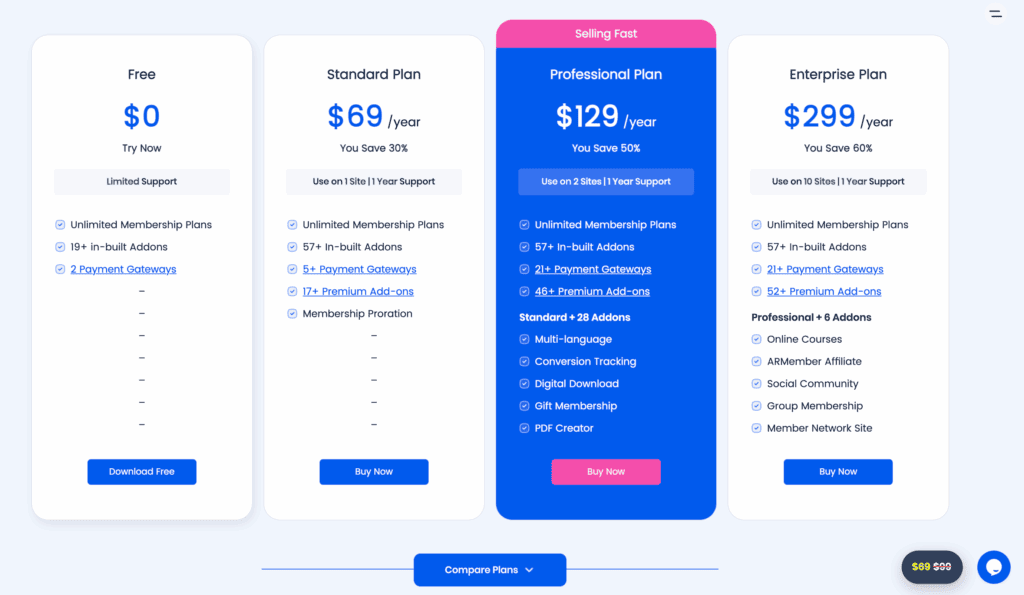
The plugin is positioned as a budget-friendly powerhouse, and its pricing structure reflects that. Here’s a breakdown:
- Free: Costs $0 and can be used on unlimited sites. It includes unlimited membership plans, over 19 add-ons, 2 payment gateways (PayPal and Bank Transfer), and basic page builder integrations.
- Standard: Costs $69 per year for 1 site. It includes everything in Free, plus access to over 57 add-ons, more payment gateways, and 16+ premium add-ons.
- Professional: Costs $129 per year for up to 2 sites. This tier adds support for over 21 payment gateways, 46+ premium add-ons, and gift memberships.
- Enterprise: Costs $299 per year for up to 10 sites. This is the top tier, unlocking all 52+ premium add-ons, including a built-in course builder for creating and selling online courses.
It’s important to know that all premium plans are billed annually and include one year of support and updates. The listed prices often reflect a sale, so the value is quite high compared to some competitors.
ARMember Alternatives
Too buggy for you? Maybe theft don’t offer the right payment plugins for your customers. Whatever your reason for needing an alternative, we’ve got your back. Here are two of the most popular and reliable choices:
- MemberPress: Often considered the industry standard, MemberPress is known for its rock-solid reliability, excellent support, and seamless integrations. It’s a premium-only plugin that’s incredibly easy to set up and is a favorite for people who want a tool that just works.
- Paid Memberships Pro (PMPro): PMPro is a highly flexible and developer-friendly option. It has one of the most generous free versions of any membership plugin, making it a great starting point. Its extensive library of add-ons allows you to add almost any functionality you can imagine.
Final Thoughts
So, is ARMember the right choice for your membership site?
It’s an easy plugin to set up and manage on a daily basis. While I found it a little slow at times and ran into that minor interface bug, these were not dealbreakers. For anyone who needs a comprehensive, all-in-one membership solution without the high recurring costs of some competitors, ARMember is an excellent contender.
I recommend you try it on a staging site. This would help you explore the plugin without affecting your live site.
FAQs
Is there a free version of AR Member?
Yes, there is a free version of ARMember available for download from their website. It’s quite capable, offering unlimited members and plans, but limits you to just two payment gateways.
Does AR Member slow down your site?
Any large plugin can impact site speed. While I noticed a slight slowdown during my testing, it wasn’t dramatic. The impact on your site will depend on your hosting, the number of members, and how many other plugins you’re running.
Is AR Member easy to use?
Yes, for the most part. Thanks to its setup wizard and intuitive dashboard, it’s one of the more beginner-friendly membership plugins. You can set up plans and restrict content without needing to know any code.
What are the benefits of using AR Member?
The main benefits are its affordability, extensive feature list (even in the free version), built-in form builder, wide range of integrations, and advanced features like content dripping. It offers a complete all-in-one solution.
How do I install AR Member?
Since it’s not on the WordPress.org repository, you must first download the plugin’s zip file from the official ARMember website. Then, in your WordPress dashboard, go to Plugins > Add New > Upload Plugin, and upload the zip file you downloaded.

Shreya has been a writer for as long as she can remember. Now, she writes articles that help WordPress users manage the sites that they're proud of, with little to no coding


