

Among the many types of booking plugins available for WordPress, MotoPress Hotel Booking stands out as an all-in-one solution for property owners. If you’re tired of paying hefty commissions to sites like Airbnb or stressed about preventing double-bookings, you’re in the right place.
In this article, we’ll break down exactly what MotoPress Hotel Booking offers. We’ll explore its key features, compare the free and pro versions, and explain how it can help you streamline your operations and grow your revenue.
Using a staging website is the perfect, risk-free way to test out the MotoPress Hotel Booking plugin before it goes live on your site. Its prime benefit is transforming your website into a powerful, commission-free booking system, allowing you to stop paying fees to third-party platforms and take full control of your revenue.
WordPress booking plugins come in different forms – for appointments, hotels, etc. The hotel booking plugin provides features like a real-time search form for guests and accepts secure online payments through gateways like PayPal and Stripe.

For this article we’re going to discuss 4 main aspects of a booking plugin:
- The ability to manage the bookings as an admin
- Features that offer the customer autonomy
- Usability
- Pricing
Here’s everything we learnt from our testing of MotoPress Hotel Booking plugin.
Your Control Panel: A Look Under the Hood
The true power of the MotoPress Hotel Booking plugin lies in its comprehensive backend, which gives you, the administrator, complete control over every aspect of your rental business. From managing day-to-day reservations to setting long-term pricing strategies, every tool you need is centralized within your WordPress dashboard. Here’s a breakdown of the key features at your disposal.
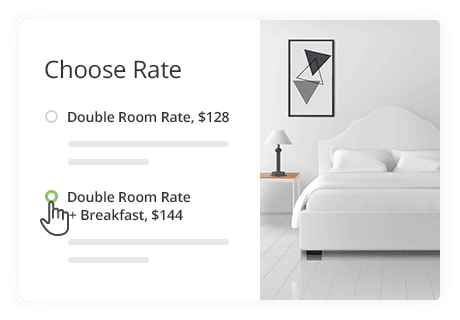
- Centralized Dashboard: View and manage all incoming, pending, and canceled reservations from a single, unified screen.
- Booking Calendar: Get a clear visual overview of your property’s occupancy with a color-coded calendar.
- Manual Bookings: Easily add reservations from phone calls or walk-ins directly from the backend.
- Booking Rules: Set advanced rules for minimum/maximum stays and specific check-in/out days to control availability.
- Accommodation Types: Create and manage unlimited property listings with detailed descriptions, photos, and amenity lists.
- Bookable Services: Offer and sell extra services or packages, such as breakfast, airport transfers, or local tours.
- Dynamic Pricing: Implement flexible pricing that changes based on the season, number of guests, or length of stay.
- Taxes and Fees: Automatically add mandatory taxes, resort fees, or cleaning charges to your bookings.
- Discount Coupons: Create and manage custom discount codes to run marketing promotions and reward loyal customers.
- iCal Synchronization (Pro): Automatically sync your booking calendar with OTAs like Airbnb and Booking.com to prevent overbooking.
- Reports: Generate and download detailed reports on your bookings and revenue in CSV format for easy analysis.
- Email Notifications: Customize the automated emails sent to guests and admins for booking confirmations, cancellations, and other updates.
- Mobile Management: Use the dedicated mobile app to view and manage your bookings and payments from anywhere.
Seamless Booking Experience for Your Guests
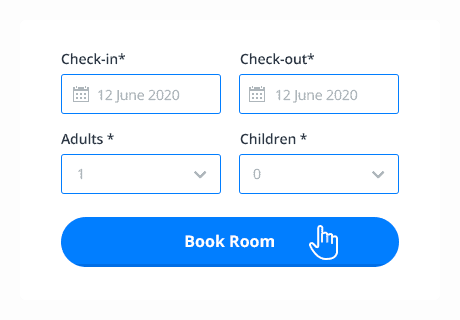
A great management system is only half the battle; to turn visitors into paying guests, the booking process must be simple, transparent, and intuitive. MotoPress Hotel Booking is designed with the guest journey in mind, providing a seamless experience from the moment they search for a room to the final confirmation. This focus on customer autonomy helps build trust and increases direct conversions.
- Real-Time Availability: Guests can instantly check for open rooms for their desired dates using a simple and dynamic search form.
- Intuitive Booking Process: A guided, step-by-step wizard makes booking straightforward and error-free, from selecting a room to making a payment.
- Multiple Bookings: Customers can easily book several different rooms or properties in a single transaction.
- Rich Property Listings: Guests can explore detailed pages for each accommodation, complete with photo galleries, amenity lists, and full descriptions.
- Bookable Extra Services: During checkout, guests can add optional extras like breakfast, spa packages, or airport transfers to their reservation.
- Dynamic Price Visibility: A clear, itemized price breakdown shows all costs upfront, including any taxes or fees, so there are no hidden surprises.
- Automated Notifications: Guests receive instant and professional email confirmations for their booking requests, approvals, and cancellations.
- Guest Accounts: Customers can create personal accounts to view their booking history, manage upcoming stays, and process cancellations if needed.
- User Reviews and Ratings: A built-in system allows past guests to leave star ratings and feedback, helping build trust and social proof for new visitors.
- Flexible Payment Options: Integrating with a payment gateway is important for hotel bookings. Guests have the freedom to pay securely online, make a partial deposit, or choose a “pay on arrival” option.
Potential Downsides of the MotoPress Hotel Booking Plugin
While MotoPress Hotel Booking is a powerful and feature-rich tool, it’s important to be aware of its limitations before committing. Based on user feedback and reviews, some areas could be improved. Understanding these potential drawbacks will help you decide if it’s the right fit for your specific needs and technical comfort level.
- Limited Styling Options: The design of the booking form and calendar is not easily changed without custom CSS, which can make it difficult to perfectly match your website’s theme.
- Clunky Booking Process: Some users find the booking workflow less intuitive for guests when compared to the ultra-smooth experience offered by major OTAs.
- Restrictive Free Version: The free “Lite” version is significantly limited, lacking essential features like direct online payments and iCal sync, making it unsuitable for most professional businesses.
- No Multi-Vendor Support: The plugin is built for a single property owner or business and cannot be used to create a marketplace-style website with multiple independent vendors.
- Inconsistent Sync: Users have reported that the iCal sync, especially with cancellations, can sometimes be unreliable and may require manual checks to avoid errors.
- Mixed Customer Support: There are reports of users receiving slow or generic responses from the support team, leading to frustration when dealing with technical issues.
- Unclear Policies: Some customers have expressed confusion over the company’s refund policies and subscription terms, particularly regarding what happens after a subscription is canceled.
- Limited Reviews Add-on: The official add-on for customer reviews has notable limitations: it cannot verify if a reviewer was a real guest and doesn’t calculate an overall average property rating.
How Easy is MotoPress Hotel Booking to Use?
The Simply Schedule Appointments plugin was the easiest to use, of all the plugins we tested. However, MotoPress was fairly easy to navigate too.
MotoPress designed the admin dashboard to be intuitive, aiming to empower “non-tech people” to build and manage a fully functional rental website without needing to code. For those who use popular page builders, the experience is even smoother. Users specifically highlight the free add-on for Elementor, which allows for seamless visual integration of the booking form and property listings directly within the builder’s interface.
Pricing: What Does MotoPress Hotel Booking Cost?
MotoPress Hotel Booking is available in a free “Lite” version, but to access the essential features needed for a professional business—like online payments and OTA synchronization—you’ll need the Pro version. The premium plugin is sold on a subscription basis, with options for single or multiple sites.
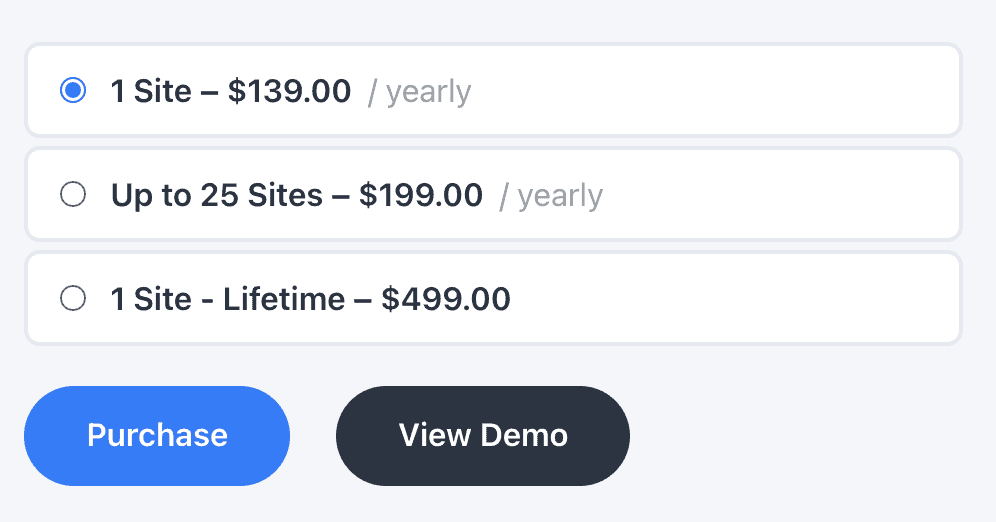
Here is a breakdown of the pricing for the Pro version:
- 1 Site yearly: $139.00
- Up to 25 Sites yearly: $199.00
- 1 Site Lifetime: $499.00
Final Thoughts
Overall, MotoPress Hotel Booking is a powerful and comprehensive solution for property owners who want to run a commission-free booking system directly on their WordPress site. It centralizes everything you need, from property listings and pricing to calendars and payments, into a single, manageable tool.
Before committing, it’s highly recommended to test the plugin on a staging site to ensure it meets your specific needs and integrates smoothly with your theme. This allows you to explore its full potential without any risk to your live website.
FAQs
What is MotoPress?
MotoPress is a company that develops plugins and themes for WordPress. They specialize in creating tools that help website owners add powerful functionality without needing to know how to code. Their products are best known for being user-friendly and are popular in specific industries, especially hospitality (with their Hotel Booking plugin) and content creation.
What is the best plugin for hotel bookings?
While the “best” plugin depends on your specific needs, MotoPress Hotel Booking is widely considered one of the top choices for several reasons:
All-in-One System: It handles everything from property listings and pricing to online payments and calendar management.
Commission-Free: You keep 100% of your revenue, unlike Online Travel Agencies (OTAs).
iCal Sync: It automatically syncs with platforms like Airbnb and Booking.com to prevent double-bookings.
Other popular options exist, but MotoPress offers a robust, dedicated solution built specifically for hotels, villas, and vacation rentals.
Is the MotoPress Hotel Booking plugin free?
Yes, there is a free version called MotoPress Hotel Booking Lite. This version allows you to list your properties, manage a booking calendar, and manually confirm reservation requests. However, to unlock essential features for running a business—like accepting online payments through Stripe/PayPal and automatically syncing your calendars with other platforms—you need to upgrade to the premium “Pro” version.
How to use the MotoPress booking plugin?
Getting started is straightforward. Here are the basic steps:
- Install and Activate: Find “MotoPress Hotel Booking” in the WordPress plugin directory and install it.
- Add Accommodations: In your WordPress dashboard, go to the “Accommodations” menu to create listings for your rooms or properties, adding details like photos, descriptions, and amenities.
- Set Pricing and Rules: Define your pricing (including seasonal rates), set minimum/maximum stay rules, and configure your booking confirmation process.
- Display the Booking Form: Add the booking search form to a page on your site so guests can check availability and make reservations.
What plugins does MotoPress offer?
Besides their flagship Hotel Booking plugin, MotoPress offers a range of other popular tools, including:
- Appointment Booking: A scheduling plugin for service-based businesses like salons, coaches, and clinics.
- Restaurant Menu: A plugin for creating and displaying beautiful online menus.
- Getwid: A free library of extra blocks for the native WordPress (Gutenberg) editor.
- MotoPress Content Editor: A drag-and-drop page builder for creating custom page layouts.

Shreya has been a writer for as long as she can remember. Now, she writes articles that help WordPress users manage the sites that they're proud of, with little to no coding


