

Picking the right form plugin can feel like a chore. The Ninja Forms vs WPForms debate is a great illustration of this.
They both look great on paper, but they’re built for different users.
Honestly, the “best” one really depends on your specific needs and technical comfort level. After putting both to the test, here’s our honest breakdown to help you choose quickly.
WPForms is the simple, guided choice for beginners, while Ninja Forms offers a powerful free version with flexible add-ons for developers. Whichever you pick, always use a reliable backup plugin to protect your form entries and site data.
Ninja Forms vs WPForms: A quick comparison

Which one is easier for beginners?
Honestly, the WPForms form builder takes the prize for being the most beginner-friendly. Its entire experience is designed to get you from zero to a published form with the least amount of friction. Think of it like a guided tour.
Here’s why it feels simpler:
- Guided setup: A wizard walks you through creating your first form.
- Tons of templates: You start with a huge library of pre-made templates, not a blank slate.
- Live preview: You see exactly what your form looks like as you build it.
- Easy publishing: A simple button adds your form to any page.
- Smart logic: Setting up conditional fields is visual, free and easy to grasp.
Now, that doesn’t mean that the Ninja Forms builder is difficult. It’s still very user-friendly, but it expects you to know a bit more. It’s less of a guided tour and more of a “here are the tools, have at it” experience.
The free version is powerful, storing entries right away. But the workflow involves a few more clicks and sometimes requires pasting shortcodes manually.
Core feature analysis
On the surface, both plugins build forms, but how they do it and what they offer along the way are completely different.
The form building experience
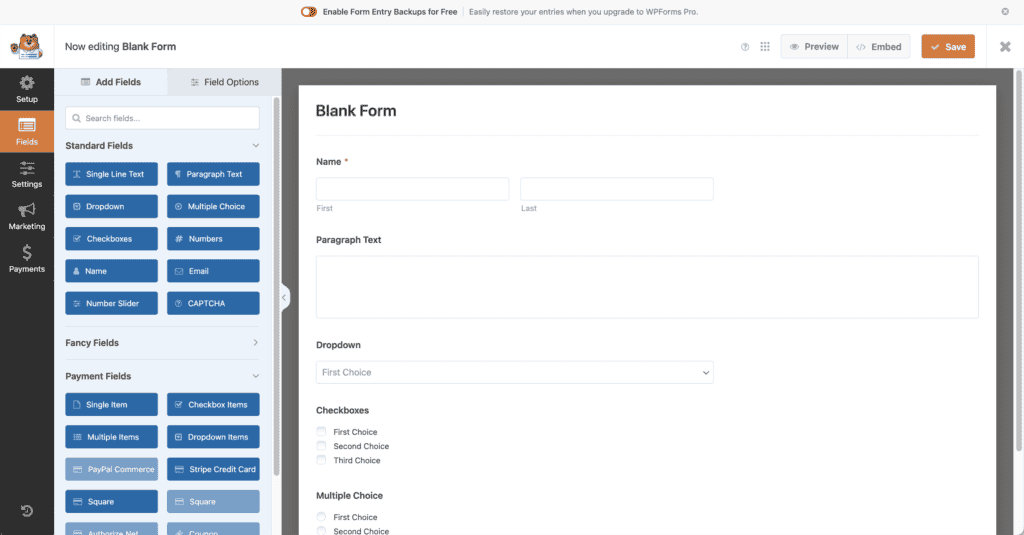
WPForms offers a true “what you see is what you get” experience. You drag fields from the left panel onto a live preview of your form with the click of a button. It feels incredibly intuitive, almost like a guided tour, making it nearly impossible to get lost.
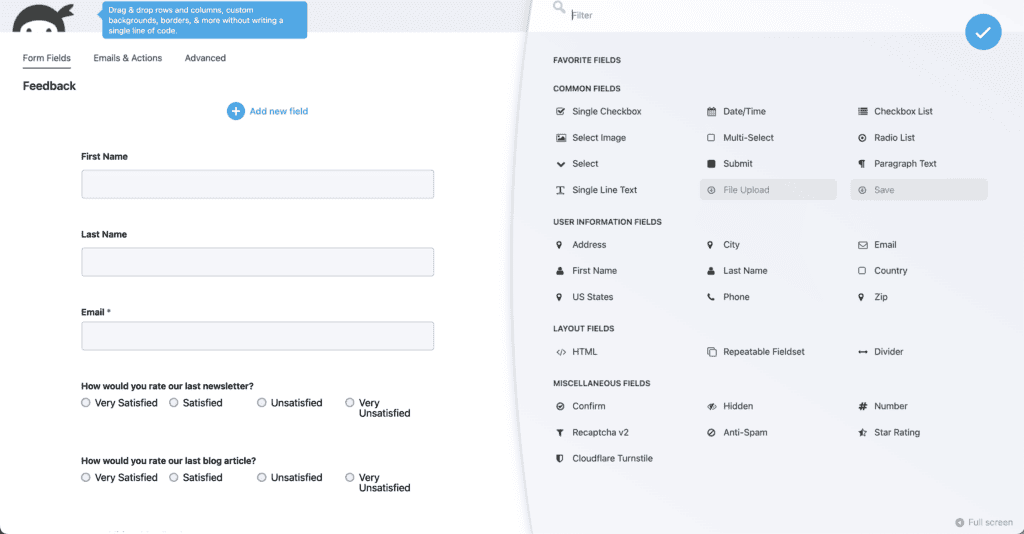
Ninja Forms, on the other hand, has a clean and capable builder, but it feels more abstract. You drag fields into a panel, and to adjust settings, you click on them, which opens up new menus.
There’s no live preview in the main builder window. It’s more of a toolbox: all the tools are there, but you have to know which ones to pick up.
Some advanced settings are even tucked away behind a Developer Mode, so it’s always a good idea to safely test changes on a staging site before deploying them live.
Available form fields
Both give you the essentials for free: name, email, text boxes, dropdowns, etc. Ninja Forms offers over 24 fields for free and uses a modular approach for the rest. You can buy just the File Uploads add-on if that’s all you need, which can be more cost-effective.
WPForms boasts a huge library of over 35 field types, but advanced fields like File Uploads, Signatures, and Likert Scales are locked behind its premium plans. Since these fields collect critical data, having a reliable WordPress backup is essential.
Conditional logic
This is the feature that makes your forms feel smart (“If a user selects ‘Yes,’ then show this next question.”). It’s a premium feature on both platforms. Ninja Forms‘ conditional logic is equally powerful but also comes as a paid add-on. The interface is effective but can feel slightly less integrated than the WPForms experience.
WPForms integrates it visually and cleanly; the rules are easy to build and manage right from the field settings.
Entry management
This is a massive point of difference. Ninja Forms is the clear winner for free users because it stores all form submissions in your WordPress dashboard from the start. This is a huge feature to offer for free. The view is a simple, functional list.

WPForms requires a premium license to save and manage entries. However, once you pay, its entry management system is far superior. It’s like a mini-CRM where you can easily search, filter, and comment on entries.
Integrations
Ninja Forms sticks to its à la carte model. You can buy just the Mailchimp add-on or the HubSpot add-on, giving you more control over costs if you only need one or two key connections. Both also work with Zapier to connect to thousands of other apps.

WPForms bundles its integrations into its higher-tier plans. The Pro plan, for instance, gives you access to everything: Mailchimp, HubSpot, Salesforce, you name it. It’s an all-or-nothing approach.
Help and support
Ninja Forms provides support for all users via a ticket system, which is fantastic. The catch? Paid users get priority, with a goal of responding within 8 hours. Free users are in the same queue but can expect to wait longer. Their documentation is also excellent and very developer-focused.
WPForms offers extensive documentation and tutorials for everyone. Free users can get help on the public WordPress.org forums, while premium customers get priority email ticket support that is generally very responsive.
Pricing plans explained
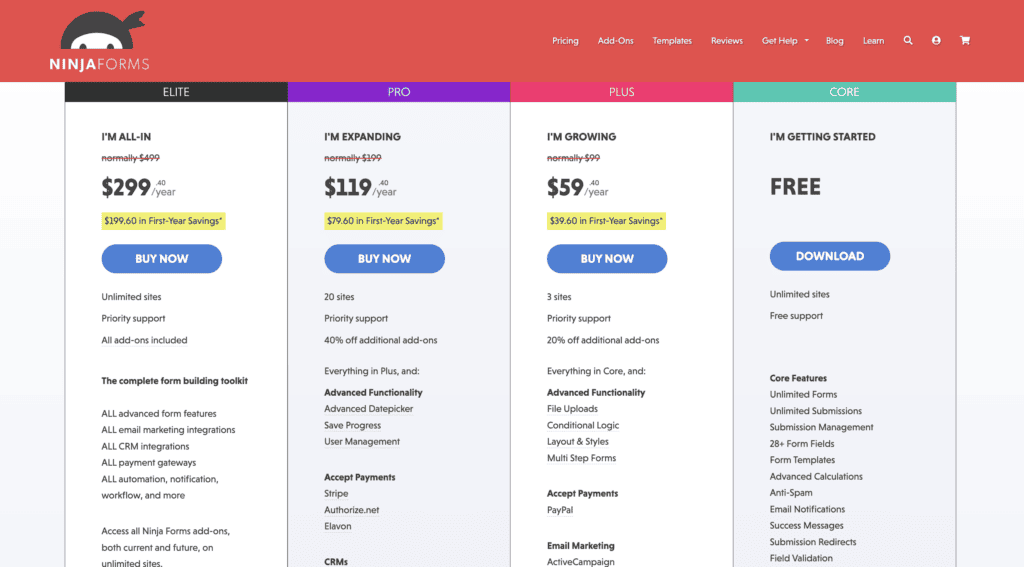
The Ninja Forms builder also has a great free core plugin. For more power, you can either buy individual add-ons à la carte or purchase a membership plan starting at $99/year. This modular approach is perfect if you only need one or two specific premium features and don’t want to pay for a whole bundle.
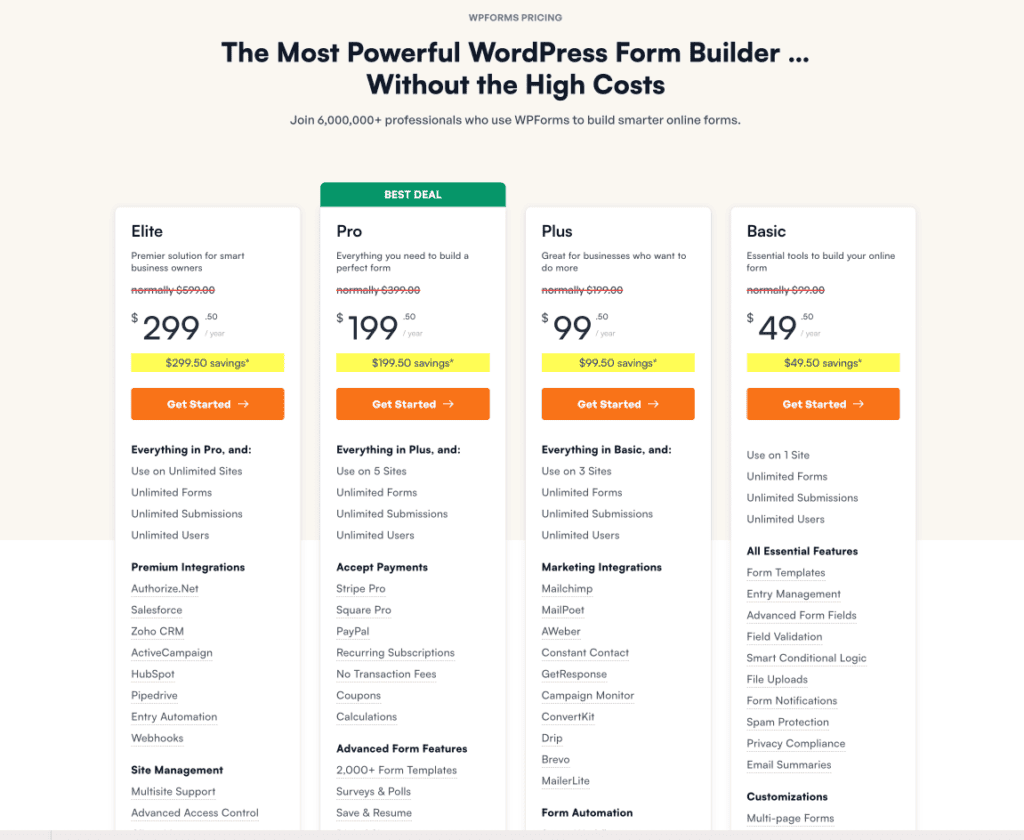
The WPForms plugin has a free Lite version and four premium plans, starting around $50/year for a single site. These are introductory prices, so they go up on renewal. The plans bundle features together, so the more you pay, the more you get: like surveys, polls, and advanced integrations.
Which form builder is right for you?
There’s no single best plugin, only the best one for you.
Choose Ninja Forms if:
- You need a powerful free plugin that stores entries from day one.
- You’re on a tight budget and want to buy add-ons individually.
- You’re a developer who values flexibility and hooks.
- You’re comfortable with a slightly more hands-on building process.
Choose WPForms if:
- You’re a beginner and want the easiest, most guided experience.
- You want access to a massive library of pre-built form templates.
- You need powerful features like conversational forms or surveys.
- You prefer a simple, all-in-one annual subscription.
Other competitors in the game
The WordPress form world is bigger than just two plugins. While WPForms and Ninja Forms are popular for a reason, you might find a better fit with one of these alternatives, depending on your needs.

Gravity Forms builder: This plugin is the workhorse for developers and agencies. It’s a premium-only plugin with no free version. It has a reputation for being rock-solid and incredibly extensible.
Its real power lies in its massive ecosystem of official and third-party add-ons that can make it do almost anything. The interface feels a bit dated compared to WPForms, but for complex, mission-critical forms (like registrations with multi-step logic and dozens of integrations), many pros still swear by it.

Formidable Forms: Think of Formidable Forms as a form builder that wants to be an application builder. Its unique strength isn’t just collecting data, but displaying it.
You can take user submissions and turn them into content on the front end of your site. If your goal is to create data-driven websites, Formidable Forms is in a class of its own.

Fluent Forms: If site speed is something you value a lot, Fluent Forms is worth a look. It markets itself as the fastest and most lightweight form plugin on the market, and it lives up to the hype.
It’s a newer player but has grown rapidly by offering an incredibly generous free version packed with features that others charge for. This includes conditional logic and multi-step forms. Its Pro version is also very competitively priced, making it a fantastic value proposition.

Contact Form 7: The old-timer. With over 5 million installations, Contact Form 7 is one of the original form plugins, and it’s 100% free. However, it has no visual builder.
You build forms using shortcode-like tags in a simple text box. It’s minimalist and reliable for creating a basic contact form, but it’s not user-friendly and requires other plugins to handle anything beyond simple email notifications. It’s for purists and those who don’t mind a very hands-on, code-centric approach.
Parting thoughts
Your choice is simple: pick Ninja Forms for its powerful free version and flexible add-ons or WPForms for a guided, all-in-one experience.
Whichever you pick, always test your forms to make sure they work. ou can skip the tedious manual back-and-forth with BlogVault’s automated form testing tool.
FAQs
What is the best alternative to WPForms?
A great alternative is Gravity Forms for developers or Fluent Forms for users seeking a fast, modern experience. Gravity Forms offers deep customization, while Fluent Forms provides excellent speed and value.
Is Ninja Forms free?
Yes, Ninja Forms has a powerful free core plugin that you can download from the WordPress repository. Advanced features like payment gateways or conditional logic are available as individual paid add-ons.
What is a ninja form in WordPress?
Ninja Forms is a popular plugin that lets you create custom forms with a drag-and-drop interface. It’s known for its user-friendly design and flexible, modular approach to adding premium functionality.
What is the difference between Ninja Forms and Formidable Forms?
The biggest difference is that Ninja Forms is primarily for collecting data, while Formidable Forms excels at both collecting and displaying that data on your site. Formidable is better for creating applications like directories or event listings.
What is the most advanced form builder for WordPress?
Gravity Forms and Formidable Forms are widely considered the most advanced options available. Gravity Forms is the top choice for deep developer customization, while Formidable is best for building complex, data-driven applications.
Which is better, Contact Form 7 or WPForms?
For the vast majority of users, WPForms is better due to its intuitive visual builder and beginner-friendly workflow. Contact Form 7 is a free, minimalist tool but lacks a modern interface and is much harder to use.

Shivani enjoys crafting guides that make every aspect of using WordPress simple and easy to follow. When she's not glued to her laptop, you can find her buried in a good book or occasionally, painting.


