

Booking management plugins are essential. This is our hands-on Appointment Hour Booking plugin review. Tired of the endless emails just to schedule one client? Manual scheduling wastes time and leads to costly mistakes like double-booking.
An automated system can fix this. It saves you time, makes you look more professional, and lets clients book appointments 24/7. This means fewer missed opportunities and happier customers.
We tested this plugin from start to finish. This review covers its features, pricing, usability, and potential drawbacks. By the end, you’ll know if it’s the right choice for your website.
A staging site is the best place to test the Appointment Hour Booking plugin, as its powerful flexibility can also lead to complexity and conflicts with other tools. Once confirmed it works for your setup, it’s an excellent choice with a fantastic free version for any service-based business.
Quick Appointment Hour Booking Plugin Review
The Appointment Hour Booking plugin is an integrated scheduling system designed for service-based businesses like clinics, consultants, and personal trainers. At its core, it transforms your WordPress site into a powerful booking engine, allowing clients to select a service and reserve a specific start time based on your predefined availability. This functionality automatically prevents double-booking and manages your calendar, saving you from administrative headaches.
This booking plugin acts as a flexible business tool. You can define multiple services with unique durations and prices, integrate payment gateways to accept deposits, and automate customer communications with confirmation emails and reminders. It provides a complete, self-service solution for clients to book your time while giving you the tools to manage and analyze your appointments efficiently.
Booking Management Made Simple
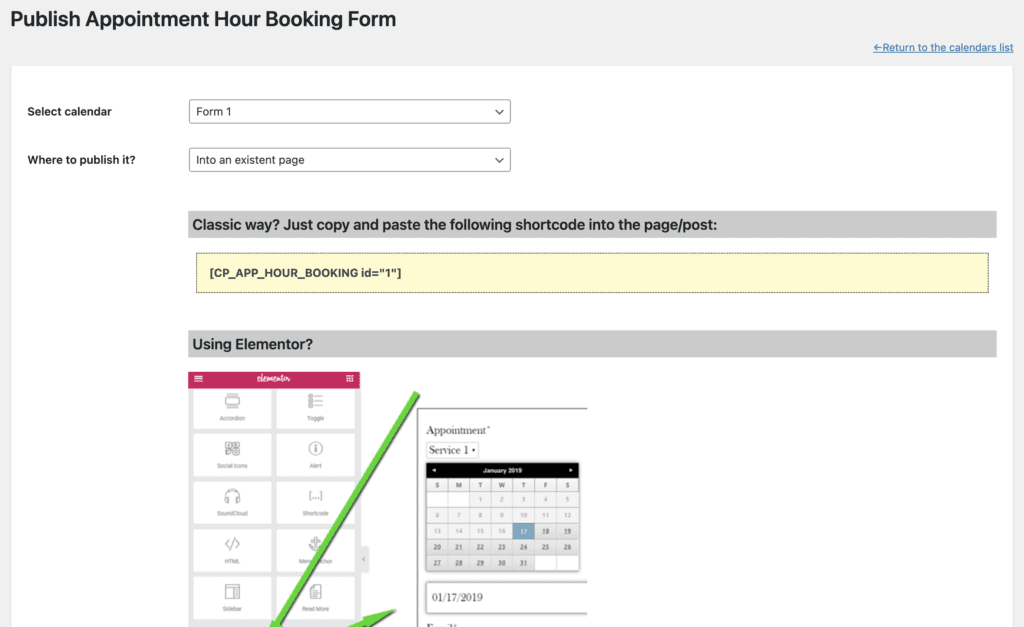
Our Appointment Hour Booking plugin review found that its main advantage is its balance. It’s simple enough for a basic setup but also has surprisingly deep controls for more complex schedules.
Here are the specific features we found most useful:
- Dynamic Time Slots: Intelligently calculates available start times based on the service duration (e.g., 9:00, 9:45, 10:30), not just fixed hours, maximizing your schedule’s efficiency.
- Integrated Form Builder: Includes a built-in, drag-and-drop form builder to add custom fields, so you don’t need a separate plugin like Contact Form 7.
- Flexible Calendar Control: Easily set a standard weekly schedule and then override specific dates for holidays, vacations, or special events without disrupting your regular hours.
- Simple Reporting & Data Export: Offers visual reports to track booking trends and lets you export all appointment data to a CSV file with a single click.
Seamless Booking Experience for Your Clients
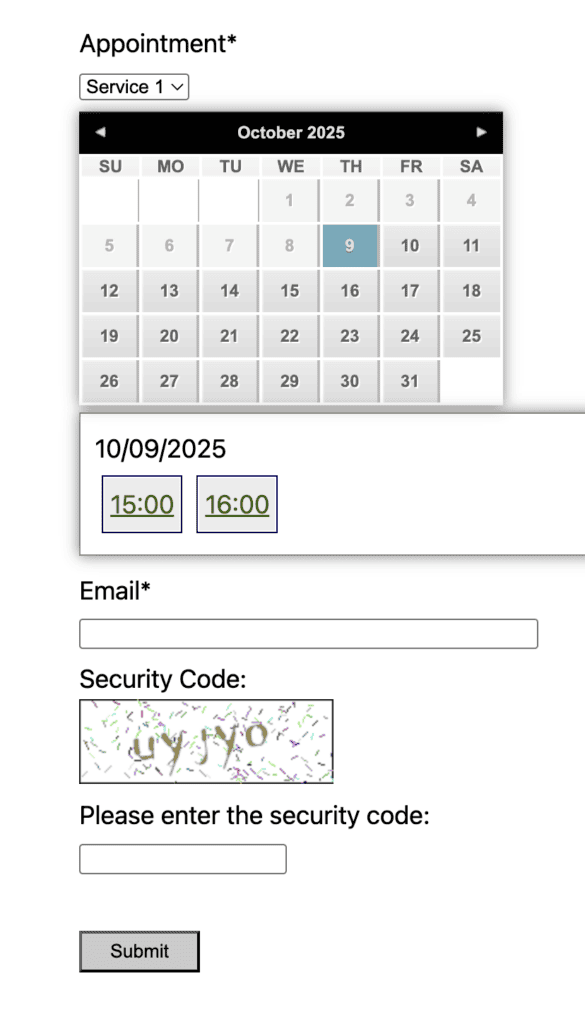
A booking system is only as good as the experience it provides to your customers. If the process is confusing or frustrating, you risk losing their business.
After walking through the booking flow from a client’s perspective, here’s what we found.
- Clear, Visual Time Selection: Customers are first presented with a clean calendar showing all available dates. Once they click a date, a simple list of available start times appears. This intuitive, two-step process eliminates the guesswork and frustrating back-and-forth of trying to find an open slot.
- Easy Multi-Service Selection: This is a fantastic feature for businesses offering combined services, like a salon (cut and color) or a spa (massage and facial). The form allows customers to select and book multiple services in a single, seamless transaction.
- Transparent, Real-Time Pricing: As clients add or change services, the total cost updates instantly on the screen. This transparency ensures there are no surprises at the end, which builds trust and encourages them to complete the booking.
- Self-Service Cancellations (Premium Add-on): Empowering your customers is key to a modern service experience. With this feature, the confirmation email includes a unique cancellation link. This allows clients to cancel their own appointments with a single click, which they will appreciate for its convenience.
- A Smooth, Error-Free Submission: Features like form validation and CAPTCHA work quietly in the background to benefit the customer. They ensure that common mistakes (like a mistyped email) are caught instantly and that the form submission goes through successfully on the first try, preventing user frustration.
Pricing: Free vs. Premium Plans
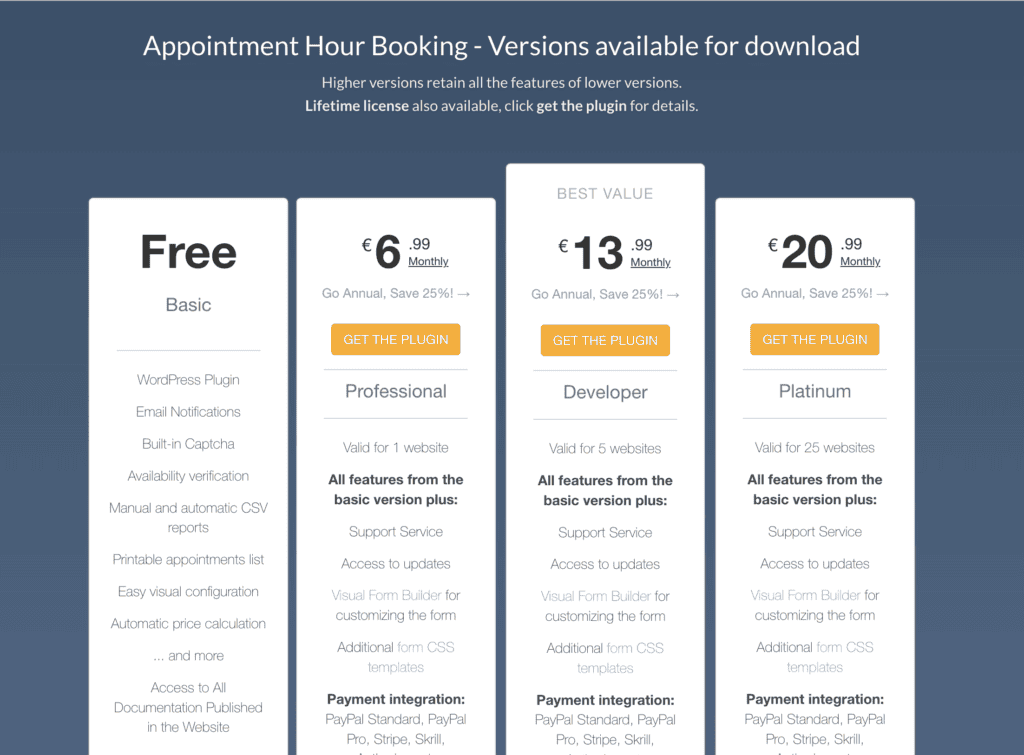
The free version of the Appointment Hour Booking plugin is incredibly capable and offers more than enough functionality for many businesses to get started. However, to unlock professional-grade features that truly automate your workflow—like accepting payments, syncing with external calendars (iCal), you’ll need to
Here’s a breakdown of the premium plans:
- Professional Plan: €59/year (or ~$65/year) for 1 website. Perfect for a single business or consultant.
- Developer Plan: €118/year (or ~$129/year) for 5 websites. Great value for freelancers managing multiple client sites.
- Platinum Plan: €177/year (or ~$195/year) for 25 websites. The most cost-effective option for agencies.
Experience and Usability
Getting started with Appointment Hour Booking is straightforward. The visual calendar and basic service setup are intuitive, letting you get a simple booking form live quickly. However, the plugin’s greatest strength—its flexibility—is also its biggest challenge. The sheer number of advanced options can feel overwhelming and creates a much steeper learning curve than simpler alternatives.
This complexity can lead to friction with other WordPress tools, like WooCommerce or caching plugins, so you should be prepared to troubleshoot. While documentation exists, our experience and user reports suggest that support can be hit-or-miss. Ultimately, this is a robust tool, but expect to spend time in the settings and be ready to solve a few problems, especially for more advanced use cases.
What’s Missing? Features for Larger Businesses
The plugin is an excellent solution for individuals and small businesses, but it may lack some advanced features that larger teams or multi-location businesses require. If your operations are more complex, you might find yourself needing:
- Advanced Staff Management: The plugin’s core functionality doesn’t include assigning different staff members to specific services or allowing clients to choose a particular provider during booking.
- Multi-Location Support: There is no built-in way to manage separate booking calendars for multiple business locations, which is a critical feature for chains or franchises.
- Booking Approval Workflow: All bookings are confirmed automatically. There isn’t an option for an administrator to manually approve or deny an appointment request before it’s finalized.
- Deeper CRM & Marketing Integrations: While some integrations exist via add-ons, seamless connections to popular CRM platforms or advanced email marketing tools are not a core feature.
- Enhanced Reporting Dashboard: The reporting is functional, but businesses focused on growth may want a more advanced, at-a-glance dashboard with deeper analytics on revenue, staff performance, and booking trends.
Final Thoughts
The Appointment Hour Booking plugin is a powerful tool with a remarkably robust free version. It provides an automated scheduling system that saves service businesses significant time, and its integrated form builder gives it a real edge over competitors.
While its advanced features have a learning curve and can conflict with other plugins, the payoff in efficiency is worth the effort. Our final recommendation is simple: test it thoroughly on a staging site before taking it live to explore its full potential without risk.
FAQs
What is the best booking plugin?
The “best” plugin depends entirely on your needs. However, Appointment Hour Booking is a top contender for anyone who needs a highly flexible, time-based scheduling system directly on their WordPress site. Its powerful free version makes it one of the best choices to start with.
What is the Appointment Hour Booking plugin?
It is a WordPress plugin designed to create booking forms for services. It allows customers to choose a service with a specific duration (e.g., a 60-minute massage) and then select an available start time from your calendar.
Why do you need the Appointment Hour Booking plugin?
You need it to automate your scheduling. It saves you time on back-and-forth emails, prevents double-booking, offers clients the convenience of 24/7 booking, and makes your business appear more professional.
How do you use the Appointment Hour Booking plugin?
The basic process is simple:
Install and activate the plugin on your WordPress site.
Configure your business hours and any days you’re closed.
Define your services, including their duration and price.
Create and publish the booking form on a page on your website.
Who should use the Appointment Hour Booking plugin?
This plugin is ideal for any individual or business that books appointments for services with a defined start time and duration. This includes consultants, doctors, therapists, personal trainers, salons, tutors, and anyone else who manages a time-based schedule.

Shreya has been a writer for as long as she can remember. Now, she writes articles that help WordPress users manage the sites that they're proud of, with little to no coding


