An SMTP plugin is your best bet for resolving those frustrating WordPress emails that go missing or end up in spam.
You’ve probably heard about Fluent SMTP, but does it live up to the hype?
This hands-on Fluent SMTP plugin review cuts through the noise to show you what it does. We’ll help you decide if it’s the right tool to finally get your emails delivered reliably.
Fluent SMTP is the best free plugin for fixing WordPress emails, offering premium features others charge for. It’s a huge step for site reliability, but always remember: a backup plugin is your most essential safety net and should be in place before you add any new tool.
Fluent SMTP plugin review at a glance
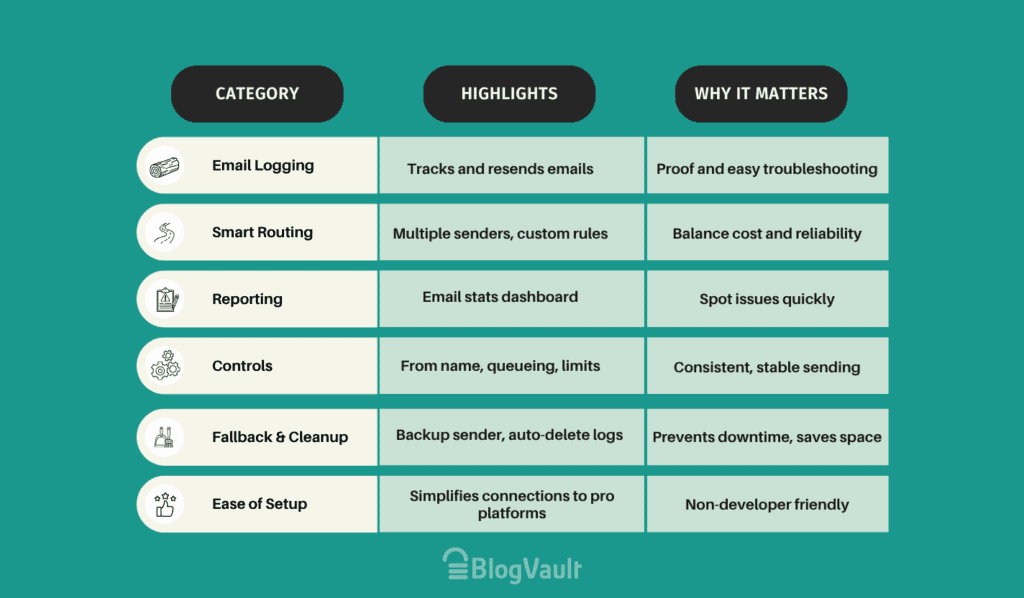
Our first impressions

Coming from the team behind the highly-regarded Fluent Forms plugin, Fluent SMTP makes a professional first impression. You’re met with a clean, modern interface that rivals paid plugins. It’s entirely free of the typical nag screens or aggressive upselling common in other free tools.
The setup wizard is logical and efficient. It simplifies the process of connecting to professional email services. Most notably, full email logging is available right out of the box. This is a key feature that many competing plugins place behind a paywall.
Key features and interface deep dive
Let’s move past the marketing points. Here are the features that deliver tangible benefits:
Email logging
A common pain point is a user claiming they never received an order confirmation, a classic sign of WordPress email deliverability issues. Without logs, you’re operating blind.
Fluent SMTP provides a comprehensive email log directly within the WordPress dashboard. It shows every outgoing message and its delivery status. You can even resend a failed email with a single click on the Retry button.
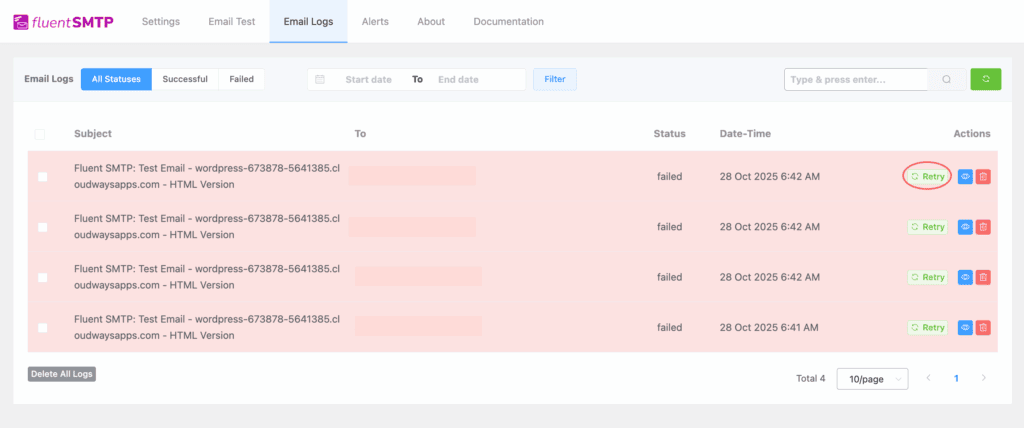
Why this matters: This feature provides a verifiable audit trail. It moves you from a position of uncertainty to one of control. Your support process is now equipped with definitive proof of transmission. This isn’t a luxury; it’s a necessity.
Multiple connections and smart routing
Think of it this way: not all emails your website sends are equally important. A password reset for a customer, for instance, is a critical email that directly impacts their ability to access your site. A simple notification to you, the admin, is less so.
Fluent SMTP lets you connect more than one email sending service at the same time. You can then create simple rules to decide which service handles which type of email.
Here is a practical example:
- For your most important emails, like customer order receipts, you can tell Fluent SMTP to use a highly reliable, professional service (like Amazon SES or SendGrid).
- For less important emails, like internal site notifications, you can tell it to use a standard, free service (like your Gmail account).
This gives you the flexibility to optimize for cost and reliability. You only use the more dependable (and sometimes paid) service for the emails that absolutely must get through. It’s a level of control rarely found in a free tool.
Reporting and notifications
Beyond individual logs, Fluent SMTP provides Sending Stats. This is a simple dashboard report that gives you a high-level view of your email performance. You can quickly see the volume of sent versus failed emails over a specific period.
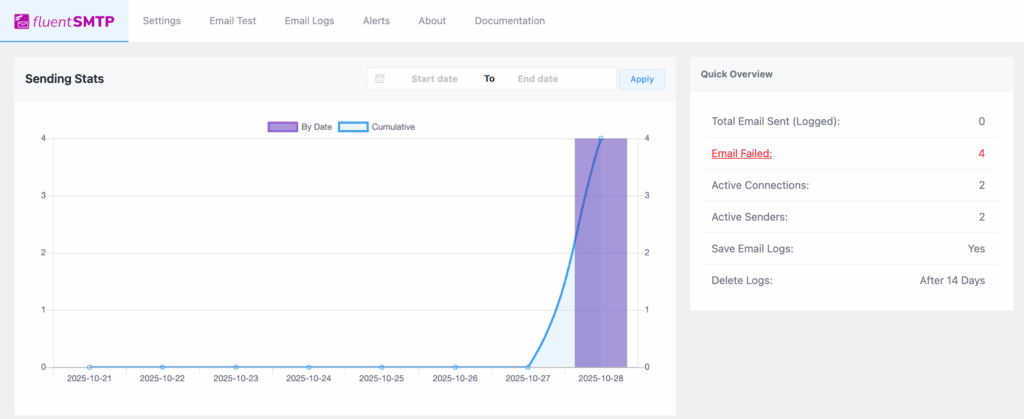
Why this matters: This allows you to spot trends at a glance. If you see a sudden spike in failed emails, you know there’s a problem with your provider that needs immediate attention.
General settings and controls
Fluent SMTP also includes essential controls for day-to-day management. You can set a default From Name and From Email for all outgoing WordPress emails. This ensures your messages look professional and consistent, rather than coming from a generic WordPress address.

For sites that send large batches of emails, the email queueing feature helps manage server load by sending messages in staggered intervals instead of all at once. This prevents performance issues during bulk sending operations.
Fluent SMTP’s strengths
Here is a quick look at where the plugin truly excels.
- Premium features at no cost: You get access to powerful tools like email logging and multiple connections, which are typically locked behind a paywall in other plugins.
- Excellent for troubleshooting: The detailed email log lets you see exactly why an email failed, saving you hours of guesswork and providing proof of delivery for customer support.
- Easy setup for pro services: It simplifies the connection process for technical services like Amazon SES, making them accessible even for non-developers.
- Maintains your brand professionalism: The plugin does not add any “Sent by…” branding to your emails, keeping your communications clean and focused on your brand.
- Provides a safety net: With fallback connections, the plugin can automatically switch to a backup email service if your primary one fails, preventing lost emails during an outage.
- Helps keep your site fast: You can set email logs to delete automatically. This is a crucial feature. It prevents your WordPress database from bloating and slowing down your website over time.
Fluent SMTP’s weaknesses
To give you a balanced view, here are the limitations you should be aware of.
- Potential performance issues: On high-volume sites, the logging feature can cause your site to slow down. You must actively configure log deletion to prevent this.
- No dedicated support: Support is community-based, which means no guaranteed response times—a risk for business-critical websites.
- Some tricky integrations: Users report persistent authentication problems with certain providers, like Microsoft 365.
- Only handles sending, not design: The plugin improves deliverability but doesn’t include tools to customize your email templates. You’ll need another plugin for that.
Installation and configuration
Getting started with Fluent SMTP is refreshingly straightforward.
First, you install and activate the plugin from your WordPress dashboard. Once that’s done, a setup wizard launches automatically to guide you through the main steps:

- Choose your email provider. Select your service from the list. It includes all the major players like Amazon SES, SendGrid, and Gmail, which is a great starting point.
- Enter your credentials. The wizard shows you exactly what information it needs, such as an API key or client secret. You’ll get these details from your email provider’s website and paste them into Fluent SMTP.

- Confirm with a test email. Finally, go to the Email Test tab and send a message to yourself. This gives you instant confirmation that everything is working correctly.
The wizard is seamless. Your only task is to grab the API keys from your provider’s website. Once you have those, finishing the setup is one of the easiest experiences you’ll find with this type of tool.
Is Fluent SMTP for you?
- Small business owners and agencies. If you need a professional, reliable email for your business or for client sites without adding another monthly bill, this is your plugin. It gives you enterprise-level features for free.
- The budget-conscious developer. If you want to use a powerful service like Amazon SES but don’t want to pay for a premium connector plugin, Fluent SMTP is the best tool for the job.
- Anyone who needs to troubleshoot emails. If you’ve ever been frustrated by lost form submissions or customer complaints, the free email logging will be a lifesaver.
Here are some alternatives to consider
While Fluent SMTP is a fantastic choice, it’s always good to know the landscape. Here’s my take on the other major players I’ve used and who they’re best for.
WP Mail SMTP
The interface is polished, the documentation is extensive, and the whole experience feels very stable and reliable. The free version is excellent for making a basic connection to a single provider, and its setup wizard is one of the best.
Post SMTP
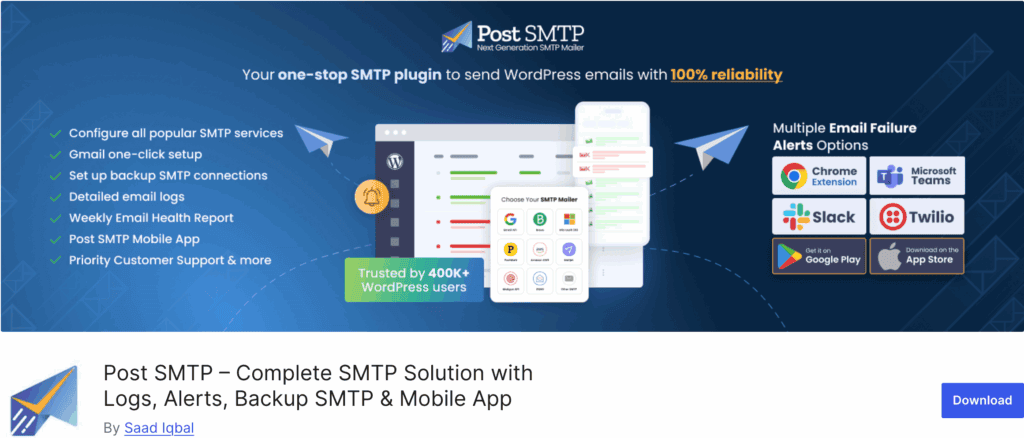
Post SMTP feels like a tool built for a power user. Honestly, its interface isn’t as modern or clean as Fluent SMTP’s. But where it shines is in its diagnostics. Its connectivity tester and detailed logs are second to none for figuring out complex email issues, especially with stubborn servers.
Easy WP SMTP
This plugin is the definition of a no-frills tool. There’s no fancy dashboard, no logging, and no complex settings. It’s essentially just a single page where you enter your SMTP credentials.
Parting thoughts
Fluent SMTP is an exceptionally capable plugin. It effectively solves the fundamental WordPress email deliverability problem for free, with a feature set that competes directly with paid products.
While it may not be the solution for every scale, it stands as the most powerful free WordPress SMTP plugin on the market. Especially when supported by a solid WordPress maintenance routine to keep the entire site running smoothly. For most WordPress site owners, it is the definitive choice.
FAQs
Is Fluent SMTP better than WP Mail SMTP?
In its free version, Fluent SMTP is more feature-rich. It offers email logging and multiple connections that WP Mail SMTP reserves for its paid tiers.
Is Fluent SMTP free?
Yes, the plugin is completely free.
What does Fluent SMTP do?
Fluent SMTP sends your WordPress emails through a reliable external provider. This dramatically improves deliverability and prevents emails from being marked as spam.
Does Google have a free SMTP server?
Yes, Gmail provides a free SMTP server, though it has daily sending limits. Fluent SMTP can easily integrate your site with a Gmail account.

Shivani enjoys crafting guides that make every aspect of using WordPress simple and easy to follow. When she's not glued to her laptop, you can find her buried in a good book or occasionally, painting.