Choosing a backup type feels like a small settings decision until a plugin update breaks checkout, a page disappears, or malware cleanup forces you to restore the site.
That is when Full vs Incremental vs differential backups stop being jargon. The method you choose affects how often backups can run, how much load they put on your WordPress site, how much storage they need, and how safely you can restore the right version.
Full backups copy everything and are easiest to understand, but they are too heavy to run often on many WordPress sites. Incremental backups are usually the best everyday option when the tool gives complete, tested restore points; differential backups are the middle option but grow until the next full backup.
For most WordPress sites, the best setup is simple: start with a complete full backup, use incremental backups for regular protection, take on-demand backups before risky changes, store backups offsite, and test a restore before you need one. Think of backups as a time machine with rules. The method decides how many points in time you can return to, how much work the site does to create them, and how painful restore day becomes.
The important nuance is that backup type is only one part of safety. A good backup schedule still fails you if it skips custom database tables, stores archives on the same server, or gives you a restore process nobody wants to touch during an outage.
The difference in plain english
A complete WordPress backup needs both the database and files. The database holds posts, pages, orders, users, comments, settings, and plugin data. Files include uploads, themes, plugins, and WordPress core files.
Full, incremental, and differential are three common types of backups, but the right choice depends on how your site changes and how quickly you need to recover.
Here is what each backup type copies after the first complete backup:
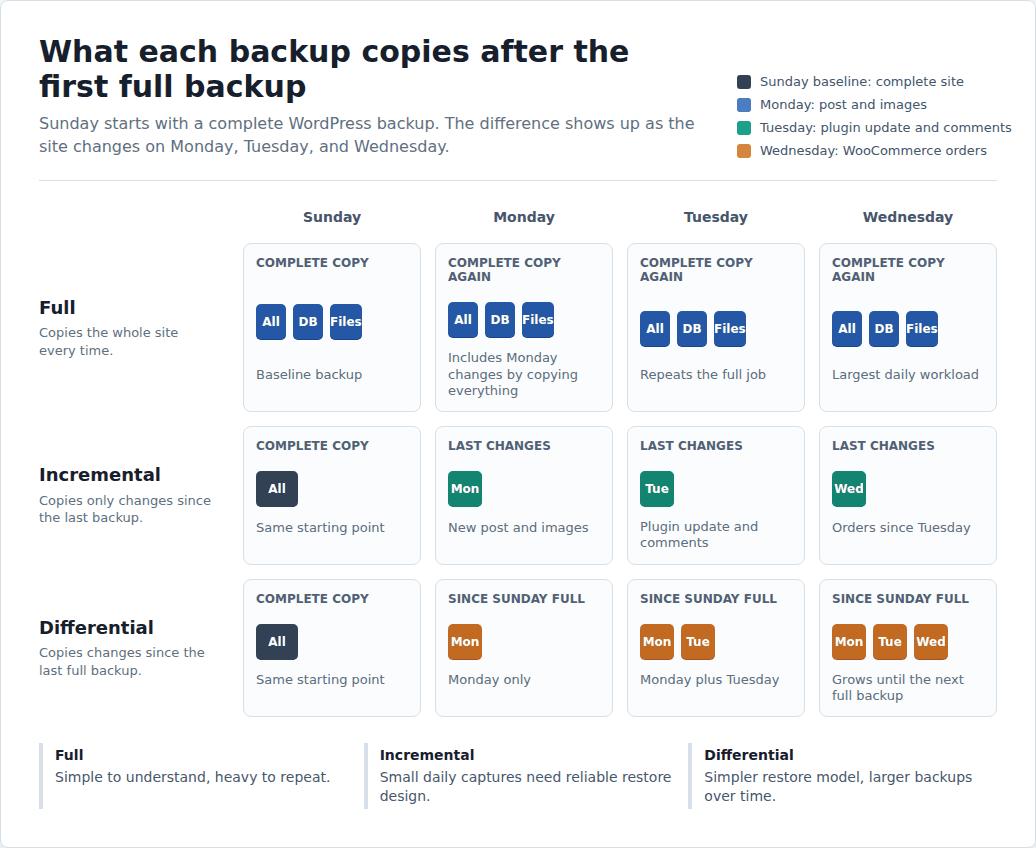
- Full backup: copies the entire site every time.
- Incremental backup: copies only what changed since the last backup.
- Differential backup: copies everything that changed since the last full backup.
That small wording difference creates the real tradeoff: full backups are simple but heavy, incremental backups are light but depend on good restore design, and differential backups are simpler than traditional incremental chains but get larger over time.
For WordPress, “changed” can mean more than a new file. It might be a database row for an order, a plugin setting, a redirect rule, a form entry, a user role change, or a new image in the uploads folder. A good backup system has to catch both sides: files and database changes.
Full vs incremental vs differential backup comparison
| Backup type | What it copies | Main strength | Main tradeoff | Best WordPress use |
|---|---|---|---|---|
| Full | The whole site every time | Easiest to understand and useful as a clean baseline | Slowest, most storage, highest server load | Migrations, major changes, periodic complete snapshots |
| Incremental | Changes since the last backup | Fast, storage-efficient, low load when built well | Weak tools can make restore chains fragile | Frequent protection for active WordPress sites |
| Differential | Changes since the last full backup | Restore is usually simpler than a traditional incremental chain | Backup size grows until the next full backup | Sites that accept larger backups for simpler restore mechanics |
The safest backup is not always the one that copies the most data each time. It is the one that runs often enough, stores data away from the live host, and restores cleanly.
Full backups explained
A full backup takes a complete copy of your WordPress site: database, uploads, plugins, themes, settings, and site files.
Use one before a migration, redesign, major plugin update, malware cleanup, or any change where “we can roll back” needs to be true. A full backup is also a good baseline for the rest of your backup system.
The catch is weight. Every full backup repeats the entire job. On a media-heavy site or WooCommerce store, that can mean more storage, longer backup windows, and more pressure on hosting resources.
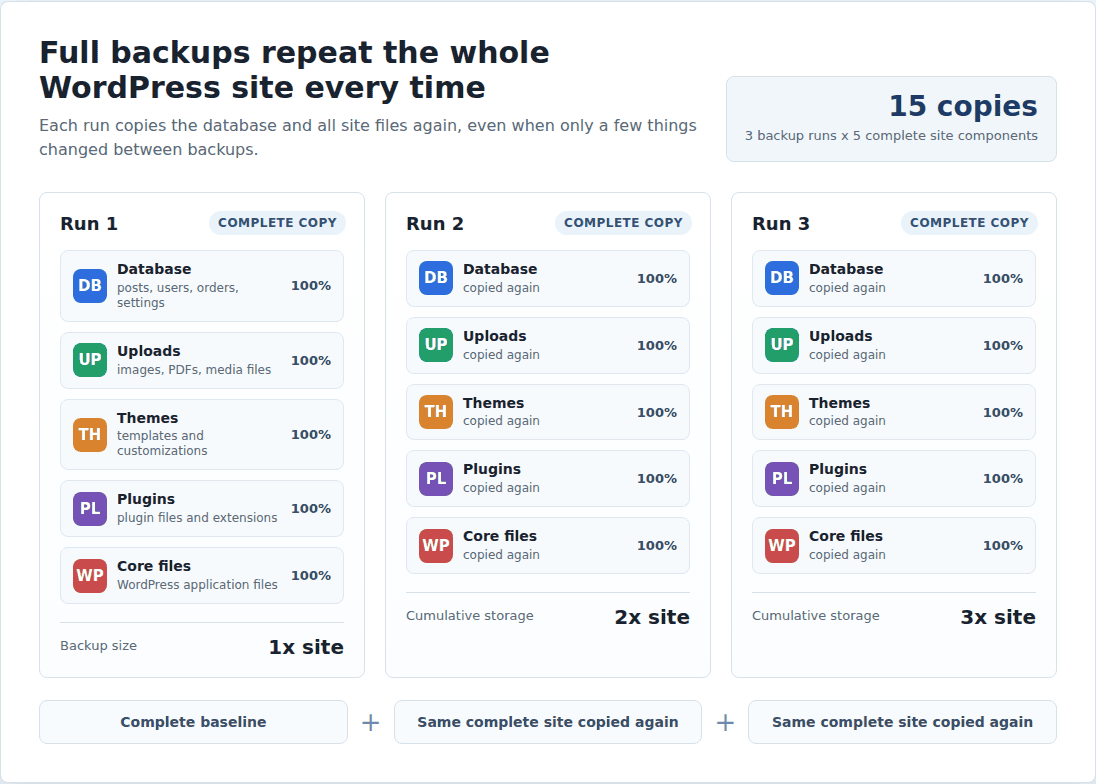
Full backups are not bad. They are just a poor everyday-only strategy for sites that change often.
Use full backups for baselines and major changes. Do not rely only on them if your site accepts orders, members, bookings, comments, or frequent content edits. If you are still setting up protection from scratch, start with a practical guide to backup your WordPress site before fine-tuning the schedule.
Incremental backups explained
Incremental backups solve the weight problem. After the first complete backup, they copy only what changed. If you publish a post on Monday, the backup captures that post and its images. If a plugin updates on Tuesday, it captures those file changes. If a customer places an order on Wednesday, it captures the relevant database changes instead of copying the whole site again.
That is why incremental backups usually fit complex WordPress sites the best. They can run more often without making the live site do the same heavy work again and again.
The risk is restore quality. Traditional incremental systems can depend on a chain: the original full backup plus each later incremental backup. If that chain is damaged or poorly managed, restore day gets ugly fast.
Modern WordPress backup tools can hide that complexity by capturing changes incrementally while still giving you complete restore points in the dashboard. That matters when you need to restore WordPress from a backup quickly instead of troubleshooting a backup chain. That is the version worth choosing.
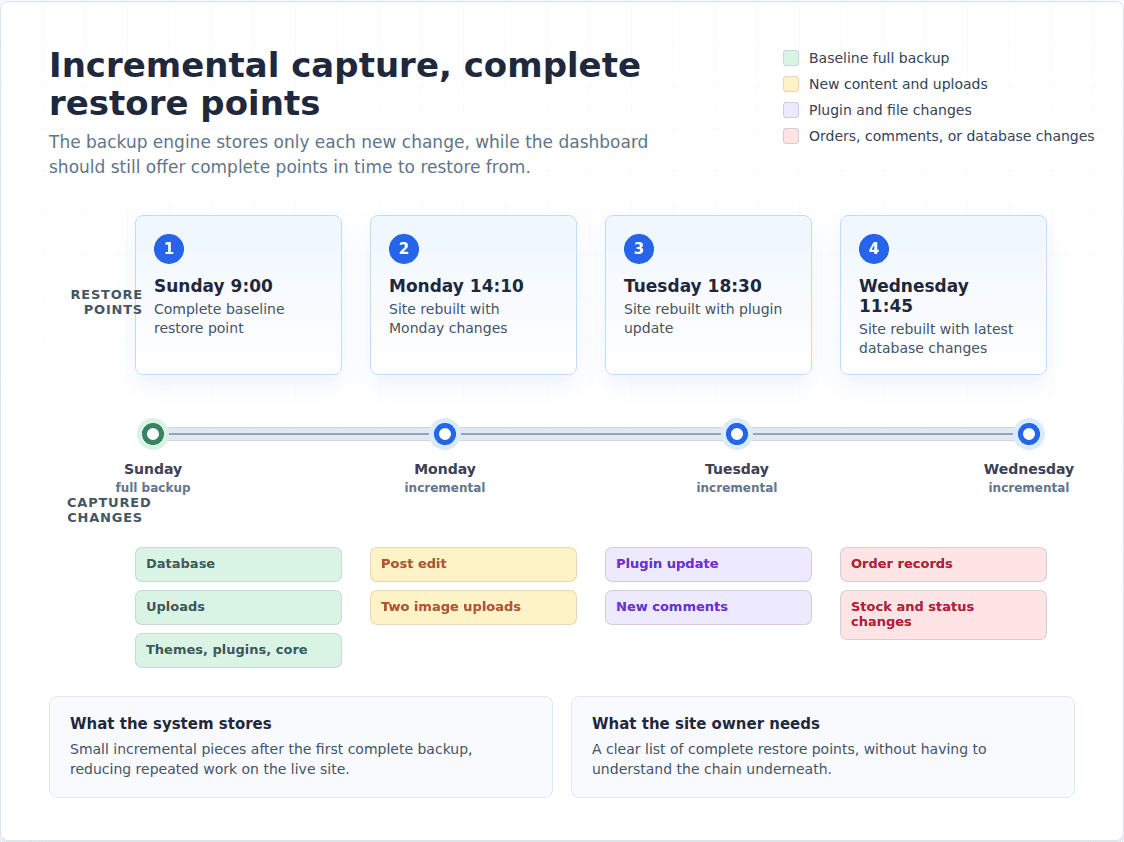
BlogVault follows this practical model for WordPress: it starts with a complete backup, then tracks incremental changes so the live site is not repeatedly hit with full-backup load. The useful part is not the word “incremental.” The useful part is incremental efficiency paired with restore points that are meant to be usable under pressure.
Differential backups explained
Differential backups copy everything that changed since the last full backup. If Sunday is the full backup, Monday’s differential includes Monday’s changes. Tuesday’s includes Monday plus Tuesday. Friday’s includes everything since Sunday.
The advantage is restore simplicity. You usually need the full backup and the latest differential backup, not every small backup in a long chain.
The tradeoff is growth. Differential backups get larger until the next full backup resets the cycle. A quiet brochure site may barely notice. A store with orders, refunds, product edits, uploads, and customer accounts can feel that growth quickly.
Use differential backups when you value simpler restore mechanics and can accept larger backup files between full backups. For many WordPress owners, a well-built incremental system with complete restore points is the better daily fit.
Differential backups are easiest to like early in the cycle. Monday’s backup after a Sunday full backup may be small. By the end of a busy week, the same method can be copying several days of orders, uploads, plugin changes, and content edits every time it runs. If those are the two options on your shortlist, the incremental vs differential backup tradeoff is worth looking at separately.
A WordPress example makes it clearer
Imagine this week on a WordPress site:
| Day | Site change | Full backup | Incremental backup | Differential backup |
|---|---|---|---|---|
| Sunday | Baseline backup | Copies everything | Copies everything | Copies everything |
| Monday | New post and images | Copies everything again | Copies Monday’s changes | Copies Monday’s changes |
| Tuesday | Plugin update and comments | Copies everything again | Copies Tuesday’s changes | Copies Monday plus Tuesday |
| Wednesday | WooCommerce orders | Copies everything again | Copies Wednesday’s changes | Copies Monday through Wednesday |
This is where the decision becomes practical. If the site barely changes, a heavy full backup may not bother you. If the site changes all day, repeatedly copying everything is wasteful.
It also shows why “daily backup” can mean very different things. A daily backup may be fine for a site that changes twice a month. On a WooCommerce store, it can miss a full day of orders, payment status changes, stock updates, refunds, coupon use, and new customer accounts.
For revenue sites, the sharper question is: how much data can you afford to lose?
Backup people call that RPO, or recovery point objective. In plain English, it means how far back you would be forced to rewind. Losing one day of edits is annoying on a brochure site. Losing one day of orders can mean refunds, support tickets, manual reconciliation, and unhappy customers.
There is a second term worth knowing: RTO, or recovery time objective. That means how long the site can stay broken while you restore it. A slow restore may be tolerable for a hobby blog. It is a real business problem for a store in the middle of a sale.
Which backup type should you use?
Choose based on how often the site changes and how painful data loss would be.
- Small brochure site: scheduled backups may be enough, with an on-demand full backup before bigger edits.
- Active blog or content site: use frequent incremental backups so posts, images, comments, SEO settings, and redirects do not fall through the gaps.
- Membership, LMS, or community site: use frequent backups because user data changes even when admins are not editing anything.
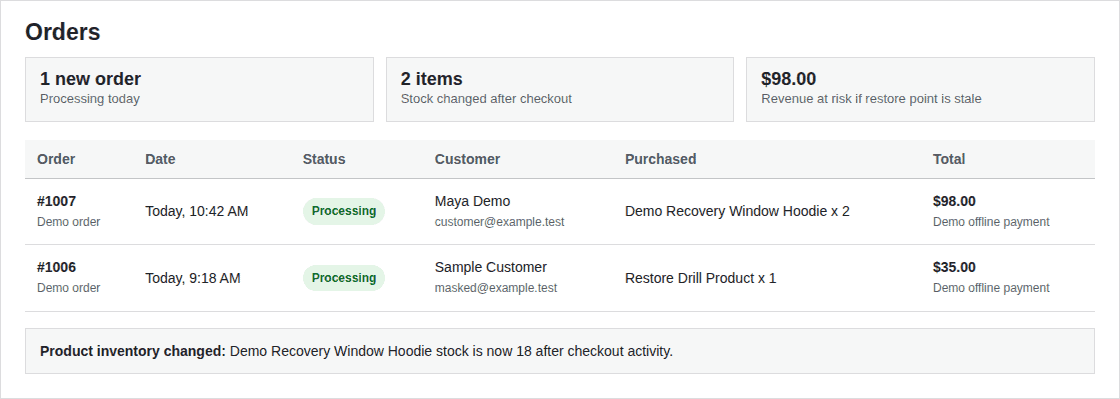
- WooCommerce store: use real-time or very frequent backups. Orders, payment status, stock, coupons, refunds, and customer records can change all day, so WooCommerce backup needs a tighter recovery window than a brochure site.
- Agency or freelancer sites: prioritize restore reliability, offsite storage, test restores, and clear restore points over backup terminology.
The rule is simple: the more often your site changes, the less sense it makes to depend on occasional full backups alone.
What matters more than the backup label
Before trusting any WordPress backup tool, check these basics:
- Does it back up files and the database?
- Does it include uploads, themes, plugins, settings, and custom tables?
- Are backups stored offsite, away from the live hosting account?
- Are backups encrypted in storage and during transfer?
- Is there enough backup history to go back before a malware infection or bad update?
- Can you create an on-demand backup before updates?
- Can you test your WordPress backups without overwriting the live site?
- Does it alert you when a backup fails?
- Is the restore process simple enough to use during an emergency?
This is where many backup setups fail. The site owner sees “backup completed” for months, then discovers the archive was stored on the same server that failed. Or the files restore, but the database does not. Or restore technically works only if a developer manually stitches pieces together while the store is already down.
A backup you have never restored is still a theory. Test one before the emergency makes the test expensive.
Do the test restore somewhere safe, not over the live site. A WordPress staging environment is the right place to check whether the restored site loads, whether wp-admin works, whether key pages open, whether forms still submit, and whether a store can reach checkout. You do not need a perfect disaster drill every week. You do need proof that the backup is usable.
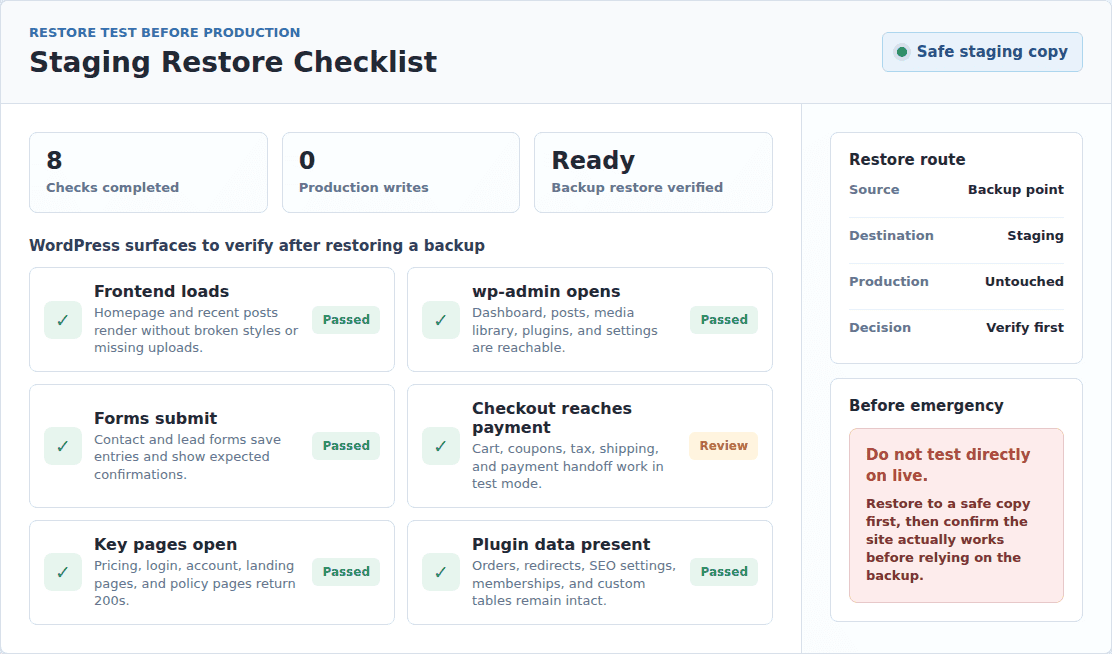
up still needs scanning, patching, and hardening after the restore.
This is why frequent restore points matter. You want to go back before the compromise without rewinding farther than necessary.
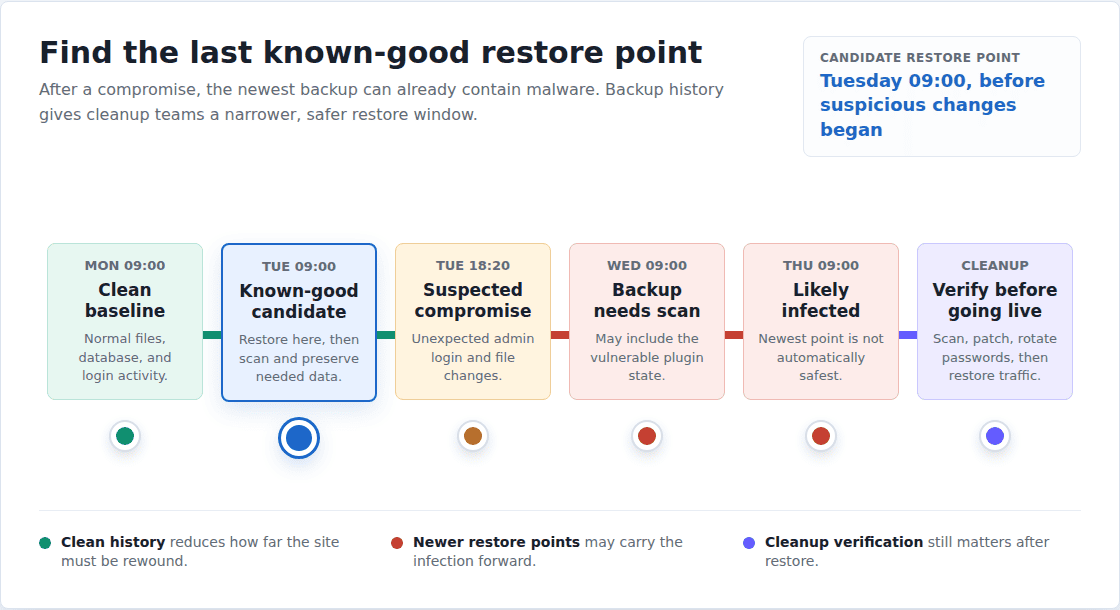
The backup is the rewind button. It is not the whole incident response plan.
After a hack, restore carefully. Clean or verify the site, patch the vulnerable plugin or theme, rotate passwords where needed, and then decide which data must be preserved. A restore that brings back the same vulnerable state is not a recovery. It is a pause before the next problem.
Final recommendation
For most WordPress sites, use a full backup as the baseline and incremental backups for regular protection. Add on-demand backups before risky updates, store backups offsite, keep enough backup history, and test at least one restore so you know the system works before a real failure. Use differential backups only when you specifically want the full-plus-latest-differential restore model and can accept growing backup size between full backups.
BlogVault is a strong fit if you want this handled as a WordPress workflow instead of a backup-engineering project. It uses the practical full-then-incremental approach, keeps site load lower than repeated full backups, and focuses on usable restore points, test restores, and recovery when something breaks.
The decision rule is simple: choose the method that gives you the most usable restore points with the least strain on the live site. For most active WordPress sites, that points to incremental backups done well.
FAQs
What is the difference between full, incremental, and differential backups?
A full backup copies the whole site every time. An incremental backup copies only changes since the last backup. A differential backup copies all changes since the last full backup.
Which backup type is best for WordPress?
Incremental backups are usually best for regular WordPress protection when the tool gives complete, reliable restore points. Full backups are still important for baselines, migrations, and before major changes.
Are full backups safer than incremental backups?
Not always. Full backups are simpler, but if they are too heavy to run often, they can leave large gaps between restore points. A frequent, well-managed incremental backup can be safer for active sites.
Is incremental backup better than differential backup?
For most WordPress sites, yes. Incremental backups are lighter and easier to run often. Differential backups can be simpler to restore than traditional incremental chains, but they grow until the next full backup.
What backup type should WooCommerce stores use?
WooCommerce stores should use real-time or very frequent backups. Daily backups can miss orders, customer records, stock changes, refunds, and payment updates that happen during the day.
Is sync or mirroring the same as a backup?
No. Sync and mirroring can copy a bad change quickly, including deleted files, corrupted data, or malware. A real backup gives you separate restore points so you can go back to a known good version.

Shivani enjoys crafting guides that make every aspect of using WordPress simple and easy to follow. When she's not glued to her laptop, you can find her buried in a good book or occasionally, painting.