A performance plugin can be a magic wand that solves all your website speed issues. Poor user experience? Dismal PageSpeed scores? These plugins can fix a lot of the problems you have.
In my research, I found that WordPress administrators recommend Perfmatters a lot. It’s popular for its granular control and lightweight design. It works differently by focusing on removing unnecessary code and features to make your site fundamentally faster.
But, is that enough? In this article, we’ll break down exactly what Perfmatters does, who it’s for, and whether it’s the right investment for your WordPress site.
Perfmatters is a powerful plugin but it works best in tandem with other plugins. For a more comprehensive performance solution, try Airlift.
What features were we looking for in Perfmatters?
To set the stage, we built a messy test site on purpose: heavy page builder, multiple forms, sliders, social sharing, analytics, and eCommerce add‑ons. Dozens of plugins, lots of requests, slow load times, and poor Core Web Vitals—the kind of real‑world bloat many WordPress sites struggle with.
We installed Perfmatters to see how much of that bloat we could remove without breaking functionality. Here’s exactly what we looked for:
- Caching: A WordPress caching plugin saves static versions of your pages so the server doesn’t rebuild them on every visit. It’s one of the biggest wins for faster load times and a lower time to first byte (TTFB).
- Asset optimization: This is about controlling which CSS and JS load, removing unused CSS, and deferring/delaying scripts so they don’t block rendering. It reduces requests, file sizes, and main-thread work—directly improving metrics like FCP, LCP, and Interaction to Next Paint.
- Image optimization: Image optimization includes compression, next-gen formats (WebP/AVIF), lazy loading, and proper dimensions. It matters because images are often the heaviest part of a page and heavily impact LCP and CLS.
- Database optimization: Cleaning revisions, auto‑drafts, spam/trashed comments, and expired transients keeps the database lean, which helps admin responsiveness and dynamic queries. While it’s a lighter front-end win (especially with page caching in place), it improves overall site health and can reduce server load.
Caching
WordPress caching can be powerful but Perfmatters is not a caching plugin. A good caching plugin is fantastic for improving your server’s response time (TTFB) by delivering a pre-built page. Unfortunately, Perfmatters doesn’t do any of it.
Image Optimization
When it comes to image optimization, Perfmatters focuses exclusively on how your media loads, not on the image files themselves. It provides excellent lazy loading for images, iframes, and videos, which defers off-screen media and dramatically improves initial load times. It also helps you tackle Core Web Vitals directly by allowing you to preload critical images to improve your Largest Contentful Paint (LCP) and add missing image dimensions to prevent Cumulative Layout Shift (CLS).
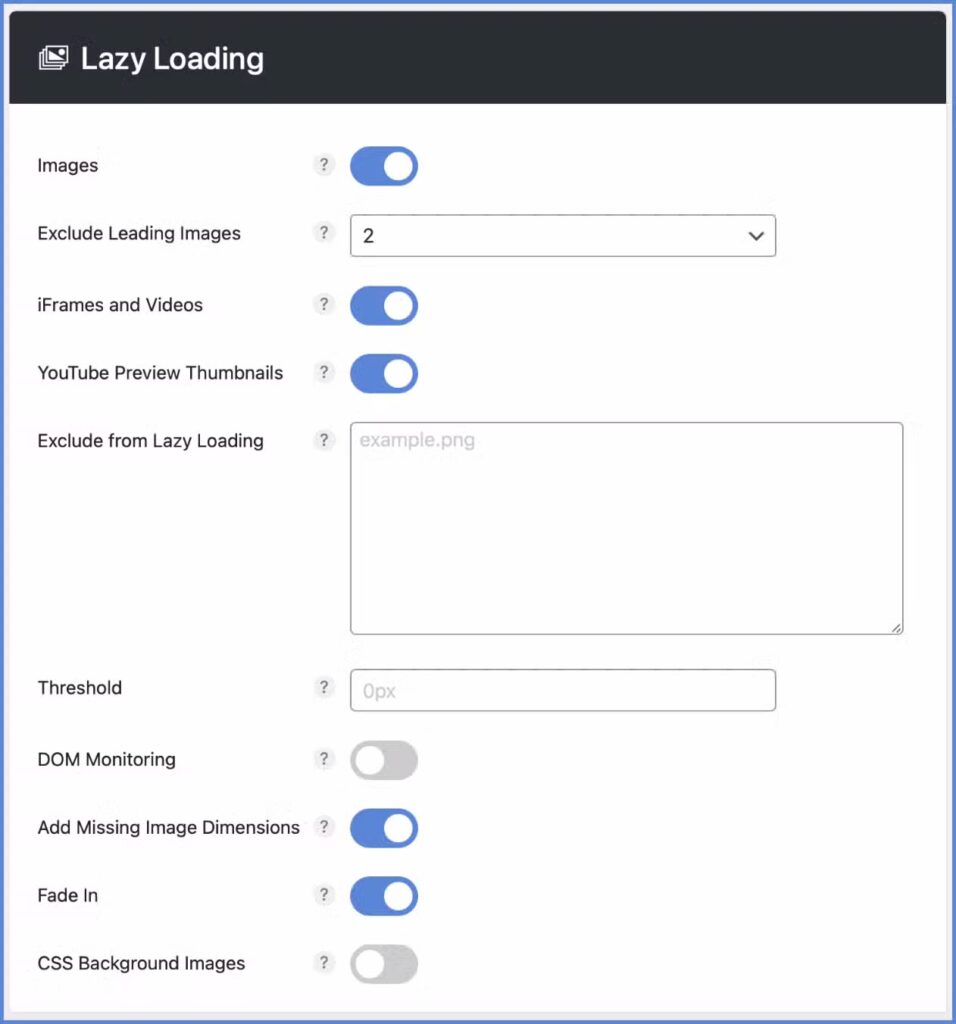
What Perfmatters does not do is file optimization, such as image compression or conversion to modern formats like WebP. Compressing images reduces their file size, which is a fundamental part of making any page fast.
Asset Optimization
Asset optimization is undoubtedly the core strength of Perfmatters and the primary reason most users choose it. It gives you surgical control to selectively disable CSS and JavaScript files on a per-page or even sitewide basis. For example, if your contact form plugin loads its scripts on every single page of your site, you can use the Script Manager to ensure it only loads on your “Contact Us” page. This single action can eliminate unnecessary code and speed up your entire site.

Beyond this, Perfmatters offers advanced features like the ability to Remove Unused CSS, which is critical for fixing render-blocking warnings, and robust controls to defer or delay JavaScript until user interaction. This granular control over what loads and when is what sets Perfmatters apart from many all-in-one solutions, allowing you to meticulously remove bloat that slows down your pages.
Database Optimization
Cleaning your database and optimizing it can help prevent lots of WordPress errors. Over time, your database gets cluttered with unnecessary data. Perfmatters allows you to easily clean up this bloat, including old post revisions, auto-drafts, trashed items, spam comments, and expired transients. You can also schedule automatic cleanups on a daily, weekly, or monthly basis. This lets you “set it and forget it,” ensuring your database remains optimized without any manual intervention.

Pricing
Perfmatters pricing varies depending on the number of websites you use. It is a premium plugin with no free version. The standard pricing structure is as follows:
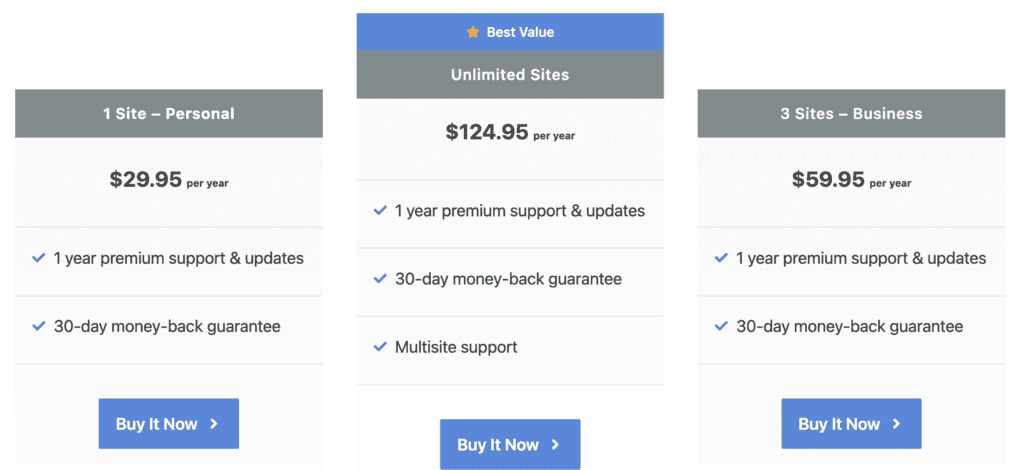
- $29.95 per year for a single site license.
- $59.95 per year for a 3-site license.
- $124.95 per year for an unlimited sites license.
It’s important to note that your purchase includes not just the plugin itself, but also one full year of plugin updates and premium support.
What Perfmatters is Missing Compared to All-in-One Solutions
While Perfmatters is a master of granular control, its specialized focus means it intentionally leaves out several key features. Understanding these downfalls can be integral to your decision.
- No Full-Fledged Caching: Perfmatters is a tuning plugin, not a caching plugin. Unlike Airlift or WP Rocket, it doesn’t create static pages. You must pair it with a separate caching solution to get the full performance benefit.
- Lacks All-in-One Simplicity: Perfmatters requires a hands-on approach to configure its granular settings, making it ideal for power users. In contrast, Airlift is designed as a “set-it-and-forget-it” automated system with minimal user input required.
- No Built-in Image Compression or CDN: Perfmatters offers lazy loading but does not compress images or convert them to WebP. It also doesn’t include a CDN service. All-in-one solutions like Airlift bundle these services into their package for a more complete, out-of-the-box experience.
The Better Alternative – Airlift
Airlift offers a fundamentally different approach that can be ideal for users looking for a single solution. It acts like a dedicated performance expert that continuously works on your site. It analyzes each page individually to build and maintain a custom optimization strategy, adapting daily to any changes you make. Here’s a breakdown of what this intelligent automation actually does:
- Intelligent Image Optimization: Airlift automatically identifies which images are visible on screen (viewport) and preloads them, while resizing, lazy loading, and converting all others (including background and slider images) to the modern WebP format.
- Dynamic Code Optimization: It dynamically calculates the “Used CSS” for every page to eliminate render-blocking issues. It also intelligently defers and delays JavaScript, executing scripts only when a user interacts with the page, ensuring a faster, more responsive experience.
- Advanced Font and Media Handling: It automatically optimizes fonts by converting them to modern formats (WOFF2) and subsetting them for smaller file sizes. Videos and iframes are intelligently lazy-loaded to prevent them from slowing down the initial page render.
- Smart Caching with Continuous Adaptation: Airlift’s page caching system is designed to work with popular page builders and WooCommerce. Crucially, it re-analyzes your site daily, automatically updating its optimization rules to adapt to any new content, plugin updates, or theme changes, ensuring your site stays fast over time.
Final Thoughts
The biggest flaw of Perfmatters is that it’s an incomplete toolkit. It forces you to juggle multiple plugins for caching and image optimization.
This is why you should use Airlift instead.
Airlift is a fully automated, all-in-one solution that replaces your entire performance stack. It handles everything—caching, image optimization, CDN, and asset control—without the complexity or risk.
FAQs
Is Perfmatters free?
No, Perfmatters is a premium-only plugin. There is no free version or trial available to download from the WordPress repository. The purchase of a license grants you access to the full plugin, along with one year of premium support from their development team and continuous plugin updates to ensure compatibility and security.
How much does Perfmatters cost?
Perfmatters is sold as an annual subscription with pricing based on the number of sites you need to use it on. The standard plans are: a single site license for $29.95 per year, a 3-site license for $59.95 per year, and an unlimited sites license for $124.95 per year. Because prices can change, you should always check their official website for the most up-to-date information.
What is the Perfmatters plugin?
Perfmatters is a lightweight WordPress performance plugin designed to speed up your site by removing bloat and reducing unnecessary code. Its main job is to give you control over which scripts and styles load on your pages, disable unused WordPress features (like emojis and embeds), and keep your database clean. It is not a caching plugin but is instead designed to work alongside one to make your website fundamentally faster and more efficient.
What is the difference between Perfmatters and Asset CleanUp Pro?
While both plugins have a powerful script manager as their core feature, they differ in scope and focus. Asset CleanUp Pro is a highly specialized tool focused almost entirely on unloading CSS and JavaScript files with very granular rules, which can sometimes feel more complex for beginners. Perfmatters is a broader performance suite; in addition to its excellent Script Manager, it includes dozens of other one-click optimizations for your database, WordPress core features, and media loading. Many users find Perfmatters more user-friendly and an easier all-in-one tool for general performance tuning.

Shreya has been a writer for as long as she can remember. Now, she writes articles that help WordPress users manage the sites that they're proud of, with little to no coding