Making sure your WordPress site is protected and running smoothly is something many site owners worry about. You might be wondering if your site is secure enough or if it’s loading quickly enough.
Without clear answers, worries about hidden issues on your site can weigh heavily on your mind.
Fortunately, there’s a direct solution: a WordPress audit. While WordPress site logs are helpful to identify the issue, they work best in paired with a thorough audit to provide a complete picture of both the strengths and weaknesses of your site. With detailed insights, you can make the necessary changes to tighten your site’s security and improve its speed and visibility.
A WordPress audit checks how well your site is doing in terms of speed, security, and updates. Tools like BlogVault make it easy to handle these checks from one place, helping you keep your site running smoothly without needing multiple tools.
What is a WordPress audit and why do you need it
A WordPress audit gives your website a complete check-up to ensure everything is running smoothly.
It looks for security weaknesses that hackers could exploit, allowing you to protect your data and users, and keep them safe.
The audit also helps spot and fix slow loading speeds, which can really annoy visitors and is crucial for improving your site’s search engine rankings. After all, nobody likes waiting for a page to load.
Regular audits mean you can catch and resolve small issues before they grow into bigger problems, keeping your website at peak performance. With all this information from an audit, you can improve and protect your site, ensuring it works for you and your visitors the way it should.
How to perform a WordPress audit?
An audit is crucial for keeping your site in top shape. It focuses on checking key areas to ensure everything runs smoothly and securely. Here’s how you can do it:
1. Check site software
You can start with checking to see if your site’s software is up to date. Make sure that WordPress itself, along with any themes and plugins, are all updated to their latest versions. WordPress updates often include critical security fixes, so they’re important to keep your site safe.
If you have plugins or themes that you’re not using, it’s a good idea to remove them than keep them deactivated. Unused plugins can clutter your site and even create security risks.

Before applying any updates to your live site, create a staging site and test them there. This is a safe place to make sure everything runs smoothly before visitors to your actual site see any changes. After updating, look out for compatibility issues and ensure all parts of your site work harmoniously.

2. Check site security
Use a trusted security plugin to perform a thorough scan, looking for any vulnerabilities. If any malware is detected, security plugins can help you clean it up quickly. Also, check user roles to make sure they have just the right amount of access. Limiting access reduces the risk of security breaches by preventing unauthorized changes.

Strong passwords and two-factor authentication provide an extra layer of security. Ensure you and your users create complex passwords and change them regularly. Keep an eye on the activity log for any suspicious behaviour, so you can catch problems early on.
3. Check and optimize server timeout settings
Make sure your website’s server responds quickly to visitors to avoid any delays that might frustrate them. You can do this by increasing the PHP time limit so your site doesn’t freeze while executing a task or request.
4. Audit site structure
Auditing your site structure means reviewing how your website is organized to ensure it’s easy for visitors to navigate. When auditing, focus on making the content and key pages easy to find. Check how the site’s navigation works—intuitive navigation helps users easily reach their desired pages, improving their overall experience.
Organize your menus and sitemap to enhance usability and improve SEO. You can do this by keeping menus simple and logical, grouping similar pages under clear categories, and ensuring your sitemap includes all key pages and is submitted to search engines like Google. Important pages should be reachable with as few clicks as possible.
Regularly check forms, navigation buttons, and other interactive elements to ensure they’re functioning correctly. If you have an online store, make sure shopping carts and payment gateways work smoothly without any hiccups.
Testing the site on different browsers and operating systems is also a good idea to catch any compatibility issues that could mess with how your site looks or works.
5. Check site speed
Ensuring your website is fast is super important. You can use tools like Google PageSpeed Insights or GTmetrix to see how quickly your site loads. They give you a detailed report and suggest things you can improve.
To make things even speedier, try using a performance optimizer plugin like Airlift to boost your page speed and help your site rank better.

6. Verify backup and recovery
Backups are like safety nets for your site, so it’s key to ensure they’re set up properly. Verify that automatic backups are scheduled and happening regularly. Use a backup plugin to simplify this process.
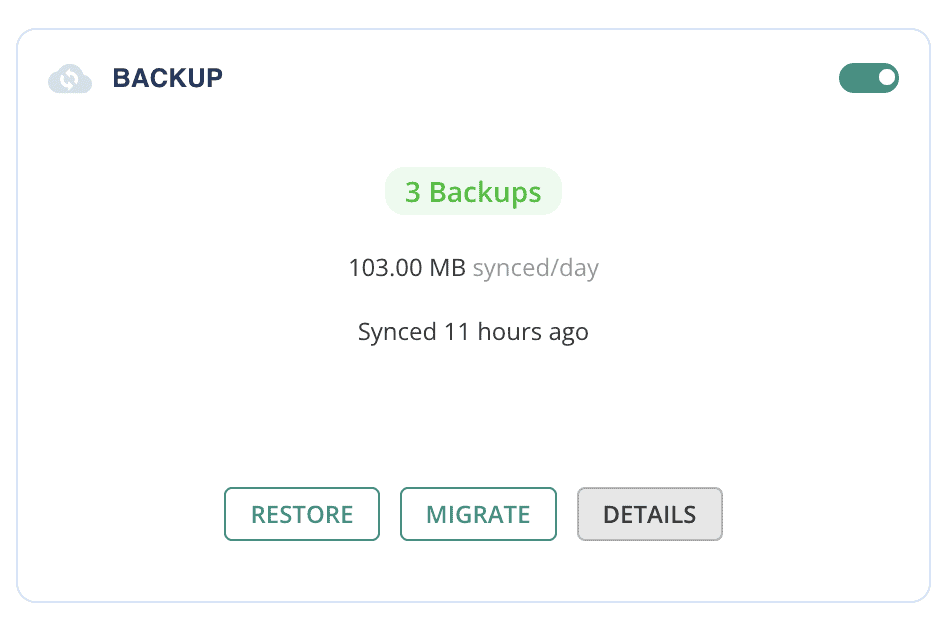
You should also test your restores to ensure these backups actually work. Confirm the reliability of your backup process by testing backups and ensuring reliable restores. Lastly, store these backups securely in multiple places like cloud storage and your local devices to avoid data loss.

BlogVault takes care of all your backup needs with features like offsite storage and automatic backups to ensure your data is safe and easily accessible. With its test restore feature, you can verify that your backups work perfectly, giving you peace of mind that your website can be quickly restored in case of an emergency.
7. Review SEO
Start by checking your title tags, meta descriptions, headings, and alt text. These tiny pieces of text pack a big punch when it comes to optimizing your content. Look at your internal linking structure and URL hierarchy too.
These elements should guide visitors and search engines smoothly through your site. Along the way, fix any broken links using tools like Ahrefs broken link checker. Update or remove these links to maintain site integrity, which can drag down your SEO health.
8. Monitor site analytics
Understanding how people use your site can unlock opportunities for improvement. Check your Google Analytics to gather insights about user behavior, metrics like bounce rates, which show how many people leave after viewing just one page, and conversion paths, which track the steps users take to complete a desired action, like making a purchase or signing up for a newsletter.
Use Google Search Console to spot indexing issues and see how your keywords are performing. Identify pages that aren’t doing well and brainstorm ways to make them shine.
9. Examine mobile responsiveness
With so many people browsing on mobile, ensuring your site looks and works great on small screens is just as important. Test your site using responsive design tools like Mobile Friendly Test or simulations to check if everything adjusts well.
Make sure buttons are easy to tap and navigation is smooth on mobile devices. To improve performance install Airlift. This plugin helps cut down on heavy scripts and use mobile-friendly images along with other optimizations to increase your pagespeed.
10. Evaluate content quality
The heart of any website is its content. Take a close look at your site’s words and images to ensure they’re accurate, relevant, and aligned with current SEO strategies. Update or remove old information to keep everything engaging and current.
Consider doing a content gap analysis to find areas where you can add valuable new content that your visitors will appreciate.
11. Assess compliance and accessibility
Your site must comply with legal regulations like GDPR and ADA to handle personal data correctly and ensure equal access for everyone. GDPR focuses on protecting user privacy, while ADA ensures accessibility for people with disabilities.
To improve accessibility, check for issues like poor color contrast or missing alt text. Fix these so that everyone can easily use your site, which also helps attract a wider audience.
Parting thoughts
A WordPress site audit is an essential step to keep your site running smoothly, securely, and in a way that makes visitors want to stick around.
By going through each part of your site—like updates, security, SEO, and user experience—you ensure everything’s in top shape for both visitors and search engines.
FAQs
What is an audit in WordPress?
A WordPress audit is like a complete check-up for your website. It looks at all the different parts of your site—from how fast it loads to how secure it is. This helps you find what’s working well and what might need a little fixing.
How to secure a WordPress website?
To secure your WordPress site, start by using strong passwords and update them regularly. Make sure you’re using the latest version of WordPress, and keep your themes and plugins updated.
How do you audit for SEO?
Auditing for SEO means ensuring your site can be easily found by search engines like Google. Check to see if your titles, descriptions, and headings are optimized. Make sure your content is relevant and uses the right keywords. Fixing broken links and improving site speed can also boost your SEO.
How to audit your website for free?
You can audit your website for free using online tools. There are plenty out there that can help you check your site’s speed, security, and SEO performance. They give you a report of what’s good and what might need some work, all without costing a thing.
Why should I audit my website?
Auditing your website is important because it helps you keep everything running smoothly and securely. It’s like catching little problems before they become big ones. By performing regular audits, you’re ensuring your website stays fast, safe, and easy for people to find and use.

Shivani enjoys crafting guides that make every aspect of using WordPress simple and easy to follow. When she's not glued to her laptop, you can find her buried in a good book or occasionally, painting.