
Choosing the right WordPress hosting provider is a critical and often confusing decision. A good partner handles the complex technical side for you.
This includes optimizing performance, dealing with security, and running updates.
Rapyd Cloud enters the market promising to be that kind of partner. This Rapyd Cloud review will help you decide if they live up to it.
Rapyd Cloud is a premium managed host where all plans include the full suite of security and performance features. This includes a server-level WAF and Cloudflare Enterprise. The service is structured for users who require a complete, high-performance infrastructure out of the box.
Rapyd Cloud is a managed WordPress host. It is engineered for performance-critical websites, like e-commerce stores and online communities.

The platform was created by the team behind BuddyBoss after trying to run their high-traffic communities on nearly every major managed host.
They consistently faced the same core problems. This includes poor performance from slow uncached responses, resource contention, preventable security incidents, and inadequate support for deep infrastructure issues.
Their platform, which uses a high-performance stack including LiteSpeed Enterprise servers, was built from the server up to solve these exact issues.
Security
From our experience testing hosts, how a company handles security is one of the most telling signs of its quality. Rapyd Cloud’s approach is layered and fundamentally different from what many other managed hosts offer, so we will break it down piece by piece.
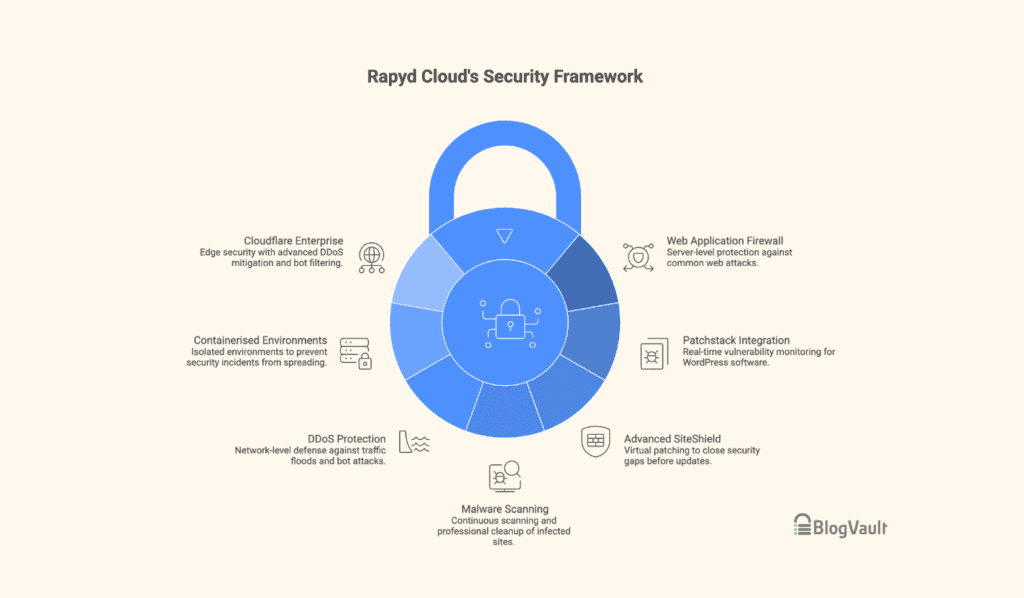
Web application firewall
Every Rapyd Cloud plan includes a server-level Web Application Firewall (WAF). Keep in mind that this is different from a plugin. It operates at the infrastructure level, filtering malicious traffic before it ever gets to your WordPress application.
The WAF is constantly updated to block common WordPress attacks like SQL injection and cross-site scripting.
This means that threats are stopped much earlier. And since it operates at the server level, it is a very efficient way to handle security filtering without adding processing load to your WordPress site.
Patchstack integration

The platform integrates with Patchstack for real-time vulnerability monitoring. If you have used security plugins, you will be familiar with this type of scanning.
Patchstack keeps an eye on WordPress core, your plugins, and your themes. When a new vulnerability is discovered, that information is fed directly into Rapyd Cloud’s security system.
This gives you specific threat intelligence for your site’s software combination. This is particularly relevant for complex sites, such as those with WooCommerce or LMS plugins, which naturally have a larger potential attack surface to monitor.
Advanced SiteShield: Virtual patching
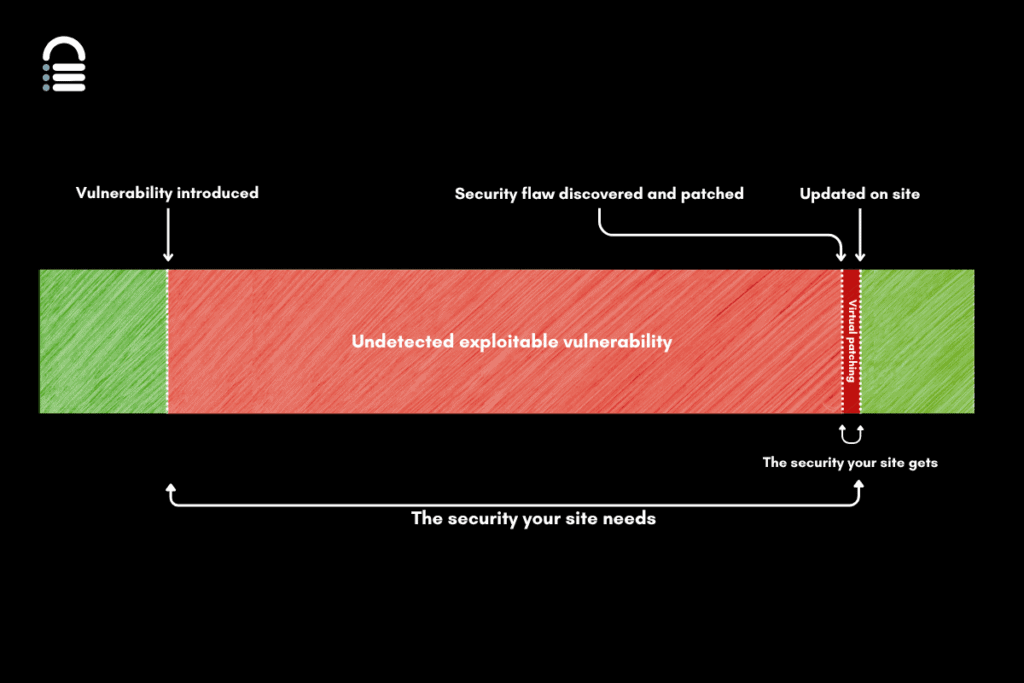
The Advanced SiteShield add-on automatically applies a server-level virtual patch. This happens the moment a plugin vulnerability is detected before an official update is available.
This service is designed to close the window between a vulnerability’s discovery and its patch release. For its roughly $4/month price tag, it’s an effective way to handle this specific risk.
Malware scanning
All sites on Rapyd Cloud are continuously scanned for malware. If any is found, their team handles the professional cleanup.
This is a critical distinction. They do not just send you a report asking you to fix the problem yourself. Cleaning a hacked site involves finding files, checking databases, and verifying the fix. It’s a process that requires a good security checklist to ensure nothing is missed.
Having the host’s expert team take ownership of that entire process is a game-changer.
DDoS protection and bot filtering
Network-level DDoS protection is also included. This service absorbs large-scale traffic floods before they can knock your site offline. This is a core part of modern website security. The platform also filters out automated malicious traffic, like spam bots, before they can consume your server’s resources.
Containerised environments
Every website on the platform runs in a fully isolated container. Your site’s CPU, RAM, and storage are not shared with other customers. While this is great for performance, it is a huge security advantage.
This means that a security incident on another website cannot spread to yours. In many shared hosting environments, a vulnerability on one site can create a risk for the entire server. This architecture prevents that.
Performance
A slow website frustrates visitors and directly impacts your bottom line. Rapyd Cloud pairs its security with a performance stack that is competitive.
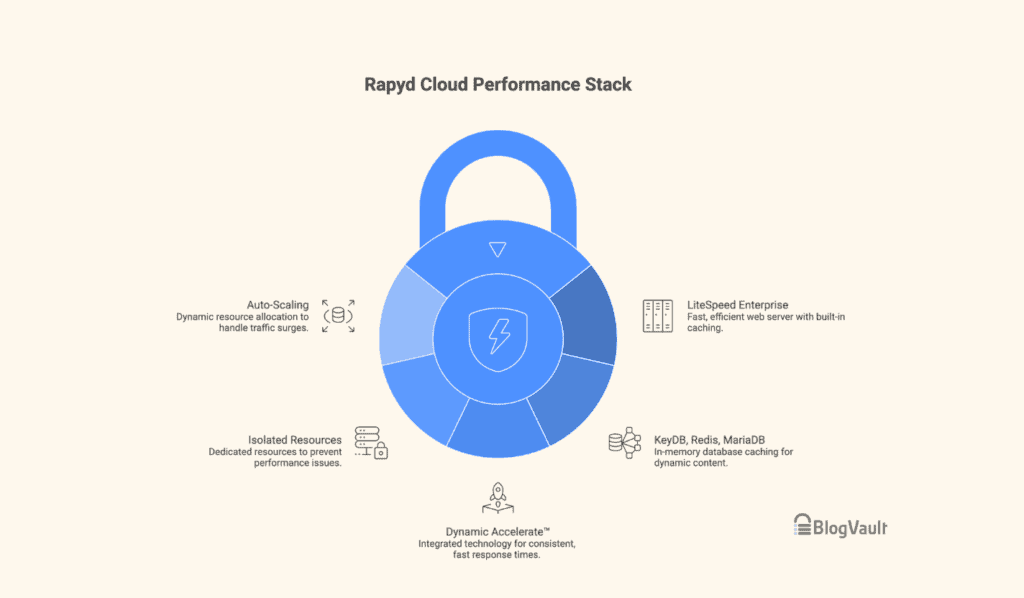
LiteSpeed enterprise
Rapyd Cloud uses LiteSpeed Enterprise servers. This is a faster, more efficient alternative to common web servers like Nginx or Apache, especially for busy WordPress sites.
Its main advantage is built-in, server-level caching. This means it works before WordPress loads, making it incredibly fast. This makes a noticeable difference for dynamic content, like for logged-in users or during an e-commerce checkout.
KeyDB, Redis Object Cache, and MariaDB
A slow database is a common performance killer. Rapyd Cloud uses MariaDB with a Redis Object Cache, which stores frequent database results in memory to avoid repetitive work. This directly speeds up dynamic content like product pages and member dashboards.
Their focus is on making these uncached parts of a site fast from the start, resulting in a snappier admin area and checkout process.
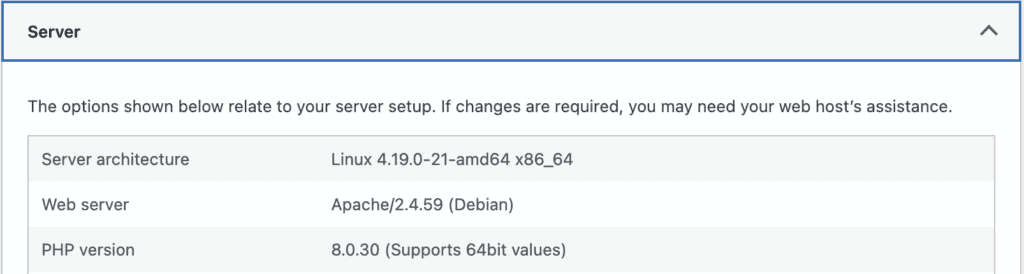
Dynamic Accelerate™ technology
Dynamic Accelerate™ is Rapyd Cloud’s name for how all their performance tech works together. The name is not what is important; the result is. It is their system for delivering consistent, fast response times across your entire site, not just the easy-to-cache parts.
Isolated resources and auto-scaling
Every site on Rapyd Cloud runs in an isolated container, which eliminates the “noisy neighbor” problem found in shared hosting. Another site’s traffic spike cannot slow you down.
The platform also auto-scales, giving your site more resources during a traffic surge to prevent it from going down. From our experience, this reliability is a critical feature for any business website.
Caching
Bad caching is a liability. It can show one user’s private data to another or break your WooCommerce checkout. Rapyd Cloud’s caching is configured to understand and avoid these specific WordPress problems.
It correctly handles logged-in users and dynamic pages for membership or learning sites. For WooCommerce, its Smart Purge technology means updating one product only clears that specific product’s cache, not your entire site, which keeps things fast.
Higher plans also offer ElasticSearch, which makes product search much faster for large stores. Most importantly, these smart defaults prevent the kind of serious data leaks that can happen with a misconfigured cache.
Cloudflare Enterprise CDN

Rapyd Cloud integrates Cloudflare Enterprise, a significant upgrade over the free plans other hosts offer. It’s built directly into the platform, not a separate plugin.
This provides a two-layer cache for speed, global content delivery for international users, and enterprise-grade DDoS protection. Everything is managed in their dashboard, making a high-cost service an accessible part of their standard hosting.
Support
Support quality is where many managed hosts fail. A good team saves you hours of stress, while a bad one makes problems worse.
Rapyd Cloud’s support emphasizes technical depth over ticket volume. Their 24/7 team diagnoses complex issues like server-level caching conflicts and slow database queries directly, bypassing frustrating support escalations.
For users running business-critical websites, this direct access to expert help is a core requirement, often resolving issues in hours, not days.
Pricing
Rapyd Cloud is a premium host focused on infrastructure quality, not on being the cheapest option. A key point is that all plans include the full platform, with no essential features gated behind more expensive tiers.
Here is a quick look at the Rapyd Cloud plans.
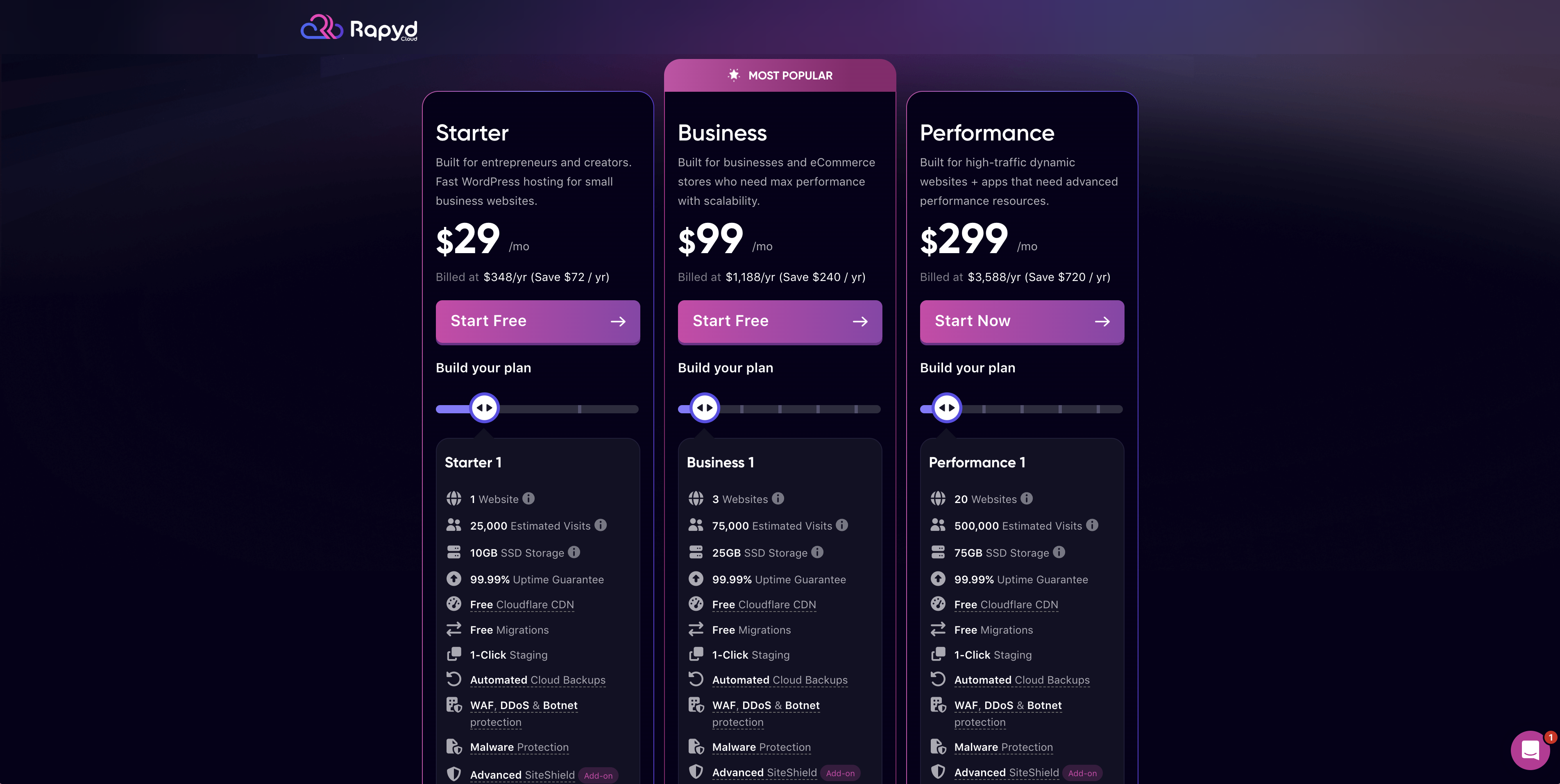
Starter Plan: Begins at $29/month (billed annually).
- Best for: A serious business website that has outgrown basic shared hosting.
Business Plan: Starts at $99/month (billed annually).
- Best for: Active e-commerce stores, LMS platforms, and membership sites.
- Key additions: Adds Redis Object Cache, Auto-scaling, and WooCommerce Smart Purge.
Performance Plan: Begins at $299/month (billed annually).
- Best for: High-traffic applications and large e-commerce stores needing maximum performance.
- Key addition: Adds Elasticsearch for WooCommerce to speed up product search.
All plans come with a 3-day free trial and a 14-day money-back guarantee, giving you a safe way to test the service.
Is Rapyd Cloud right for you?
Rapyd Cloud is a strong fit for site owners who view hosting as a core part of their business strategy, not just a monthly bill.
This platform is a strong choice if you run:
- A WooCommerce Store: You get a secure foundation for transactions with their server-level WAF, vulnerability monitoring, and container isolation.
- An LMS or Membership Site: The multi-layered security stack helps you protect your members’ personal and payment data, which is essential for building trust.
- An Agency or Freelance Business: The site isolation is the key benefit here. A security issue on one site cannot spread to your others, significantly reducing your risk.
Who should look elsewhere?
If you run a simple blog or a brochure website, this platform’s advanced features are likely more than you need. A more standard host would be a more practical and cost-effective fit.
Parting thoughts
Rapyd Cloud is for site owners who treat hosting as critical infrastructure, not a commodity. Its security is comprehensive and operates at the server level, where the most important protections live.
Paired with a performance stack built for real-world traffic, it delivers on the true promise of managed hosting. If this approach fits your needs, their 3-day free trial at rapyd.cloud is the best way to test the platform.
FAQs
Is site migration to Rapyd Cloud really free?
Yes, site migration to Rapyd Cloud is completely free. Their expert team handles the entire “white glove” migration process for you to ensure a smooth transition.
Does Rapyd Cloud include a free trial?
Yes, Rapyd Cloud includes a 3-day free trial. They also offer a 14-day money-back guarantee, giving you a risk-free period to test their platform.
Can Rapyd Cloud handle high-traffic spikes for WooCommerce?
Yes, Rapyd Cloud is specifically designed to handle high-traffic spikes for WooCommerce. Its isolated resources and auto-scaling ensure your store stays fast and online during critical sales events.
How does the auto-scaling feature work on Rapyd Cloud?
The auto-scaling feature automatically allocates more server resources. This happens when it detects a traffic surge. This happens instantly within your site’s isolated container to maintain performance without any manual intervention.
What security features are included in a Rapyd Cloud plan?
Every Rapyd Cloud plan includes a comprehensive set of security features. This includes a server-level WAF, DDoS protection, continuous malware scanning, Patchstack integration, and isolated site containers.
How many websites can I host on one Rapyd Cloud account?
The number of websites you can host depends on your specific plan. Their Starter plan is for a single site, while their Business and Performance plans are designed to support multiple websites.

Shivani enjoys crafting guides that make every aspect of using WordPress simple and easy to follow. When she's not glued to her laptop, you can find her buried in a good book or occasionally, painting.