Is the Airlift plugin the magic wand you were looking for?
A performance plugin is supposed to fix all your page load speed issues without destroying it. But, the reality is that speed plugins either temporarily work well, crash your website or don’t work at all. Finding the right one for my website was tough.
When I was doing my research, Airlift quickly emerged as a new and bold option. It claimed to be an expert at front-end optimizations. What does that even mean? Why will it help?
This article will cut through all the jargon and help you decide if Airlift is the plugin for you.
🏆 Verdict
Of all the plugins I’ve tested, Airlift is the best. It has a whole suite of features that will automatically optimize your website for you. Within minutes, our PageSpeed scores were the best they’ve ever been.
When we put Airlift to the test, we focused on how it handles the biggest bottlenecks that slow down WordPress sites. Here’s a breakdown of the core features we examined to reach our verdict:
- Media Optimization: How it manages images and videos, the heaviest assets on a page.
- Asset Optimization: How it cleans up and streamlines your site’s CSS and JavaScript code.
- Caching: How it creates instant-loading copies of your pages for visitors.
Let’s take a closer look at how each of these features performs in practice.
Media Optimization
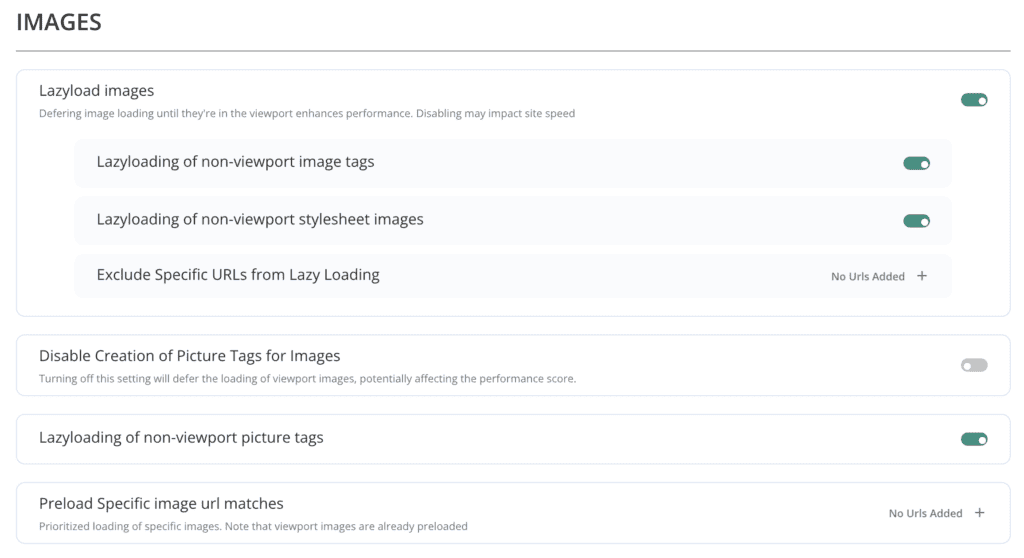
Airlift’s media optimization features are designed to improve performance by addressing images and videos. This is very important because media assets are the most common reasons for slow websites.
Side note: When we tested WP Super Cache, it didn’t even offer this feature. So, when researching performance plugins, consider this.
Here are the different ways that it handles media optimization:
- Intelligent Lazy Loading: Speeds up your site by delaying media from loading. Images, videos, and iFrames only load when you scroll to them. It also correctly handles tricky sliders and background images.
- Automatic Resizing & Compression: Makes your images load faster on any device. It automatically serves the perfect size for desktops, tablets, and phones. It also compresses images and converts them to smaller formats like WebP without losing quality.
- Preloading for Instant Impact: Makes your most important images load first. It finds the key images at the top of your page. This helps visitors see your content instantly.
Asset Optimization (CSS, JavaScript)
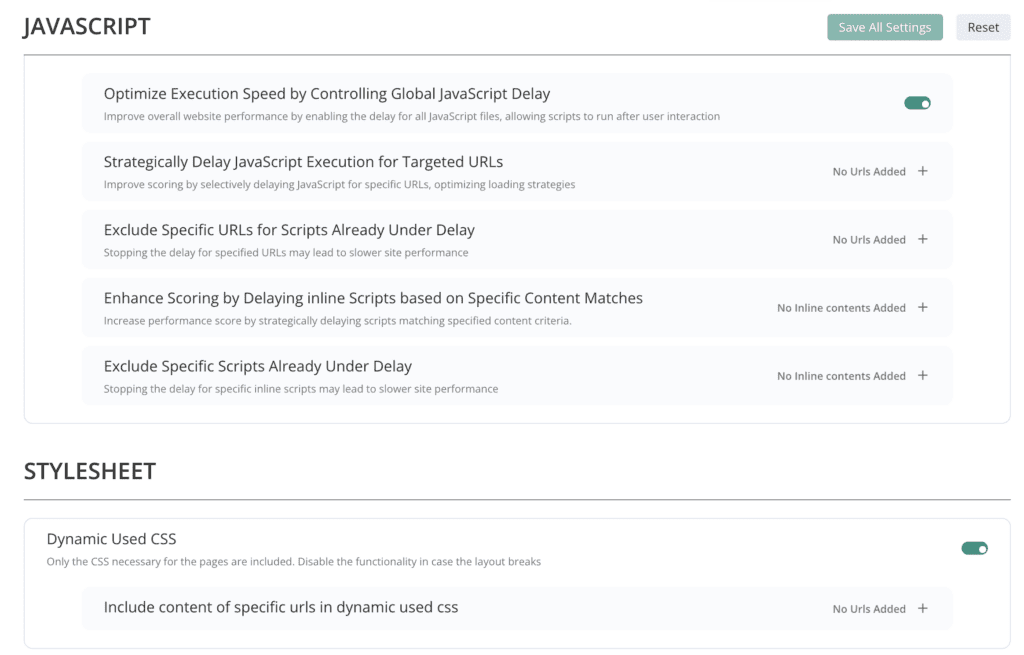
Airlift’s asset optimization features target the code that builds your site: CSS and JavaScript. This code can often be bloated and slow down your site’s rendering.
Side note: In our review of WP Rocket, we found that it often crashed websites when it did asset optimization. If you use the wrong performance plugin, this is the price you may have to pay.
Airlift solved this problem because it:
- Eliminates Unused Code: Makes your CSS files much smaller. It analyzes each page and removes code that isn’t needed. This helps your site render faster for visitors.
- Stops Code from Blocking Your Page: Stops your code from slowing down page rendering. It intelligently defers JavaScript and loads CSS without delay. This allows visitors to see and interact with your page sooner.
Caching
WordPress caching plugins create a super-fast copy of your pages, so they don’t have to be rebuilt every time someone visits. Airlift’s caching features make your site load instantly for visitors.
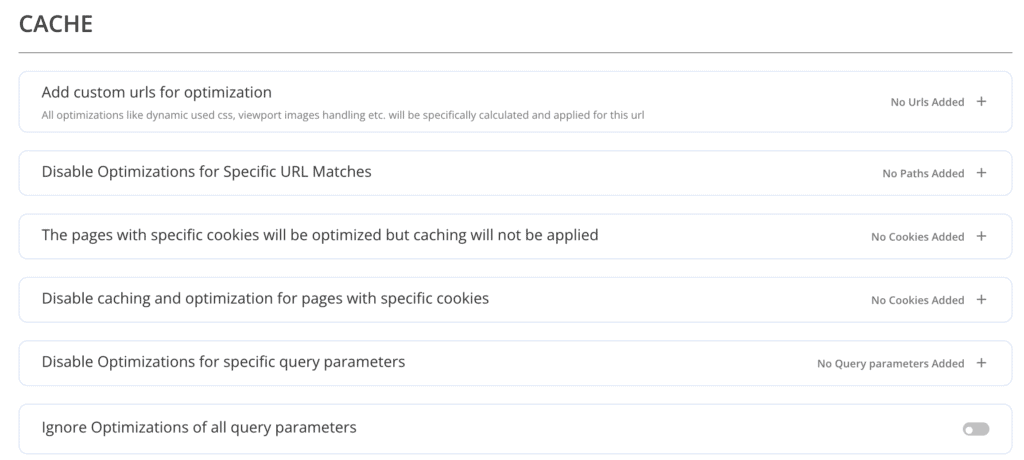
Here’s how Airlift improves your site’s caching:
- Smart Caching Engine: Makes your site load instantly. It creates static, super-fast versions of your pages. This reduces server load and delivers content quickly.
- Always Fresh Content: Keeps your website up-to-date. The cache is automatically cleared when you update a page. Visitors will always see your latest content.
- Handles Dynamic Pages: Protects your important pages. It knows not to cache dynamic pages like shopping carts. This ensures your store and other interactive features work correctly.
Pricing
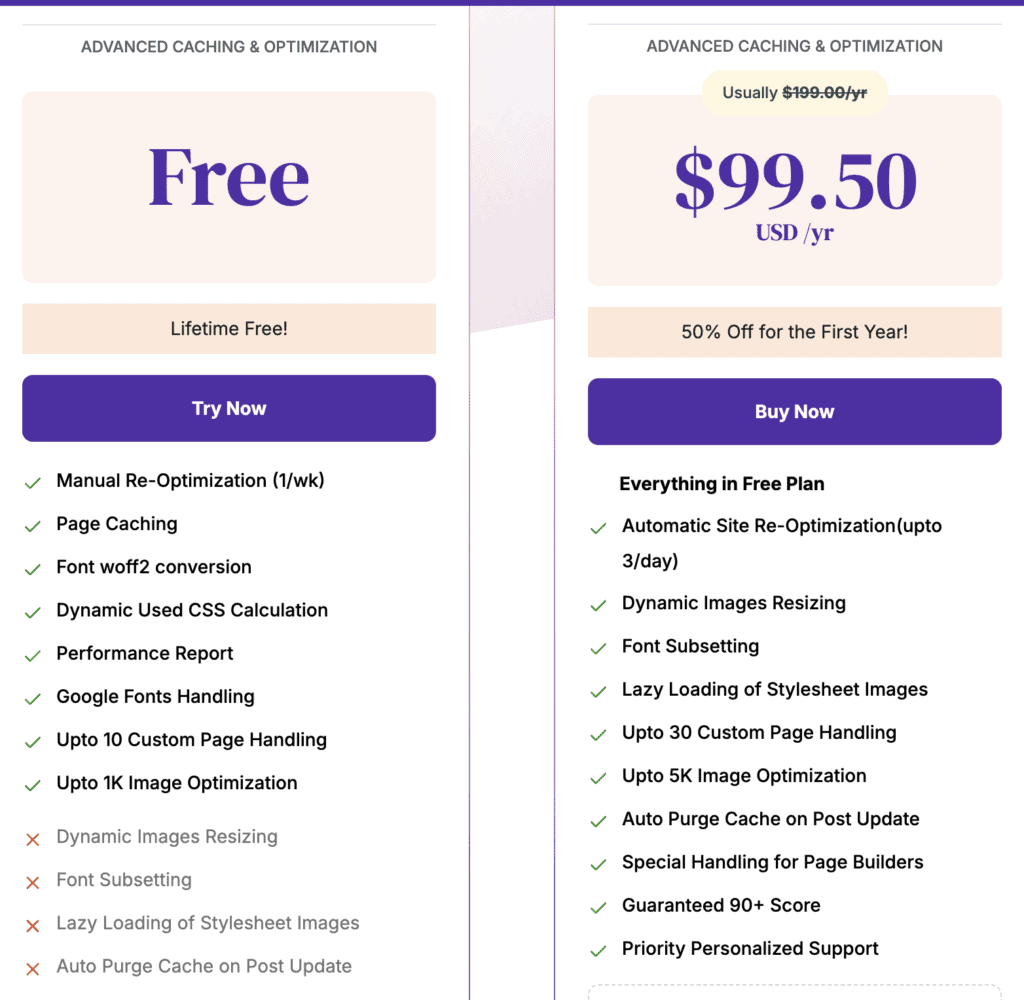
Airlift offers a free plan that gives you access to its core speed features, including page caching and basic optimization for your images and code. It’s a great way to get started with improving your site’s performance. However, this version requires some manual upkeep.
Airlift’s pricing plans unlocks Airlift’s full automated potential, turning it into a true “set-and-forget” solution. It handles all the optimization work for you, re-optimizing your site daily and automatically clearing the cache whenever your content changes. While the free plan is powerful on its own, if you want advanced performance features like automatic site optimization and auto-clearing the cache, you can upgrade to their premium subscription for $99.50 for the first year. This makes it the ideal choice for active business websites, blogs, and online stores.
Other Performance Optimization Features
Beyond handling your media, code, and caching, Airlift includes several other smart features. These are designed to keep your site running fast and work well with the specific tools you already use.
- Continuous, Daily Optimization: Keeps your site fast all the time. Airlift automatically re-optimizes your site every day. This ensures your site stays fast even after you add new content or update plugins.
- Faster Fonts: Makes your website fonts load much faster. It can host Google Fonts on your own server. This reduces external requests and improves load times.
- Specialized Page Builder Support: Works great with popular page builders. It includes special fixes for tools like Elementor and Divi. This helps avoid common performance issues and ensures compatibility.
- WooCommerce Ready: Keeps your online store running smoothly. Airlift is fully compatible with WooCommerce. It makes sure your shop, cart, and checkout pages always work perfectly.
Final thoughts
Making a WordPress website fast is difficult because it’s a constant balancing act. Every optimization you do can affect a different aspect of your CWV. Another challenge is that it’s not a one-time fix; a single new plugin or content update can slow everything down again, forcing you to start over.
This is what makes Airlift stand out. It takes a holistic approach, continuously analyzing your site every day and creating a custom optimization strategy for each individual page. Airlift provides an adaptive, “set-and-forget” solution built for the challenges of a modern website.
FAQs
Is the airlift plugin free?
Yes, there is a free version of the Airlift plugin. However, it has significant limitations, such as requiring you to manually re-optimize your site and clear your cache after making changes. For this reason, it is best suited for testing or for very small, static websites.
What is the use of the Airlift plugin?
The Airlift plugin is an all-in-one performance tool for WordPress. Its purpose is to speed up your website by combining several optimization techniques into one package, including page caching, image compression and resizing, and optimizing your site’s code (CSS and JavaScript).
Is airlift free?
A free version is available, but its features are limited and require manual work to keep your site optimized. The full set of automated features, which most active websites would need, is only available in the paid plan.
How do you install Airlift?
To download the Airlift plugin, visit the official website at airlift.net, where you can get the plugin’s .zip file. You then install it by uploading that file directly to your WordPress dashboard under Plugins > Add New.

Shreya has been a writer for as long as she can remember. Now, she writes articles that help WordPress users manage the sites that they're proud of, with little to no coding