

While looking for a booking plugin, an Amelia booking plugin review is a great place to start. It’s frustrating to spend more time managing your schedule than actually serving your clients.
Finding the right tool means your business can take bookings 24/7, even while you sleep. It cuts down on no-shows with automatic reminders and gives your customers a smooth, professional experience from the moment they land on your site, which ultimately helps you make more money.
But is Amelia the right choice for you? This deep-dive review breaks down everything—its core features, pricing, and hidden limitations—so you can decide if it’s the automated solution your business has been waiting for.
Test sites are the perfect, risk-free environment to explore Amelia’s extensive features and deep customization options. Using one gives you a safe space to get everything working perfectly without impacting your live website or customers.
What is the Amelia Booking Plugin?
Of all the WordPress booking plugins, Amelia is a popular name in the market. It is a comprehensive WordPress booking plugin designed to automate appointments and events for service-based businesses. It positions itself as an all-in-one solution, replacing chaotic manual scheduling with a centralized, professional booking system.

A notable entry point is its “Amelia Lite” version, available for free on the WordPress.org plugin directory. This allows you to explore the core booking mechanics, create basic services, and embed a step-by-step booking form on your site at no cost.
For established businesses, salons, or clinics that need to manage multiple employees, accept online payments, or host events, the premium versions unlock the plugin’s full potential. These tiers add critical features like team scheduling, Zoom and Google Meet integrations, custom notification workflows, and advanced financial reporting, making Amelia a powerful, enterprise-level solution that grows with your needs.
What I Tested in Amelia Booking Plugin
When I fired up Amelia on my test site, I wasn’t just looking for features. I needed to know if it could handle the real, day-to-day chaos of running a service business. Here’s what mattered to me:
- Could it actually manage my time? This was the big one. I needed to see if it could seamlessly handle multiple employees, different services with their own durations, and buffer times between appointments. If it couldn’t prevent a 9 AM and a 9:15 AM booking from overlapping, it was useless.
- Would my clients actually use it? I tested the booking process on my phone, pretending to be a customer. Was it intuitive or confusing? Even more, I checked if the customer panel gave them real autonomy—like letting them reschedule or cancel on their own without emailing me.
- How much of a headache was the setup? I’m not a coder, so I needed a plugin I could get running without a PhD in WordPress. I timed how long it took me to create a service and get a live booking form on a page. The learning curve was a major factor.
- Was the price actually justified? I pushed the free “Lite” version to its limits to see where it broke. I wanted to know exactly what business-critical features were locked behind the paywall—like payments and Google Calendar sync—and if the premium tiers were worth the investment for what I got.
Usability Analysis of the Amelia Booking Plugin
When I first activated Amelia, I was impressed by its clean and smooth dashboard. It looks like a premium, modern piece of software, which definitely sets a good first impression.
However, that initial polish didn’t translate into immediate clarity. I found myself struggling to figure out where to start. The workflow wasn’t very intuitive, and I had to spend a fair bit of time clicking through different menus to understand how to connect services to employees and display the final booking form.
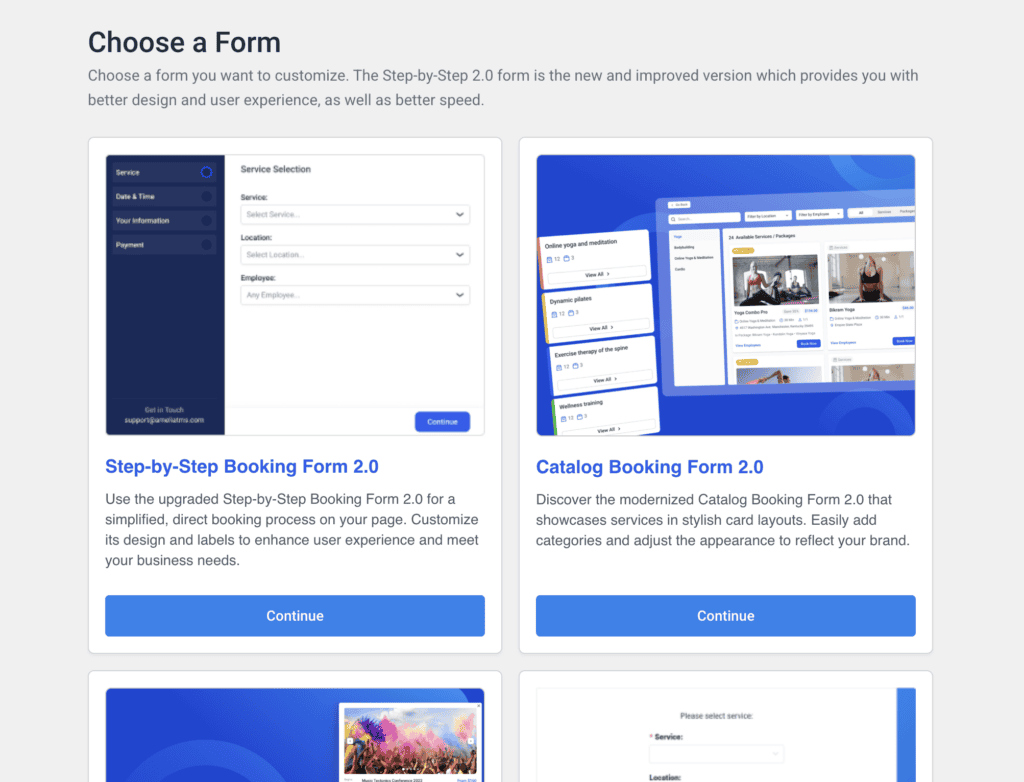
But once I got past that initial learning curve, I discovered where Amelia really shines: customization. There were a ton of options, and it was surprisingly easy to design a booking form that perfectly matched my site’s branding. Changing colors, fonts, and the layout didn’t require any code, and I had a professional-looking form published in no time.
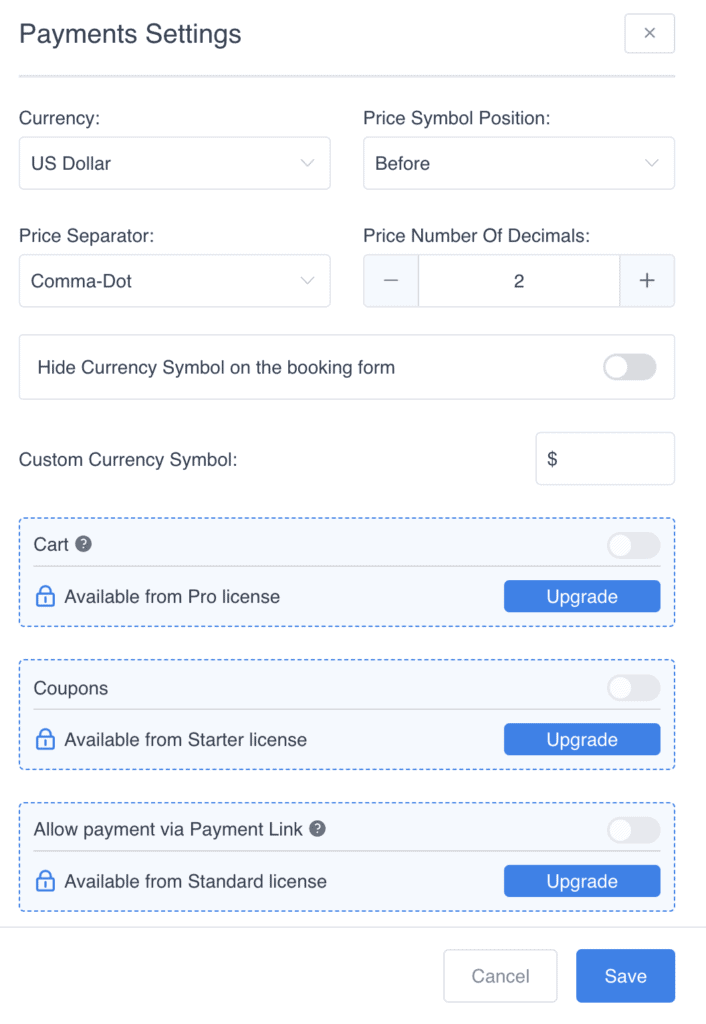
For businesses needing to accept payments, I also found it was easy to integrate payment gateways. Although, integration with specific payment gateways requried a premium upgrade.
A huge plus for me is that everything is managed right from my WordPress admin panel. I never had to log into a separate website or third-party service to manage my schedule, which keeps my workflow simple and contained.
WP Amelia Empowers Admins with Total Control
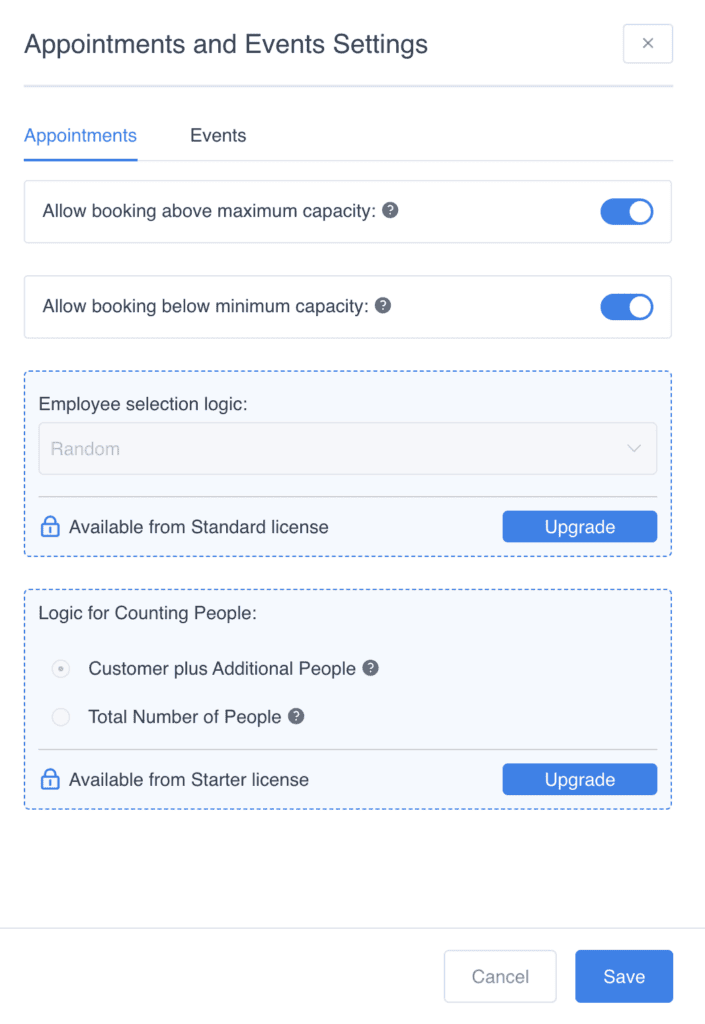
Beyond the customer-facing booking form, WP Amelia provides a powerful suite of tools for administrators to manage their entire business from the WordPress backend. This centralized command center allows you to oversee schedules, staff, finances, and customer communication all in one place. Here’s a breakdown of the key appointment management features available to you as an admin:
- Backend Calendar View
- Provides a centralized, visual calendar within the WordPress dashboard to see all appointments and events at a glance.
- Includes powerful search and filtering options, allowing you to sort the calendar by date, employee, customer, service, or appointment status.
- Services and Categories Management
- Allows you to create, edit, and organize all your services and events into logical categories for easy management.
- You can configure specific details for each service, including its duration, price, capacity, buffer times between sessions, and settings for group appointments.
- Employee Management and Assignment
- Gives you a complete system to manage employee profiles, define their individual working hours, assign them to specific services, and set special days off.
- Offers the flexibility to set different service availability and even different pricing for each employee.
- Customer Management
- Features a centralized customer database where client data is automatically saved with each new booking.
- You can manually import customer lists, view the complete appointment history for any client, and communicate with them directly through the notification system.
- Financial Overview and Reporting
- Includes a dedicated dashboard and a “Finances” page with KPIs, charts, and revenue summaries for a clear overview of your business’s performance.
- Allows you to filter all payments by date, customer, employee, or status and export financial reports as a CSV file.
- Customization and Roles
- Lets you customize the appearance and branding of your front-end booking forms.
- Provides granular “Roles Settings” to define what permissions employees have, such as the ability to manage their own schedules or access specific backend pages.
- Notifications
- Handles all automated communication with both customers and employees, including appointment confirmations, reminders, and follow-ups via email and SMS.
- Templates for all notifications are fully customizable, and built-in timezone support ensures messages are sent at the right time for the recipient.
- Integration with External Calendars
- Prevents double-bookings and keeps everyone’s schedule in sync with two-way synchronization for Google Calendar and Outlook Calendar.
- Appointments and events are automatically added and updated across both Amelia and the connected external calendars.
Giving Customers Control of Their Bookings
A great booking system doesn’t just benefit the administrator; it provides a seamless and empowering experience for the customer. WP Amelia is designed to give your clients significant autonomy over their appointments, which reduces your manual workload and increases customer satisfaction. This is achieved through a dedicated customer panel and a variety of flexible options during the booking process itself.
- Front-End Customer Panel: You can create a branded, private area on your website where customers can log in to view and manage all their bookings without ever needing to access the WordPress backend.
- Reschedule Appointments: If you enable this feature, customers can reschedule their own appointments directly from their panel, either by dragging and dropping them on a calendar or using an “Edit” option.
- Cancel Appointments: Clients can easily cancel their own future appointments and packages. When they do, both the customer and the assigned employee automatically receive a notification (if configured).
- Manage Profile Details: The panel allows customers to update their personal information at any time. For GDPR compliance, you can also enable an option for them to delete their own profiles.
- Recurring Appointments: For applicable services, customers can set up appointments to recur on a daily, weekly, or monthly basis, choosing how many times it should repeat or until a specific date.
- Book for Others: When making a booking, customers can easily specify the number of people in their group, making it simple to book for family or friends at the same time.
- Self-Serve Booking: Customers have the freedom to book 24/7 from any device. They can use a step-by-step booking wizard, a service catalog view, or a search function to find the exact service and time slot they need.
- Select Add-ons (Extras): If your services include optional extras, customers can browse and select which add-ons they want to include with their appointment during the booking process.
- Control Employee Selection: You can give customers the choice to select their preferred employee for a service. Alternatively, if you hide this option, Amelia can automatically assign an available employee.
- Book and Manage Packages: Customers can purchase packages of multiple services and then use their customer panel to book their included appointments as needed. They can also track their remaining sessions and cancel the entire package if your policy allows.
Amelia Booking Plugin: Pricing Tiers
Amelia’s pricing offers a tiered structure designed to scale with your business needs, from a single solopreneur to a multi-location agency. Each plan is priced annually and includes one year of premium support and updates.
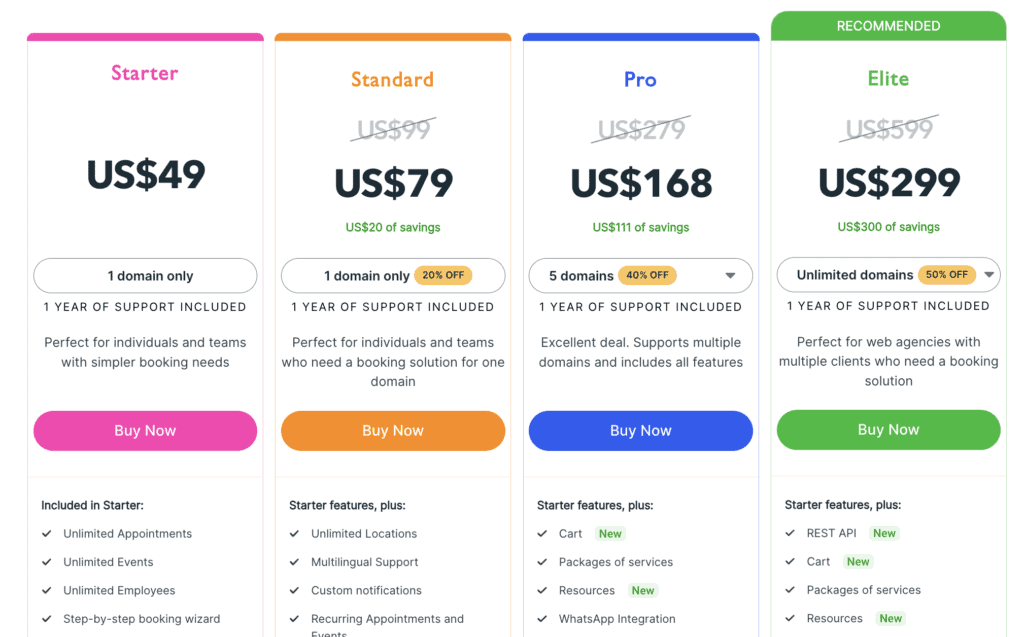
- Starter: This entry-level premium plan is priced for a single domain. It unlocks many of the core features missing from the free version, making it a viable option for small businesses just starting with automated booking.
- Standard: Also for a single domain, the Standard plan builds on the Starter tier by adding more integrations, such as additional payment providers and two-way calendar sync with Outlook.
- Pro: A higher-tier plan that supports up to three domains. This plan introduces advanced features essential for growing businesses, including service packages, recurring appointments, and custom fields for your booking forms.
- Elite: The top-tier plan supports an unlimited number of domains. It includes every feature Amelia offers, such as advanced cart functionality (allowing customers to book multiple different appointments in a single transaction) and full REST API support for custom development.
What’s Missing in Amelia? 5 Things It Can’t Do
While WP Amelia packs a ton of features, it’s not perfect for every single business. After digging in, I found a few specific things it can’t do that might be a big deal for some users.
- No “Chained” or Dependent Bookings. Amelia can’t handle complex booking flows where one appointment depends on another. For example, you can’t force a client to book a “Consultation” first and then a “Follow-Up” in the same session. It treats each booking as a standalone item.
- No Built-In Live Chat. If a customer has a question while in their dashboard, there’s no way for them to send a quick message to you. You’d need to install a completely separate live chat plugin to offer real-time support.
- Can’t Assign Multiple Staff to One Appointment. This is a big one for businesses like spas. If you offer a service that requires two or more employees at the same time (like a couples massage), Amelia can’t handle it. You can only assign one staff member per appointment.
- No Selling Undated Products or Gift Cards. Amelia is built strictly for scheduling services on a calendar. You can’t use it to sell standalone items like gift certificates, memberships, or prepaid class packs that aren’t tied to a specific date and time upon purchase.
- It Doesn’t Look and Feel Like Native WordPress. The Amelia backend is very slick, but it has its own custom design. If you’re someone who loves the familiar, standard look of the WordPress admin area, you might find Amelia’s interface feels a bit disconnected from everything else.
Best Alternatives to Amelia
While Amelia is a powerful tool, it might not be the perfect fit for everyone. Whether you’re looking for a more intuitive interface, a more generous free version, or a different feature set altogether, here are two of the best alternatives to consider:
- Simply Schedule Appointments (SSA): Known for its incredibly intuitive interface and generous free version. SSA is often praised for being easier and faster to set up than Amelia, making it a great choice for users who prioritize simplicity and a smooth user experience.
- BookingPress: A feature-rich alternative that competes directly with Amelia’s premium tiers. It offers a modern design and a wide array of add-ons, making it a strong contender for businesses that need extensive customization and functionality.
Final Thoughts
Amelia is a powerful and highly capable booking plugin, especially in its premium versions. It provides a comprehensive, all-in-one solution for managing complex schedules, staff, and payments directly within WordPress. However, its extensive feature set comes with a steeper learning curve than some of its competitors.
Test Amelia on a staging site first before installing it on your live website. This will allow you to explore its features and ensure it meets your needs without risking your live business operations.
FAQs
Is Amelia booking free?
Yes, there is a free “Lite” version available on WordPress.org. However, it has significant limitations, such as no payment gateways, no calendar sync, and no custom notifications, making it more of a trial than a long-term solution for most businesses.
What is Amelia used for?
Amelia is used to automate appointment and event booking for service-based businesses. Common users include salons, clinics, consultants, coaches, repair shops, and any other business that relies on a schedule.
What is Amelia software?
Amelia is a WordPress plugin. It installs directly onto your WordPress website, allowing you to manage all your bookings from your site’s admin dashboard without relying on a third-party platform.
What languages are available in Amelia booking?
The Amelia plugin is fully translatable and includes built-in translations for several languages, including French, German, Spanish, Dutch, and Russian. It is also compatible with popular multilingual plugins like WPML, allowing you to translate it into any language.

Shreya has been a writer for as long as she can remember. Now, she writes articles that help WordPress users manage the sites that they're proud of, with little to no coding


