If you’re looking for Nitropack alternatives, it’s likely because you’ve realised that it’s not for you. Maybe your site has crashed one too many times because of it. Maybe you’re looking for more control. Maybe your customers have complained of a bad user experience.
The right performance plugin for WordPress ensures your website is fast for visitors and easy for you to manage. But with so many options available, figuring out which one is right for you can feel overwhelming. So, we’ve broken down the best choices into simple, clear recommendations. We’ll explain what each one does without the confusing technical jargon.
The best alternative to NitroPack is Airlift. It delivers superior performance by automatically handling server-level caching, critical code optimization, and asset delivery through its integrated edge CDN.
How Nitropack alternatives work?
To find the right NitroPack alternative, it helps to know what these tools are doing behind the scenes. A good performance plugin for WordPress isn’t magic; it just handles a few key tasks very efficiently to make your site load faster. Here’s a quick, jargon-free breakdown.
- Caching: The Secret Superpower. Instead of building a page from scratch for every visitor, WordPress caching takes a “snapshot” and serves that instantly. It’s the difference between cooking a meal fresh every time versus having it pre-made and ready to serve.
- Cleaning Up the Code (Minification). This process removes unnecessary spaces and comments from your site’s code. This makes the files smaller and faster for browsers to download.
- Shrinking Your Images. Plugins compress your images to reduce their file size without any visible loss in quality. It’s like vacuum-sealing clothes to fit more into a smaller suitcase.
- Database Spring Cleaning: Clearing WordPress database means removing digital junk from your site’s database, like old post revisions and spam comments. A cleaner database is faster for your server to read, speeding up your site.
These are the features I was looking for in all our testing.

1. Airlift
NitroPack is a genuinely powerful service that often delivers on its promise of dramatic speed improvements. However, that power comes with a trade-off that many site owners find frustrating. Its aggressive, all-or-nothing approach can feel like a “black box,” leaving you with little control or understanding of what’s happening under the hood. When a conflict arises, troubleshooting can be a nightmare, and the subscription cost can quickly become a significant expense for growing sites.

This is precisely where Airlift enters the picture. In our search for a true NitroPack alternative, we wanted something that could replicate that automated, cloud-based power without the steep price and lack of transparency. Airlift is designed from the ground up to be that solution. It uses a similar cloud optimization engine to analyze your site and apply a tailored set of advanced optimizations, but it does so with a much clearer interface and a more accessible pricing model. It’s built for the site owner who wants the “set it and forget it” convenience of NitroPack but isn’t willing to give up control or overpay for it.

The setup was incredibly simple, and within minutes, we saw tangible improvements to Core Web Vitals scores. What stood out was the feeling of getting an enterprise-level service—complete with a global CDN, server-side caching, and dynamic image optimization—without the enterprise price tag. It successfully captures the automated magic of NitroPack while feeling more integrated and less like a third-party service you’re locked into.
Key Features:
- Cloud-Based Optimization: Like NitroPack, Airlift processes and optimizes your site from the cloud, ensuring instant speed gains without putting any load on your own server.
- Automatic & Tailored Optimization: The service analyzes your site and automatically applies the best optimizations for your specific setup, including dynamic image resizing, font subsetting, and lazy loading for stylesheets.
- Comprehensive All-in-One Stack: Airlift is a complete solution, providing server-level caching, a built-in content delivery network (CDN), and advanced image optimization out of the box.
- Intelligent Cache Management: The cache is automatically purged and rebuilt whenever you update a post or page, ensuring your visitors always see the most current version of your site without any manual intervention.
Price
Airlift operates on a freemium model. The free plan is robust enough for many smaller sites, with paid plans scaling based on usage and feature requirements. This makes it a risk-free and highly scalable alternative to NitroPack’s subscription-only tiers.
2. WP Rocket
We have put Nitropack and WP Rocket and compared their features. We found that while NitroPack’s automated, hands-off approach is appealing, it comes at the cost of control. When an optimization causes a visual glitch or a feature to break, you’re often left waiting for support, unable to tweak the specific setting that’s causing the issue. This “black box” nature, combined with a recurring subscription that scales with traffic, can be a major pain point for business owners who want predictability in both performance and cost.

WP Rocket is the definitive answer for those who want to reclaim control. It’s not a cloud service that takes over your site; it’s a self-contained plugin that lives within your WordPress dashboard, giving you a clear and intuitive set of toggles for every optimization. It’s designed for the user who wants powerful results but also wants to understand what’s happening and have the ability to fine-tune the settings themselves. It replaces NitroPack’s opaque automation with empowered simplicity.
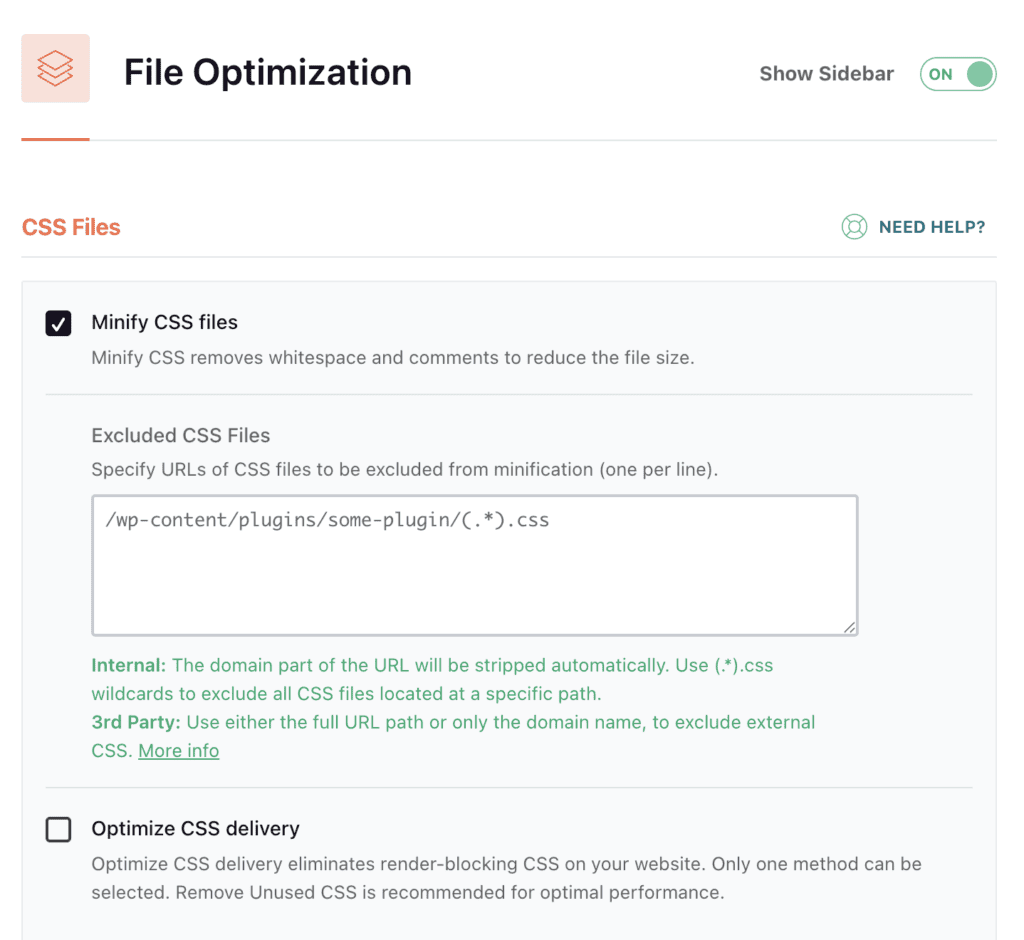
In our tests over the years, WP Rocket has consistently proven to be the easiest and most reliable all-in-one performance plugin to configure. You can install it, activate the default settings, and see an immediate, significant improvement in load times. The user interface is the best in the business, making advanced concepts like file minification and deferred JavaScript loading accessible to absolute beginners. While you’ll need to pair it with an image optimization plugin to match NitroPack’s full feature set, its core caching and asset optimization engine is world-class.
Key Features:
- Comprehensive Caching: Includes page caching, browser caching, and cache preloading to ensure visitors get a fast experience every time.
- File Optimization: Aggregates and minifies HTML, CSS, and JavaScript files to reduce their size and the number of requests.
- Media Optimization: Implements lazy loading for images and videos, which drastically improves the initial perceived load time.
- Database Optimization: Provides tools to clean up your database by removing old post revisions, spam comments, and transients.
- eCommerce Compatibility: Intelligently and automatically excludes cart and checkout pages from the cache, ensuring eCommerce stores run smoothly.
Price
WP Rocket is a premium-only plugin, with plans starting at $59/year for a single site.
3. LiteSpeed Cache (LSC)
NitroPack’s cloud-based system is designed to be universal, working on any type of hosting environment. This is a strength, but it’s also a fundamental limitation. By being server-agnostic, it can’t leverage the unique architecture of a highly optimized web server. This means that if you’re on a top-tier hosting stack, a generic service like NitroPack might actually be leaving a significant amount of performance on the table.

In our review of LiteSpeed Cache, we found that it is the perfect example of a specialized solution that blows generic ones out of the water. It’s not just a plugin; it’s the user-facing controller for the powerful caching engine built directly into LiteSpeed web servers. This direct server-level integration allows it to handle caching far more efficiently than any PHP-based plugin or external service ever could. For anyone whose host uses LiteSpeed, this plugin is the ultimate NitroPack alternative, offering enterprise-grade speed at zero cost.
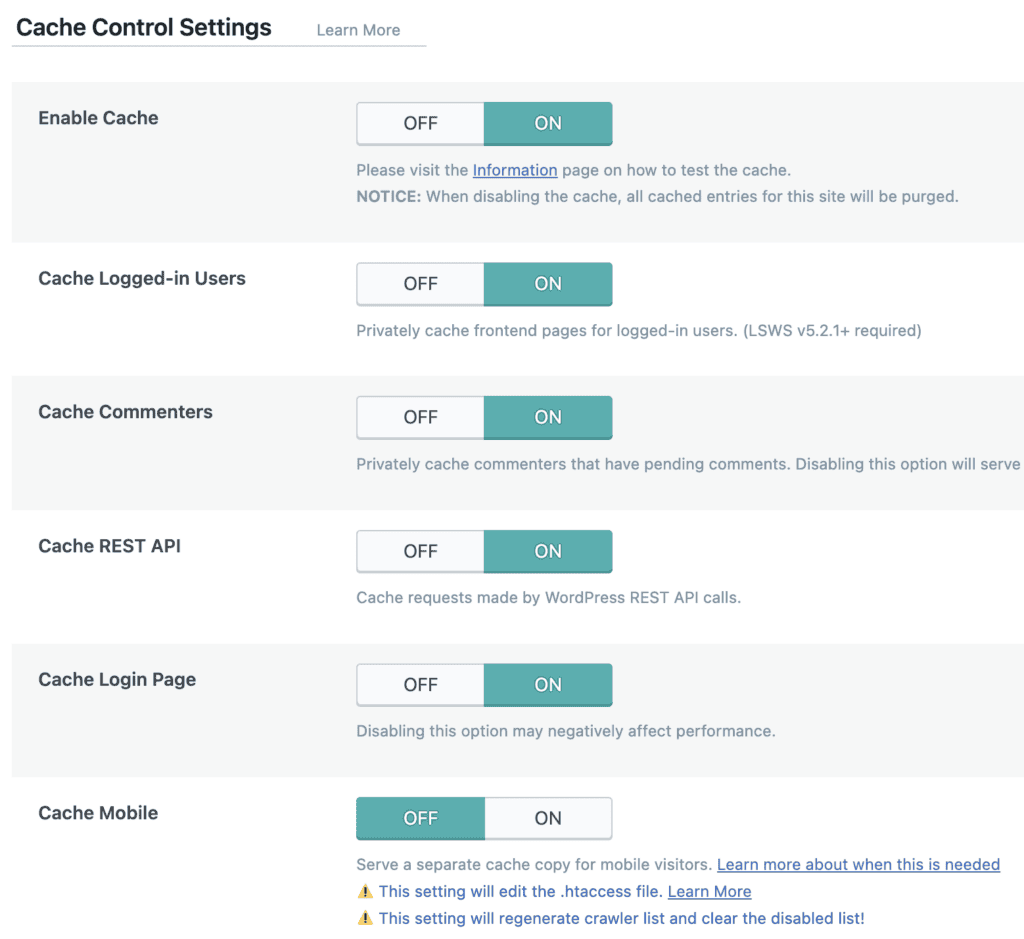
Every time we test LSC on a compatible server, the results are simply phenomenal. The Time to First Byte (TTFB) drops to levels that are hard to achieve with other tools, making the entire site feel incredibly responsive. While the plugin’s dashboard is packed with an almost overwhelming number of settings, its default configuration works brilliantly. Furthermore, its integration with the free QUIC.cloud service provides a CDN and image optimization, making it a true, all-in-one powerhouse that can go head-to-head with any premium service.
Key Features:
- Server-Level Caching: Delivers unmatched performance by caching pages directly on the web server, which is significantly faster than standard methods.
- Image Optimization: Integrates seamlessly with the QUIC.cloud service to compress and optimize images, including WebP conversion.
- Asset Optimization: Provides a full suite of tools for minification, combination, and deferral of CSS and JavaScript.
- Database Optimization: Includes tools to clean and optimize the WordPress database for better performance.
- Advanced Options: Supports advanced technologies like Edge Side Includes (ESI), which allows for “hole-punching” to serve dynamic content within cached pages.
Price
The LiteSpeed Cache plugin is completely free. Its companion cloud services, like QUIC.cloud CDN and image optimization, operate on a generous freemium credit system.
4. WP-Optimize
NitroPack’s all-encompassing approach is one of its main selling points, but it can also be a significant flaw. For many websites, this level of aggressive, automated optimization is simply overkill. You may not need every single bell and whistle, but you’re still paying for the full suite. This can feel like using a complex piece of industrial machinery when all you really needed was a well-made hammer.
WP-Optimize provides a much more focused and practical alternative. It began its life as a best-in-class database cleaning tool and has since expanded to cover the essential pillars of web performance: caching, image compression, and, of course, database health. It doesn’t try to do everything under the sun. Instead, it concentrates on doing the most critical tasks exceptionally well, all within an interface that is refreshingly simple and easy for beginners to navigate.
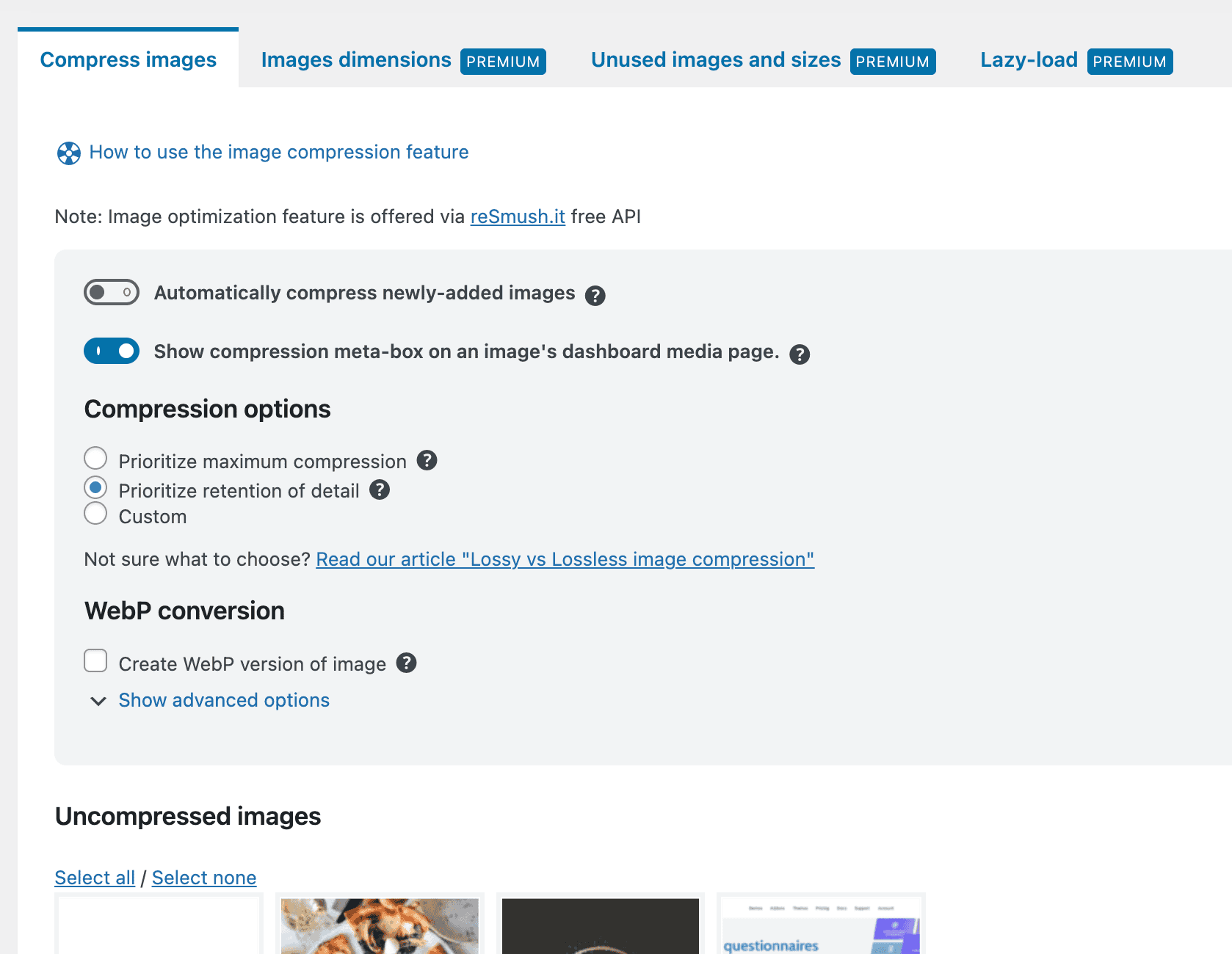
Our experience with WP-Optimize is that it’s one of the most approachable and reliable performance plugins available. Its database optimization tool remains its standout feature; we’ve seen it work wonders on older, sluggish sites by clearing out years of digital clutter. The caching and image compression modules are straightforward and effective. While it may not achieve the absolute highest PageSpeed scores compared to a hyper-aggressive service like NitroPack, it delivers a massive 80% of the benefit for 20% of the complexity and cost.
Key Features:
- Superior Database Cleaner: Its core function excels at removing bloat like old post revisions, spam comments, and expired transients.
- Image Compression: A powerful tool that compresses images using lossy, lossless, or custom settings to reduce their file size.
- Effective Caching: Offers a solid page and browser caching system that is simple to set up and manage.
- File Minification: Reduces the size of scripts and styles to speed up their delivery to the browser.
Price
WP-Optimize has a very capable free version. Premium plans, which add more advanced features, start at $49/year.
5. Hummingbird
One of the frustrations with a service like NitroPack is that while it gives you a final PageSpeed score, it doesn’t do a great job of teaching you about your site’s performance. It’s a “do it for me” solution, which is great until something goes wrong or you want to understand the “why” behind the optimizations. It can leave you feeling disconnected from your own site’s health.

In our testing of caching plugins for WordPress, Hummingbird was a popular name. It’s from the team at WPMU DEV and takes a different approach. It’s designed to be your performance coach. The plugin not only provides a full suite of optimization tools but also integrates performance reports directly into your dashboard. It scans your site, gives you a score, and then provides a clear, actionable checklist of improvements. It bridges the gap between doing and understanding, making it a fantastic alternative for those who want to learn as they optimize.
In our tests, Hummingbird’s user experience is a major highlight. The interface is clean, polished, and guides you through the optimization process in a way that feels supportive rather than overwhelming. The built-in reporting is genuinely useful for spotting issues you might have otherwise missed. While some benchmark tests show it to be a fraction slower than the most aggressive premium competitors, its combination of solid features and educational tools makes it a standout choice, especially for those who manage multiple client sites.
Key Features:
- Full Caching Suite: Includes page, browser, Gravatar, and RSS caching to cover all bases.
- Integrated Performance Reports: Runs performance tests from within your dashboard and provides actionable reports to improve your score.
- Asset Optimization: Offers robust tools for minification, combination, compression, and repositioning of CSS and JavaScript.
- Advanced Pro Tools: The premium version includes powerful features like automated critical CSS generation and delaying non-critical JavaScript.
Price
Hummingbird offers a strong free version. The Pro version, with its advanced features, starts at $60/year or is included in a WPMU DEV membership.
6. W3 Total Cache
NitroPack is designed to simplify performance optimization by automating everything. While this is great for beginners, it can be incredibly restrictive for developers and advanced users who need granular control over every aspect of their site’s caching policy. If you need to implement fragment caching or fine-tune object cache settings, a closed system like NitroPack simply isn’t an option.
W3 Total Cache (W3TC) is the ultimate antidote to NitroPack’s simplicity. It’s one of the oldest and most comprehensive performance plugins ever created, and its primary philosophy is to give the user control over everything. Its settings panel is a sprawling landscape of options covering every conceivable type of caching, minification setting, and CDN integration. For a power user, it’s a paradise of tweakable settings.
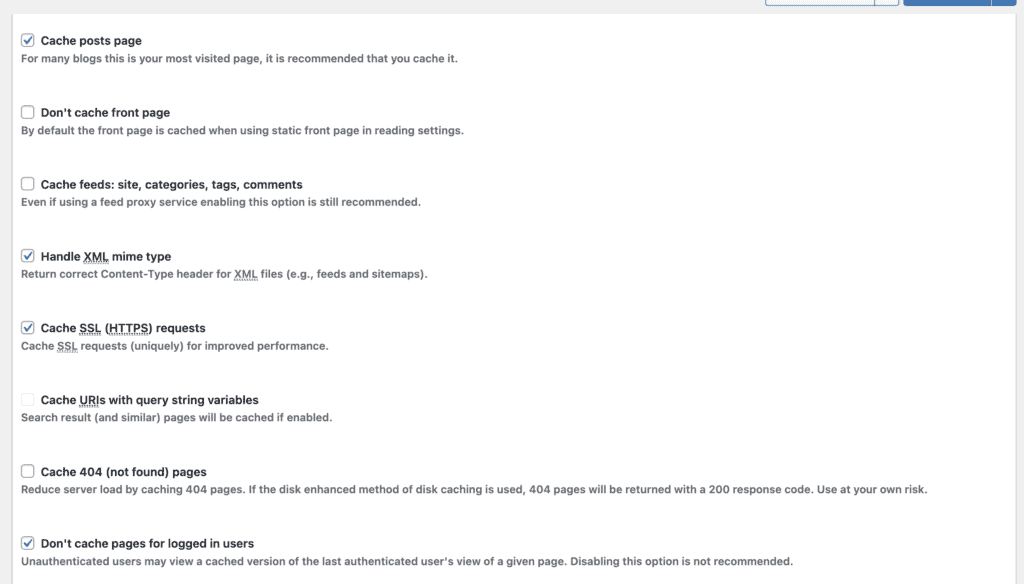
To be blunt, W3TC is not for the faint of heart. Our experience with it confirms its reputation: it’s incredibly powerful in the right hands but can easily break a site if configured incorrectly. A beginner would be completely lost. However, for a developer who needs to implement a complex caching strategy for a high-traffic site, W3TC provides a level of control that NitroPack can’t even approach. While its effectiveness on modern Core Web Vitals can sometimes lag behind newer tools, its raw power and flexibility are undeniable.
Key Features:
- Extremely Advanced Caching: Offers a wide array of caching methods, including page, object, database, and fragment caching.
- Detailed Minification: Provides granular control over the aggregation and minification of HTML, CSS, and JS files.
- Broad CDN Support: Integrates with virtually any Content Delivery Network provider.
- Script Optimization: Includes options for delaying non-critical JavaScript and CSS to improve render times.
Price
W3 Total Cache has a feature-rich free version. The Pro plans, which unlock even more advanced features, start at $99/year.
Other Factors That Crush Your Speed
Choosing the best NitroPack alternative is a huge step, but it’s important to be realistic. Even the most powerful performance plugin for WordPress can’t fix a broken foundation. Think of it like this: you can put the best engine in the world into a car with flat tires and a rusty frame, but it’s still not going to win any races. Your website’s underlying components—hosting, theme, and page builder—are that frame and tires.
Before you blame a plugin for not getting you a perfect 100 score, it’s worth checking if one of these core elements is holding you back. Fortunately, a smart, holistic service can help mitigate some of these issues. For example, a cloud-based optimizer like Airlift can bypass a slow server with its own CDN and caching layer, effectively putting a better engine and better wheels on your car.
- Your Web Host. This is the single most important factor in your site’s speed. A cheap, overcrowded shared hosting plan will always be slow, no matter what plugin you use. The server simply can’t respond to requests quickly. Moving to a quality managed WordPress host or a performance-focused provider is the best investment you can make for speed.
- Your WordPress Theme. Not all themes are created equal. Many popular themes from marketplaces like ThemeForest come packed with dozens of features, scripts, and stylesheets you’ll never use. All of this adds up to “code bloat” that slows your site down. Opting for a lightweight, block-based theme or a well-coded option like GeneratePress or Kadence can make a massive difference.
- Your Page Builder. Page builders like Elementor and Divi offer incredible design flexibility, but this often comes at a performance cost. They load their own sets of code on every page, which can add significant weight and complexity. While they are getting better, a site built with the native WordPress block editor will almost always be faster.
Final Thoughts
Navigating the world of WordPress performance can feel complex, but it doesn’t have to be. While there are many excellent NitroPack alternatives, each with its own strengths, the goal is to find a solution that delivers maximum results with minimum hassle. You shouldn’t have to become a web performance expert just to run your business website.
After extensive testing, it’s clear that if you’re looking for the automated power of NitroPack without the high cost and complexity, Airlift by BlogVault is the one-stop solution. It delivers the comprehensive, cloud-based optimization that gets top scores, but with a more transparent approach and an affordable price. It’s the smart choice for anyone who wants to set it, forget it, and get back to business.
FAQs
What is similar to NitroPack?
Services like Airlift are most similar to NitroPack, as they are both all-in-one, cloud-based solutions that automate caching, CDN delivery, and image optimization. For a plugin-based alternative, WP Rocket and FlyingPress offer a similar comprehensive feature set that you manage from within your WordPress dashboard.
What is the difference between NitroPack and Cloudflare?
NitroPack is an all-in-one performance service that actively optimizes your site’s code, images, and files and provides caching. Think of it as a full-service auto shop that tunes up your entire car. Cloudflare, at its core, is a Content Delivery Network (CDN) and security service. It takes your already-optimized site and delivers it to visitors faster from servers around the world. Think of it as a global superhighway for your car to drive on. They do different jobs but work very well together.
Is the NitroPack plugin free?
NitroPack offers a limited free plan that is suitable for very small websites with low traffic. For most business sites, you will need to subscribe to one of their paid monthly plans, which are tiered based on pageviews and CDN bandwidth.
What is the difference between NitroPack and Autoptimize?
NitroPack is a complete, automated performance service that handles caching, image optimization, CDN, and code optimization. Autoptimize is a free, specialized plugin that focuses on one thing and does it very well: optimizing your code by minifying and combining CSS and JavaScript files. Autoptimize is a great tool, but it is not a full caching or all-in-one solution; it’s best used as part of a larger stack alongside a caching plugin and a CDN.

Shreya has been a writer for as long as she can remember. Now, she writes articles that help WordPress users manage the sites that they're proud of, with little to no coding