
It makes sense to look into a tool like WP Fastest Cache when you need to improve your website’s speed. It’s one of the most popular performance plugins available, and a logical place to begin. It’s known primarily for its caching abilities. Is that enough? What do you really need to make your WordPress site faster?
We’ve created this simple guide to walk you through exactly what each option does, without the jargon, so you can feel confident in the choices you make for your site.
WP Fastest Cache has significant flaws, including its reliance on outdated optimization methods, paywalled essential features, and a complete lack of automation. Our review of Airlift showed that it is the better solution because it offers a fully automated service that provides continuous site analysis, complete image optimization, and intelligent asset handling out of the box.
Our search for the best speed plugin began with WP Super Cache. As one of the oldest and most trusted caching plugins, its core function is simple: creating static HTML files to serve pages faster. But we quickly realized that modern performance requires a more comprehensive approach.
Here’s a quick look at how WP Fastest Cache handled basic performance improvements:
Caching
As a free caching plugin, WP Fastest Cache’s core functionality is to speed up your site by creating static files. However, in our experience, its implementation is so rudimentary that it barely qualifies as a competitive solution in today’s landscape. Here’s a quick look at what it does:

- Static HTML & Gzip: These are not features; they are the absolute bare minimum. Touting Gzip compression and static file generation in 2024 is like a car manufacturer bragging that their vehicle comes with wheels. These are server-level configurations that any decent hosting provider should already handle. The plugin simply provides a convenient switch for a non-feature.
- Browser Caching: Again, this is a fundamental web concept, not an innovative plugin function. The plugin’s control over cache headers is blunt and lacks the granular control needed to properly manage assets for frequent and infrequent visitors.
- Preloading: The preloading feature is a blunt instrument that can easily overwhelm shared hosting environments by creating a massive spike in server resource usage. It lacks intelligent queuing or throttling, making it a liability, not a benefit, for the very users it targets.
Asset Optimization

Asset optimization shrinks and reorganizes your website’s code files. This improves loading speed by reducing download times and preventing these files from blocking your page from appearing to visitors. However, WP Fastest Cache’s approach to asset optimization caused our test site to crash and was a mess to restore.
- Minify CSS and HTML: Basic minification is a solved problem. The plugin’s minifier is rudimentary and prone to breaking complex layouts and themes. There are far superior, dedicated tools that perform this task with greater precision and reliability.
- Combine CSS and JS: ❌ This is a critical failure. Combining files was a best practice under the old HTTP/1.1 protocol. On modern servers running HTTP/2 (which is virtually all of them), this practice is an anti-pattern. It prevents parallel file loading and can actually make your site slower. Promoting this feature demonstrates a fundamental misunderstanding of modern web performance.
- Deferring JavaScript: The fact that this essential, render-blocking optimization is locked behind a premium paywall is indefensible. This isn’t an “advanced” feature; it is a baseline requirement for achieving a good PageSpeed score. Walling it off is a clear cash grab.
Database Optimization

Database optimization is like tidying up your website’s digital filing cabinet; it removes old, unnecessary data, making the database smaller and more efficient. WP Fastest Cache offers this as a premium feature. It offers a checklist that offers users a one-click button to delete post revisions, transients, and spam comments. Without proper context or safeguards, this can be reckless.
- Lack of Precision: This is not a true database optimization tool like WP-Optimize or a command-line utility. It’s a simple DELETE query without the intelligence to understand what is safe to remove. A poorly timed cleanup can break ongoing processes or remove data that a user might have needed to restore.
- False Sense of Security: It encourages users to believe they are performing meaningful database maintenance when they are simply running a superficial cleanup. Real database optimization involves analyzing table indexes, identifying slow queries, and ensuring proper data structure—tasks this feature doesn’t even attempt.
Media Optimization
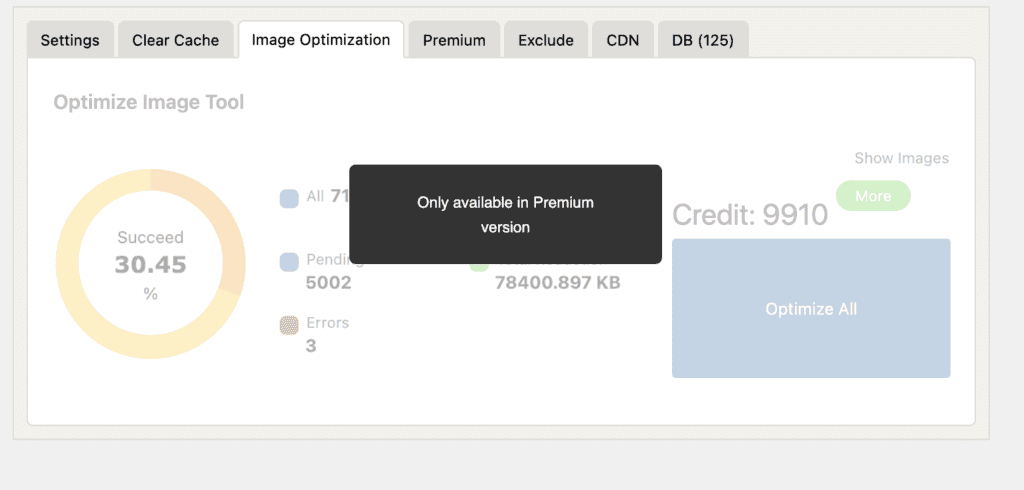
Media optimization reduces the file size of your images and videos through compression and resizing. This is vital for performance because these files are typically the largest part of a webpage and have the most significant impact on load time.
WP Fastest Cache offers this as a premium feature and here is what we found:
- Subpar Performance: The optimization offered is a black box. It cannot compete with dedicated, specialized image optimization services (like ShortPixel or Imagify) that offer superior compression algorithms, detailed controls, and robust CDN delivery.
- An Unnecessary Bundle: Users are forced to buy an entire suite of mediocre features just to access one that is better handled by other, often free, plugins. This is not a value proposition; it’s a trap.
Pricing
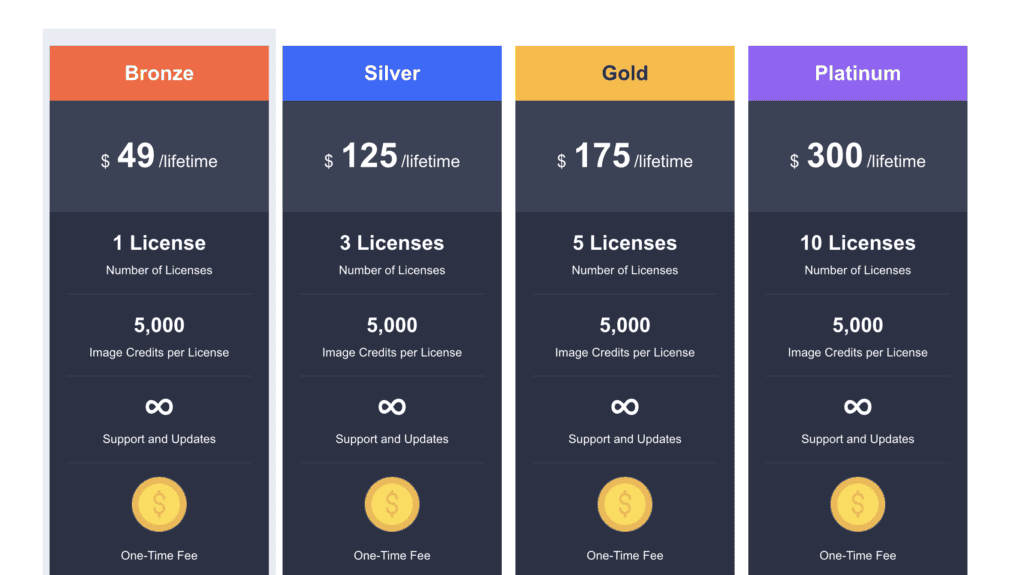
WP Fastest Cache’s pricing is a one-time payment model that appears attractive, but a closer look at the numbers reveals a poor value proposition across all tiers.
- Bronze ($49 for 1 site): This entry price is too high for the features offered. Key functions like image optimization are handled more effectively by dedicated services that often cost less annually. You are paying a premium for a bundle of mediocre utilities.
- Silver to Platinum ($125 to $300): While these multi-site plans reduce the cost-per-site (down to $30 on the Platinum plan), they don’t solve the core issue. The discount doesn’t justify deploying a flawed toolkit. You are paying to implement outdated optimization practices, like combining files on modern servers, across multiple client websites.
The one-time fee is a false economy. The investment at any level is better spent on superior, specialized tools that deliver tangible performance gains, rather than this underperforming, all-in-one package.
What Is Missing in WP Fastest Cache?
While WP Fastest Cache handles the basics, it falls short on the advanced, automated features required for top-tier performance. Its manual, toggle-based approach simply can’t compete with modern, intelligent optimization.
- Intelligent Asset Handling: The plugin lacks the ability to remove unused CSS or generate critical CSS. It uses outdated methods like combining files instead of intelligently optimizing how assets load for each page.
- Integrated CDN: It can connect to a Content Delivery Network, but it doesn’t include one. You still need to find, configure, and pay for a separate CDN service to get global speed benefits.
- True Automation: WP Fastest Cache is a “set it and forget it” tool. It doesn’t adapt as your site changes. There is no continuous analysis or improvement; the settings you pick are the settings you get.
- Advanced Caching Mechanisms: It doesn’t support more robust caching systems like Redis or Memcached object caching, which are crucial for speeding up complex websites and reducing database load.
The Better Alternative: Airlifft
Instead of manually tweaking a dozen settings, a better approach is to use a service that handles everything automatically. Airlifft is a comprehensive solution that acts as a performance expert for your site. It doesn’t just apply generic rules; it analyzes your pages and builds a custom optimization strategy.
Airlifft automatically manages:
- Complete Image Optimization: It compresses images, converts them to WebP, resizes them for different screens, and applies lazy loading.
- Intelligent Asset Optimization: It minifies code, removes unused CSS and JS, and fixes render-blocking issues to ensure the fastest possible load time.
- Automated Database Cleanup: It runs regular, scheduled optimizations to keep your database lean and efficient.
- Continuous Optimization: This is the key difference. Airlifft constantly monitors your site and adapts its strategy daily, ensuring your site remains fast without any manual intervention.
Final Thoughts
WP Fastest Cache is an excellent starting point for anyone wanting to improve their WordPress site’s speed. Its simple, checkbox-based interface makes basic caching accessible to beginners, and the free version provides a noticeable boost.
However, for a truly fast and optimized website, it’s not enough. Its most powerful features are locked behind a paywall, and its approach relies on you to manually configure and hope for the best. For those who want comprehensive, automated performance without the guesswork, a more advanced solution like Airlifft is the clear choice. It handles every aspect of optimization—from caching and images to code and database cleanup—so your site stays fast effortlessly.
FAQs
What is WP Fastest Cache?
WP Fastest Cache is a WordPress plugin designed to make your website load faster. It works by creating simple, static HTML files of your pages, which reduces the work your server has to do and delivers content to visitors much more quickly.
Is WP Fastest Cache free?
Yes, there is a free version that includes core caching and optimization features. There is also a premium version, available for a one-time payment, which unlocks more advanced capabilities like image optimization, database cleanup, and mobile-specific caching.
How to use WP Fastest Cache?
After installing and activating the plugin, go to its settings page in your WordPress dashboard. From there, simply check the boxes for the features you want to enable. For a quick start, enable “Cache System,” “Gzip,” and “Browser Caching.”
Which is the fastest level of cache?
The fastest level of cache for a webpage is serving a static HTML file. This method, used by WP Fastest Cache, completely bypasses the slower processes of running PHP code and querying the database, allowing the page to be delivered to the visitor almost instantly.

Shreya has been a writer for as long as she can remember. Now, she writes articles that help WordPress users manage the sites that they're proud of, with little to no coding