
You’re staring at HubSpot and WordPress. You need a great website, but feel swamped by all the options and tech talk. You don’t want to pick the wrong platform, waste money, or end up with a website that just doesn’t do what you need it to.
Whether you’re just starting or considering switching your website to WordPress from HubSpot or vice versa, we’re here to clear everything up.
This HubSpot vs WordPress comparison guide will help you decide which platform fits your business and budget.
HubSpot offers an all-in-one solution with integrated marketing and CRM, but it comes at premium prices with less customisation. WordPress, on the other hand, provides design freedom and lower costs, but it requires technical management and setup.
HubSpot in a nutshell

HubSpot is an all-in-one platform designed for business growth that combines website building, marketing, sales, and customer service tools. At its core is a CRM system that gives you a unified view of all your customer data.
Since it’s cloud-based, HubSpot handles all hosting, security, and updates for you. The website builder features a drag-and-drop editor for easy page creation, plus custom code access through HubL for advanced users who need more control.
The platform includes AI assistance for content creation, built-in SEO tools with optimization recommendations, and analytics to track performance. Native tools like forms, live chat, and meeting schedulers work seamlessly together.
For e-commerce, it integrates with platforms like Shopify or offers HubSpot Payments for direct transactions. A free version is available, but you get more advanced features in paid tiers.
WordPress in a nutshell

WordPress, as you know, is the most popular website-building software. It’s open-source, which means the core software is completely free to use and modify however you want.
Unlike HubSpot, WordPress requires separate hosting and a domain name, giving you full control over your site’s code and data. However, you’re responsible for maintenance, security, and updates.
It’s important to know that WordPress has two versions. WordPress.org is the self-hosted option offering complete control and flexibility, which is our focus here. WordPress.com is a hosted service that’s easier to manage but limits customisation. Knowing the difference between WordPress.com and .org helps avoid confusion when choosing your platform.
The real strength of WordPress lies in its incredible flexibility. You can customise your site with themes and add features through thousands of available plugins. While it once demanded technical skills for customisation, drag-and-drop builders like Elementor now simplify design for beginners.
Which platform is more intuitive for beginners?

HubSpot lets you jump right in with no technical setup required. You can either let AI help build your site (this is a paid feature) or start from scratch using their guided drag-and-drop editor that shows you changes in real-time.

What’s nice is that HubSpot walks you through everything. You’ll get onboarding tours and helpful SEO notifications that pop up when needed. Managing content, scheduling posts, and customising your theme’s colors and fonts doesn’t require any coding knowledge. Plus, you have chat support when you get stuck.

With WordPress, you’re looking at some initial setup work. You’ll need to choose a good web host and then a domain. Don’t worry, most hosting companies make setting up your WordPress site easier with a one-click WordPress installation feature.
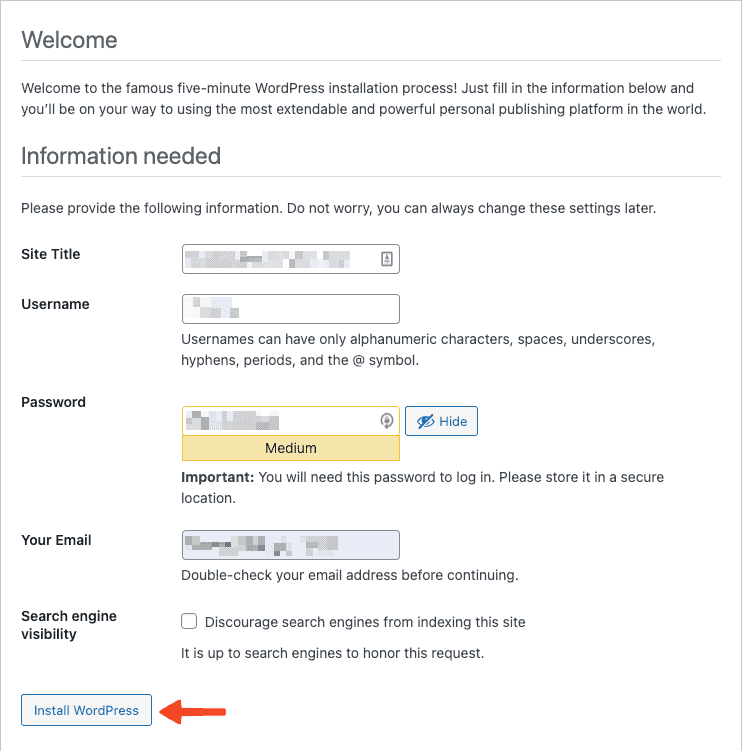
WordPress can be overwhelming due to the vast selection of themes and plugins. There’s no direct support, so when issues arise, you’re often searching online or seeking help in forums.
While it offers unlimited flexibility, it also requires handling maintenance, security updates, and technical decisions, which can be daunting when you’re eager to launch your site.
How much design control do you have?
HubSpot uses a drag-and-drop system with pre-made sections and content modules that you can see change in real-time as you work. You’ll start with a pre-designed theme from their marketplace, which gives your site a consistent foundation to build on.

What makes HubSpot smart is its global styling approach. Change your colors, fonts, or general styling from one central location, and it automatically applies across your entire site. This keeps your branding consistent without having to update every page individually.

The content modules, like text blocks, images, and call-to-action buttons, are designed to work seamlessly together within your chosen theme. Navigation editing is straightforward, and if you upgrade, AI tools can help generate initial design layouts.
For those who need deeper customisation, HubSpot offers HubL coding language, though you need to have some technical knowledge.

WordPress starts you off with thousands of themes to pick for your site as your design blueprint. Popular plugins like Elementor or Divi transform WordPress into a powerful visual editor where you can control every element, section, and column with precision.

Here’s what sets WordPress apart: complete access to all your website’s code files. If you know HTML, CSS, or PHP, you can create any design you can imagine. No preset limitations are holding you back.

This freedom shines when you need custom content structures. Whether it’s unique product listings, team pages, or portfolio layouts, WordPress handles it all. Add in the countless plugins for animations, galleries, and design elements, and your creative possibilities become virtually endless.
How powerful are the SEO features?
HubSpot includes built-in keyword research tools and gives you real-time SEO recommendations as you write. This includes meta descriptions, titles, headers, and internal linking suggestions that appear right in the editor.

It helps you plan content around topic clusters to build authority, with AI assistance available on paid plans.
The best part? HubSpot automatically handles technical SEO like XML sitemaps, schema markup, SSL certificates, and mobile responsiveness. You get performance dashboards and seamless integration with your CRM, Google Analytics, and SEMrush.

WordPress uses dedicated SEO plugins like Yoast SEO or Rank Math that offer deep control over every SEO element. You can fine-tune meta titles, descriptions, robot rules, and add detailed schema markup for rich search results.

With WordPress, you can control the factors that make your site fast, like choosing tools to speed up loading times and picking a good hosting service.
Fast sites tend to rank better on Google, and WordPress’s extensive plugin ecosystem offers specialized SEO tools for everything, from fixing broken links to researching keywords.
Which platform is better for e-commerce?
HubSpot isn’t built for large online stores with hundreds of products, but it handles simpler sales scenarios effectively. When you need a full store, it integrates with platforms like Shopify directly within the HubSpot interface.
This lets you add and manage products, track inventory, and sync customer data without switching between platforms.

The real advantage is the centralized approach. You can automate marketing workflows, create targeted email campaigns, and use real-time analytics to track performance, all from HubSpot’s dashboard. This streamlines your entire eCommerce operation.
For direct sales, HubSpot Payments lets you collect one-time or recurring payments through your pages with subscription billing options. All sales data stays centralized with your customer information, and you only pay transaction fees for actual sales made.

With WordPress, the free WooCommerce plugin, you can set up a WooCommerce store of any size. It handles all product types: physical goods, e-downloads, services, and subscriptions.
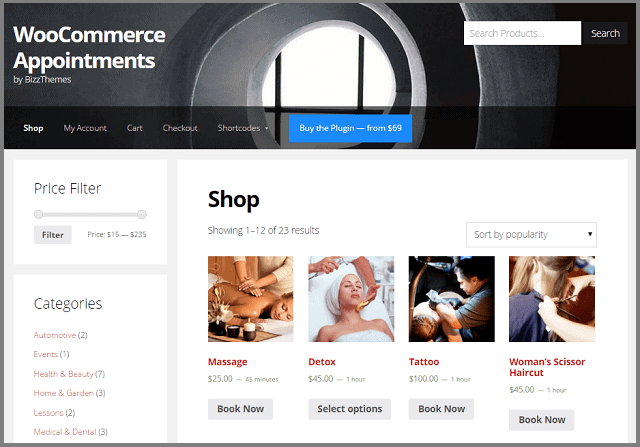
You get extensive customisation for store design, product pages, and checkout processes. Hundreds of plugins handle shipping, taxes, inventory, and marketing. Unlike most platforms, WordPress doesn’t charge transaction fees. You only pay standard payment processor fees.
Which platform lets you scale more effectively?
HubSpot automatically handles traffic increases and technical demands behind the scenes. As your business grows, you simply upgrade to higher plans to unlock more contacts, emails, and advanced features while everything stays integrated in one platform.
The infrastructure scales with you (global CDN, security monitoring, DDoS protection), all without you needing to think about it. You won’t need IT staff to manage servers or worry about performance optimization as your audience expands.
WordPress scaling depends entirely on your hosting plan and how well you manage it. As traffic grows, you’ll need to upgrade hosting, optimize caching, compress images, and potentially add a CDN to maintain speed.
The upside? Ultimate flexibility. WordPress can scale to handle massive, complex applications through custom development. But as your site grows, you’ll need to actively manage database optimization, security updates, and plugin performance.
Who maintains the website?
HubSpot manages all core software updates, server maintenance, and infrastructure for you. They provide continuous security monitoring with DDoS protection, firewalls, 2FA, and free SSL certificates, plus guarantee 99.95% uptime.

You don’t worry about plugin conflicts, component updates, or backups. HubSpot handles it all automatically. Additionally, the built-in reCAPTCHA and spam filtering come standard.
With WordPress, you’re responsible for all maintenance tasks. You need to manage core WordPress updates, plus updates for all your themes and plugins. Website security is on you too: choosing security plugins, configuring firewalls, and managing spam protection.
You also handle backups of your website files and database, plus server maintenance to keep everything secure and running smoothly. This requires staying vigilant to ensure all components work together and staying updated to prevent security vulnerabilities.

The good news? You can outsource this to a managed WordPress host or dedicated maintenance service if you don’t want to handle it yourself.
How much will you be paying realistically?
HubSpot uses tiered subscription plans (CMS Hub Free, Starter, Professional, and Enterprise). Pricing scales based on features, contact volume, and capabilities you need.
Your subscription includes hosting, security, updates, maintenance, and built-in features. Additional costs come from usage like contact volume or payment processing fees. Other “Hubs” for marketing, sales, or service are separate subscriptions. You’ll only pay separately for domain registration.
WordPress software is free, but everything else costs money. Web hosting ranges from a few dollars monthly to hundreds for managed hosting. You’ll need to buy and renew your domain name annually.
Many themes and plugins are free, but you’ll likely need paid ones for essential features. Factor in costs for backup services, security plugins, or maintenance services. If you lack technical skills, expect developer fees for setup and troubleshooting.
Total costs vary dramatically from very low for simple sites to very high for complex ones.
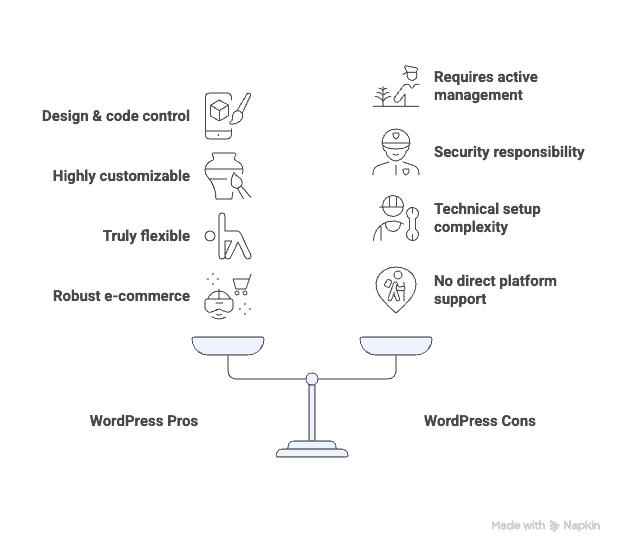
Pros and cons: HubSpot vs WordPress
HubSpot:

WordPress:
Which platform is right for YOU?
The choice between HubSpot and WordPress ultimately comes down to your priorities, budget, and how much control you want over the technical side of things.
Choose HubSpot if:
- You want an all-in-one marketing, sales, and service solution
- You prefer hands-off maintenance and updates
- You have a budget for predictable monthly fees
- You need built-in marketing automation and CRM
- You prioritize ease of use over unlimited customization
Choose WordPress if:
- You want complete control over design and code customization
- You are on a tight budget
- Looking for a scalable e-commerce store
- Access to thousands of plugins for endless functionality
- Don’t mind handling updates, security, and hosting for flexibility
The bottom line: HubSpot is perfect for businesses that want everything handled for them with integrated marketing tools. WordPress is ideal for those who want maximum control and customisation, even if it means more hands-on management.
Parting thoughts
There’s no single best platform; your choice depends on your business priorities and workflow preferences. Choose HubSpot for an all-in-one solution with minimal technical management.
Opt for WordPress if you value maximum design freedom and are comfortable handling technical maintenance tasks yourself or through outsourcing.
FAQs
Does HubSpot support WordPress?
Yes, HubSpot supports WordPress through plugins that integrate HubSpot’s marketing tools with your WordPress site. This allows you to use features like email marketing, forms, and CRM functionality directly on your WordPress site, enhancing your marketing capabilities.
What is better than HubSpot?
The answer depends on your business needs. In terms of CRM, Salesforce often provides more advanced features and customisation. As a CMS, WordPress offers greater flexibility and customisation compared to HubSpot. Assess your specific requirements in CRM capabilities and content management to determine the best fit.
Which CMS is better than WordPress?
There isn’t a universally better CMS than WordPress; it depends on your needs. Platforms like Squarespace are better for ease of use and design, while Drupal offers more complex customisation and scalability options.
Is HubSpot a good blog platform?
HubSpot is a solid blog platform, especially if you want integrated marketing, SEO recommendations, and CRM features. While it may lack some advanced customisation options compared to WordPress, its streamlined approach is beneficial for integrated marketing efforts.
Is HubSpot very expensive?
HubSpot can be costly compared to other platforms, with pricing depending on features and scale. It offers free tools, but premium plans can add up, especially when using advanced marketing and sales features.

Shivani enjoys crafting guides that make every aspect of using WordPress simple and easy to follow. When she's not glued to her laptop, you can find her buried in a good book or occasionally, painting.