

When searching for plugins for membership sites, a comprehensive ultimate member plugin review is essential to determine if this popular tool is right for you. You’re likely trying to figure out if it has all the features you need, if the cost fits your budget, and most importantly, if it will scale with your community’s growth.
Making the wrong choice can lead to a slow website, frustrated users, and a costly migration down the road. This article will cut through the noise, breaking down Ultimate Member’s key features, real-world performance, and pricing so you can make a confident decision. Before installing any major plugin, it’s always wise to take a full backup with a tool like BlogVault to keep your site safe.
We built a test site to try this plugin out. We found that Ultimate Member is an excellent and powerful free tool for building a community-focused website with user profiles and member directories. Its strength is in creating a social hub. However, its monetization features are weak out-of-the-box and require purchasing expensive extensions.
Ultimate Member is a popular WordPress membership plugin for building community-focused sites with front-end user profiles, registration, and directories. Founded by Calum Allison it’s famous for offering a comprehensive suite of powerful community-building features like content restriction and custom user roles completely for free.
We were definitely intrigued when we found the plugin. When we started to test it, we wanted to know how the plugin handles the following tasks:
- Ease of Use: How simple is it to set up and manage daily? A complicated plugin can quickly eat up your time.
- Core Features: Does it have all the essential tools you need, like robust content restriction, payment gateways, and member management?
- Pricing and Value: Is it affordable, and does the price justify the features? What’s the true cost over time?
- Security and Reliability: How well does it protect your site and your members’ sensitive data? Is the plugin regularly updated and maintained?
- Customization: Can you make it match your brand’s look and feel without needing to be a professional developer?
Manage Membership Plans and Access Control
The foundation of any membership site is its ability to control who sees what content. A good plugin should make it easy to protect your posts, pages, or even the entire site based on a user’s membership level. Here’s how Ultimate Member handles access control.
- Create User Roles: You can create multiple custom user roles with specific permissions, like “Bronze,” “Silver,” or “Gold” members.
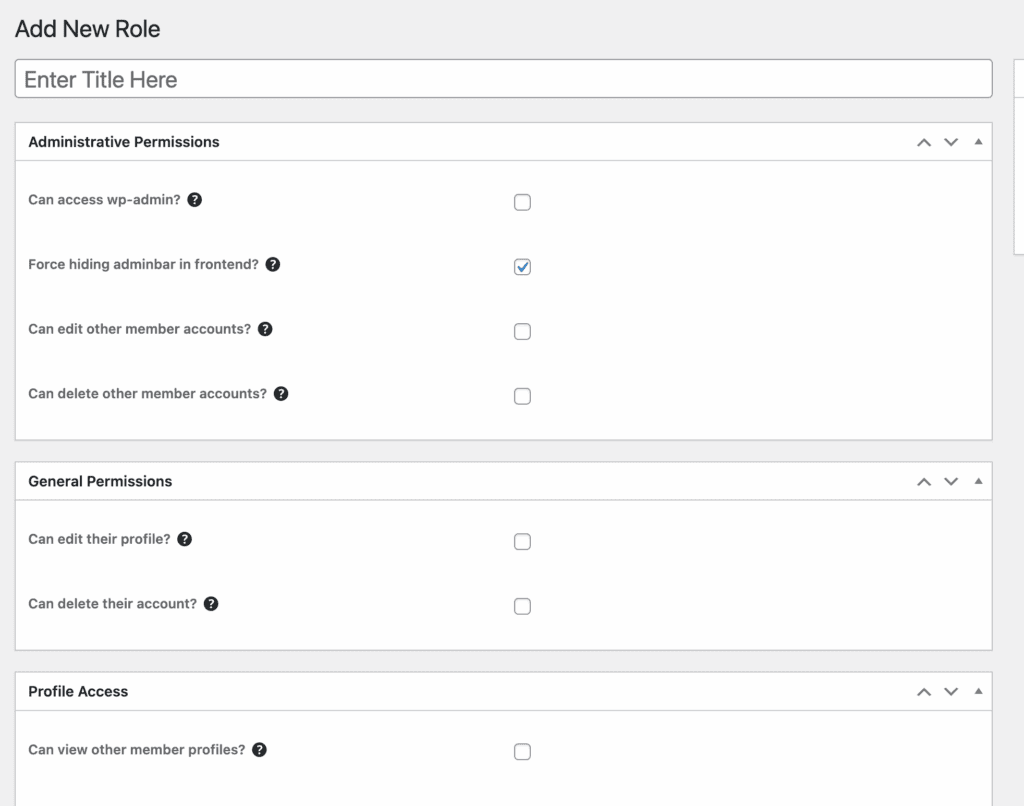
- Global Content Restriction: Easily restrict access to your entire website, making it accessible only to logged-in users.
- Page/Post Specific Restriction: Override global settings to restrict individual pages or posts to specific user roles or logged-in users.
- Gutenberg Block Restriction: Apply access rules to individual content blocks within a page or post, allowing you to show/hide specific paragraphs or images.
- Conditional Navigation Menus: Show or hide menu links based on a user’s login status or role (e.g., only show the “My Account” link to logged-in users).
- Custom Restriction Message: Display a custom message to users who try to access content they don’t have permission to view.
- WooCommerce Integration: Restrict access to products, shop pages, or offer member-only discounts. (Pro via WooCommerce extension)
- Content Dripping: This is not a built-in feature and requires integration with other plugins.
Manage Members
Managing your members should be a seamless experience for both you and them. The goal is to provide a professional front-end interface for registration, login, and profile management, keeping users away from the confusing WordPress backend.
- Front-End User Experience: All core user interactions—registration, login, and profile editing—happen on the front end of your site.
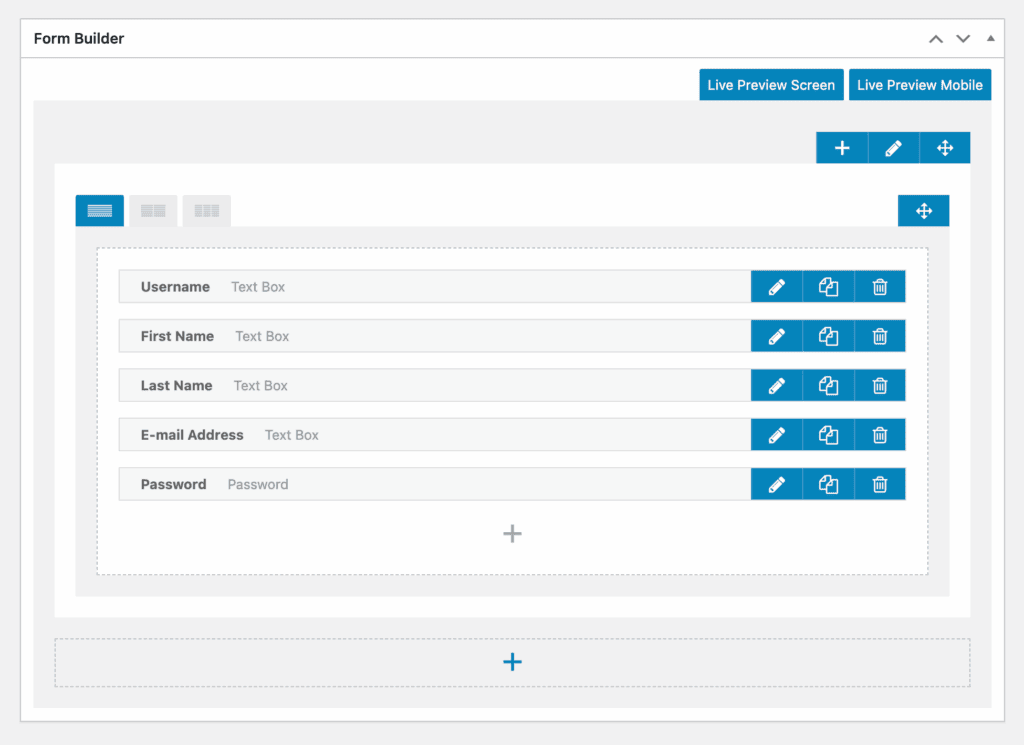
- Custom Form Fields: Use an intuitive drag-and-drop builder to create unique registration and profile forms with various field types.
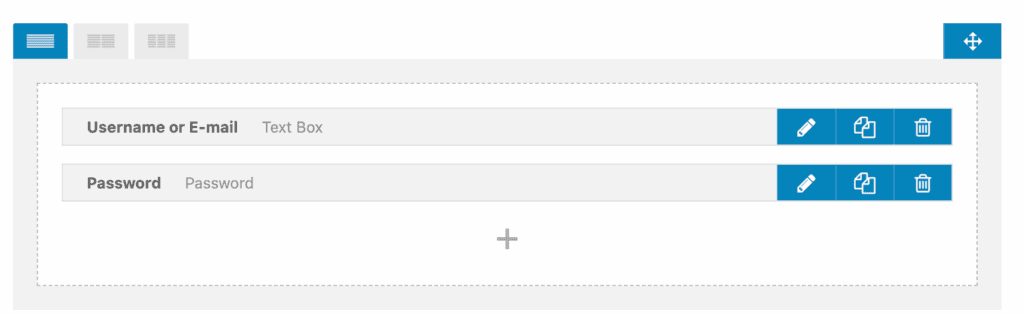
- Member Directories: Create searchable and filterable lists of your members to encourage community interaction.
- Manual User Approval: You can require admin review and manual approval for all new registrations.
- Email Activations: Force new users to activate their account by clicking a link sent to their email.
- Front-End Account Management: Members get a dedicated account page to manage their profile, change their password, and update their details.
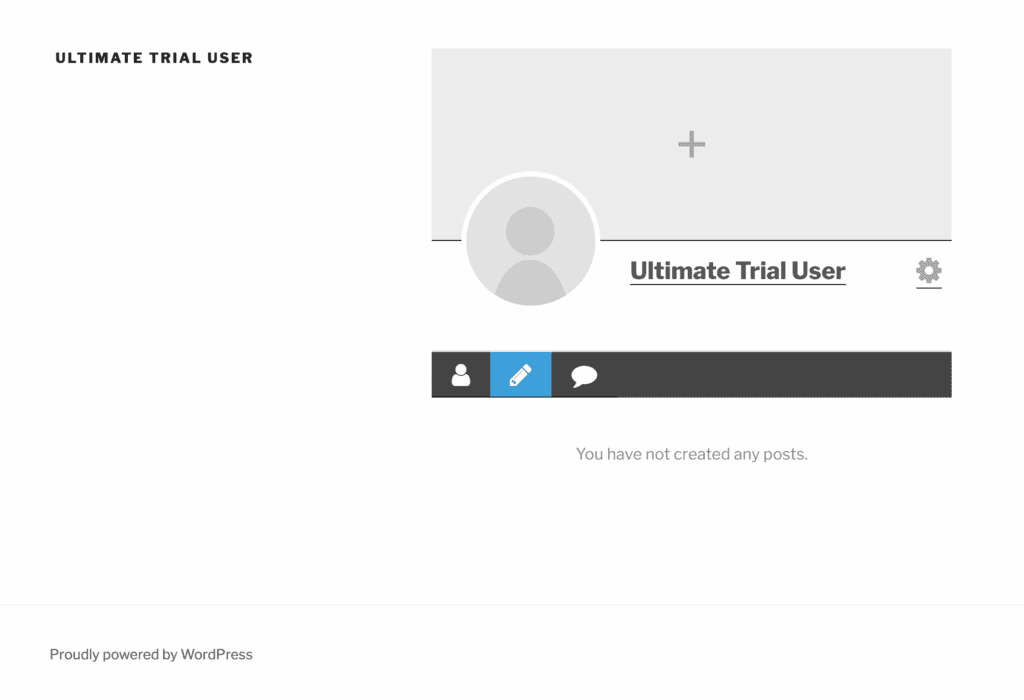
- User Notes: Admins can add private, backend-only notes to user profiles for internal reference. This can be a really helpful feature, it is a premium add-on and not a feature that the plugin offers out of the box.
- Private Messaging: Allow members to send direct, private messages to each other. I couldn’t test this feature because this was a paid extension. But, it’s a feature I haven’t seen in a lot of membership plugins.
- Social Activity: Create a news feed where users can post updates, comment, and interact with each other. This is also a pro extension I couldn’t test. But, it’s a great feature to have.
Content Dripping
Content dripping is the process of releasing content to members on a schedule (e.g., a new lesson unlocks every week). This is a common feature for online courses or sequential training programs. Unfortunately, content dripping is not a core feature of the Ultimate Member plugin. Achieving this functionality requires integrating it with a separate Learning Management System (LMS) or a different membership plugin that specializes in it.
Payments and Subscriptions
For many, the primary goal of a membership site is monetization. This requires a reliable system for accepting one-time or recurring payments for access. It’s crucial to understand that the free Ultimate Member plugin is not a payment solution.
- No Built-in Payment System: The core plugin does not handle any financial transactions or subscriptions.
- Stripe Integration: You can accept one-time or recurring subscription payments directly through Stripe. This is not a feature that is available out of the box. You’ll need a pro extension.
- WooCommerce Integration: Use the full power of WooCommerce to sell memberships as products. This pro extension lets you use any payment gateway compatible with WooCommerce.
- Coupons & Refunds: The creation of discount codes and the management of refunds are handled through your chosen payment system (Stripe, WooCommerce), not directly within Ultimate Member.
Design and Customization
Your membership area should feel like a natural part of your brand, not a generic, tacked-on feature. Ultimate Member excels at providing tools to customize the look and feel of your forms and profiles to match your site’s design.
- Front-End Focused Design: All forms, profiles, and directories are displayed on the front end, automatically inheriting your theme’s styles.
- Drag-and-Drop Form Builder: Visually create and arrange fields for your registration and profile forms without any code.
- Customizable Email Templates: Edit the content and basic design of automated emails for registration, password resets, and more.
- Customizable Profile Appearance: Control details like cover photo aspect ratios and profile photo shapes (circle or square).
- Developer Friendly: The plugin includes many actions and filters, allowing developers to extend its functionality with custom code.
- Conditional Logic for Forms: With this pro extension, you can show or hide certain form fields based on a user’s previous selections or their assigned role.
Privacy, Security, and Compliance
When you’re handling user data, security and privacy are non-negotiable. A good membership plugin should give you the tools to protect your site from spam and empower users to control their own data, helping you comply with regulations like GDPR.
- Spam Protection: Built-in anti-spam measures like honeypot fields and time delays are included in registration and login forms.
- Google reCAPTCHA: Add CAPTCHA verification to your forms to prevent bots. Ultimate Member doesn’t offer CAPTCHA out of the box. You need a free extension.
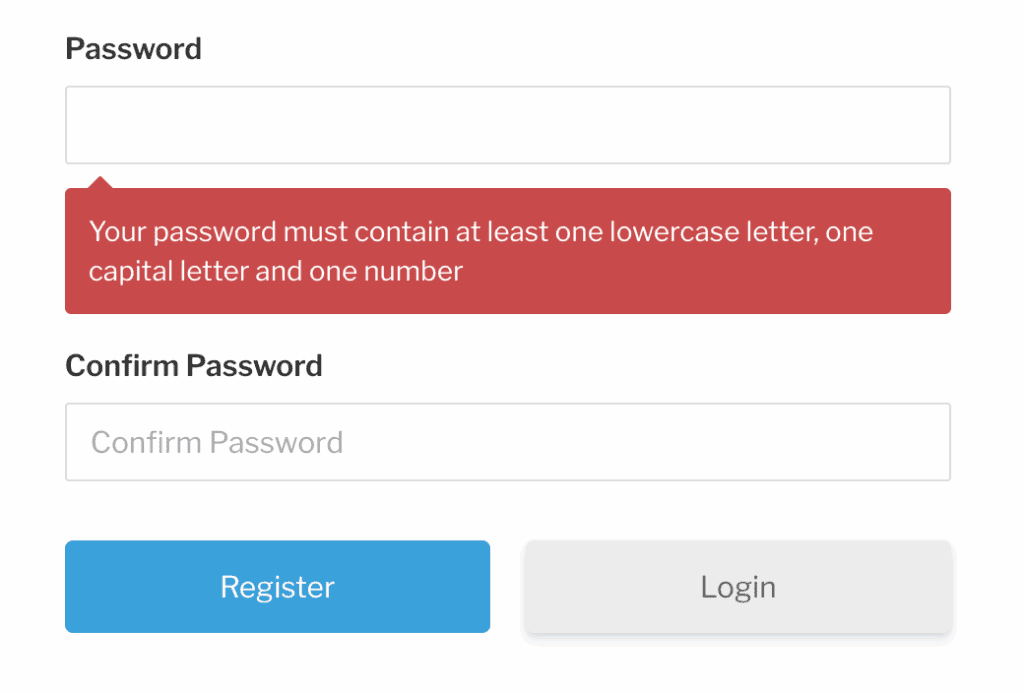
- Force Strong Passwords: Good password security is necessary to prevent a whole host of security issues. So, this is a good feature to have.
- Profile Privacy Settings: Allow users to make their profiles private or hide them from public member directories.
- Account Deletion: Give users the ability to delete their own accounts directly from their account page.
- Terms & Conditions: Add a required “I agree to the Terms & Conditions” checkbox to registration forms. This is a free extension that you need to setup in addition to the plugin.
Price
Understanding the true cost of Ultimate Member is essential for budgeting. Here’s a quick look at the pricing:
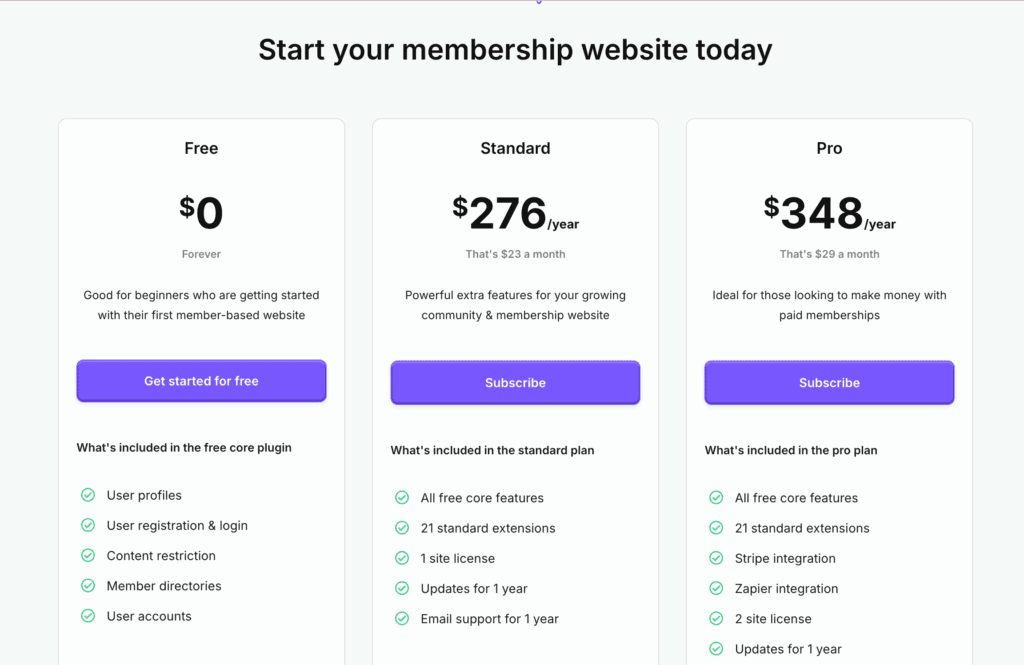
While Ultimate Member has a very powerful free version, unlocking its full potential for monetization and advanced features requires a paid subscription.
- Free Plan: Includes the core plugin features such as user profiles, registration, login, and member directories.
- Standard Plan: Costs $276 per year. This plan includes all free features, 21 standard extensions, a license for 1 website, updates, and email support for one year.
- Pro Plan: Costs $348 per year. This plan includes all features of the Standard plan, plus Stripe and Zapier integrations, a license for 2 websites, and the Ultimate Member Them
Usability
Getting started with Ultimate Member is refreshingly simple. There’s no setup wizard to click through or an account you need to create. As soon as you install and activate the plugin, you can dive right into configuring the settings.
However, it’s not my favorite UI. The settings pages are built within the standard WordPress dashboard, which can feel very cluttered and clunky. Ultimate Member uses a system of tabs and then sub-tabs that contain different categories within them, so I didn’t find it as intuitive as it could be.
As a side note, I have previously tested ARMember and found its dedicated dashboard to be much better than this one. It was easier to navigate, manage users, and restrict content in a more streamlined way.
I would describe Ultimate Member as a very solid, foundational plugin that a good developer could tinker with and customize extensively. Because of its complex menu system, it’s not very beginner-friendly. On a positive note, it didn’t slow down my site or cause me any performance issues during testing.
Ultimate Member Alternatives
Is Ultimate Member’s community-first approach not what you need? Or maybe the cost of its premium extensions for monetization is a dealbreaker. Whatever your reason for needing an alternative, we’ve got your back. Here are two of the most popular and reliable choices:
- MemberPress: Often considered the gold standard for selling content, MemberPress is a premium-only plugin focused on reliability and ease of use. It’s an all-in-one solution for creating paid subscriptions, online courses, and paywalled content, and it “just works” right out of the box.
- Paid Memberships Pro (PMPro): PMPro is a highly flexible and powerful option, especially if you want to start selling memberships for free. Its core plugin includes payment gateway support and recurring subscriptions, something Ultimate Member requires a paid extension for. It’s a great choice for those who need a cost-effective start with room to grow.
Final Thoughts
So, is Ultimate Member the right plugin for your website?
It’s an incredibly powerful and feature-rich plugin, especially considering its core version is completely free. If your primary goal is to build a vibrant online community with custom user profiles, registration forms, and member directories, it is one of the best choices available.
However, its heavy reliance on paid extensions for monetization is its biggest weakness. If you need to sell paid subscriptions from day one, you’ll find the setup more complex and costly compared to all-in-one solutions. For anyone who needs a powerful, free foundation for an online community, Ultimate Member is an outstanding choice.
We recommend you install it on a staging site first. This lets you explore all its features and see how it works with your theme without any risk to your live website.
FAQS
Is Ultimate Member safe?
Yes, Ultimate Member is generally considered safe. As one of the most popular membership plugins, it is actively maintained and updated by its development team to patch vulnerabilities. However, like any complex plugin, security issues can arise. It is crucial to always keep the plugin updated to the latest version and follow standard WordPress security practices, such as using strong passwords and a security plugin.
What is the best membership plugin?
There is no single “best” membership plugin, as the right choice depends entirely on your website’s goals. Ultimate Member is an excellent choice if your primary goal is to build a community with rich user profiles and member directories for free. If your main objective is to sell paid subscriptions or online courses, a plugin like MemberPress or Paid Memberships Pro might be a better fit, as they have monetization features built into their core.
How much does Ultimate Member cost?
The core Ultimate Member plugin is completely free and available on the WordPress repository. This version includes all the essential features for community building. To add advanced functionality like payment processing via Stripe, social activity feeds, or private messaging, you will need to purchase their premium extensions. Access to all extensions is available through the “Extensions Pass” for $249 per year.
What is the difference between Ultimate Member and Profile Builder?
Both Ultimate Member and Profile Builder are excellent plugins that specialize in creating front-end user registration forms and profiles. The main difference lies in their focus. Ultimate Member is more community-oriented, with strong built-in features like member directories and extensions for social activity. Profile Builder, on the other hand, is a more straightforward tool focused on creating highly advanced registration forms and managing user fields, often integrating with other plugins to build a community.

Shreya has been a writer for as long as she can remember. Now, she writes articles that help WordPress users manage the sites that they're proud of, with little to no coding


