Choosing an analytics tool often feels like a trade-off: you can get powerful insights, but you have to send your visitors’ data to third-party companies like Google. What if you want to understand your audience without compromising their privacy? This is where WP Statistics comes in, promising a self-hosted, privacy-first alternative.
You’re looking for a simple way to track your visitors and see which content performs best, all while keeping full control over your data. This information is key to making smarter decisions and growing your site, but you want to do it responsibly.
We tested WP Statistics to see if it delivers on its promise. This article will tell you everything you need to know to make a decision. Is WP Statistics the right analytics plugin for you? Let’s find out.
10 Best WordPress Backup Plugin Showdown: Tested for Quick Restores, Large Sites & Performance
Our WP Statistics review found that it’s an outstanding choice for privacy-conscious users. It offers simple, easy-to-understand reports inside their dashboard.
However, we recommend you install a backup plugin. WP Statistics is a self-hosted solution. This makes you responsible for the security of your data. A backup plugin like Blogvault can help.
Quick Glance at WP Statistics
WP Statistics is one of the most popular free WordPress analytics plugins for WordPress, offering a complete, self-hosted solution. You don’t have to integrate GA4 with your site. Its main draw is that it collects and stores all your website data directly on your own server. This means you have 100% data ownership, and no information is shared with external companies, making it GDPR and CCPA compliant right out of the box. For users who want to de-Google their website, it’s a leading contender.

While testing WordPress analytics plugins, these are the factors we were on the lookout for:
- Ease of Use: Look for a simple setup and a clean, intuitive dashboard that is easy to navigate without leaving WordPress.
- Tracking Capabilities: The plugin should provide core metrics like visitors and page views, with options for more detailed event tracking.
- eCommerce Integration: If you have an online store, ensure it can track sales, revenue, and product performance.
- Actionable Reporting: Check that it provides clear, easy-to-understand reports directly within your WordPress dashboard.
- GDPR & Privacy Features: The plugin must be built for privacy, offering features like IP anonymization without complex configurations.
- Website Performance: A good plugin should be lightweight and have a minimal impact on your site’s loading speed.
- Marketing & SEO Insights: It should provide data on top content and referral sources to help your growth strategy.
- Data Ownership: The plugin should clarify where your data is stored and who has access to it.
- Security & Access Control: Make sure you can control which user roles on your site are allowed to view analytics reports.
- Pricing and Value: Evaluate if the features offered provide a good return on investment for your specific needs.
Here’s what we found in our testing:
Tracking Capabilities
A great analytics plugin shows you not just how many visitors you have, but what they do. WP Statistics provides a solid foundation for this, though advanced tracking often requires premium add-ons.
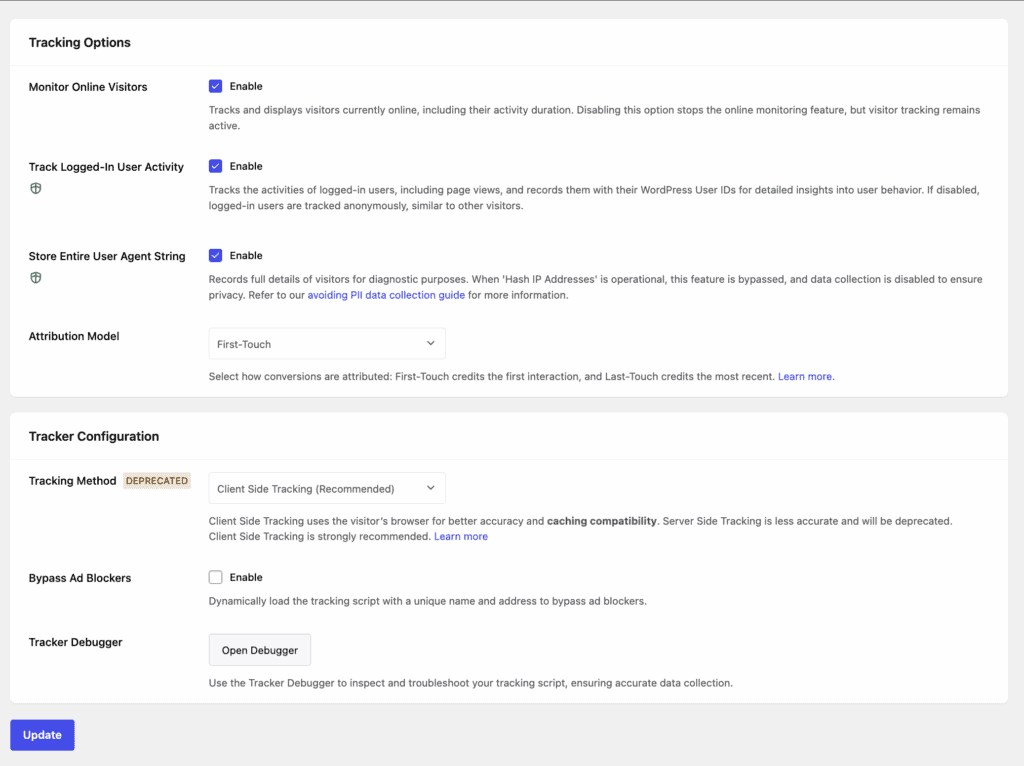
- Core Analytics: Automatically tracks all the essentials, including page views, visitors, referrers, browser types, and search engine traffic, right after activation.
- Event and eCommerce Tracking: The free version does not automatically track events like file downloads, outbound link clicks, or e-commerce sales. These advanced features are available through premium add-ons like Data Plus and Marketing.
- Custom Event Tracking: For tracking specific goals like button clicks or form submissions, you will need the premium Marketing add-on.
Reporting Capabilities
The best data is useless if you can’t understand it. WP Statistics excels at presenting its data in clean, straightforward reports that are built right into your WordPress dashboard, so you never have to leave your site.
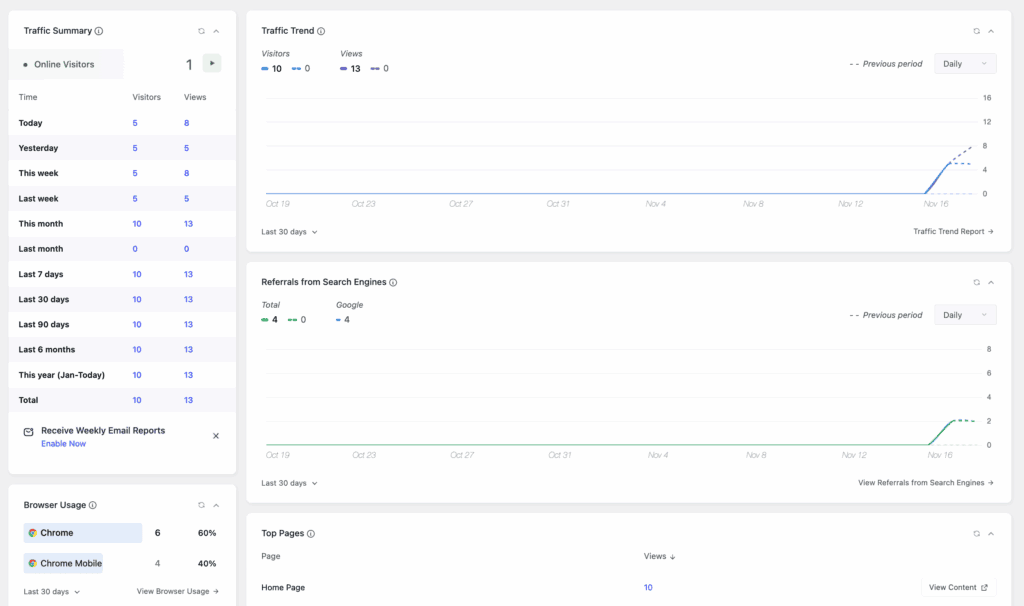
- In-Dashboard Reports: A comprehensive and customizable overview of all key metrics.
- Visitor Insights: See where your visitors are from (countries and cities), what devices they use, and which sites referred them.
- Content Reports: Easily identify your top-performing posts, pages, and categories to see what content resonates with your audience.
- Real-Time Reports: Shows how many users are currently online on your site.
- Author Analytics: Tracks content performance by author, which is great for multi-author blogs.
Data Ownership, Compliance, and Security
This is where WP Statistics truly shines. In a world focused on data privacy, this plugin is built from the ground up to give you full control and ensure compliance.
- 100% Data Ownership: All analytics data is stored on your own server in your WordPress database. No data is ever sent to a third party.
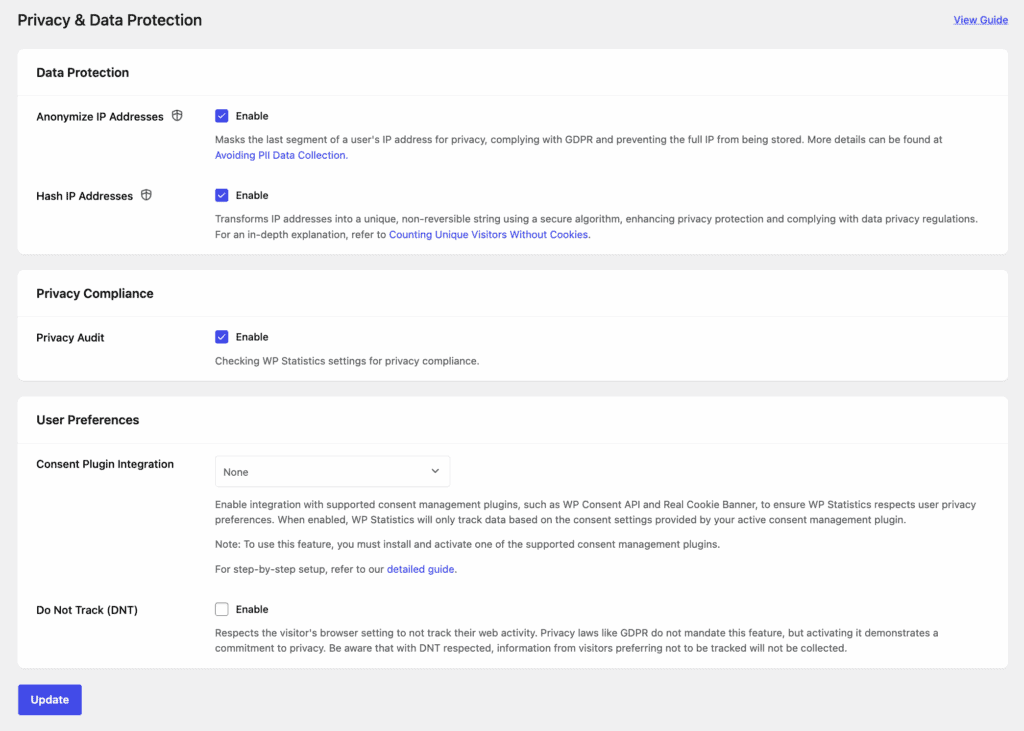
- GDPR/CCPA Compliant by Default: The plugin uses IP hashing to anonymize visitor data and is cookie-free by default, meaning you often don’t need a cookie consent banner for its tracking.
- Privacy Features: It respects users’ “Do Not Track” browser settings and includes tools for exporting or deleting user data to comply with privacy requests.
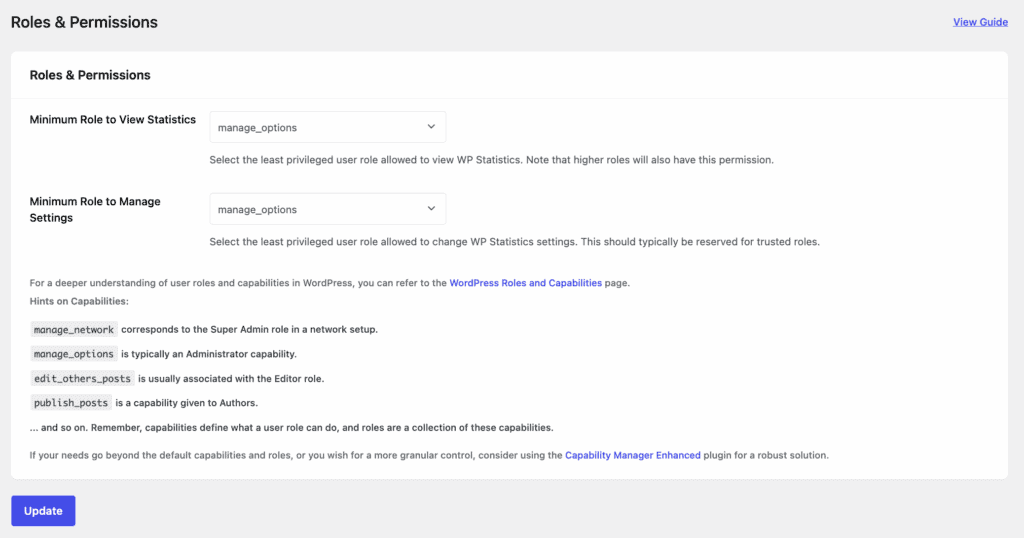
- User Role Permissions: You can easily control which WordPress user roles (e.g., Editor, Author) can view the analytics reports, keeping your data secure.
Performance Impact
Since WP Statistics stores data in your own database, users often worry about its impact on site speed. The plugin is designed to be lightweight, but performance can depend on your traffic levels.
- Self-Hosted Script: The tracking script is processed locally, avoiding external HTTP requests that can slow a site down.
- Optimization Settings: Includes a dedicated settings page to help you manage how data is stored and purged, which is useful for preventing database bloat on higher-traffic sites.
- Ad Blocker Bypass: Can load its tracking script with a unique name to avoid being blocked by ad blockers, leading to more accurate data.
Pricing & Value for Money
WP Statistics is a powerful free plugin that covers the needs of most bloggers and small businesses. For those who need more, its premium add-ons provide advanced functionality at a reasonable price.
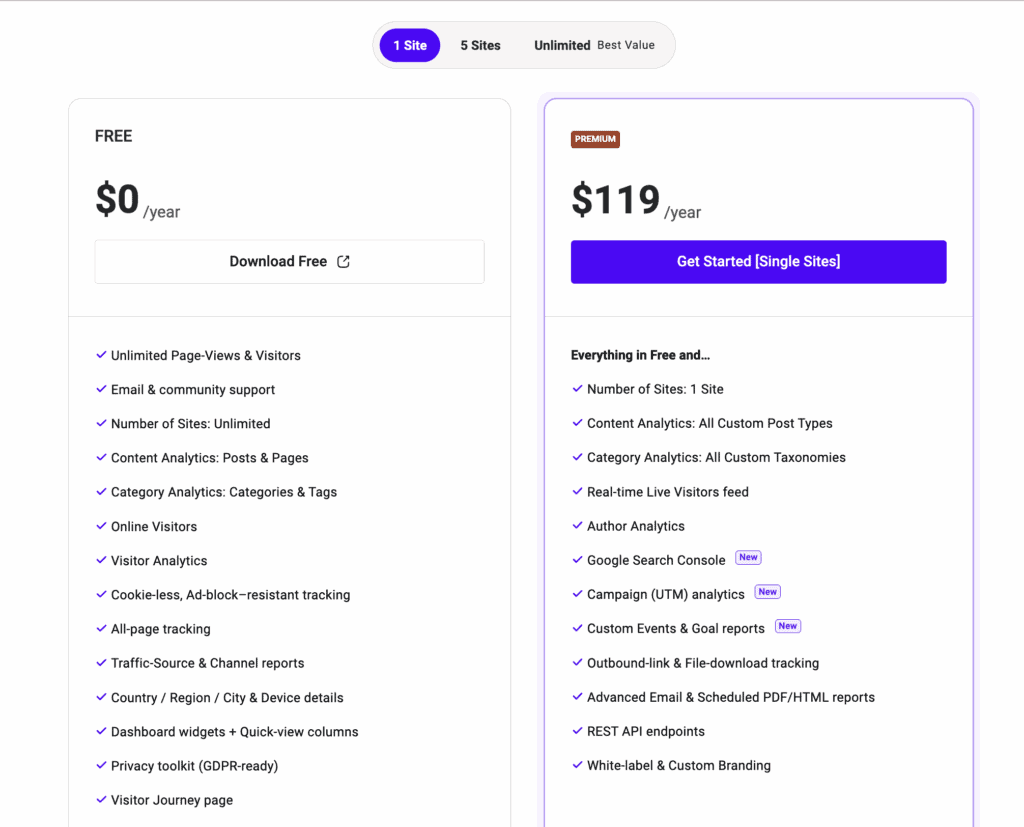
For advanced features like e-commerce reporting, real-time data, UTM campaign tracking, and custom reports, you can purchase individual add-ons or bundled licenses. This allows you to pay only for the extra features you need.
Usability and Experience
It was one of the easiest analytical plugins to setup. Just install and activate. That’s it. It started collecting data immediately without needing me to create an external account, copy tracking codes, or navigate complex authentication steps.
I could quickly check my top pages and see where traffic is coming from without logging into another platform. The interface is clean and intuitive, presenting the data in a way that’s instantly understandable.
Alternatives to WP Statistics
Maybe WP Statistics is not for you. Maybe it’s slowing down your site. As your site grows, maybe WP Statistics is not able to provide robust reports. Whatever your reasons or needing an alternative, here are our top two recommendations:
- MonsterInsights: If you prefer using the power of Google Analytics but want an easy-to-use interface, MonsterInsights is the best option. It brings GA reports into your dashboard and simplifies advanced tracking for e-commerce, forms, and custom events without code.
- Google Site Kit: Google Site Kit is Google’s official free plugin for WordPress. It integrates data from Analytics, Search Console, and AdSense into one dashboard. It’s a great high-level overview but lacks the deep, privacy-centric features and 100% data ownership of WP Statistics.
Final Verdict
So, here’s my final take on WP Statistics. I loved that it gives you valuable insights without forcing you to hand over your visitor data to third parties. If you’re a blogger, a non-profit, or a small business owner who just wants clear, easy-to-read stats this plugin is for you.
That said, based on our tests, it isn’t the perfect fit for everyone. If you’re running a high-traffic e-commerce store or a site that’s heavy on marketing campaigns, you might run into performance issues. Storing all that data on your own server can eventually slow things down, and you may find yourself missing the more advanced features of other tools.
Irrespective of which plugin you decide for analytics, take a backup. It’s good practice to take regular backups that you can easily restore. If something goes wrong when testing this plugin, you can recover your site with a few clicks.
FAQs
Does WP Statistics slow down your website?
On high-traffic websites, it can potentially slow down the database because it stores all data locally. However, for low-to-medium traffic sites, the impact is generally minimal, and the plugin includes optimization settings to manage data storage.
Is WP Statistics easy to set up for a beginner?
Yes, it’s incredibly easy. You just need to install and activate the plugin from the WordPress repository. It starts tracking automatically with no need for coding or connecting to an external service.
How accurate is WP Statistics compared to Google Analytics?
They often show different numbers because they track users differently. WP Statistics counts visits on the server-side and is less likely to be blocked than Google Analytics’ client-side script. It often reports higher numbers, but it should be seen as a different, not necessarily less accurate, measurement tool.
What advanced features is WP Statistics missing?
The free version lacks advanced marketing features like e-commerce tracking, detailed conversion funnels, and goal tracking. These are available in premium add-ons but are standard in tools powered by Google Analytics.
If I stop using WP Statistics, will I lose all my historical data?
Yes. Since all data is stored in your WordPress database, deactivating and deleting the plugin will remove all the tables and historical data it has collected. Be sure to export any data you want to keep before removal.

Shreya has been a writer for as long as she can remember. Now, she writes articles that help WordPress users manage the sites that they're proud of, with little to no coding