
If you’ve ever pushed a faulty update to your live WordPress site, you know the panic that follows. That’s why WordPress staging is non-negotiable. But choosing between WP Stagecoach vs WP Staging can be confusing.
We stress tested both plugins. We were looking at the features, how they perform, the impact on the live site and more. Here’s everything we learned to help you choose confidently.If you’re still exploring your options, here’s a deeper look at some of the best staging plugins for WordPress and how they compare.
Verdict: WP Staging was incredibly slow and resource intensive. WP Stagecoach used to be feature rich but has been badly maintained over the last few years. In my experience, BlogVault’s staging was faster, more secure and easier to set up.
We tested WP Staging and WP Stagecoach both plugins on a 206 MB WordPress site. Apart from the features, we were looking for a few different things:
- Security Considerations: Was your live site safe? Are there any security features that protect your staging site?
- Performance: We wanted to see if either plugin had any performance impacts on our live site. How do the plugins handle large live sites? Is it resource intensive? Can you quickly build a staging site?
- SEO ConsiderationsWe evaluated how each plugin handles staging site visibility, testing mechanisms for preventing accidental indexing and staging URLs..
- Pricing: The big reason why people prefer WP Staging is that it’s free. But, is it really useful as a free plugin? Is WP stagecoach worth its dime?
Quick look at WP Stagecoach vs WP Staging
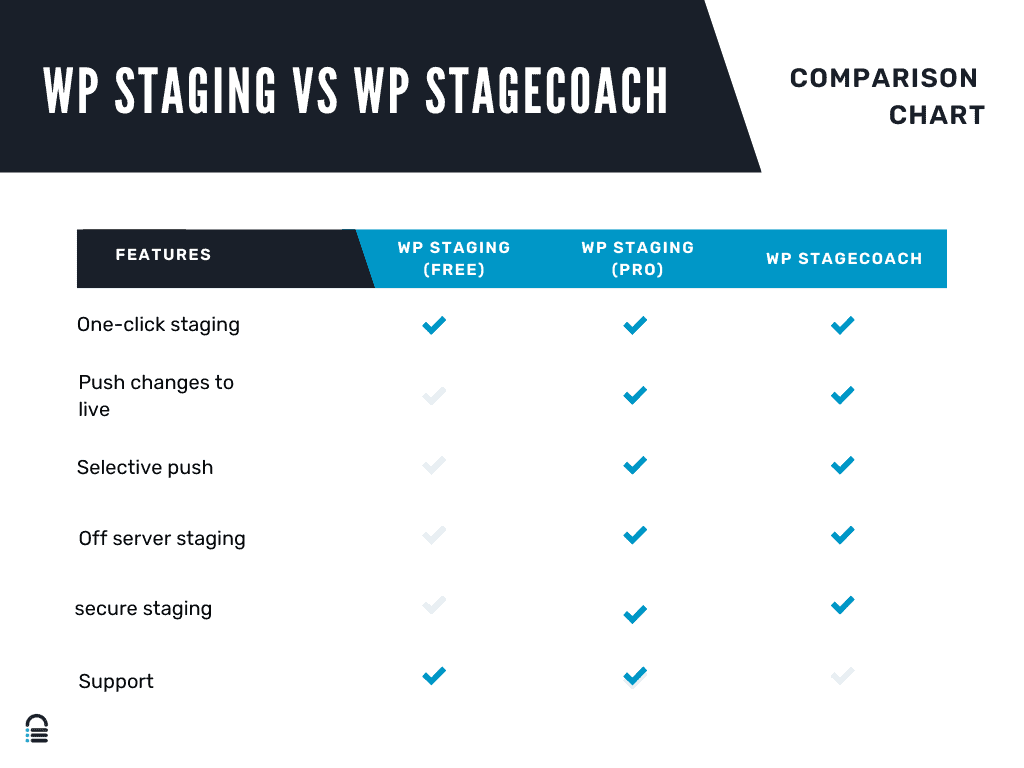
WP Staging:
WP Staging is popular amongst small business owners or website owners that are looking for simple solutions. It works by creating exact replicas of your live site directly on your current infrastructure.

The free version helps you build a staging site. You can choose what files and database tables you want to use. You get basic security as well. However, you need to unlock the pro tier to enable the ability to push changes to the live site.
WP Stagecoach:
WP Stagecoach offers a cloud-based solution that can build staging sites without affecting the performance and security of your site. It creates your staging site on a completely separate cloud server. With a single click, the service copies your live site to a secure, isolated cloud environment.

On paper, this sounds great. It is faster and more secure. It’s everything you need from a good staging plugin. However, we have to mention that they were acquired by WP Masters a few years ago. Their developers and website aren’t as active anymore. I tried to buy a new license from WP Stagecoach website and the website was stuck in a state of processing my payment for hours. There are also a lot of complaints on forums of customers struggling to get in contact with a support team. For this reason, I don’t recommend you use this plugin.
With that in mind, let’s dive a little deeper on different aspects of the two plugins.
Access Control and Data Protection: WP Stagecoach vs WP Staging
WP Stagecoach:
The cornerstone of their security strategy is server-level isolation. This means your staging site exists in a completely separate environment from your live site—think of it like keeping your original It also offers additionally security features like:
- SSL Encryption: Every connection is locked down with SSL certificates.
- Isolated Server Environment: Zero cross-contamination risk
- Automatic Threat Monitoring: Continuous background security checks
This approach prevents potential vulnerabilities from spreading between your staging and live environments.
WP Staging:
WP Staging presents a more vulnerable security model. By creating staging sites on the same server as your live site, it essentially leaves your digital front door partially open. The risks are significant:
- No Server-Level Isolation: Staging and live sites share the same environment
- Increased Cross-Contamination Risk: A WordPress security issue in staging could potentially impact your live site
- Limited Built-In Protection: Relies heavily on your hosting provider’s security measures
Performance Impact of WP Stagecoach and WP Staging
WP Stagecoach:
For starters, WP Stagecoach uses their own servers to build your staging site. This means that your test site won’t slow down your live website. No server load, no performance issues.
It also offers other features that are designed for performance. One of those features is the way they handle heavy sites. It would typically take hours to transfer gigabytes of images. WP Stagecoach will break down the entire website migration into tiny, manageable chunks.This also reduces the impact on your own servers.
WP Staging:
In stark contrast, WP Staging revealed significant performance issues. Like we mentioned earlier we tested the plugin on a small test site. A 206 MB website took 15 minutes and 38 seconds to stage. We also saw definite signs of a spike in server usage. All of this is typical of staging plugins that build staging sites on your servers. This is because every file transfer competes with your live site’s resources. The same problem occurs when pushing changes from staging to live. I noticed a significant spike in server resources and drop in performance.
SEO and Staging Site Visibility of WP Stagecoach and WP Staging
WP Stagecoach
WP Stagecoach automatically implements noindex tags to prevent staging sites from being discovered by search engines. It uses subdomains like stage.example.com, creating a clear separation between live and staging environments.
WP Staging
In contrast, it requires a more manual approach to SEO management. Users must personally configure noindex settings and carefully manage the visibility of their test site. The plugin typically creates staging sites using subdirectories, which can potentially increase the risk of accidental indexing
Pricing Breakdown of WP Staging and WP Stagecoach
WP Staging
WP Staging starts with a very basic free version. The basic tier allows users to create staging sites directly on their existing server at no additional cost. But, you can’t push your changes from staging to live.

For developers and site owners wanting more advanced features, the Pro version starts at $18 a month. In my opinion, if you choose WP staging, you should invest in the paid version. This totals to about $216 a year. The other plans are designed for agencies and developers. The highest of those plans is for almost $50 a month.
WP Stagecoach
WP Stagecoach has a very simple pricing structure. Every plan has all their features. The pricing varies depending on the size of your site. The larger the site, the more expensive it. But, for context, the plan for their small staging site was $149 a year. For large sites, it goes up to $549 a year.

Staging features I missed
While WP Staging and WP Stagecoach handle basic staging needs, they fall short in several critical areas.
- True One-Click Staging Restoration: Both plugins require manual intervention when pushing staging changes live. This can be a great feature for changes to sites in production. BlogVault eliminates this risk with one-click merge. It automatically handles database merges, file updates, and configuration changes without breaking your live site.
- Automated Staging Cleanup: Both competing solutions leave abandoned staging sites consuming resources. BlogVault automatically archives old staging versions after set periods while preserving their configurations, solving the “staging sprawl” problem that plagues WordPress developers.
- Lightning-Fast Staging Performance: While WP Staging took 15+ minutes and WP Stagecoach requires significant processing time for large sites, BlogVault redefines speed expectations. Our proprietary staging engine created a perfect clone of our 206 MB test site in just 26 seconds – faster than most plugins take to initialize. This isn’t just about convenience; it transforms workflows by enabling:
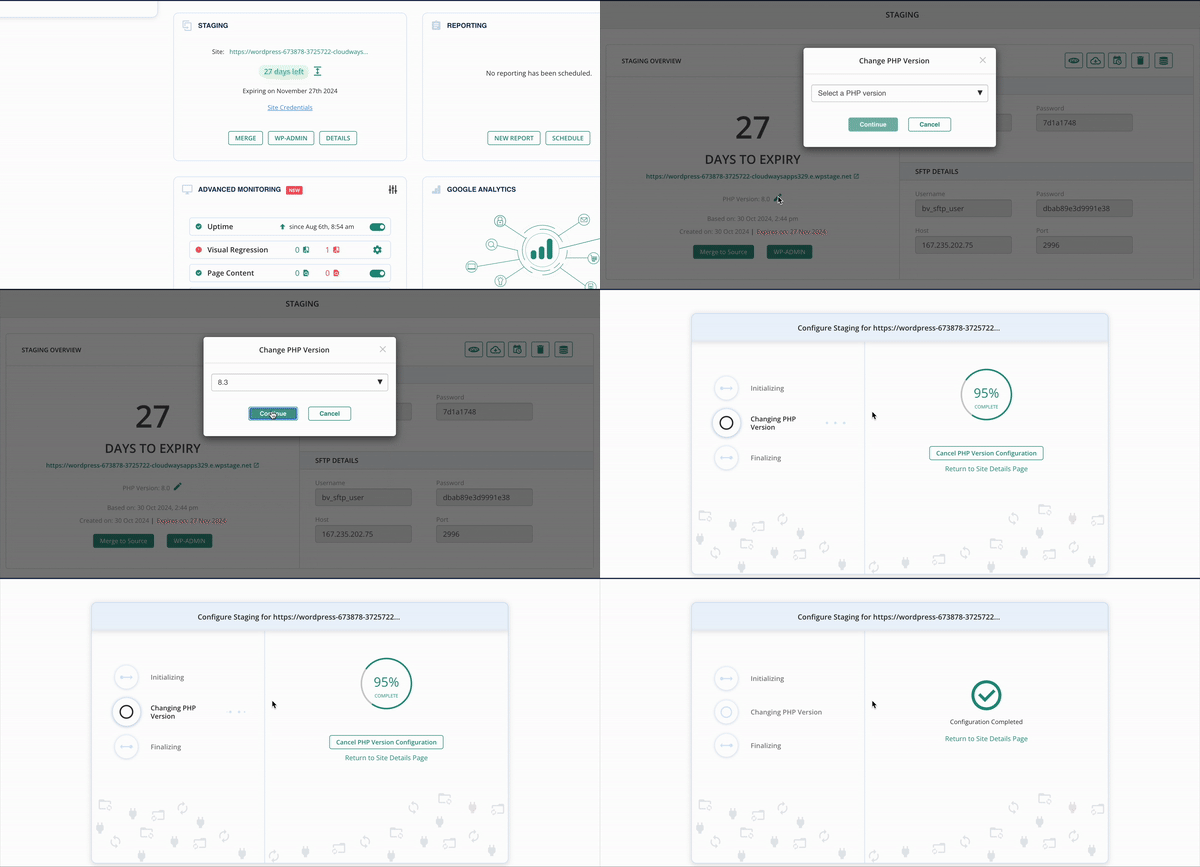
- PHP considerations: WP Staging and WP Stagecoach miss a critical feature – the ability to test different PHP configurations. This can reduce the risk of updates to your websites. BlogVault solves this problem by giving developers full control over PHP settings in staging environments making it easier to test WordPress updates safely.
Wrapping Up
If we’re being brutally honest, WP Staging is the “least bad” option between the two – it works, the developers update it, and it won’t completely ruin your day. But congratulating a plugin for basic functionality is like praising a car for having wheels. The bar is pretty low here.
Here’s the thing: why settle for “functional” when you can have exceptional? BlogVault doesn’t just do staging – it handles your backups, security, migrations, and staging in one polished package. It’s powerful enough to work as a WordPress demo site too great for testing changes or client sites safely
While you’re juggling multiple mediocre plugins, BlogVault users are getting everything done with one tool that actually works well.
FAQs
What’s the best staging plugin?
BlogVault takes the crown as the best staging solution, offering lightning-fast staging (26 seconds vs 15+ minutes), built-in backups, security features, and PHP customization. While WP Staging works for basic needs, BlogVault provides a complete site management solution that goes far beyond simple staging.
What is the difference between WP Staging and Duplicator?
WP Staging creates staging sites for testing changes, while Duplicator is primarily a migration and backup tool. WP Staging keeps your staging site connected to your live site for easy updates, whereas Duplicator creates standalone packages for moving sites between servers or creating backups.
What is the difference between WP Staging and UpdraftPlus?
WP Staging focuses on creating test environments for your site, while UpdraftPlus is a backup and restore plugin. UpdraftPlus can create backups and restore them, but it doesn’t offer the staging functionality that lets you test changes safely before going live.
What is a WP Staging site?
A WP staging site is an exact copy of your live WordPress website used for testing updates, new plugins, themes, or design changes. It’s like having a private workshop where you can experiment without risking your actual website that visitors see.
What is the difference between staging and production in WordPress?
Your production site is your live website that visitors see and use. Your staging site is a hidden copy where you test changes before making them live. Think of production as your storefront and staging as your back-room workshop where you prepare new displays.

Shreya has been a writer for as long as she can remember. Now, she writes articles that help WordPress users manage the sites that they're proud of, with little to no coding