

The right analytics plugin can turn that confusing data into a clear roadmap for growth. This MonsterInsights review will determine if it’s the solution your WordPress site needs.
You’re looking for a simple way to see what content is boosting your SEO, track e-commerce sales, and measure marketing performance. This is data that can help you understand what is driving traffic and what is falling flat. You can then make smart decisions to improve your content strategy.
We tested MonsterInsights and this article will tell you everything you need to know to make a decision. Is MonsterInsights the right analytics plugin for you? Let’s find out.
We took a backup before we started because it’s a safety net before adding any new software to our site. Once we started our MonsterInsights review, loved the experience. Wee found that advanced tracking is incredibly simple to set up without code and it provides great business insights that you might find helpful.
Quick Glance at MonsterInsights Review
Created by Syed Balkhi of WPBeginner, MonsterInsights is the most popular Google Analytics plugin for WordPress, trusted by over 3 million sites. It’s renowned for its simple, code-free setup that connects your site to GA in minutes. Its main draw is displaying easy-to-understand reports directly in your WordPress dashboard and automatically tracking key events like file downloads and outbound link clicks, saving you from the complex GA interface.

While testing WordPress analytics plugins, these are the factors we were on the lookout for:
- Ease of Use: Look for a simple setup wizard to connect with GA4 and a clean, intuitive dashboard that is easy to navigate.
- Automatic Event Tracking: The plugin should automatically track clicks, downloads, and form submissions without needing any code.
- eCommerce Integration: If you have an online store, ensure it easily tracks sales, revenue, and product performance from platforms like WooCommerce.
- Actionable Reporting: Check that it provides clear, easy-to-understand reports directly within your WordPress dashboard.
- GDPR & Privacy Features: The plugin must offer tools like IP anonymization and cookie consent integration to help you comply with privacy laws.
- Website Performance: A good plugin should be lightweight and have a minimal impact on your site’s loading speed.
- Marketing & SEO Insights: It should provide data on top content, referral sources, and include tools like a UTM builder to help your growth strategy.
- Custom Tracking: The ability to add custom dimensions is crucial for tracking specific data unique to your site, like author performance or user engagement.
- Security & Access Control: Make sure you can control which user roles on your site are allowed to view analytics reports.
- Pricing and Value: Evaluate if the features offered in the free and paid versions provide a good return on investment for your specific needs.
Here’s what we found in our testing:
Tracking Capabilities
A great analytics plugin goes beyond simple page views to show you how users actually interact with your site. This deeper insight is crucial for understanding what content is most engaging. MonsterInsights offers several powerful tracking features that work right out of the box.
- Automatic Event Tracking: Automatically tracks common user interactions without manual setup, including outbound link clicks, affiliate link clicks, file downloads, and scroll depth.
- Custom Event Tracking: Allows for tracking custom links and button clicks by adding simple HTML attributes, suitable for call-to-action buttons or specific campaigns.
- eCommerce Tracking: Offers dedicated tracking for online stores, integrating with platforms like WooCommerce, Easy Digital Downloads, and MemberPress to monitor sales, revenue, and top products.
- Media Tracking: Automatically tracks embedded video plays, including how many times videos are watched and the average watch time.
Reporting Capabilities
Collecting data is only half the battle; you need to be able to understand it easily to make smart decisions. A key strength of MonsterInsights is its ability to translate complex analytics into clear, actionable reports directly inside your WordPress dashboard.
- In-Dashboard Reports: Displays easy-to-read analytics reports directly within the WordPress dashboard.

- Real-Time Reports: Shows who is on your site, which pages they are viewing, and where they are coming from at that moment.
- Audience Reports: Provides details on visitors, such as location, device usage, and new versus returning users.
- Behavior Reports: Includes data on top landing pages, exit pages, and top-performing content.
- Search Console Reports: Displays the top 50 Google search terms driving traffic to your site.
- Forms Conversion Reports: Tracks the performance of forms on your site, showing views and conversions.
- Site Speed Reports: Offers reports on your website’s performance with actionable recommendations.
Performance Impact
Website speed is essential for both user experience and SEO, so any plugin you add must be lightweight. MonsterInsights is built with performance in mind and includes specific features to ensure it has a minimal impact on your site’s loading times.
- Local gtag.js Hosting: A feature that allows you to host the Google Analytics tracking script locally, which can improve site speed scores.
- Performance Addon: This addon lets you adjust sample rates for tracking, which helps manage data processing limits for very high-traffic sites.
- Optimized Script Loading: The plugin is designed to load tracking scripts efficiently to minimize any potential slowdown.
Marketing Tools
Your analytics data should directly inform your marketing and content strategy. MonsterInsights includes built-in tools that help you measure the effectiveness of your campaigns and identify opportunities for growth, connecting your data directly to your business goals.
- UTM URL Builder: A built-in tool for creating custom URLs with UTM parameters to track marketing campaigns from sources like email newsletters and social media.
- SEO/Content Insights: Integrates with Search Console and SEO plugins like Yoast to provide data on keywords, top pages, and content performance. THey recommend you try All in One SEO from the dashboard. But, they work seamlessly with others.
- PPC Tracking: An Ads add-on helps set up conversion tracking for platforms such as Google Ads and Meta Ads without needing to edit code.
Custom Dimensions
Standard analytics can tell you a lot, but sometimes you need to track data that is unique to your website, like which author’s posts perform best. Custom dimensions allow you to do this, and MonsterInsights makes this advanced feature accessible without complex configurations.
- Custom Dimensions Add-on: A premium add-on enables the creation of custom dimensions to track specific, non-standard data.
- Available Options: Includes Author, Post Type, Category, Tags, Logged-in Status, User ID, and SEO Score (with Yoast integration).
Data Ownership, Compliance, and Security
In an era of data privacy, it is crucial that your analytics tool handles user data responsibly and securely. MonsterInsights prioritizes compliance and security, ensuring you maintain full control over your data while respecting user privacy.
- IP Anonymization: Automatically anonymizes visitor IP addresses to help with privacy compliance.
- Cookie Consent Integration: They recommend you integrate with WPConsent or any other consent plugin you prefer.
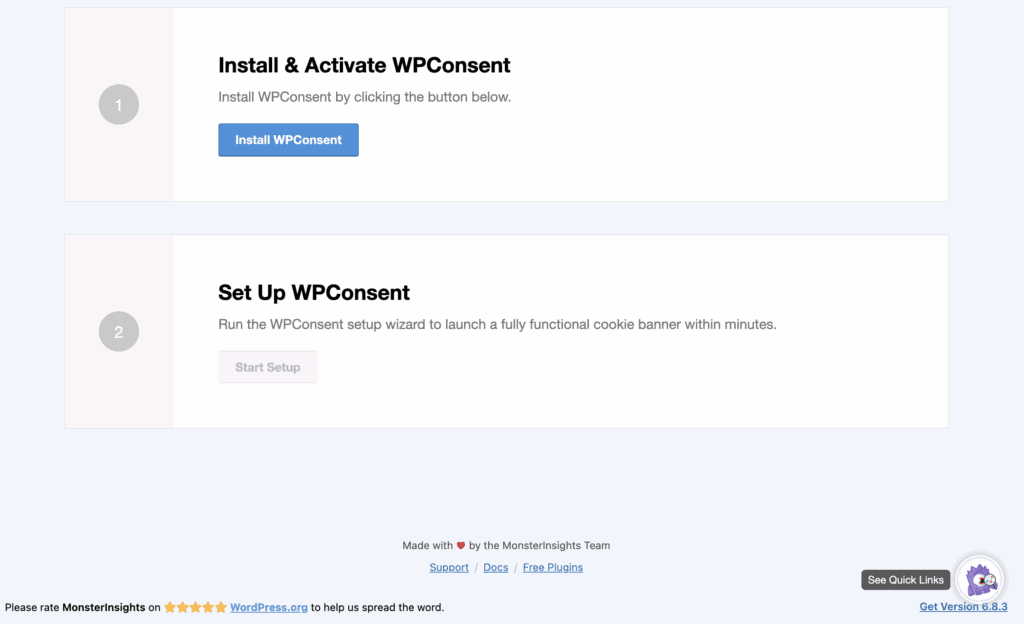
- EU Compliance Add-on: Simplifies compliance with regulations like GDPR by automatically anonymizing IPs and integrating with consent tools.
- No Third-Party Data Storage: All data is sent directly to your own Google Analytics account, ensuring you retain full data ownership.
- User Role Permissions: Allows administrators to control which WordPress user roles can view the MonsterInsights reports, restricting access to sensitive analytics data.
Pricing & Value for Money
MonsterInsights pricing is flexible and designed to scale with your website’s needs, ensuring you only pay for the features you’ll actually use. While the free version provides an excellent entry point for basic analytics, the premium plans unlock the powerful tracking and reporting tools that can deliver a significant return on investment for growing businesses.
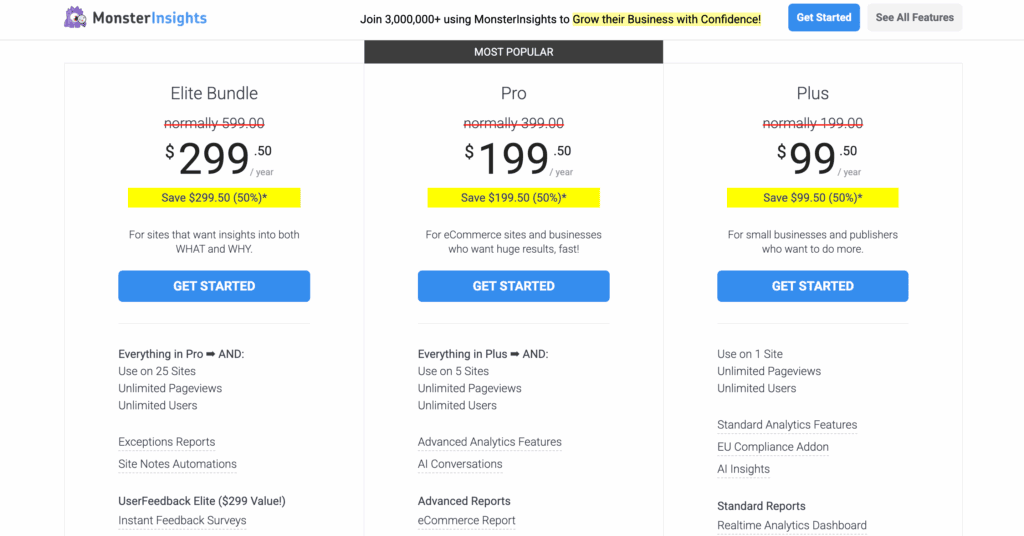
- Lite (Free) Version: Perfect for beginners, this version covers essential tracking and reporting needs, including automatic outbound and affiliate link tracking, all within your WordPress dashboard.
- Premium Tiers (Plus, Pro, Agency): These plans are necessary for advanced features like eCommerce tracking, custom dimensions, forms conversion reports, and priority support. The tiered structure allows you to choose the right level of functionality, whether you’re a small business owner, a serious marketer, or an agency managing multiple client sites.
Usability and Experience
From my own experience of MonsterInsights, I loved its sheer ease of use. As someone who finds the technical side of WordPress intimidating, this plugin made understanding my audience very easy.
The setup process, which I was honestly dreading, turned out to be incredibly simple. The guided setup wizard walked me through every step of connecting my site to Google Analytics 4, from authenticating my account to choosing the right property. I didn’t have to copy a single line of code, and the entire connection was live in just a few minutes. It completely removes the technical barrier that stops so many people from using analytics properly.

Once it was running, the real value became clear in my day-to-day workflow. Instead of getting lost in the overwhelming Google Analytics interface, I can now see all my most important data right on my WordPress dashboard. The reports are clean, visual, and easy to read, showing me top-performing content, where my visitors are coming from, and other key insights at a glance.
Alternatives to MonsterInsights
While MonsterInsights is a market leader, it’s always wise to know the alternatives. Depending on your specific needs for data depth or budget, one of these plugins might be a better fit.
Analytify
Analytify is a strong competitor that also brings Google Analytics reports into your WordPress dashboard. Its main differentiator is the sheer depth and granularity of its reports. While MonsterInsights focuses on curating the most actionable insights, Analytify provides a more comprehensive, detailed view of your data, which can appeal to data scientists or users who want to dig deeper without leaving WordPress.
Google Site Kit
Site Kit is Google’s official, free plugin for WordPress. Its biggest advantage is that it integrates data from multiple Google services—including Analytics, Search Console, AdSense, and PageSpeed Insights—into a single dashboard. However, its tracking and reporting capabilities are more basic than MonsterInsights. It’s an excellent free option for a high-level overview, but it lacks the advanced event tracking, e-commerce reports, and custom dimensions that MonsterInsights offers.
Final Verdict
MonsterInsights lives up to its reputation as the most user-friendly Google Analytics plugin for WordPress. It successfully transforms a complex and often intimidating tool into a simple, actionable resource that anyone can use to grow their website. For bloggers, small business owners, and e-commerce stores who want to make data-driven decisions without a steep learning curve, the investment is well worth it. It saves you time, provides clarity, and unlocks powerful tracking features without needing to touch a single line of code.
As you use these insights to grow your traffic and business, your website becomes an even more valuable asset. Protecting that asset is critical. We recommend using a reliable backup solution like BlogVault to ensure your site is always safe. With automatic, daily backups, you can confidently make changes and grow your site, knowing that your hard work is secure.
FAQs
Is MonsterInsights worth it?
Yes, for most users, MonsterInsights is worth it. While the free version is great for basic tracking, the premium plans unlock powerful features like e-commerce and forms tracking that can provide a direct return on investment by helping you understand and optimize your conversions.
How accurate are MonsterInsights?
MonsterInsights is highly accurate because it uses the official Google Analytics tracking script to collect data. The plugin doesn’t generate its own numbers; it simply pulls the data from your Google Analytics account and displays it in a more user-friendly format within your WordPress dashboard.
Should I use MonsterInsights or Google Analytics?
It’s not an “either/or” choice—you use them together. Google Analytics is the powerful engine that collects and stores all your website data. MonsterInsights is the user-friendly dashboard that connects to that engine, making it easy to see and understand your most important data without ever leaving WordPress.
Is there a free version of MonsterInsights?
Yes, there is a free version called MonsterInsights Lite available in the WordPress plugin repository. It offers all the essential features you need to get started, including basic audience and behavior reports, which is perfect for new websites or users on a tight budget.

Shreya has been a writer for as long as she can remember. Now, she writes articles that help WordPress users manage the sites that they're proud of, with little to no coding


