

A cookie plugin is no longer optional for most websites. This WPConsent review will help you find a solution for your GDPR or CCPA needs. Compliance doesn’t have to be complicated. You just need a simple banner that works without breaking your site or requiring a developer.
This article breaks down exactly what WPConsent does, who it’s for, and whether it’s the straightforward, effective solution you’ve been looking for. We’ll give you a clear verdict so you can finally check “cookie consent” off your to-do list for good.
We used a staging site to try WPConsent. We found that it’s an incredibly easy-to-use plugin with excellent customization and automated features for basic GDPR/CCPA compliance.
Setting the Scene for WPConsent Review
WordPress cookie plugins are designed to simplify compliance with privacy laws like GDPR and CCPA. WPConsent is a realy popular name in the market and targets users who are often overwhelmed by the complexity of older, more established consent management platforms.
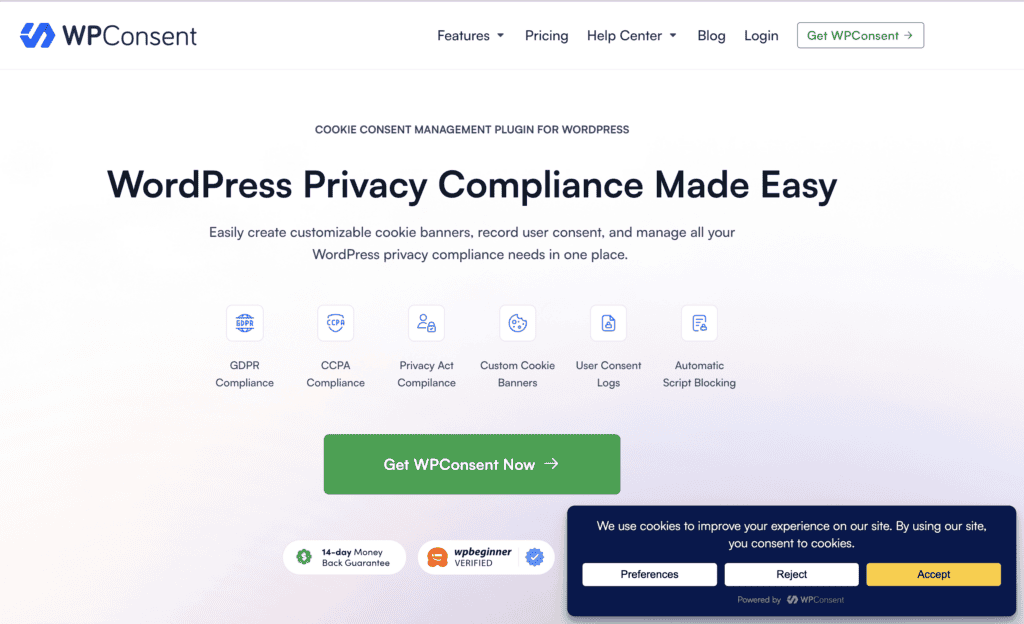
Its appeal lies in its refreshingly straightforward approach. The plugin features an onboarding wizard that guides you through the entire setup, from automatically scanning your site for cookies to customizing a consent banner. It will block trackers until a user gives consent, aiming to be a simple, lightweight solution to a complicated legal requirement.
We created a test site and installed WPConsent on it. To give you a real, hands-on answer, we focused on the following requirements for a compliance plugin:
- Legal Compliance: Does it cover the core requirements for GDPR and CCPA?
- Customization: How easy is it to design a banner that matches your brand?
- Value: Is the free version sufficient, or do you need to upgrade?
- Ease of Use: Is it truly as beginner-friendly as it claims to be?
Consent Management
The heart of any good cookie plugin isn’t just the banner itself, but how it manages user consent behind the scenes. This is where the real work of GDPR compliance for WordPress happens. WPConsent builds its entire feature set around making this process straightforward and automatic.
- Customizable Banners: WPConsent lets you create a banner that actually looks like it belongs on your site. You can choose from different layouts (like a pop-up or a bar at the bottom) and customize the content and appearance. This is crucial for getting explicit consent in a way that is clear, specific, and doesn’t disrupt your branding.
- Granular Cookie Control: Instead of a simple “accept all” button, the plugin allows visitors to consent to specific cookie categories like “Analytics” or “Marketing.” This gives users genuine control over their data, which is a fundamental requirement of most privacy laws.
- Global Privacy Control (GPC) Support: WPConsent automatically respects the GPC signal, a setting in some browsers that tells websites a user does not want their data sold or shared. This is an important, forward-looking feature that helps with CCPA compliance and shows you respect user privacy preferences.
- Ongoing Consent Management: Privacy laws require that users can change their minds easily. The plugin adds a simple way for visitors to revisit their cookie preferences at any time and modify their choices, ensuring you remain compliant long after their first visit.
- Consent Logging: For audit purposes, WPConsent automatically records and stores a secure, anonymized log of all user consents. This log includes details like the timestamp and the specific consent given, and it can be exported when needed.
- Geolocation Detection: This premium feature automatically detects a visitor’s location and can be configured to only display the cookie banner to users in regions with specific privacy laws (like the EU). This improves the experience for visitors from other parts of the world.
- Multi-Language Support: If you have an international audience, you can’t show everyone an English-only banner. WPConsent allows the banner text to be displayed in different languages, which improves the user experience and is essential for global compliance.
Automated Script and Content Blocking
True compliance means actively preventing these scripts from running until you get permission. This is where WPConsent’s automated blocking features come in, providing an easy cookie banner setup that actually enforces user choices without you having to touch any code.
- Third-Party Script Blocking: This is the plugin’s most critical job. It automatically identifies and stops scripts from services like Google Analytics, Facebook Pixel, and other marketing trackers from loading until a user explicitly agrees. This is the core technical requirement for GDPR compliance.
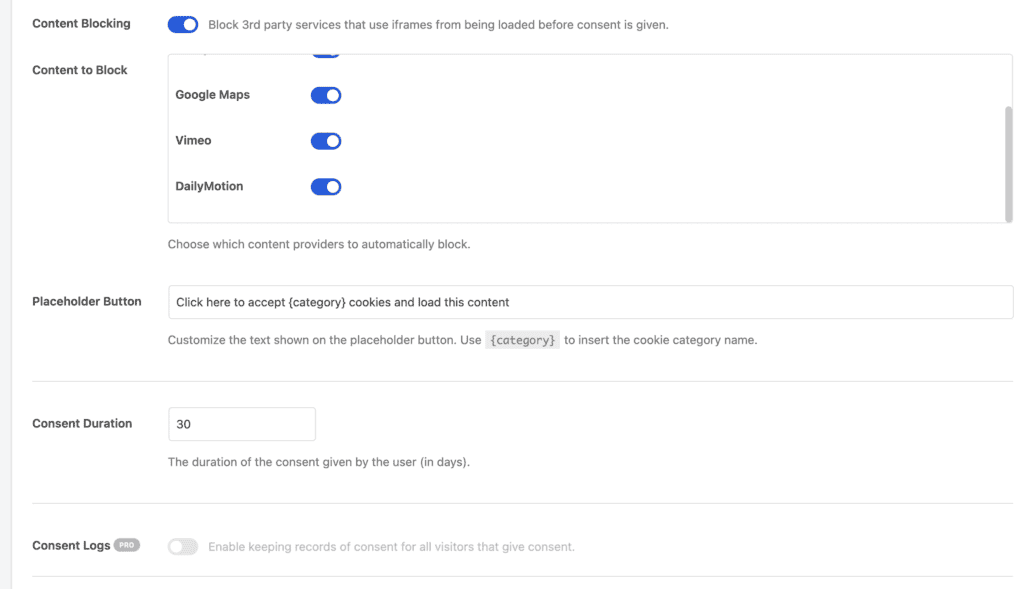
- Content Blocking: The plugin can also block embedded content, such as YouTube videos or Google Maps, that might place their own cookies. It replaces the content with a placeholder, asking for consent before loading it, which improves both compliance and user experience.
- Google Consent Mode V2 Support: WPConsent is fully compatible with Google’s latest consent mode. In simple terms, this allows the plugin to communicate a user’s consent choices directly to Google services, which can then adjust their behavior accordingly for more privacy-friendly analytics.
Design and Customizatio
Your cookie banner is often the first element a visitor interacts with on your site, and a generic, ugly banner can make your brand look unprofessional. WPConsent excels here, giving you a powerful visual editor to control nearly every aspect of the banner’s appearance without needing to write any code.
- Multiple Layouts: You can choose from several display formats to best fit your site’s aesthetic. These include a Long Banner (a horizontal bar at the top or bottom), a Floating Banner (a compact box in the corner), and a Modal Banner (a pop-up that overlays the page content).
- Color and Style Customization: The plugin gives you full control over the banner’s visual elements. You can customize the background, text, and button colors to match your brand palette, adjust font sizes for readability, and choose between different button styles (filled or outlined) and corner shapes (square or rounded).
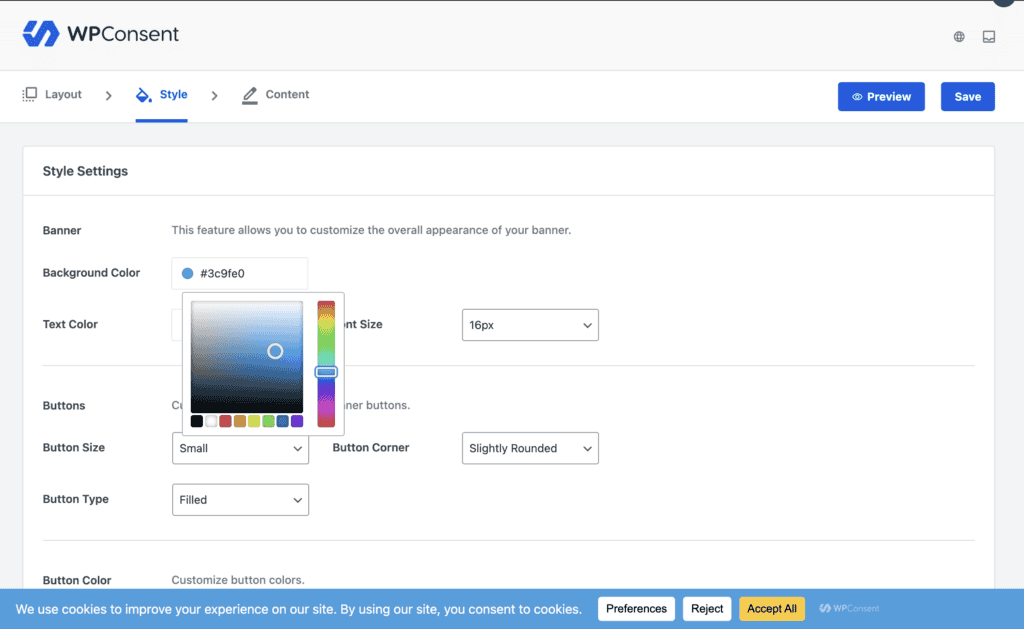
- Content Editing: Beyond just the visuals, you can change every piece of text to align with your brand’s voice. This includes modifying the main banner message, editing the text on each button, and changing the titles and descriptions within the detailed preferences panel.
- Logo Integration: For a more professional and trustworthy appearance, you can upload your own logo directly into the banner. This small touch helps integrate the banner seamlessly with the rest of your site design.
- Button Control: WPConsent allows you to rearrange the order of the “Accept,” “Reject,” and “Preferences” buttons using a simple drag-and-drop interface. You can also disable specific buttons if they don’t fit your consent strategy.
WPConsent’s Pricing: Straightforward and Predictable
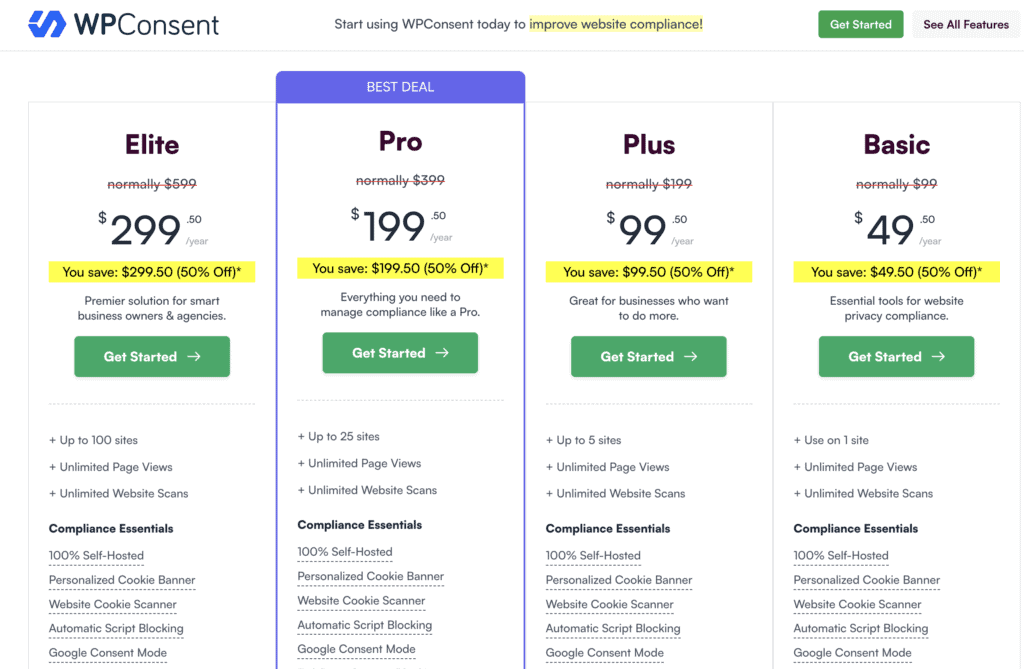
WPConsent’s pricing structure is refreshingly straightforward. We found its model to be a significant advantage, especially for agencies or freelancers who need predictable costs. The pricing is based on the number of websites you need to cover, not the number of pages on each site. This means your costs won’t unexpectedly increase just because your site is growing.
The plugin offers a highly functional free version, but the premium tiers are where the most powerful automation and compliance features are unlocked.
- Free: This version is available directly from the WordPress plugin repository and is ideal for beginners or websites with basic needs. It includes automatic script blocking, a customizable banner, the website scanner, and a basic policy generator.
- Basic: For $49.50 per year, this plan covers a single website, making it perfect for individual blogs or small personal sites that need the full feature set.
- Plus: At $99.50 per year, this tier covers up to 5 websites. It’s the best value for small businesses or users who manage a few different sites.
- Pro: Costing $199.50 per year, the Pro plan covers 25 websites, making it a great fit for agencies or freelancers managing a portfolio of client sites.
- Elite: For $299.50 per year, this top-tier plan covers 100 websites, designed for larger agencies and networks that need to manage a high volume of sites efficiently.
Is WPConsent Easy to Use?
Where WPConsent really shone in our testing was its usability. From the moment we activated it, the guided onboarding wizard had us up and running with a compliant banner in under five minutes. It started with a scan of the entire website that revealed information about how many plugins are tracking data without the user’s consent.
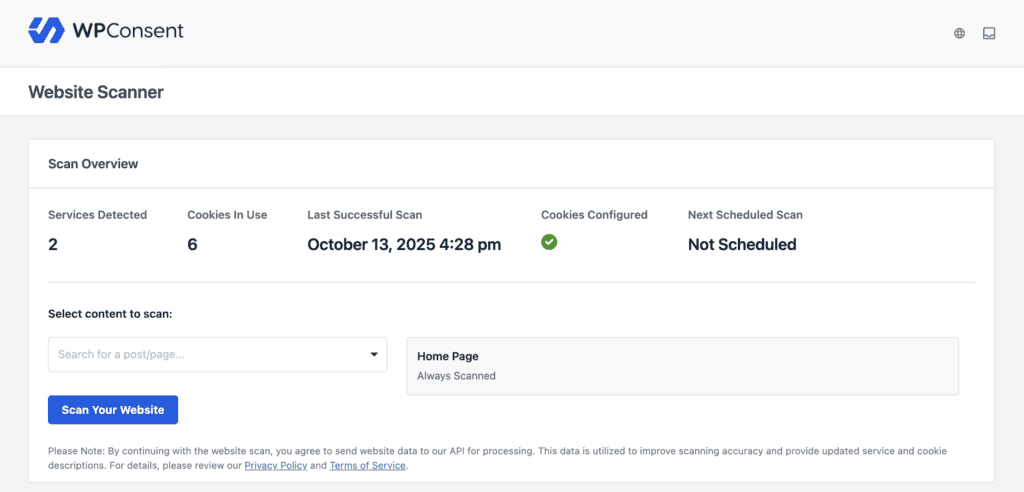
They also offered templates and designs to customize the banner. We were impressed that the entire process was completely code-free. The standout feature for us was the live visual editor. Being able to see our design changes in real-time removed all the guesswork from creating a banner that matched our brand.
What’s Missing? A Look at WPConsent’s Limitations
No plugin is perfect, and WPConsent requires an honest look at its limitations. While it excels at simplicity and core functionality, users with more advanced or specific compliance needs might find some features lacking.
- More Granular Consent: WPConsent allows users to consent by categories (e.g., Analytics, Marketing), which is sufficient for most sites. However, it lacks the ability for users to accept or reject individual services within a category. For example, a user can’t accept Google Analytics while rejecting a different analytics tool if both are in the same “Statistics” category.
- Comprehensive Automatic Blocking: The plugin is excellent at automatically blocking a wide range of common tracking scripts. However, we found that sites running less common or custom third-party technologies might need to manually configure blocking rules, which adds a layer of complexity.
- No IAB TCF Integration: WPConsent does not currently support the Interactive Advertising Bureau’s (IAB) Transparency and Consent Framework (TCF). While this isn’t a requirement for most websites, it is a standard used by many in the digital advertising ecosystem to manage and communicate consent choices.
- Displaying Detailed Service Information: Some advanced privacy regulations require displaying detailed information about each service (e.g., data processor, legal basis) within the consent dialog. While WPConsent shows the cookies it finds, it could be more comprehensive in displaying this service-level legal information out of the box.
WPConsent Alternatives
If WPConsent doesn’t quite meet your needs, there are other powerful players in the market. When looking at WPConsent and its competitors, it’s important to understand what each tool specializes in.
- Cookiebot: Cookiebot is a powerful, enterprise-grade Consent Management Platform known for its deep website scanning and highly automated compliance. It’s a great choice for larger organizations or those who need comprehensive, detailed control. However, its pricing is based on the number of pages on your site, which can become expensive, and its interface is generally considered more complex than WPConsent’s.
- OptinMonster: While primarily known as a lead generation and conversion optimization tool, OptinMonster also includes features for creating GDPR-compliant opt-in forms and cookie consent pop-ups. If you are already using it for marketing campaigns or need a tool that combines pop-ups, lead forms, and basic consent management, it could be a good all-in-one solution.
Final Thoughts
After our hands-on testing, our WPConsent review concludes that it is an outstanding choice for WordPress users who prioritize simplicity, ease of use, and a predictable price. For small businesses, bloggers, and agencies managing straightforward client sites, it is arguably the best WordPress cookie consent plugin on the market. It successfully demystifies a complex topic and delivers a clean, effective solution.
However, a compliant cookie banner is just one piece of the puzzle. True GDPR compliance for WordPress is about safeguarding your entire digital operation, including the user data and consent logs you collect. This is why pairing WPConsent with a reliable backup and security solution is not just a good idea—it’s essential. A tool like BlogVault ensures that all your site data, including those critical consent records, is securely backed up and can be restored in minutes. This protects you from data loss and helps you maintain a trustworthy, compliant, and resilient online presence.
FAQs
Is WPConsent completely free to use?
Yes, WPConsent has a robust free version available on the WordPress repository that covers the core needs of many websites, including a customizable banner and automatic script blocking. However, advanced features like consent logging, geolocation (showing the banner only in specific regions), and additional banner layouts require upgrading to a premium plan.
Is WPConsent enough to make my website fully GDPR/CCPA compliant?
WPConsent provides the essential technical tools to help you become compliant, such as blocking scripts and logging consent. However, no plugin can guarantee 100% legal compliance on its own. Full compliance also depends on having accurate legal documents (like a Privacy Policy) and ensuring the plugin is configured correctly for your specific data practices. It’s a powerful tool, but we always recommend consulting with a legal professional.
Does WPConsent work with Google Analytics and Consent Mode?
Yes, WPConsent fully supports Google Consent Mode V2. This means it can communicate a user’s consent status directly to Google services. If a user does not consent to analytics cookies, the plugin will instruct Google Analytics not to collect identifying data, which is a critical feature for using analytics in a privacy-compliant way.
Can I customize the cookie banner to match my website’s design?
Absolutely. This is one of WPConsent’s biggest strengths. It includes a live visual editor that allows you to change colors, fonts, layouts, and button styles to perfectly match your brand’s aesthetic, all without needing to write a single line of code.
Can I show the cookie banner only to visitors from specific countries?
Yes, but this feature, known as geolocation, is only available in the premium versions of WPConsent. With a premium plan, you can configure the banner to display only to visitors from specific regions where laws like GDPR apply, providing a cleaner, uninterrupted experience for users from other parts of the world.

Shreya has been a writer for as long as she can remember. Now, she writes articles that help WordPress users manage the sites that they're proud of, with little to no coding


