When choosing between plugins for memberships, this simple membership review will help you find out if it’s the right one for you. You just want to protect some premium content without getting lost in a thousand complex settings, right?
Picking the wrong tool can lead to angry members who can’t log in or, worse, people accessing content they haven’t paid for. Simple Membership promises a no-fuss solution, but does “simple” also mean “limited”?
We’ve tested the plugin to see if it delivers on its promise. This article breaks down its real-world performance, features, and potential pitfalls to help you decide if it’s the smart, straightforward solution your website needs.
We created a test site with a few fake users, plans and blogs. We found that it’s a free plugin that is packed with all the essentials you need for a small membership site. I would recommend advanced websites use a more feature rich plugin like ARMember.
Amidst the list of membership plugins, Simple Membership is popular for its lightweight, and user-friendly solution for WordPress. Its core philosophy is to help you easily protect exclusive content and manage member access without the overwhelming complexity of larger plugins. It’s built specifically for beginners, bloggers, and small businesses who need a straightforward membership system that just works.
To see if it truly delivers on its promise of simplicity, we tested Simple Membership based on the following key areas:
- Ease of Use: How quickly can a complete beginner get it set up and protect their first piece of content? A simple plugin should save you time, not create a new learning curve.
- Core Features: What essential tools does the free version provide? We’ll look at its content protection, member management, and basic payment options right out of the box.
- Pricing and Value: The core plugin is free, but what’s the real cost when you need more functionality? We’ll evaluate the value of its paid add-ons and whether it remains budget-friendly as you grow.
- Support and Reliability: Can you rely on a free plugin to be secure and well-maintained? We’ll check its update frequency and the quality of its community support forums.
- Flexibility and Integrations: How well does it play with other plugins and themes? A simple plugin shouldn’t break your site or limit your options for payment gateways and other tools.
Manage Membership Plans and Access Control
The most fundamental job of any membership plugin is to control who sees your content. This is where you set the rules for your entire site, creating value by making certain materials exclusive. Here’s how Simple Membership handles this crucial task.
- Unlimited Membership Levels: Create as many free or paid access tiers as you need (e.g., Free, Bronze, Gold) to structure your offerings.
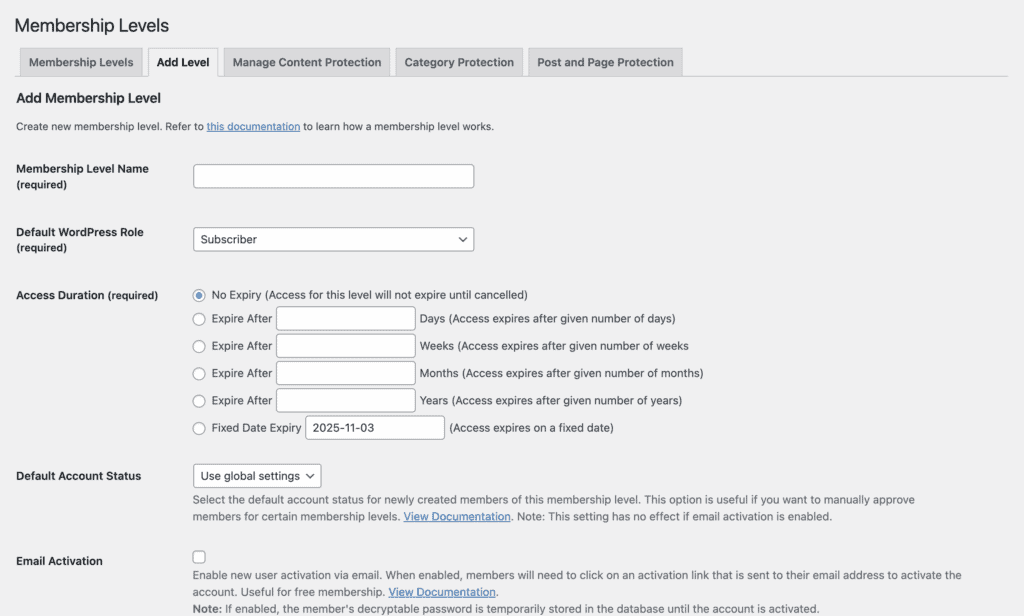
- Total Content Restriction: Protect specific posts, pages, categories, and custom post types, ensuring only the right members can see them.
- Partial Content Protection (Teasers): Show a snippet of premium content to non-members to entice them to sign up and view the rest.
- Bulk Protection: Save time by applying protection rules to entire categories of posts and pages at once.
- Custom Protection Messages: Decide what message visitors see when they land on a protected page, guiding them to register or log in.
- Default Protection: Automatically protect all new content you create under a specific membership level.
Manage Members
A good membership plugin gives you a central dashboard to view, edit, and support your members without hassle. This is about making your day-to-day administrative tasks simple and efficient.
- Central Member Dashboard: View, search, and filter your entire member list by status or membership level from one place.
- Manual Member Management: Manually add new members, approve pending accounts, or edit existing member details as needed. I had to assign the plans to my existing fake users.
- Clear Account Statuses: Easily see if a member’s account is Active, Inactive, Pending, or Expired.
- Member Upgrades/Downgrades: Admins can change a member’s level, or members can upgrade their own accounts through a payment button.
- Email Verification: Add a layer of security by requiring members to confirm their email address before their account becomes active.
- Member Data Import/Export: Import existing WordPress users or bulk-import members with a CSV file. A data exporter is available as a paid add-on.
- Admin Notes for Members: Keep private notes on a member’s profile for your own reference.
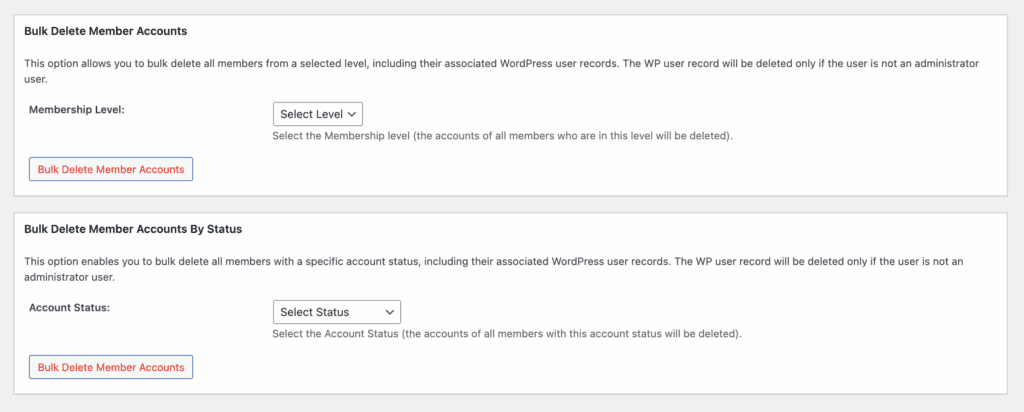
- Member Account Deletion: Give members the option to delete their own accounts directly from their profile page. You can do it in bulk and by category. This is an unusual feature that I haven’t seen in any other membership.plugins I tested.
Payments and Subscriptions
Getting paid is the goal of most membership sites. A good system automates signups, renewals, and cancellations, saving you manual work. Here’s how Simple Membership manages payments.
- Multiple Payment Gateways: Natively accepts popular payment gateways like PayPal, Stripe, and Braintree (Braintree is for one-time payments only).
- One-Time & Recurring Payments: Set up both single “buy now” payments and automatic recurring subscriptions.
- Automated Processing: The plugin automatically handles member signups, payment collection, and account upgrades upon successful payment.
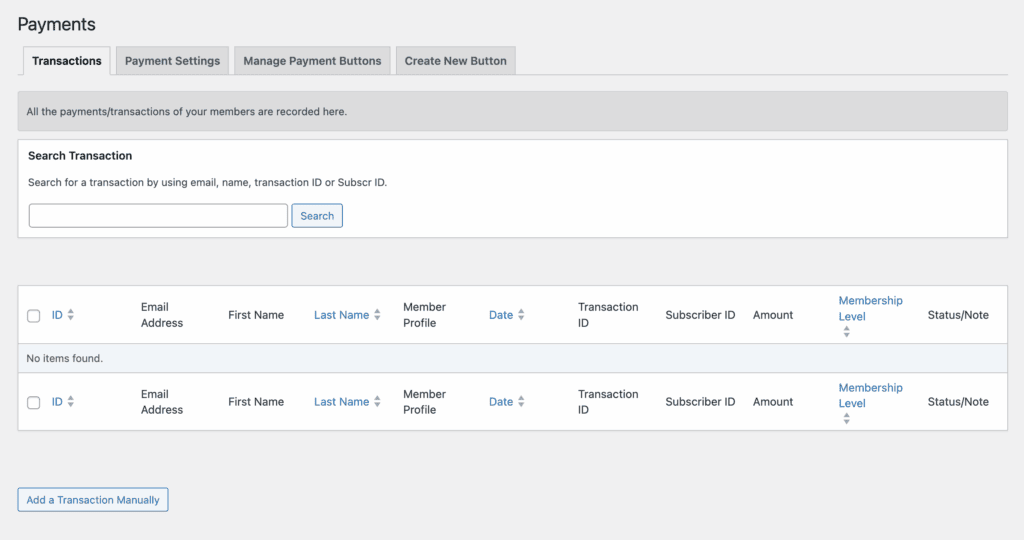
- Detailed Payment Logs: Keep a record of all transactions, which can be viewed directly in your WordPress dashboard.
- Free Trials: Offer a free trial period for subscriptions to attract more customers.
- Promo Codes: Create and manage promotional codes for Stripe subscription payments to run sales and special offers.
- Note on Refunds: Refunds are not processed within the plugin; they must be handled directly from your PayPal or Stripe account dashboard.
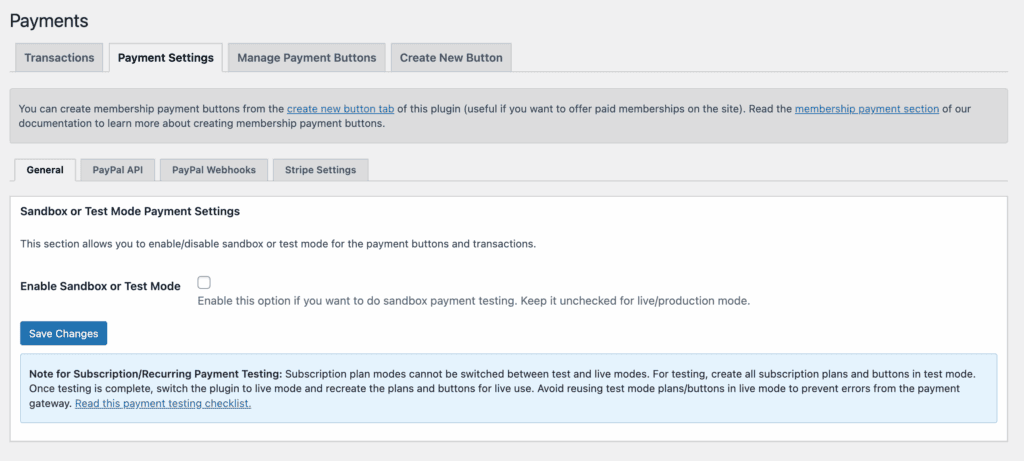
- Sandbox: They also offered a sandox to test a runthrough. You’re able to make fake transactions and see the user experience of using the payument gateway you enable.
Design and Customization
Your membership area should feel like a natural part of your website, not a clunky add-on. Customization allows you to match login forms, registration pages, and member profiles to your brand’s look and feel, creating a seamless and professional experience for your users.
- Universal Theme Compatibility: Designed to work with any well-coded WordPress theme.
- Easy Shortcode Implementation: Use simple shortcodes like [swpm_login_form] to place login, registration, and profile forms anywhere on your site.
- Front-End Member Pages: Provides all necessary front-end pages for members to register, log in, and edit their profiles without seeing the WordPress backend.
- Custom Redirection: Control where users are sent after they log in, register, or log out.
- Customizable Email Templates: Edit the content of automated emails sent to members using simple merge tags.
- Developer Friendly: Includes an API with action and filter hooks for developers who need advanced customization.
- Translation Ready: The plugin can be easily translated into other languages.
Privacy, Security, and Compliance
When you run a membership site, you are responsible for protecting your members’ data. Security isn’t just a feature—it’s a necessity. A good plugin provides tools to prevent unauthorized access, stop spam, and keep user information safe.
- Password Strength Policy: Enforce the use of strong passwords for all members during registration. It’s really basic password security butI wasn’t expecting much from a membership plugin.

- Brute Force Login Prevention: Automatically block IP addresses after a set number of failed login attempts.
- Limit Active Logins: Prevent members from sharing accounts by limiting how many devices can be logged in at the same time.
- Spam Protection: Integrate with Google reCAPTCHA or Cloudflare Turnstile on registration forms to block spam bots.
- Email Address Filtering: Restrict registrations to specific email domains (whitelisting) or block certain domains (blacklisting).
- Terms & Conditions: Require users to agree to your terms of service and privacy policy before they can register.
Extending Functionality with Add-ons
The Simple Membership plugin keeps its core lightweight on purpose. Instead of packing in every possible feature, it uses a modular system of add-ons to extend its functionality. This is a smart approach: you only install and pay for the specific tools you need, keeping your site fast and uncluttered.

While many essential Simple Member add-ons are free, the premium ones typically come with a budget-friendly one-time fee, which is a major advantage over subscription-based models.
Free Add-ons
These add-ons are available at no cost and cover many of the most common features you’ll need to enhance your membership site.
- After Login Redirection: Control exactly where members are sent after they successfully log in.
- Custom Messages: Customize the default messages shown to members and non-members across the site.
- Partial or Section Protection: Protect specific parts of a post or page using simple shortcodes, perfect for creating teaser content.
- Full Page Protection: Ensures non-members are completely redirected away from protected content, rather than just seeing a restricted message.
- Social Login: Allow users to register and log in conveniently using their Google or Facebook accounts.
- CAPTCHA Integrations: Add Google reCAPTCHA or Cloudflare Turnstile to your forms to prevent spam registrations.
- MailChimp Integration: Automatically add new members to your MailChimp email lists to streamline your marketing.
- Affiliate Integrations: Connect with popular affiliate plugins like WP Affiliate Platform to run your own affiliate program.
- Bulk Import Member Data: Easily import a list of members from a CSV file.
- WP User Import: Convert existing WordPress users on your site into Simple Membership members.
- Miscellaneous Shortcodes: Adds useful shortcodes to display member counts, member info, and more.
Premium Add-ons
For more advanced functionality, you can purchase these add-ons, which typically come with a one-time fee.
- Membership Form Builder: Create custom registration and profile forms with unique fields like file uploads, checkboxes, and text areas for different membership levels.
- Member Directory Listing: Display a public, searchable, and sortable directory of your members on the front end of your site.
- Dynamic Menus: Show or hide specific navigation menu items depending on a user’s membership level or login status.
- bbPress Forum Integration: Restrict access to your bbPress forums, allowing only specific membership levels to view or post.
- Protect Older Posts: A time-saving tool that lets you apply protection rules to all of your existing posts in bulk.
- Member Data Exporter: Export detailed member data into a CSV file for use in other applications or for record-keeping.
Usability and User Experience
If you’re comfortable working within the standard WordPress dashboard, you’ll feel right at home with Simple Membership.
From the moment of activation, I could easily create new membership levels, manually add users, and configure basic security settings without needing to consult documentation.
The core function of content protection was particularly simple. To protect a piece of content, you just edit the page or post, check the protection box, and select which membership levels get access. Although, I wish I could just check off a list of pages and apply a single protection rule to all of them at once.
The instructions provided within the plugin, especially in the membership plans section, are very clear, so I was never struggling to figure things out.
Simple Membership Alternatives
Has your site outgrown Simple Membership and the basics? Maybe you need more powerful, all-in-one features without having to manage multiple add-ons. If you’re looking for a more robust solution, here are two of the most popular and reliable choices:
- MemberPress: Widely considered the gold standard for WordPress memberships, MemberPress is a premium, all-in-one plugin. It’s known for its rock-solid reliability, powerful features (like content dripping and course-building) built right in, and excellent customer support. It’s the perfect choice if you’re ready to invest in a tool that will scale with your business.
- Paid Memberships Pro (PMPro): If you like the idea of a free core plugin but need more power, PMPro is a fantastic option. Its free version is one of the most feature-rich available, and it’s highly extensible with a massive library of add-ons. It’s a great fit for those who want flexibility and don’t mind a more hands-on setup.
Final Thoughts
The plugin is a refreshingly straightforward and effective tool for anyone who needs to protect content without getting bogged down in complex settings. For beginners, bloggers, or small businesses on a tight budget, its free version is an incredible value and handles the essentials perfectly.
We recommend you use a staging site and test the plugin out for yourself. If you’re looking for a quick and easy way to manage a large number of users, this may be the solution for you.
FAQs
What is Simple Membership?
Simple Membership is a free WordPress plugin designed to help you create a members-only area on your website. Its main purpose is to protect your content—like posts, pages, or downloads—so that only logged-in members with the correct access level can view it. It’s known for being lightweight and easy for beginners to set up.
What are the three types of membership?
While there are many models, most membership sites fall into three general categories:
- Free Membership: Users sign up (usually just with an email) to get access to basic content. This is great for building an email list.
- Tiered Membership: You offer multiple levels (e.g., Bronze, Silver, Gold) where each higher tier costs more and gives access to more content and benefits.
- All-Access Pass: You charge one single fee (either one-time or recurring) that gives members access to everything you offer.
Simple Membership is flexible enough to handle all of these structures.
Is a membership fee a subscription?
Not always. A subscription specifically refers to a recurring payment (e.g., monthly or yearly). A membership fee is the cost to join, which could be a one-time payment for lifetime access or a recurring subscription. Simple Membership supports both one-time payments and recurring subscriptions through gateways like Stripe and PayPal.
Is the Simple Membership plugin completely free?
The core Simple Membership plugin is 100% free and powerful enough for many basic membership sites. However, for more advanced features like a custom form builder, a member directory, or content dripping, you will need to purchase separate add-ons. The good news is that most of these add-ons have a one-time fee, not a recurring subscription.
Can I protect content other than posts and pages?
Yes. By default, Simple Membership can protect posts, pages, and comments. With its free add-ons, you can also easily protect custom post types (like events or portfolio items), categories, and even specific sections of content within a single post using a shortcode. This makes it very flexible for protecting almost any kind of content on your site.

Shreya has been a writer for as long as she can remember. Now, she writes articles that help WordPress users manage the sites that they're proud of, with little to no coding