You’re evaluating the free version of UpdraftPlus, one of the most popular backup plugins, wondering if this is enough to protect your website, or if you need Premium.
If you choose incorrectly, you might overpay for unnecessary features. Or worse, discover during a crisis that the free version wasn’t sufficient.
We want neither of that to happen. That’s why we put together this hands-on comparison that cuts through the marketing noise. You’ll get an honest analysis and critical risk insight of UpdraftPlus free vs premium to make the right choice for your website.
UpdraftPlus is a popular WordPress backup plugin with both free and premium options. The free version suits personal blogs under 1GB with basic needs. Premium is essential for businesses, offering automated backups, encryption, one-click restores, and 24/7 support to prevent costly issues.
Free vs premium feature overview

Both Free and Premium versions handle basic backups and scheduling, but Premium transforms the entire experience. It also runs automatic backups before plugin updates, while the free version users must remember to backup their site manually.
The real gaps emerge in what gets backed up and where it goes. The free version misses critical files like wp-config.php and .htaccess, limiting you to one storage location.
Premium, on the other hand, captures everything and lets you store backups across multiple cloud services simultaneously. This version also organizes backups in subfolders instead of creating messy file dumps.
In terms of security, the free version stores an unencrypted database file while Premium encrypts all database tables and includes admin controls.
Support tells the whole story: Premium users get 24/7 expert help when sites crash, while the free users post in community forums and hope someone responds quickly.
Detailed feature comparison
Here’s a closer look at the nitty-gritty of what UpdraftPlus has to offer. We’ll break down the features of both the Free and Premium versions so you can see exactly what you’re getting:
I. Backup capabilities
With the free version, you get instant manual backups with a single button click, and backups run in the background without slowing down your site. Both the versions split your backup into organized files: database, plugins, themes, uploads, and others.
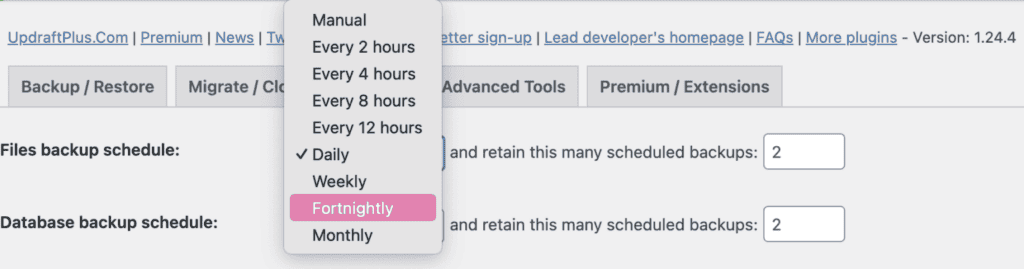
Scheduling options include preset intervals every 2, 4, 8, or 12 hours, plus daily, weekly, fortnightly, or monthly backups. But here’s where the free version hits a wall. It only backs up your wp-content folder and database, missing critical files like wp-config.php and .htaccess.

The free version also struggles with larger sites. Anything over 2-5GB often times out or fails due to heavy server resource usage during the backup process.
Premium includes all the same basic features as the free version, but it adds custom timing. With this, you can set backups for when your server isn’t busy. Premium also creates automatic backups before any plugin, theme, or WordPress updates, protecting you from potential mishaps.
Unlike the free version, Premium captures everything. Complete files, custom directories, and even external databases are backed up. Most importantly, Premium’s incremental backups solve the resource problem.
Instead of backing up everything repeatedly, they only save changed files, using 70% fewer server resources and handling sites up to 50GB+ without crashes.
II. Restore capabilities
The free version gives you a restore button in your WordPress dashboard where you can select which components to restore: database, files, plugins, themes, or uploads. However, if your restore process fails or throws timeout issues, you may encounter common UpdraftPlus restore errors that prevent successful recovery.

It also lets you restore specific parts without affecting your entire site, and you can download individual backup files if needed. The manual upload process only comes into play if you lose access to your WordPress admin and need to restore using FTP.

When restoring this backup file to a different domain, you’ll need to manually fix internal links and update file paths throughout your database.
Premium includes all the same restore capabilities as the free version. The dashboard restore button, component selection, and specific part restoration. The key difference is that you get to restore backups created by another plugin alongside the the ones created by UpdraftPlus.
III. Storage and retention
The free version limits you to one storage destination, like Google Drive or Dropbox, dumping files in messy root folders with cryptic names.
You’re also stuck with whatever free storage limits that service offers, and you’ll need to manually delete old backups when you run out of space. Free also stores backups on your server by default, which defeats the purpose if your server crashes.
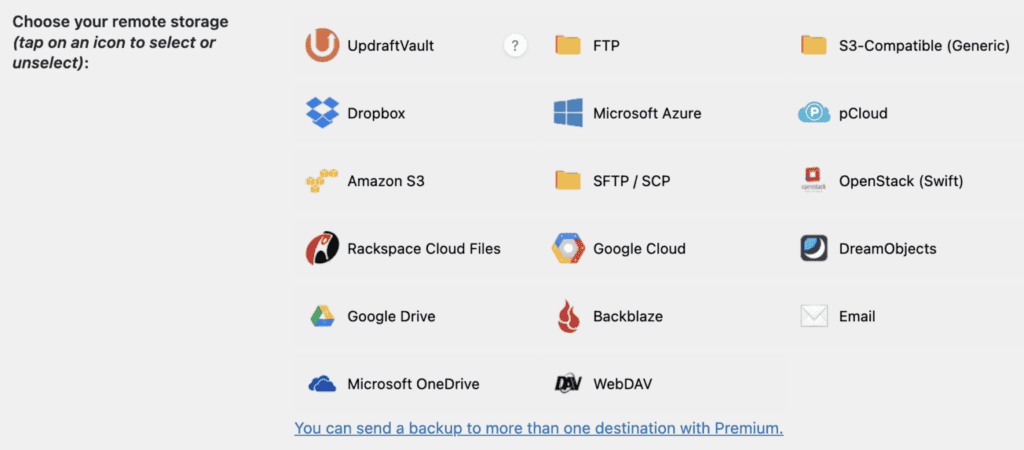
Premium opens up multiple destinations simultaneously. Send the same backup to Google Drive, Amazon S3, and Backblaze B2 all at once. If one service goes down, your backups are safe elsewhere.
You also get access to cheaper storage options like Backblaze and extended services, including OneDrive, Azure, Google Cloud, and WebDAV. Premium also includes 1GB of UpdraftPlus Vault storage with upgrade options up to 250GB.
Organization becomes effortless with Premium’s subfolder system. Your backups get sorted into subfolders of Google Drive or Dropbox instead of cluttering your cloud storage root directory.
Premium’s advanced retention rules work by age, not just count. Keep daily backups for one week, then switch to weekly backups for a month, then monthly archives. The system automatically deletes expired backups according to your rules.
IV. Security and reliability
The free version uses basic WordPress security protocols and standard HTTPS for cloud uploads. Your database tables get stored without encryption. Anyone with admin or access can read your data, including sensitive information like user passwords and personal details.
Also, all WordPress administrators can access backup functions with no restrictions, and there’s no way to lock backup settings to prevent other users from changing configurations.
You get basic error logging for troubleshooting, and there’s no way to test your backups within the interface. You’re also relying on community-driven security updates that depend on users reporting problems.
Premium encrypts your database and anonymises your backup files before storage. You can also lock access to your backup files from other admins.
You can add password protection to backup files and restrict backup access to specific administrators only. Premium includes admin lock settings to prevent other users from changing your backup configurations, plus sensitive data anonymization that removes or masks personal information.
V. Migration capabilities
Moving your site with the free version means doing everything manually. You’ll backup your source site, download all backup files to your computer, upload them to the new destination, and then restore each component separately.

This process requires technical knowledge because you’ll manually have to search and replace every URL when changing domains.
Migration time varies depending on site size, and every step risks breaking something. One wrong database import or missed file path leaves you troubleshooting cryptic errors with minimal guidance.
Premium eliminates the technical headache with one-click migration, essentially functioning as a dedicated migration plugin. Instead of downloading and re-uploading files, direct transfer moves your site between servers automatically.

Premium handles cross-server migration, multisite migration, automatically adjusting URLs, file paths, and SSL settings without manual intervention.
Pricing
Free version:
- $0 for the plugin
- Storage costs depend on your chosen service
- Community support only
Premium pricing:

UpdraftPlus offers tiered plans starting with options suitable for personal, business, and agency needs. Each plan includes features like extra Vault storage and 24/7 priority support, catering to different levels of site complexity and professional requirements.
UpdraftPlus free vs premium: The verdict
Stick with the free version if you’re running a personal blog under 1GB, are comfortable with manual backup management, and have the technical skills to troubleshoot. Free works fine for sites where a few hours of downtime won’t cost you money.
Upgrade to premium when your site handles customer data, processes payments, exceeds 1GB, or generates business revenue. Premium becomes essential for agencies, GDPR compliance needs, or when manual backup processes eat too much of your time.
Clear upgrade signals: Your site crashes, and you realize that the free version missed critical files like wp-config.php. Your backups keep failing on larger sites. You’re spending 2+ hours monthly managing backups manually. You need encryption for sensitive data, or you can’t afford extended downtime.
Cost reality check: Premium runs $70-195 annually versus $2,000-15,000 in professional recovery costs. If your site generates more than $95 yearly value, Premium pays for itself with one avoided disaster.
Start with the free version to get basic protection today, but upgrade to premium before your site becomes business-critical—because the best backup is the one that works when you need it most.
Parting thoughts
Your choice comes down to site complexity and risk tolerance. Free handles basic needs for small personal sites under 1GB, where downtime doesn’t cost money. Premium becomes essential for business sites, customer data, or anything over 1GB, where failed backups mean lost revenue.
Premium’s time savings and automated protection justify the $70-195 annual cost for most business sites. As your site grows, Premium scales with you, offering stability that the free version can’t match.
Evaluate your site’s value and choose accordingly.
FAQs
Is UpdraftPlus Premium worth it?
Yes, for websites with complex needs or business requirements, UpdraftPlus Premium is worth it. It offers advanced features like encryption, multiple storage options, and priority support. These can be invaluable for data security and peace of mind.
Is the UpdraftPlus plugin free?
Yes, there is a free version of UpdraftPlus available. It provides basic backup and restore features suitable for smaller or less complex sites. For more advanced needs, the Premium version offers additional capabilities.
How much does UpdraftPlus cost?
UpdraftPlus has various pricing plans, starting at $70 per year for the Personal plan. Costs increase with Business and Agency plans, which offer features like multisite support and enhanced security. Pricing reflects the range and depth of features included.
Is UpdraftPlus safe?
Yes, UpdraftPlus is considered safe, especially the Premium version, which includes encryption and secure storage options. It has a solid reputation for reliability in the WordPress community. However, always ensure regular updates and best practices for optimal security.

Shivani enjoys crafting guides that make every aspect of using WordPress simple and easy to follow. When she's not glued to her laptop, you can find her buried in a good book or occasionally, painting.