A WordPress cookie plugin is essential for legal compliance, which is why you’re searching for a solid Cookiebot review. You’ve poured hours into building your website, and now you’re suddenly hit with the confusing world of GDPR, cookie banners, and the looming fear of potential fines.
This review cuts through the marketing fluff. We’ll show you exactly how Cookiebot works, where it shines, and where it falls short. By the end, you’ll know if it’s the right solution to protect your site and your peace of mind.
We explored the plugin on a staging site. We found that it is an excellent automated tool for achieving basic compliance on a single website, but its per-domain pricing can quickly become expensive as your site grows.
Setting the scene for Cookiebot Review
Cookiebot is one of the most well-known WordPress cookie plugins and Consent Management Platforms (CMPs) on the market. It is designed to automate the complex task of making your website compliant with GDPR and other privacy laws like CCPA.
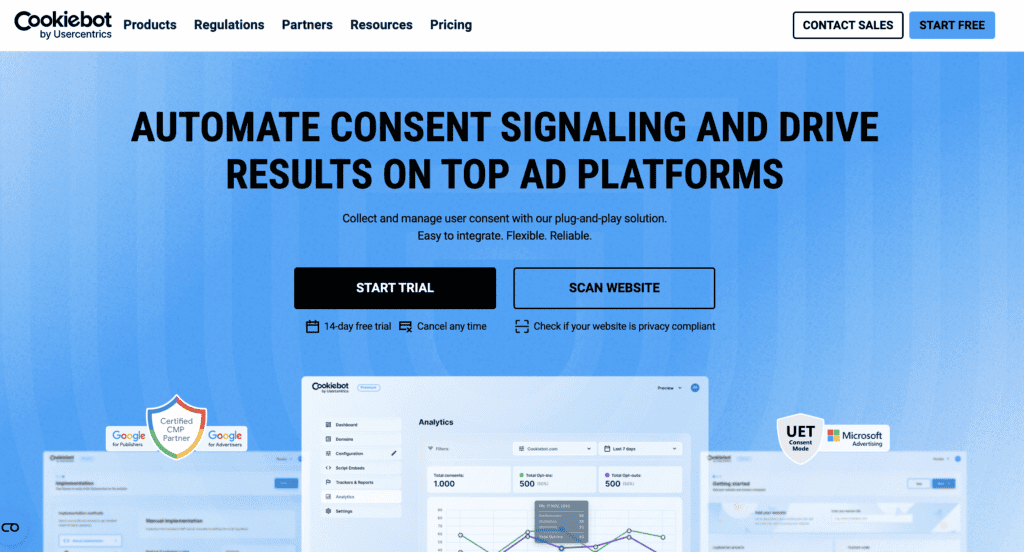
Its popularity stems from how it automatically scans your website to find and categorize all cookies and trackers. It generates a customizable consent banner for your visitors, and blocks scripts from running until it receives explicit user consent. For many website owners, it represents the “set-it-and-forget-it” solution to a major legal headache.
But with so many options available, is it still the best choice for you? To provide an honest, hands-on answer, we installed and configured the Cookiebot plugin on a live test site to see how it performs in a real-world scenario. Here’s what we were specifically looking for:
- Meets legal compliance needs
- Customization to match your brand
- Value of free vs. premium
- Ease of use for beginners
How Does Cookiebot Manage Cookies and Trackers?
The most difficult part of cookie compliance isn’t just adding a banner; it’s knowing what’s actually running on your site and ensuring it’s all blocked until you get permission. This is where Cookiebot’s automated cookie and tracker management is supposed to shine. We were keen to see if its famous scanner was as thorough as advertised. The short answer is yes—the automation here is impressive and saves a massive amount of manual effort.
Here’s a breakdown of what we found during our testing:
- Monthly Automatic Scans: We set up our initial scan, and within a few hours, Cookiebot had a complete report. The real value is the monthly automatic scan, which runs in the background. This gave us peace of mind, knowing that if we added a new plugin or script, Cookiebot would catch any new trackers without us having to do anything.
- Deep Scanning: The deep scanning technology was particularly impressive. Our test site uses various marketing and analytics tools, and the scanner correctly identified cookies from Google Analytics, Facebook Pixel, and even some less common ones embedded in a video player. This thoroughness is crucial, as many other tools perform only a surface-level scan.
- Automatic Blocking: Once the scan was done, the automatic blocking feature kicked in immediately. We tested this by visiting our site before giving consent and confirmed that our Google Analytics tags did not fire. This is the single most important feature for compliance, and it worked flawlessly out of the box without any manual coding.
- Categorization: The automatic categorization saved a significant amount of time. Instead of giving us a long, confusing list of cookies, Cookiebot sorted them into “necessary,” “statistics,” and “marketing.” This made it easy to understand what was running on our site and to generate an accurate, user-friendly cookie policy.
- Global Cookie Repository: What powers this automation is Cookiebot’s global cookie repository. When it finds a common cookie, it already knows what it does and pulls the description from its vast database. This meant our cookie declaration was populated with clear, plain-language explanations automatically, which is a huge step up from having to research and write them all ourselves.
Consent Collection and User Control: Does It Give Users Real Choice?
A cookie banner is useless if it doesn’t collect consent in a legally compliant way. This means giving users clear, granular choices and making it easy for them to change their minds.
We tested Cookiebot’s banner functionality to see how much control it really offers the end-user. We found its options to be robust, flexible, and fully compliant with major privacy laws.
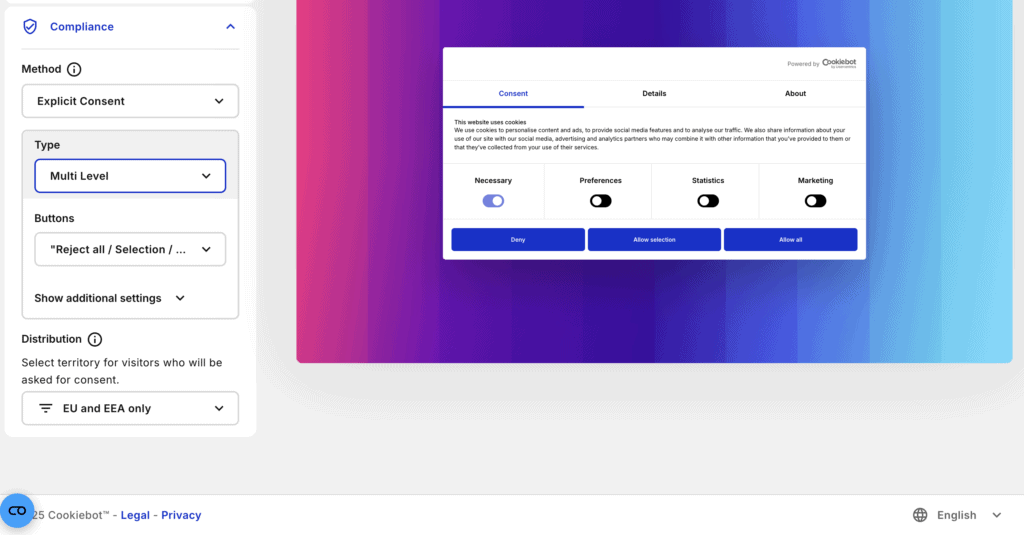
Here’s how it performed in key areas of consent collection:
- Granular Consent: We were pleased to see that the banner doesn’t force an “all or nothing” choice. Our test banner allowed visitors to tick boxes for “statistics” and “marketing” cookies separately, giving them genuine, granular control over their data. This is a critical requirement under GDPR.
- Easy Withdrawal: We checked if a user could easily change their mind after consenting. The small “privacy trigger” icon, which we placed in the corner of our site, made this simple. Clicking it re-opened the consent dialog, allowing for easy updates or withdrawal of consent at any time.
- Fully Customizable Banner: Beyond just colors (which we’ll cover later), we could customize the banner’s text and functionality. We tweaked the wording to match our brand’s tone of voice and configured the buttons to provide clear actions for our users.
- Geo-targeting: This feature worked perfectly in our tests. Using a VPN, we set our location to California, and the banner switched to a CCPA-compliant format. When we switched to Germany, it correctly displayed the more stringent, explicit consent model required by GDPR. This automation is invaluable for global websites.
- Google-Certified: For our analytics setup, the fact that Cookiebot is a Google-certified CMP was a huge advantage. We configured Google Consent Mode v2, and it integrated seamlessly, allowing us to collect vital analytics data in a privacy-compliant way, even from users who reject non-essential cookies.
Visual and Layout Customization: Making the Banner Your Own
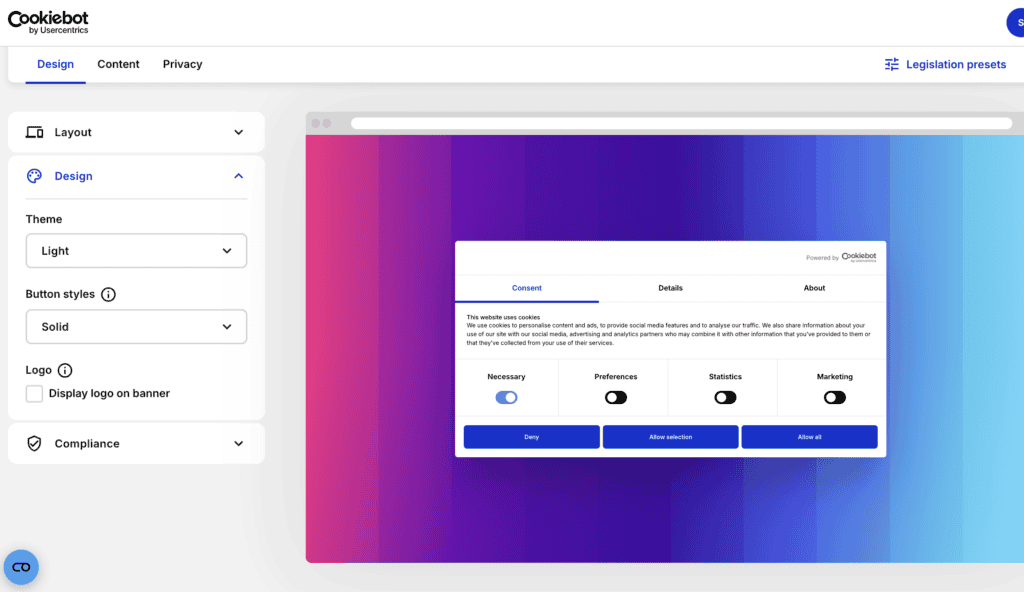
A cookie banner should feel like a natural part of your website, not a clunky, third-party intrusion. We spent time in the customization settings to see how well we could match the banner to our test site’s branding. The options were extensive enough for most needs, allowing for a high degree of visual integration.
- Templates and Presets: We started with the pre-built templates. The “Swift” design felt modern and clean, while “Elemental” offered a more classic layout. These are great starting points if you don’t want to build from scratch.
- Color Schemes: Switching between “Light” and “Dark” themes was simple. We then dove into the “Custom” color options and were able to match the banner’s background, text, and button colors precisely to our site’s hex codes.
- Position and Type: We experimented with different placements. The bottom bar was unobtrusive, but the pop-up modal was more direct. The ability to choose the right format for our user experience was a big plus.
- Branding: Adding our logo was a simple upload process, which immediately made the banner feel less generic and more integrated with our brand.
- Button Configuration: For our multi-level banner, we configured a three-button setup: “Reject all,” “Allow selection,” and “Allow all.” This provided clear, granular options for our visitors, which is best practice for GDPR.
- Privacy Trigger: The small icon that allows users to change their preferences later was also customizable. We changed its position and color to ensure it was accessible but didn’t interfere with our site’s main navigation.
Ease of Use: How Easy Is It to Get Started?
A powerful tool is useless if it’s too complicated for the average website owner to set up. We evaluated the entire process, from creating an account to deploying the banner on our WordPress test site, to gauge its user-friendliness for non-developers. Overall, the basic setup is remarkably fast and intuitive.
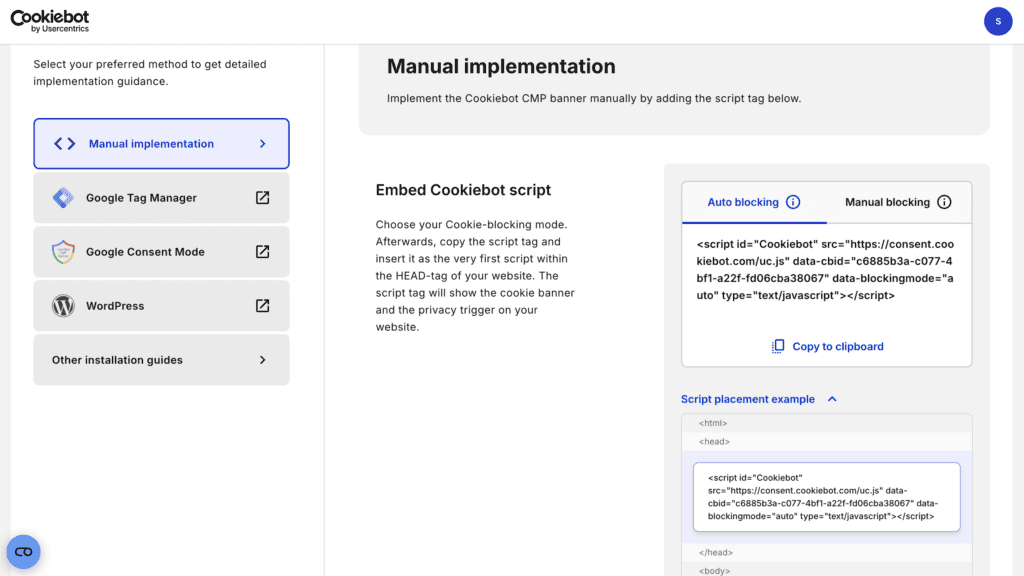
- Intuitive Dashboard: From the moment we logged in, the dashboard felt straightforward. It guides you through the three main steps: add your domain, customize the banner, and add the script to your site.
- Minimal Technical Skill Required: Our testing confirmed that you don’t need to be a developer. If you can copy and paste a line of code or install a WordPress plugin, you have all the technical skills needed to get Cookiebot running.
- Initial Setup in Minutes, But First Scan Takes Time: Creating the account and getting the script on our site took less than 15 minutes. However, be prepared to wait for the first scan; ours took about 18 hours to fully complete and categorize all the cookies on our site.
- Quick Implementation with Integrations: We tested both the WordPress plugin and the Google Tag Manager (GTM) integration. The WordPress plugin was by far the easiest method for our test site—just install, connect your account, and it handles the rest.
- Extensive Documentation: When we had a question about configuring Google Consent Mode, we found the official Help Center’s articles and video tutorials to be clear, detailed, and easy to follow.
Cookiebot’s Pricing Structure: Powerful but Potentially Pricey
Cookiebot’s pricing is what soured our experience, slightly. While the technology is solid, the pricing model is a common point of frustration for users, especially those managing multiple websites or experiencing growth. We found the pricing to be straightforward for a single small site but saw how costs could escalate quickly.
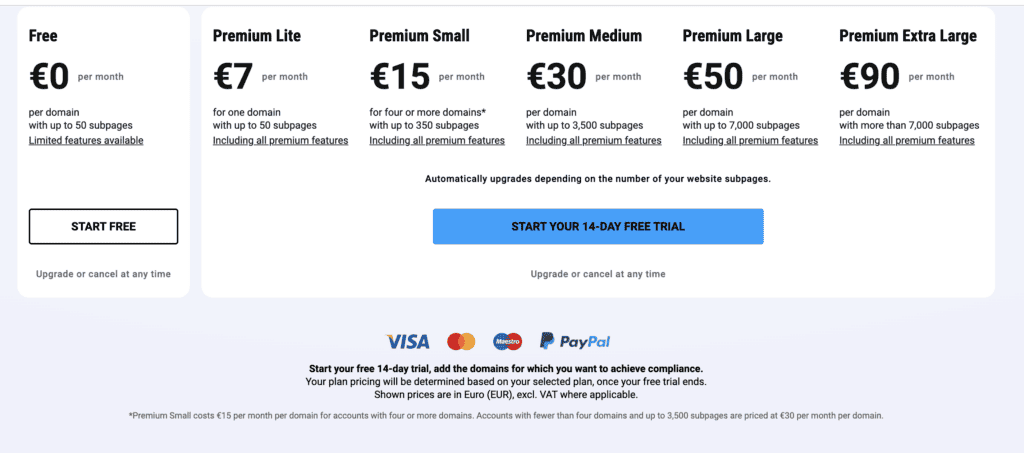
Cookiebot’s pricing is based on the number of pages on your website and is billed per domain. This means each subdomain (e.g., blog.yourwebsite.com) is treated as a separate domain and requires its own subscription.
Here is a breakdown of their monthly plans:
- Lite: $8 for one domain with up to 50 subpages.
- Small: $16 per domain (up to 350 subpages). Note: Cookiebot is phasing out this plan for accounts with 1-3 domains, automatically moving them to the Medium tier, which has caused some recent customer confusion.
- Medium: $34 per domain, up to 3,500 subpages.
- Large: $56 per domain, up to 7,000 subpages.
- Extra Large: $96 per domain, for sites with over 7,000 subpages.
Important things we noted about the pricing:
- There is a 14-day free trial for the Premium plans, and you don’t need a credit card to get started, which is great for testing.
- The system will automatically upgrade your plan if your site grows beyond your current tier’s page limit. While convenient, this can lead to unexpected bills if you’re not monitoring your page count.
- Recent customer complaints about sudden price increases seem directly tied to these automatic upgrades and changes in their pricing structure.
What’s Missing in the Cookiebot Plugin?
No plugin is perfect, and during our testing, we ran into a few limitations that could be deal-breakers for some users. While Cookiebot excels at automated compliance, it falls short in areas of deep customization and advanced analytics.
- Limited No-Code Design Options: While we could easily change colors and text, the overall layout and structure of the banners felt rigid. The built-in tools are fine for a basic look, but achieving a truly unique, seamlessly integrated design was not possible without extra work.
- Forced Developer-Level Customization: This was our biggest frustration. To make simple changes like removing the “Powered by Cookiebot” logo (even on our paid test plan), we had to find and apply custom CSS. This feels like an unnecessary hurdle for a premium tool aimed at non-technical users.
- Basic Consent Analytics: The dashboard shows you the number of consents, but that’s about it. We were looking for more actionable insights, like A/B testing different banner texts or analyzing consent rates by country. For data-driven marketers, the analytics feel very surface-level.
- Confusing Metrics: We noticed some discrepancies between the session data reported in Cookiebot and what we saw in Google Analytics 4. Finding clear documentation to explain these differences was challenging.
- Limited Reporting Frequency: The monthly scan is sufficient for static sites. However, if you run a dynamic website where new scripts or plugins are added frequently, waiting up to a month for the next automatic scan could leave you temporarily non-compliant.
Alternatives to Cookiebot
If Cookiebot’s pricing or customization limits don’t fit your needs, the good news is there are other excellent tools available. Here are a couple of popular alternatives:
- OptinMonster: While primarily known for lead generation pop-ups, OptinMonster also includes features to create cookie consent banners, making it a good option if you want an all-in-one marketing and compliance tool.
- WP Consent API: For those comfortable with a more hands-on, developer-friendly approach, WP Consent API is a free WordPress plugin that provides the basic framework for managing consent within the WordPress ecosystem.
Final Thoughts
After thoroughly testing it, we can say that Cookiebot is an excellent choice for website owners who prioritize automated, reliable compliance over deep customization. Its “set-it-and-forget-it” scanning and blocking are best-in-class and take a huge weight off your shoulders. The initial setup is fast, and it integrates seamlessly with Google Consent Mode.
For total peace of mind, we recommend you combine a specialized tool like Cookiebot with a comprehensive security and backup plugin. This ensures that your entire digital operation, including your compliance settings and consent records, is always protected and recoverable.
FAQs
Can I use Cookiebot for free?
Yes, Cookiebot offers a free plan that is suitable for one small website (under 50 pages). However, it has limited features, and you will need to upgrade to a premium plan for full compliance capabilities like consent logging and banner customization.
What is Cookiebot used for?
Cookiebot is a Consent Management Platform (CMP) used to make websites compliant with data privacy laws like GDPR and CCPA. It automatically scans for cookies, displays a consent banner to visitors, and blocks trackers until the user gives their consent.
Does Cookiebot scan my website for cookies?
Yes, one of its core features is an automated monthly scan that detects and categorizes all cookies and tracking technologies operating on your website. This ensures your cookie declaration is always up to date.
Is Cookiebot a certified Google CMP partner?
Yes, Cookiebot is a Google-certified CMP. This means it integrates seamlessly with Google Consent Mode v2 and Google Tag Manager, helping you gather important analytics data in a privacy-compliant manner.

Shreya has been a writer for as long as she can remember. Now, she writes articles that help WordPress users manage the sites that they're proud of, with little to no coding