
Using a WordPress cookie plugin is a crucial first step for website compliance, and this OptinMonster review breaks down one of the most popular tools for doing just that. This article cuts through the hype to give you a clear look at OptinMonster’s real-world pros, cons, and pricing. We’ll help you decide if it’s the powerful solution your website needs or if you should consider other options.
Always use a test site to try OptinMonster’s features so you can see how they work without affecting your live visitors. We found that it’s a powerful, feature-rich tool for established sites with a budget. It can be an expensive choice for beginners.
Setting the Scene
A cookie plugin needs to help you be compliant without any of the hassle. To give you an honest and practical review, we installed and tested OptinMonster on a test site. We specifically looked for:
- Features: Does OptinMonster provide the tools necessary to keep your website compliant with privacy laws like GDPR? We specifically tested for its ability to secure proper consent through customizable checkboxes, use geolocation targeting to show specific forms only to EU visitors, and easily add links to our privacy policy.
- Ease of Use: Is the drag-and-drop builder truly beginner-friendly, or is there a steep learning curve?
- Customization: Can you easily change the design of the popups and forms to match your website’s branding without writing code?
- Pricing and Value: Is there a free version available? Are the paid plans worth the investment, or are essential features locked behind expensive tiers?
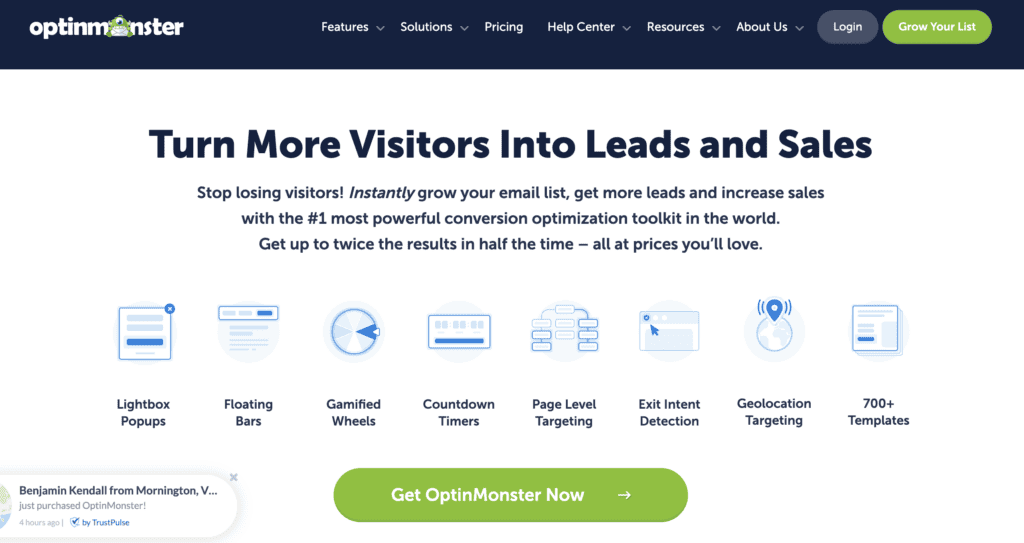
We quickly learned that OptinMonster, built by the WPBeginner team, was designed to help website owners easily convert their visitors. It’s most famous for its powerful targeting rules, especially its signature Exit-Intent® technology, which displays a campaign precisely when a user is about to leave your site.
Over the next few sections, we’ll dive into everything you need to know about OptinMonster.
Securing Visitor Consent
In today’s privacy-focused world, you can’t just ask for an email address; you need to get proper consent. Failing to comply with GDPR and other regulations can lead to heavy fines and a loss of visitor trust. During our tests, we focused heavily on how well OptinMonster equips you to handle these requirements, ensuring your lead generation efforts are both effective and compliant.
- Customizable privacy checkboxes: We found it incredibly simple to add a consent checkbox to our forms. With just a few clicks, we could add text like “I agree to the privacy policy” and make it a required field, preventing submissions until a user explicitly opted in.
- Privacy notice fields: Adding a direct link to our privacy policy page within the form was straightforward. This transparency is crucial for building trust, and OptinMonster lets you add this text without any hassle.
- Double opt-in: We tested this by integrating OptinMonster with our email marketing service. The plugin handed off the double opt-in process seamlessly, ensuring every subscriber confirmed their consent via email. This provides a clear, documented record of consent.
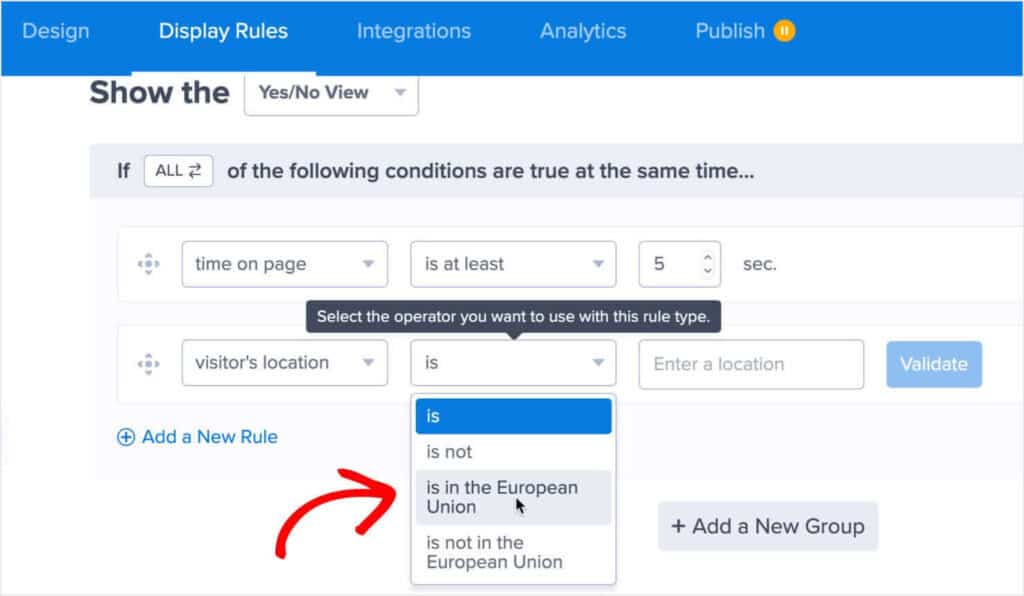
- Geolocation targeting: This was one of the most impressive compliance features we tested. We set up a specific campaign with a GDPR consent field to display only to visitors from EU countries. This allowed us to meet strict regional requirements without adding unnecessary steps for visitors from other parts of the world.
Data Processing and Security
When you collect visitor data, you become responsible for protecting it. A security issue can be disastrous for your reputation and business. That’s why we dug into OptinMonster and its security protocols and data handling policies to see if they provide the peace of mind a website owner needs.
- Data Processing Agreement (DPA): We noted that OptinMonster offers a DPA, which is a non-negotiable legal document for anyone needing to be GDPR compliant. It clearly outlines their security commitments.
- MonsterLeads storage: This feature acted as a reliable backup during our tests. Every lead we captured was securely stored in our OptinMonster dashboard. This was a great safety net, ensuring that even if an integration with our email service temporarily failed, we wouldn’t lose any subscribers.
- Secure data transfers: We confirmed that all data submitted through OptinMonster forms is protected with SSL encryption. This is a fundamental security standard that ensures information is kept private during transit.
- Internal tracking data: OptinMonster uses its own cookies to power its targeting rules (like showing a popup only once per session). Our review of their policy confirmed this data is used for onsite personalization and is not shared with third parties.
- Data portability: While there isn’t a one-click “export for user” button, all lead data is accessible within the MonsterLeads dashboard. If a user requested their data, we could easily find and provide it to them.
- Right to be forgotten (Right to erasure): This was simple to execute. We searched for a specific test lead within MonsterLeads and were able to permanently delete their record in seconds, fulfilling a potential erasure request.
- GDPR Audit Concierge: We saw this offered on higher-tier plans. While we didn’t test it, it serves as a valuable support system, promising help in gathering necessary data if you ever face a compliance audit.
- Control over integrations: When we connected OptinMonster to our email service provider, we maintained full control. The data was passed directly to our account, meaning we owned the lead data and could manage it according to our own policies.
Template and Design Features
An ugly or generic popup is an ignored popup. To capture attention, your campaigns need to look professional and match your website’s branding. We spent a lot of time in OptinMonster’s editor to see if it offered the right balance of powerful pre-made templates and deep customization options for a non-designer.
- 700+ Pre-made templates: The template library is massive. We found designs for nearly every goal, from holiday promotions to simple newsletter sign-ups. This made it incredibly fast to get a professional-looking campaign up and running.
- Canvas template for a blank slate: For total control, we started a campaign with the Canvas template. It gave us an empty canvas, allowing us to build a completely unique design from scratch without being boxed in by a pre-set layout.
- Drag-and-drop builder: The visual editor is genuinely easy to use. We were able to add headlines, images, buttons, and custom fields by simply dragging and dropping blocks onto the canvas. No coding was required.
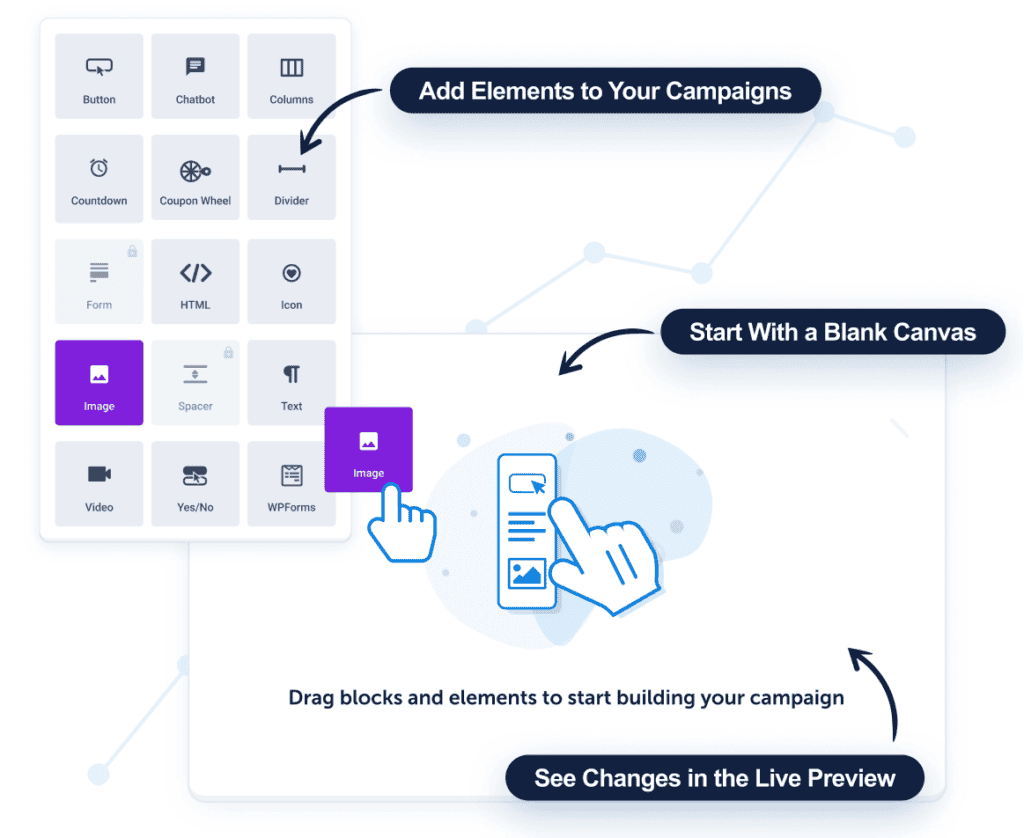
- Columns and layout control: We easily created a two-column layout for a form—an image on one side and the sign-up fields on the other. Adjusting the column sizes and spacing was intuitive.
- Mobile-specific customization: All campaigns were automatically responsive, but what we really liked was the ability to create a separate, simplified design specifically for mobile users to ensure the best possible experience on smaller screens.
- Custom HTML/CSS: For more advanced users, we found the option to inject our own code, which is great for achieving unique designs or functionality that go beyond the standard builder.
- Text and font editing: Customizing the typography was as simple as clicking on a text block. We could easily change the font, color, and size to perfectly match our test site’s branding.
- Color control and palettes: The built-in color picker was easy to use, and we appreciated the ability to save our brand’s colors in a palette for quick and consistent use across all future campaigns.
- Image and video embedding: Adding images from our media library or embedding a YouTube video into a campaign was a smooth process that helped make our test popups more engaging.
- Interactive elements: We dragged in a countdown timer to create a sense of urgency for a fake promotion. It was a simple yet effective way to encourage immediate action.
- Button customization: The call-to-action button is the most important part of any form. We had full control over its text, color, size, and even hover effects to make it as clickable as possible.
- Branding options: We saw that higher plans offer white-labeling features. This is a fantastic option for agencies that want to provide clients with a branded dashboard experience.
Usability: Is OptinMonster Easy to Use?
A tool can have all the features in the world, but if it’s confusing to operate, it’s practically useless. We spent a significant amount of time inside the OptinMonster dashboard, building campaigns from scratch and using templates to see just how beginner-friendly it really is. Our goal was to determine if you need to be a tech expert to get real value from it.
- Easy for beginners: Our overall impression is that OptinMonster is very welcoming to beginners. We jumped straight into the drag-and-drop builder and were able to create a professional-looking popup without writing a single line of code. The interface felt intuitive, and the vast template library meant we never had to start from a blank screen.
- Accessible dashboard: The main dashboard is clean and well-organized. From this central hub, we could easily create new campaigns, view the analytics for our active ones, and manage our integrations. We never felt lost or overwhelmed trying to find a specific setting.
- Templates speed up workflow: This was a huge time-saver. We were able to browse templates by our specific goal (like “Grow Email List”), pick one we liked, make a few quick text and color changes, and set it live. From start to finish, we had our first campaign running on our test site in well under 30 minutes.
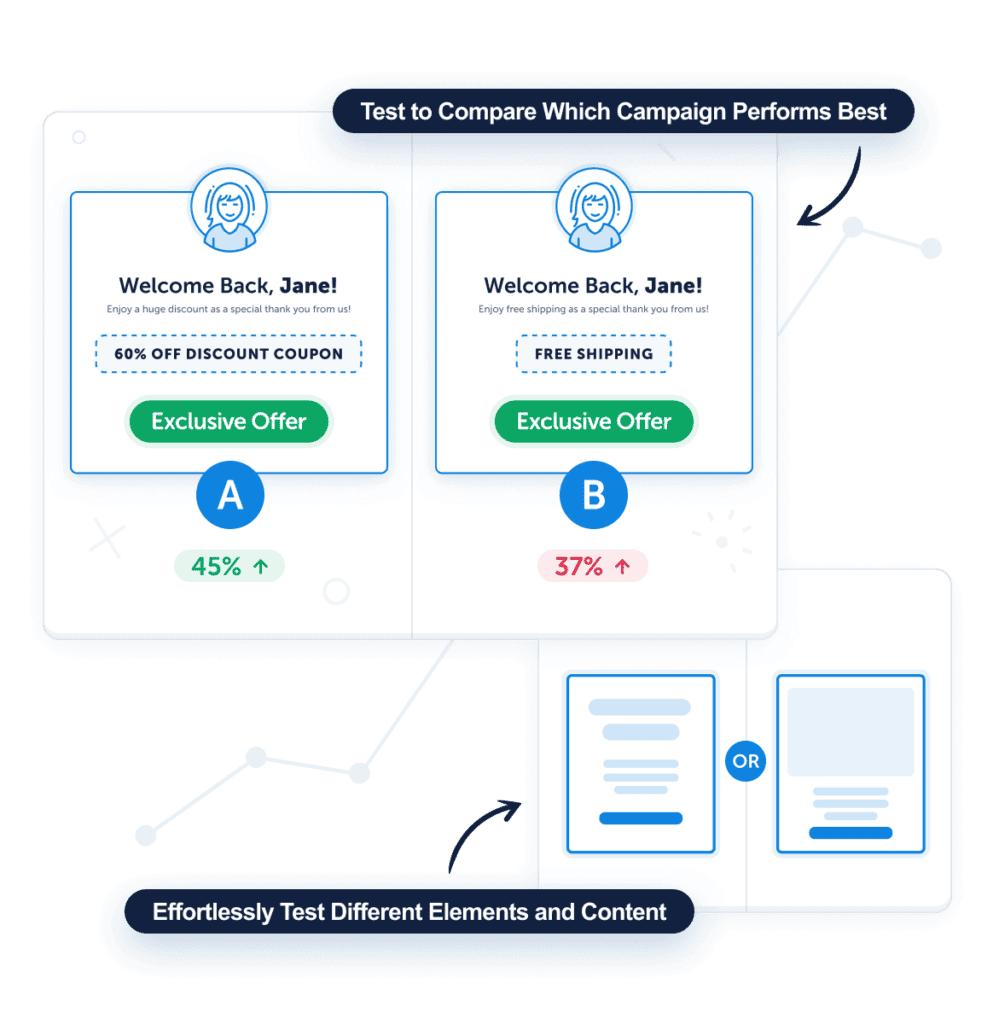
- Simplified A/B testing: We wanted to test two different headlines to see which one performed better. OptinMonster made this incredibly simple. With just a button click, we created a duplicate of our campaign, changed the headline, and the tool automatically handled the rest, splitting the traffic between the two versions.
OptinMonster Pricing
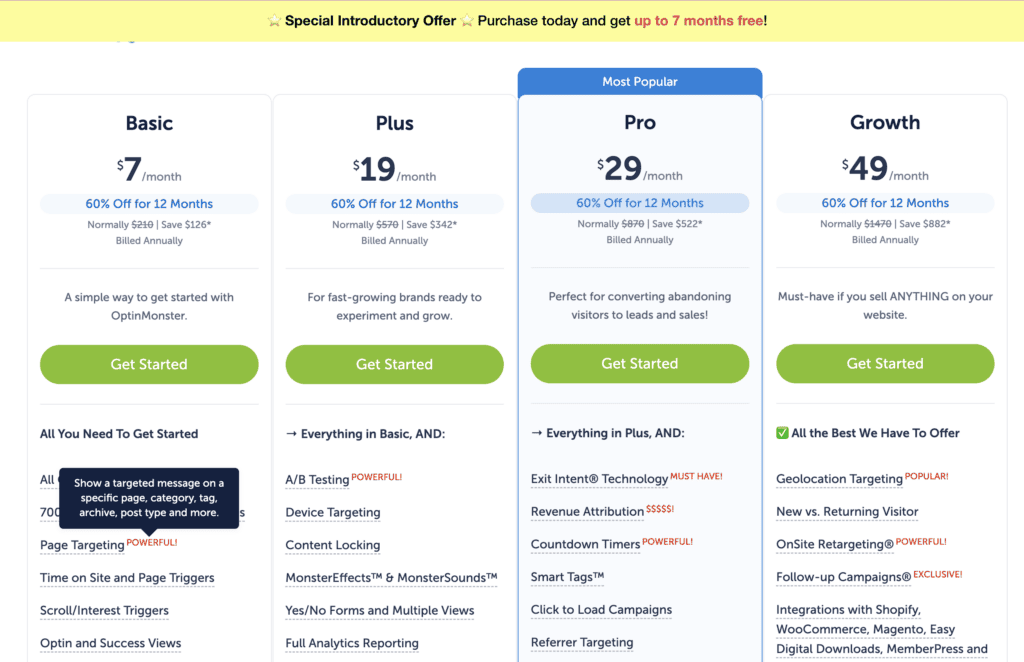
OptinMonster’s pricing indicates that it is positioned as a premium service. It’s important to note that all their advertised prices are based on annual billing. During our evaluation, we found that key features like Exit-Intent® and A/B testing are locked behind more expensive plans.
- Basic plan: $9 per month (billed annually at $108). This plan is suitable for a single site with basic needs but lacks many of the advanced features OptinMonster is known for.
- Plus plan: $19 per month (billed annually at $228). This is a better starting point for serious users, as it unlocks features like A/B testing and content locking.
- Pro plan: $29 per month (billed annually at $348). This is the most popular plan because it includes the signature Exit-Intent® technology and campaign scheduling, making it the true entry point for conversion optimization.
- Growth plan: $49 per month (billed annually at $588). This plan is designed for marketing teams and agencies, offering advanced features like OnSite Retargeting®, geolocation targeting, and branding options.
What’s Missing in OptinMonster?
No tool is perfect, and our testing revealed several areas where OptinMonster falls short or could be frustrating for certain users. It’s important to consider these potential drawbacks before you commit to a subscription.
- No free plan: This was the most immediate downside. Unlike many competitors, there’s no way to use OptinMonster for free long-term. You have to rely on the 14-day money-back guarantee to test it, which can be a barrier for those on a tight budget.
- Learning curve for advanced features: While creating a basic popup was simple, we found that mastering the more complex targeting rules and behavior automation required a significant time investment to understand and implement correctly.
- Mobile customization limitations: Getting our popups to look perfect on mobile devices was sometimes a challenge. We occasionally found it easier to create an entirely separate campaign just for mobile, which felt like double the work.
- Template customization limitations: Although the template library is vast, we sometimes felt restricted when trying to move certain elements or make significant layout changes. The builder isn’t as flexible as a true page builder.
- Potential for technical issues during A/B testing: In our research, we found reports from some users who experienced glitches or inconsistent data while running A/B tests, which can undermine the reliability of the results.
- Browser-based issues with popups: We noted that privacy-focused browsers like Brave can sometimes block OptinMonster scripts by default. This means a portion of your audience may never see your campaigns.
- Broader range of campaign positions: When compared to some other tools we’ve tested, OptinMonster’s placement options (e.g., popup, slide-in, floating bar) feel a bit standard. Competitors sometimes offer more creative display types.
- More precise targeting logic: For advanced users, the logic for combining display rules can feel limiting. Some competing tools offer more flexible “AND/OR” conditions for creating highly specific visitor segments.
Alternatives to OptinMonster
While OptinMonster is a powerful tool for lead generation, it’s not the only option available. Depending on your specific needs, other plugins might be a better fit, especially if your primary concern is website compliance or if you’re looking for a different feature set.
- Cookiebot: Cookiebot is a dedicated consent management platform (CMP). Its primary job is to scan your site for cookies, automatically block them until a user gives consent, and manage a consent log for compliance with laws like GDPR and CCPA. It’s a compliance tool, not a lead generation tool.
- WP-Consent: WP-Consent refers to a category of WordPress plugins designed specifically to help you manage cookie consent. They typically offer customizable cookie banners and basic consent options, making them a good starting point for ensuring your site meets privacy requirements.
Final Thoughts
OptinMonster is an excellent choice for established websites and marketers who have the budget and traffic to take full advantage of its powerful targeting and A/B testing features. For these users, it can deliver a significant return on investment. However, its high cost, lack of a free plan, and reported slow support make it a less ideal option for beginners or small businesses on a tight budget.
We recommend that you combine any marketing tool like OptinMonster with other essential plugins, like a reliable backup plugin, to ensure your website remains secure, compliant, and high-performing.
FAQ
Is OptinMonster good?
Yes, OptinMonster is a very good and powerful lead generation tool, especially for its advanced targeting features like Exit-Intent®. However, its value depends heavily on your budget and needs.
What does the OptinMonster do?
OptinMonster helps you convert website visitors into email subscribers and customers. It does this by allowing you to create various types of campaigns, such as popups, floating bars, and slide-ins, that prompt users to take a specific action.
Is OptinMonster free?
No, OptinMonster does not have a free plan. It is a premium-only service, though it does offer a 14-day money-back guarantee on all its plans.
Is OptinMonster worth it on Reddit?
Opinions on Reddit are mixed. Users often praise its powerful features but heavily criticize the high price, the limitations of the cheaper plans, and frequently reported slow or unhelpful customer support. The general consensus is that it can be worth it for high-traffic sites but is often too expensive for smaller projects.

Shreya has been a writer for as long as she can remember. Now, she writes articles that help WordPress users manage the sites that they're proud of, with little to no coding