

When comparing membership plugins like SureMembers vs MemberPress, you’re looking at two completely different philosophies. You’re likely here because you’re deciding between a modern, lightweight specialist and a feature-packed industry giant. This decision will impact everything from your site’s speed to your members’ experience.
We tested both plugins and wrote this article to help you make that choice. We compare features, pricing, and usability. It will be an honest review of the two.
Our review of MemberPress showed that it’s a one-stop-shop for all things memberships. In contrast, SureMembers offered good content restriction out of the box but needed third party tools for features like accepting payments.
Before we dive into the detailed comparison, here is a quick look at both plugins:
SureMembers Summary
SureMembers comes from Brainstorm Force, the team behind the popular Astra theme as well as the SureCart and SureTriggers platforms. This plugin is a key part of their SureSuite ecosystem. Its claim to fame is being a lightweight, fast, and modern plugin that focuses on content restriction.

In our review of SureMembers, I loved the simplicity, speed and affordable pricing. The modern features, like built-in spam protection and menu visibility rules, were significant pluses. The only trade-off is that it’s not an all-in-one solution. You must bring your own payment plugin to the table, and it lacks built-in reporting, as it relies on your e-commerce tool for that data.
MemberPress Summary
In the WordPress membership plugin space. MemberPress has been the gold standard and industry leader for years. It’s famous for being the ultimate all-in-one solution. From creating membership levels and restricting content to processing payments, managing subscriptions, MemberPress aims to be the only plugin you’ll ever need.

In my experience, the built-in member management and detailed reporting capabilities are top-notch. The self-serve member dashboard it creates is fantastic for user experience. However, this power comes at a cost. The higher price point and the dated interface became drawbacks for me.
Membership Plans and Access Control
The absolute core of any membership plugin is its ability to lock down content. When I dove into this, I wanted to see who gave me more power and flexibility.
SureMembers:
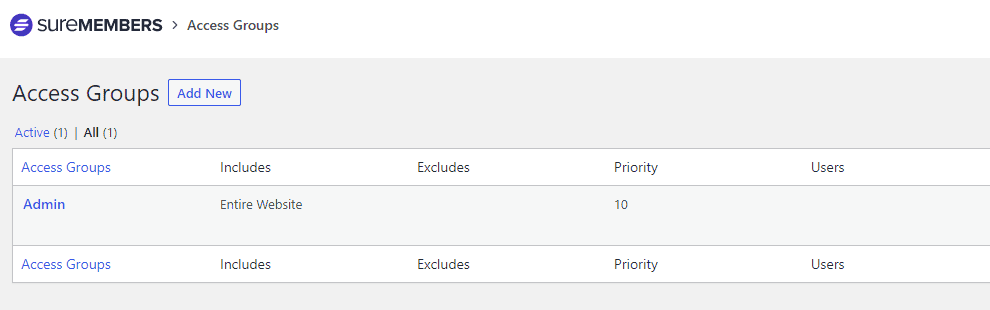
The process of setting up access groups, or membership levels, was easy. I created my “Basic” and “Premium” levels in just a couple of clicks. What I noticed was you could create as many levels as you need. As your business grows, this could grow with your requirements.
A feature I hadn’t seen in other plugins was that I was able to protect a single paragraph, an image, or a video, from the block editor. This helps you create a paywall halfway through an article, giving visitors a juicy teaser before asking them to join.
It offered features like Access Expiration which would be perfect for creating a trial period that automatically ends. It’s a well-engineered tool built to work seamlessly within the entire WordPress ecosystem.
MemberPress:
Getting started with MemberPress, I began by setting up the membership levels. I was impressed that I could create free, one-time payment, or recurring subscription levels all from the same interface. This felt very robust, knowing I could offer a free trial, a lifetime deal, and a monthly plan without needing different tools.
What really stood out was that instead of setting permissions page-by-page, I created one single rule to protect all content under a specific category, saving a ton of time. The level of control was very detailed, letting me set rules for almost any part of my site, including individual files. It also offered ways to protect partial content to create a paywall.
Similar to SureMembers, the Content Access Expiration feature can be great for limited time offers or trials you want to offer.
Manage Members
Once you have members, you need an easy way to manage them. I looked beyond just a simple user list to see who offered better tools for tracking subscriptions, understanding business health, and providing a good member experience.
SureMembers:
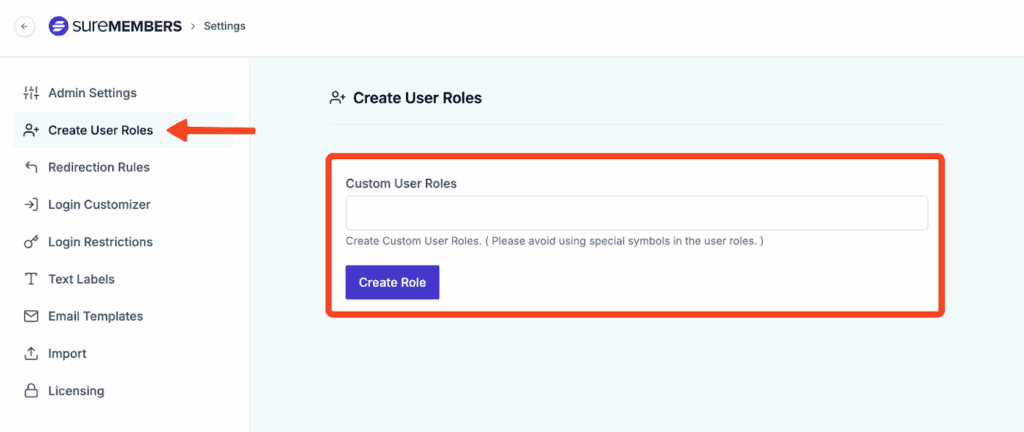
The user management dashboard in SureMembers is clean and straightforward. I could easily see all my members and perform bulk actions like adding them to a new group. Its real power, though, comes from its integration with automation tools. By connecting it to SureTriggers, I could create workflows like automatically adding a new member to my email list. While this is incredibly powerful, it does rely on another tool to unlock its full potential.
MemberPress:
MemberPress provides a much more comprehensive, all-in-one experience. What I really valued was the built-in reporting, which gave me a snapshot of my sales and member growth without needing a separate plugin.
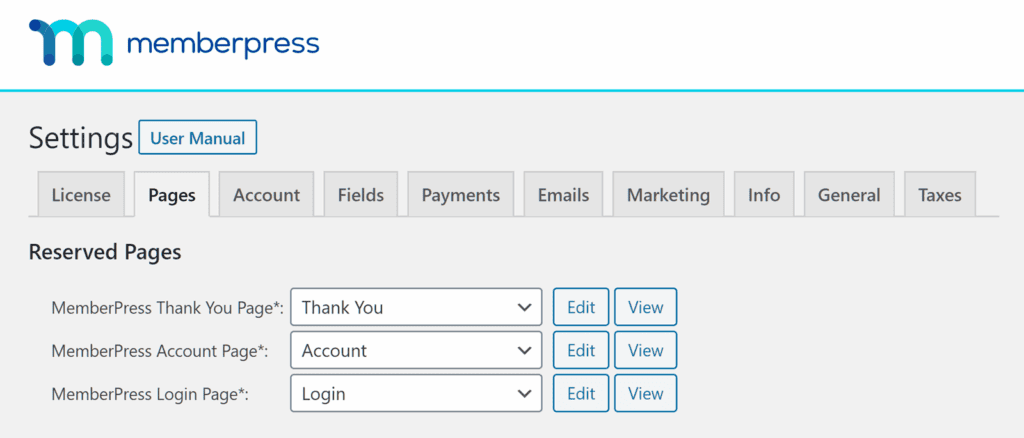
It also creates a self-serve dashboard where my members could update their own profiles and billing info, which is a huge plus for reducing admin work. From the backend, I had full control to manually edit subscriptions or export data as needed.
Content Dripping
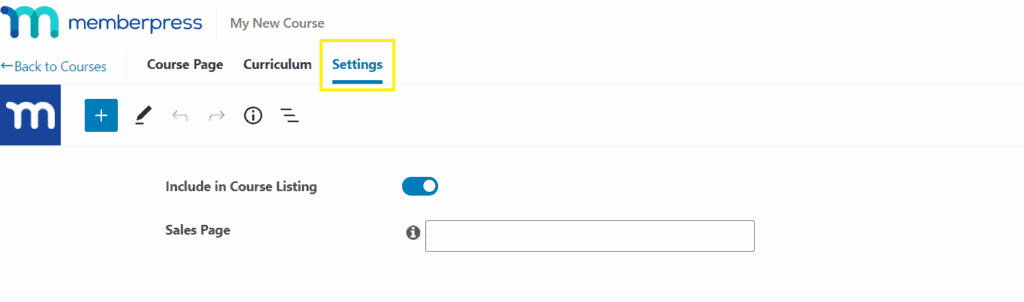
Dripping content is essential for keeping members engaged in a course or long-term membership. I tested how easy it was to set up a schedule to release content over time, preventing members from downloading everything and leaving.
SureMembers:
The scheduling options in SureMembers felt very flexible. I could set content to release a specific number of days after a member signs up or even on a fixed calendar date. Where it really impressed me was its seamless integration with course plugins like LearnDash. Dripping out individual lessons felt completely native to the platform, making it a fantastic choice for course creators. Again, it works better in combination with other plugins.
MemberPress:
MemberPress has a very reliable and easy-to-use content dripping system. I was able to create rules to drip out content based on when a member registered for a specific level. The control was quite granular, allowing me to release entire sections or individual items on their own schedule. Like SureMembers, it also allows you to set content to expire, which is great for limited-time access.
Payments and Subscription
This is where the two plugins have a very different philosophy. I looked at how they handle the most critical part of the business: getting paid.
SureMembers:
The first thing to know is that SureMembers doesn’t handle payments directly; it’s purely a content protection plugin. Its power comes from its deep integration with e-commerce tools, especially its sibling, SureCart. By pairing them, you can create a modern checkout experience with advanced sales features like order bumps and one-click upsells, which is a huge advantage for maximizing revenue.
MemberPress:
MemberPress is able to connect it directly to Stripe and PayPal without needing another plugin. It handled recurring subscriptions automatically and even had built-in tools for creating coupon codes and managing taxes. For someone who wants a simple, unified system for both memberships and payments, this is much more straightforward. The only catch is the 4.9% transaction fee on their entry-level plan.
Design and Customization
Your membership pages should look professional and match your brand. I tested how easy it was to customize things like login, registration, and account pages without needing to write code.
SureMembers:
It worked perfectly with my theme and I was able to easily customize the login forms and the messages shown to non-members. The real win for me on the design front was being able to fully design the checkout page using SureCart’s builder, which is a massive benefit for brand consistency and conversions.
MemberPress:
MemberPress has a feature called ReadyLaunch™. It’s a template system that instantly creates beautiful, mobile-responsive registration, login, and account pages that are guaranteed not to conflict with your theme. I had professional-looking pages up in minutes. Beyond that, it also allowed me to add custom fields to my registration forms and easily customize all the automated emails sent to members.
Privacy, Security and Compliance
Protecting your content and your member data is critical. I looked for which plugin offered better out-of-the-box tools for security and GDPR compliance.
SureMembers:
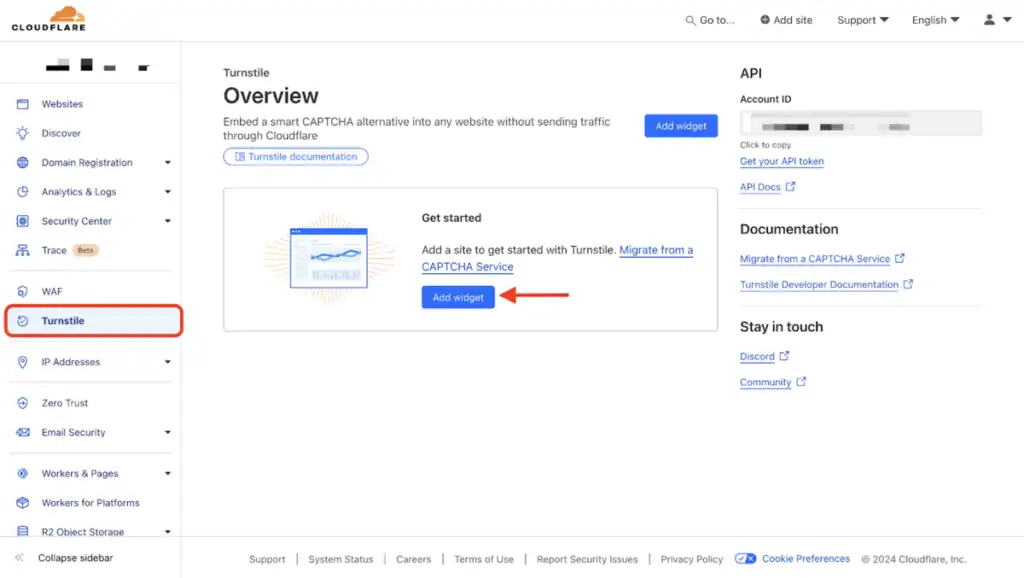
What I really appreciated with SureMembers were the built-in security tools. It includes spam protection using Google reCaptcha and Cloudflare Turnstile for its login forms, which meant I didn’t need a separate plugin for that. It also has a feature to limit concurrent logins, which helps prevent members from sharing their accounts. It feels like a plugin built with modern security needs in mind.
MemberPress:
MemberPress handles the fundamentals of security well. It has tools to help with GDPR compliance, like adding a required consent checkbox to forms, and it securely protects any digital files you want to offer for download. For things like brute force protection, it relies on integration with third-party security plugins rather than having the feature built-in, but it handles its core security responsibilities effectively.
Pricing and Value
Let’s talk about the bottom line, because it’s one of the first things I look at. When I was comparing SureMembers vs MemberPress pricing, I wasn’t just looking at the sticker price, but the real, long-term cost. This is where the two diverge significantly.
SureMembers:
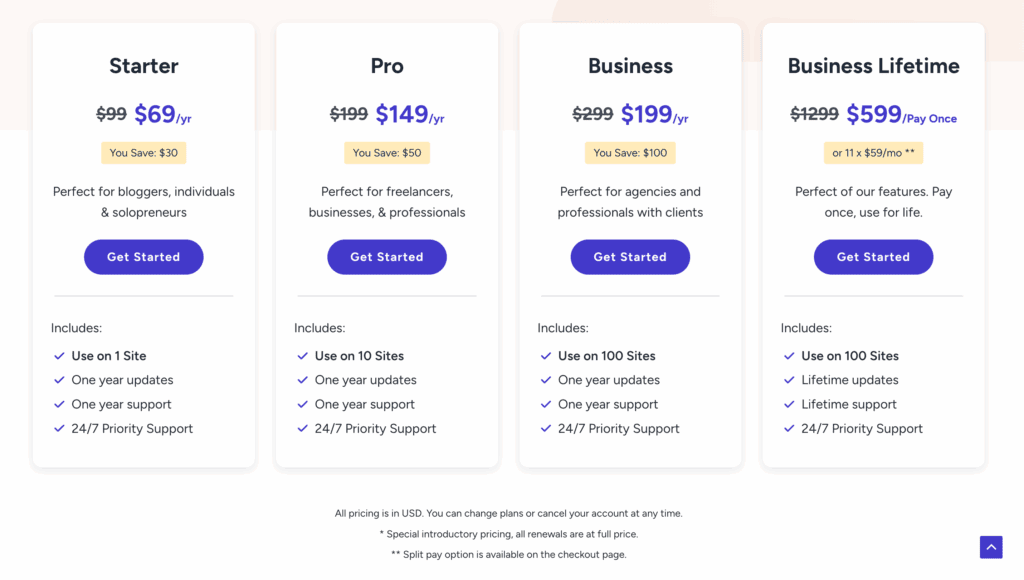
My first thought was that this is a cost-effective alternative. The plans starting at $69/year for one site are very budget-friendly. They offer plans for 1 site, 5 sites, and an agency plan for unlimited sites. The real game-changer for me was the lifetime plans. The fact that I could pay once and own the plugin forever is a huge value proposition that few competitors offer.
MemberPress:
In contrast MemberPress is a premium plugin with three tiers:
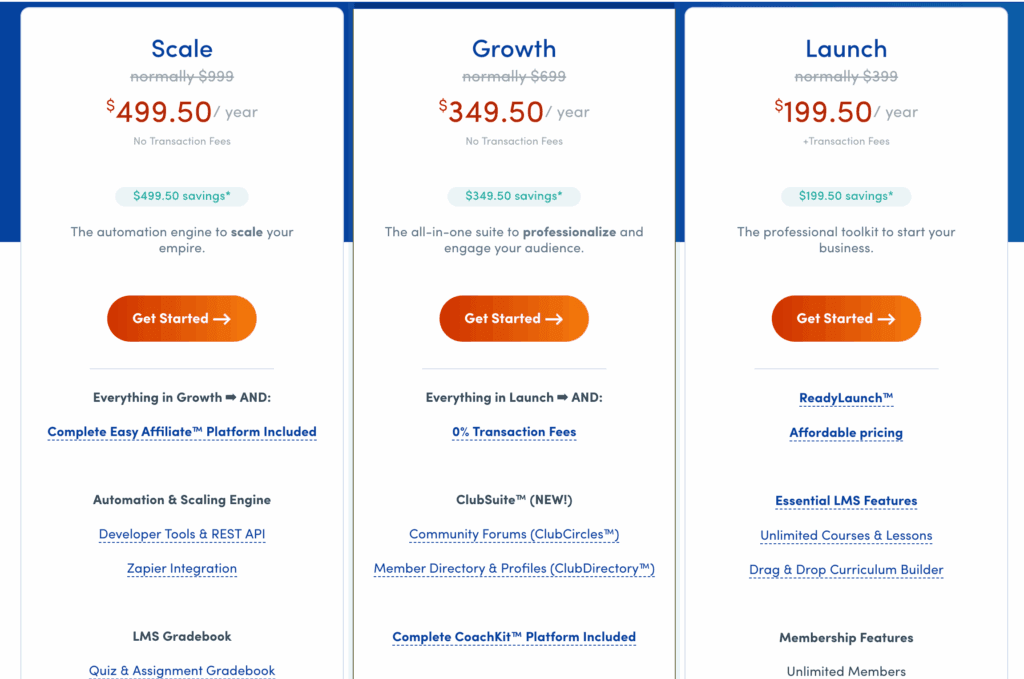
- Launch: The intro price of (~$199.50/yr) for 1 site caught my eye, but the 4.9% transaction fee was an immediate red flag. That’s a cost that can add up fast.
- Growth: To get rid of that fee, I had to look at the (~$349.50/yr) plan, which also adds key features like content dripping.
- Scale & Elite: The higher tiers (~$499.50/yr and ~$999/yr) add serious features like corporate accounts and affiliate tools, but they’re a significant investment.
It’s an annual flat rate, which is standard. But remember, you’ll still have your normal Stripe or PayPal fees on top of this.
Expert Advice: In our experience of ARMember, we found that it’s a freemium plugin that offered a robust suite of features at no cost. It might be more pocket friendly than these two.
Alternatives to SureMember and MemberPress
While SureMembers and MemberPress are fantastic choices, they aren’t the only players in the game. The WordPress ecosystem is rich with options, and if neither of the two feels like the perfect fit, here are a couple of other popular membership plugins that bring different strengths to the table.
- ARMember: ARMember packs an astonishing number of features into a single, highly affordable package. It’s an excellent option for budget-conscious users who want everything from content restriction and drip content to built-in form builders, social logins, and pop-ups. It was very beginner friendly and can help you manage a lot of content on an intuitive dashboard.
- MemberMouse: In contrast, MemberMouse is an enterprise-grade membership solution It’s geared towards established businesses and marketers who need advanced features like one-click upsells, split-testing capabilities, and detailed reporting to optimize conversions.
Final Thoughts
SureMembers is for users who prioritize speed, a beautifully simple interface, and a modular approach, combining it with other best-in-class tools. In contrast, MemberPress remains the undeniable king for those who want a single, robust plugin to handle everything from payments and subscriptions to course creation and detailed reporting, all under one roof.
Regardless of which direction you lean, we strongly recommend testing your plugin on a staging site first. This provides a safe, risk-free environment to explore all the features and ensure compatibility with your theme and other plugins before committing it to your live business.
FAQs
Do I need another plugin to accept payments with SureMembers?
Yes. This is the most important difference between the two. SureMembers is a content restriction plugin only; it does not process payments. You must integrate it with an e-commerce plugin like SureCart (which is what it’s designed for) or WooCommerce to sell memberships and handle transactions. MemberPress, on the other hand, is an all-in-one solution with payment processing built directly into the plugin.
Which plugin is easier for beginners to set up?
For absolute beginners, SureMembers is generally easier and faster to set up. Its interface is more modern, minimal, and focused on one job: protecting content. This leads to fewer settings and a quicker learning curve. While MemberPress has a helpful setup wizard, its vast number of features can feel more overwhelming for someone just starting out.
Is MemberPress or SureMembers better for selling online courses?
Both are excellent, but they serve different preferences. MemberPress is great if you want an all-in-one solution, as it includes its own built-in course builder. SureMembers is the better choice if you prefer a “best-in-class” approach, as it integrates seamlessly with dedicated, powerful LMS plugins like LearnDash or TutorLMS, giving you more specialized course features.
Is SureMembers really cheaper in the long run?
Generally, yes. SureMembers has a significantly lower starting price and, most importantly, offers a lifetime license option, which eliminates recurring annual fees and provides incredible long-term value. While you may need to purchase a payment plugin like SureCart, the combined cost, especially with a lifetime deal, often ends up being less than the mandatory annual subscription for MemberPress.
Will MemberPress slow down my website more than SureMembers?
Potentially, yes. SureMembers is intentionally designed to be lightweight and performant because it focuses only on content restriction. MemberPress, as a large, all-in-one plugin that handles payments, courses, and more, naturally has a bigger code footprint. While a well-optimized site can run MemberPress just fine, SureMembers has a clear advantage when it comes to speed and performance out of the box.

Shreya has been a writer for as long as she can remember. Now, she writes articles that help WordPress users manage the sites that they're proud of, with little to no coding


