As a popular performance optimization plugin, it’s designed to help your pages load more quickly for visitors. But, will our WP Super Cache review prove that it is enough for speed improvement?
Figuring out if one tool is enough can be confusing when you just want a faster site without the technical deep dive. It’s tough to know what’s truly effective versus what’s just a starting point. So, we’ve broken it down into simple terms, explaining what WP Super Cache does well, where its limits are, and how it fits into a complete strategy for site speed.ough for
WP Super Cache is a free caching plugin that speeds up your site by serving static HTML files to reduce server load. The free version of Airlift is far more powerful, providing automated image optimization, asset (CSS/JS) optimization, and continuous performance analysis.
WP Super Cache is one of the most popular free caching plugins for WordPress, maintained by Automattic, the company behind WordPress.com. Its primary job is to create static HTML files of your dynamic WordPress pages. While this can help with performance improvement, it’s incomplete.

Caching
A caching plugin is essential because, by default, WordPress builds every page from scratch for every single visitor. It has to fetch data from the database, process code, and assemble all the parts, which is a slow and resource-intensive process. A caching plugin bypasses this by creating a ready-made static copy of your page after the first visit.
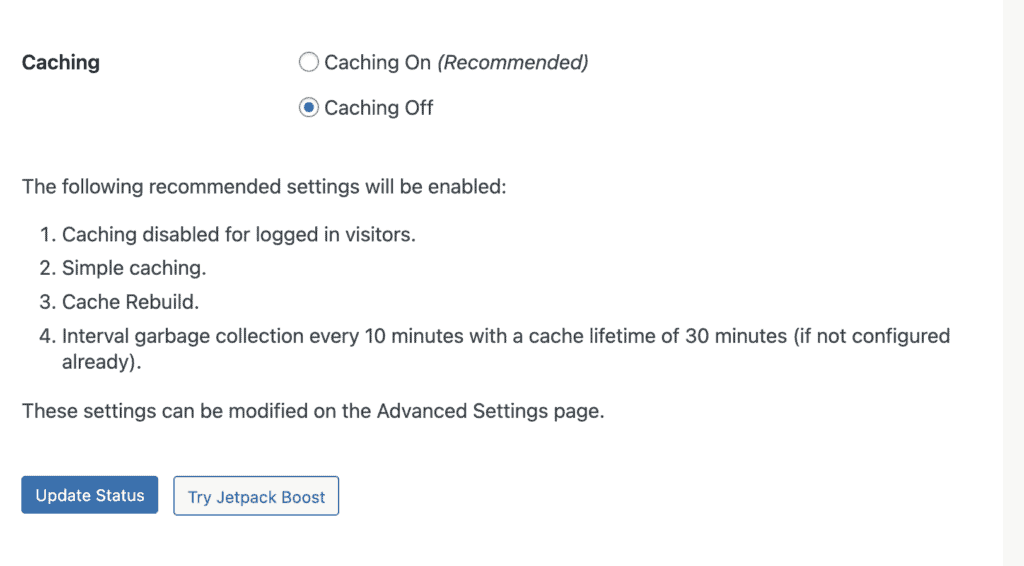
WP Super Cache is most popular free caching plugin for its two main caching methods: Simple Mode and Expert Mode. Here’s a breakdown of the two:
- Simple Mode: This mode uses PHP to serve cached files, meaning it still has to load the WordPress core for every request. While faster than not caching, this creates a performance bottleneck and is an inefficient way to deliver a static page.
- Expert Mode: This is the fastest option, as it bypasses WordPress by modifying your .htaccess file. However, this method is high-risk, as a single error can crash your site. It’s also a fragile and outdated approach, often incompatible with modern hosting environments.
Image Optimization:
Images are often the biggest culprits behind a slow website, frequently making up more than half of a page’s total size. The core issue is that a caching plugin like WP Super Cache will happily serve a pre-built page, but it does nothing to shrink the massive, unoptimized images on it. Your visitor’s browser still has to download every single heavy file, which is a major drag on performance.
A complete performance solution understands this. It doesn’t just cache the page; it tackles the images themselves. The right approach is to intelligently resize images based on the visitor’s screen, convert them to modern, faster formats like WebP, and lazy-load any images that are below the fold. This ensures the initial page view is lightning-fast because only the necessary, perfectly-sized images are loaded first.
Asset Optimization:
Your website’s design and interactivity are controlled by CSS and JavaScript files. By default, a browser will stop everything to download and process these files before it can display the page—a bottleneck known as “render-blocking.” A simple caching plugin completely ignores the assets It caches the HTML, but the render-blocking assets still have to be processed in the same inefficient way.
A smarter approach involves a surgical analysis of your site’s code. A modern optimization tool will eliminate unused code from your stylesheets, inline the critical CSS needed to display the top of the page instantly, and load the remaining scripts asynchronously so they no longer block the page from rendering. This allows your content to appear almost immediately.
Database Optimization:
Over time, your WordPress database gets clogged with junk data like old post revisions, spam comments, and expired temporary options. This database bloat causes issues like the disk full error and performance issues.
A truly comprehensive tool addresses database optimization with automated, regular cleanups of this redundant data. Unfortunately, WP Super Cache doesn’t make any changes to your database. Nothing gets deleted. Nothing was optimized.
Other Features for Better Performance
Beyond the on/off switch, WP Super Cache has a few advanced settings that can help you make your WordPress site faster. These tools can help you boost your performance a little bit. .
- Preloading: This feature proactively creates a cached version of every post and page on your site. Instead of waiting for a visitor to trigger the first cache creation, you can build your entire site’s cache at once.
- CDN Support: You can integrate a Content Delivery Network (CDN) to serve your site’s static assets, like images and CSS files. A CDN stores copies of these files on servers across the globe and serves them from the location nearest to your visitor.
- Garbage Collection: This is an automated cleanup process. It runs on a schedule to delete old, expired cache files from your server, which prevents the cache directory from becoming bloated.
What WP Super Cache Doesn’t Do: The Limitations
This is where we need to have an honest conversation. While WP Super Cache is a decent tool for its one specific job, its limitations are significant. Caching is just one leg of the performance stool; if the other legs are missing, your site will still wobble.
- No Image Optimization. Images are the heaviest part of most websites. WP Super Cache does nothing to compress, resize, or convert them to modern, faster formats like WebP.
- No Asset Optimization. Your site’s CSS and JavaScript files determine its look and feel. The plugin doesn’t minify these files or organize their loading to prevent them from blocking the page from rendering.
- No Database Optimization. Over time, your WordPress database accumulates junk like old post revisions, trashed comments, and expired temporary data. WP Super Cache offers no tools to clean this up.
- Manual Configuration. The plugin is a blunt instrument. It doesn’t adapt. If you install a new plugin or update your theme, its settings don’t change. You have to manually intervene.
The Better Alternative: Airlift
Airlift quickly became our top performance plugin because it was clear that a smarter, more holistic approach was needed. Instead of being a one-trick pony like WP Super Cache, Airlift is a comprehensive, automated performance expert for your entire site.

Airlift analyzes how each page of your site actually loads in a browser and builds a custom optimization strategy for it. It doesn’t just treat the symptom (slow page generation); it fixes the underlying diseases (bloated images, messy code, and a cluttered database).
Here’s what Airlift handles automatically:
- Advanced Caching: It implements sophisticated page and browser caching that goes far beyond what simple plugins can do.
- Complete Image Optimization: Airlift automatically compresses your images, converts them to WebP, resizes them perfectly for every screen size, and lazy-loads them.
- Intelligent Asset Optimization: It minifies CSS and JavaScript, removes unused code, and reorders how they load to eliminate render-blocking issues.
- Automated Database Optimization: Airlift runs regular, scheduled cleanups of your database to keep it lean, fast, and efficient.
- Continuous Optimization: This is the real game-changer. Airlift runs a daily analysis of your site and automatically adapts its strategy. Your site stays fast without you ever having to touch a setting.
Final thoughts
While WP Super Cache is a known name and does one thing for free, it’s a tool from a past era of web performance. It only solves a fraction of the problem.
Frankly, you shouldn’t use WP Super Cache. The free version of Airlift is far more powerful. It provides a complete, automated performance solution that addresses all the major reasons a WordPress site is slow.
FAQs
What is WP Super Cache?
WP Super Cache is a free WordPress plugin that improves website speed by creating static HTML files of your pages. It serves these pre-made files to visitors instead of making the server rebuild the page from scratch for every request.
Is WP Super Cache free?
Yes, WP Super Cache is completely free and available in the WordPress plugin repository. There is no paid or premium version.
How to use WP Super Cache?
The simplest method is to install the plugin, go to Settings > WP Super Cache, and on the Easy tab, turn caching on. For more advanced needs, you can configure settings for preloading, CDN, and garbage collection.
Should I use WP Super Cache?
No. While it’s a decent tool for basic caching, it ignores critical performance areas like image, asset, and database optimization. A modern, all-in-one free solution like Airlift is a much better choice because it provides a complete and automated strategy for your site’s speed.

Shreya has been a writer for as long as she can remember. Now, she writes articles that help WordPress users manage the sites that they're proud of, with little to no coding