

Finding the right gallery plugin can transform your website, and this FooGallery review will help determine if it’s the perfect fit for you.
Choosing a gallery plugin directly impacts your site’s visual appeal, loading speed, and overall user experience. The right plugin will make your portfolio look professional and keep visitors engaged, while the wrong one can slow your site down and frustrate your audience.
We’ve put FooGallery through its paces, testing everything from its design options and performance to its security and pricing. This article breaks down our findings, giving you the clear, honest verdict you need to decide if FooGallery is the best solution for showcasing your images.
We built a test site and tried the FooGallery plugin. We were immediately impressed by how easy it was to use. We were able to whip up a beautiful, professional-looking gallery in just a few minutes without any confusion. Its free version is surprisingly generous, offering plenty of layouts and features to get started. If you’re a beginner or simply want a fast, reliable gallery without a complicated setup, FooGallery might be for you,
Setting the scene for FooGallery Review
FooGallery is one of the most popular and highly-rated WordPress gallery plugins, and for good reason. It has earned a reputation for being exceptionally user-friendly, making it a favorite among beginners who want to create beautiful, responsive galleries without a steep learning curve.
To see if FooGallery lives up to its reputation, we put it through its paces. We installed the plugin on a test site, uploaded a collection of high-resolution images, and built a gallery to test:
- Design & Customization: Your portfolio is an extension of your brand. The plugin needs to help you customize layouts, colors, and hover effects to ensure your gallery complements your work, rather than distracting from it.
- Display Options: Features like a lightbox are crucial for allowing potential clients to view high-resolution images up close without leaving the page, creating a seamless and immersive experience.
- SEO: You want your work to be discoverable. Proper SEO features for images, like alt text and titles, help search engines understand and rank your content.
- Performance: A slow-loading portfolio is a major turn-off. Does the plugin offer any tools to improve the performance.
- Security & Customer Experience: Can it protect your images from unauthorized use while still maintaining a smooth user experience for clients?
- Usability: Is it beginner friendly? How is the dashboard to navigate?
- Pricing: What features are available for free? Which premium features are necessary?
Here’s everything we learnt from all our testing:
Design and Customization
Your portfolio’s design is a direct reflection of your brand. It’s crucial that your gallery plugin gives you the creative control to build something that looks professional and matches your website’s aesthetic. We found that FooGallery provides a solid set of tools to help you customize your galleries without needing to be a tech expert.
- Drag-and-Drop Interface: This is a simple but powerful feature. You can easily reorder your images just by dragging them around, which is a huge time-saver when you’re managing dozens of photos.

- Live Previews: FooGallery lets you see your changes as you make them. While the live preview on the main dashboard is fantastic for visualizing your gallery, we found it could be a bit slow to load. The preview in the block editor is less useful, mainly for checking custom CSS and images.

- Custom CSS: For those who like to have more control, there’s a built-in feature to add your own custom CSS to both individual galleries and albums.
- Hover Effects: The free version comes with a standard hover effect to add a bit of interactivity. If you upgrade, you get access to a wider variety of styles and icons to make your galleries more dynamic.
- Image Captions: You have complete control over how your captions look and where they appear, allowing you to add context to your images exactly how you want. Some gallery views also make it necessary to add captions.
Image Security and Client Experience
If you’re a professional photographer or artist, protecting your work from theft is a top priority. At the same time, you need to give potential clients a smooth and easy way to view or even purchase your images. FooGallery reserves its most powerful security and e-commerce features for its premium plans.
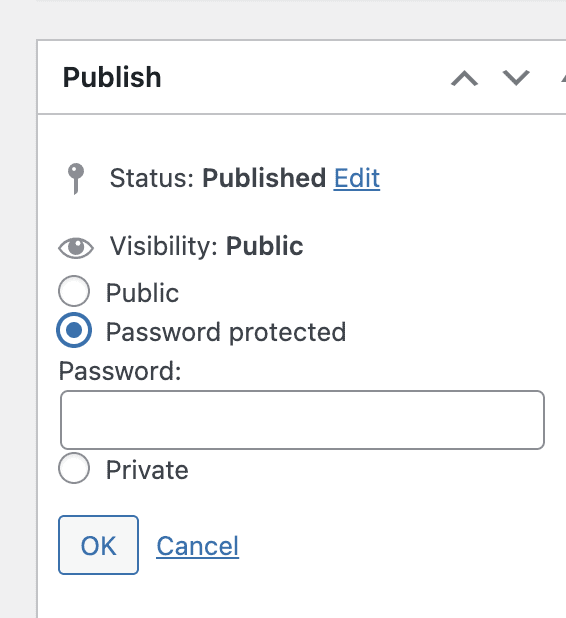
- Password Protection: Just like you can password-protect a WordPress page or post, you can do the same for your galleries. This is great for creating private client galleries. This is not revolutionary, but it’s useful.
- Image Watermarking: To prevent unauthorized use of your photos, you can automatically add a watermark. This is an exclusive feature of the top-tier Pro Commerce plan.
- Right-Click Protection: As another layer of security, you can disable right-clicking to make it harder for visitors to save your images. This is also only available in the Pro Commerce plan.
- WooCommerce Integration: For anyone looking to sell their photos online, the deep WooCommerce integration in the Pro Commerce plan is essential. It allows you to turn your galleries directly into storefronts.
Display Options
How you present your images is just as important as the images themselves. A great gallery plugin should offer flexible and engaging ways to display your work, from different layouts to interactive features like lightboxes and filtering.
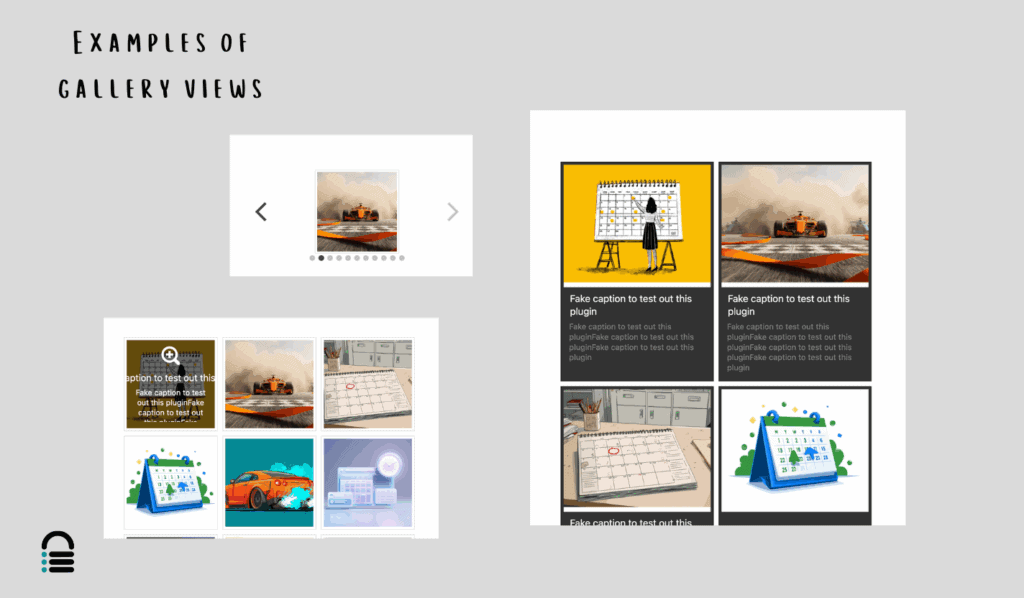
- Multiple Gallery Layouts: The plugin offers several modern layouts like masonry and justified grids right out of the box, with even more stylish options available in the premium plans. In fact, 6 of these layouts were free. Here’s a quick example of three that I liked:
- Albums: A key feature, even in the free version, is the ability to organize multiple galleries into albums. This is perfect for grouping different projects or categories of your work.
- Video Support: If you want to create video galleries from sources like YouTube or Vimeo, you’ll need to upgrade to the Pro Expert plan.
- Filtering and Tagging: For large portfolios, allowing users to filter your work by tags or categories is a fantastic user experience feature. This advanced functionality is included in the Pro Expert plan.
- Pagination: The free version includes a simple “next/previous” pagination system. The Pro plans add more advanced options like “Load More” buttons and infinite scroll.

- Built-in Lightbox: A basic lightbox is included so users can click on an image to see a larger version. For more advanced features and customization, you’ll want the premium FooBox lightbox that integrates with it.
SEO Support
You create amazing work, but it won’t do you any good if no one can find it. Search Engine Optimization (SEO) is what helps your portfolio show up in Google search results. A good gallery plugin should support your SEO efforts, not hold them back.
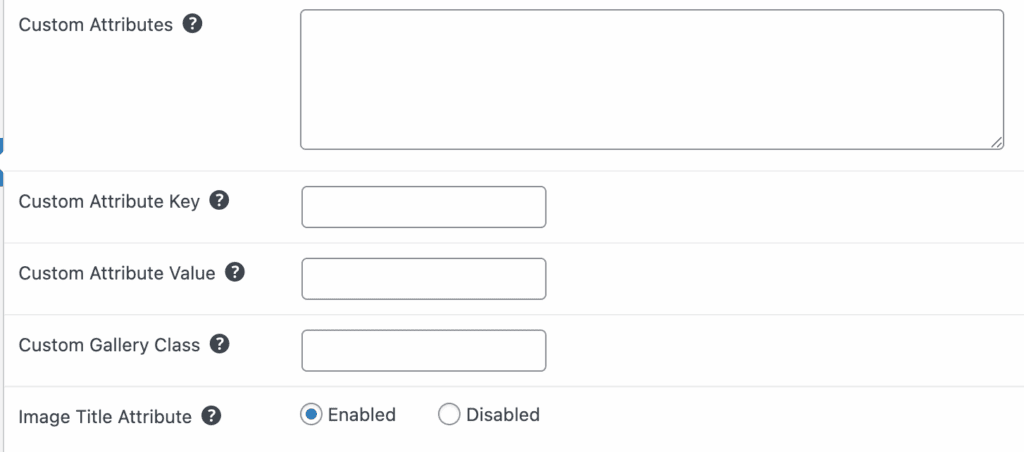
- Alt and Title Attributes: FooGallery automatically applies these crucial SEO tags to your images, helping search engines understand what each photo is about. You can add these attributes in the Adanced settings tab.
- SEO Plugin Integration: It’s designed to work seamlessly with the most popular SEO plugins, including Yoast, Rank Math, and All in One SEO.
- Responsive Design: All gallery layouts are fully responsive, meaning they will look great and function perfectly on any device, from desktops to smartphones. This is a major factor for modern SEO.
Performance Optimization
Nobody has the patience for a slow-loading website, especially one that’s supposed to show off beautiful visuals. Performance is critical, and a gallery plugin that slows down your site can cause visitors to leave before they even see your work. FooGallery is built with speed in mind.
- Lazy Loading: This feature is included and turned on by default. It means images only load as the visitor scrolls down the page, which dramatically improves initial page load times.

- Retina Thumbnail Support: Your images will look crisp and clear on high-resolution displays, ensuring your work always looks its best.
- Optimized Code: The plugin is coded to be lightweight and efficient, which helps improve your site’s Core Web Vitals scores—a ranking factor for Google.
Usability
We installed the plugin and were able to easily build a gallery in minutes. The plugin seamlessly integrated into the WordPress dashboard, so there was no learning curve. Personally, I like external dashboards because I dislike how clunky the native admin panel is. But, that may be up your alley.
Creating my first gallery was incredibly straightforward. I could either bulk upload a whole batch of photos directly from my computer or choose from images already in my media library. Within minutes, I had a functional gallery ready to go. Then, I created a new page and just added the gallery using the block editor.
The customization options were just as intuitive. The free version provided six different portfolio layouts, and I could easily tweak the appearance by changing thumbnail sizes, adjusting the hover effect, and styling the captions. It was one of the easiest plugins to try.
Pricing
FooGallery pricing is flexible and ranges from a capable free version to powerful pro plans. Here’s the breakdown:
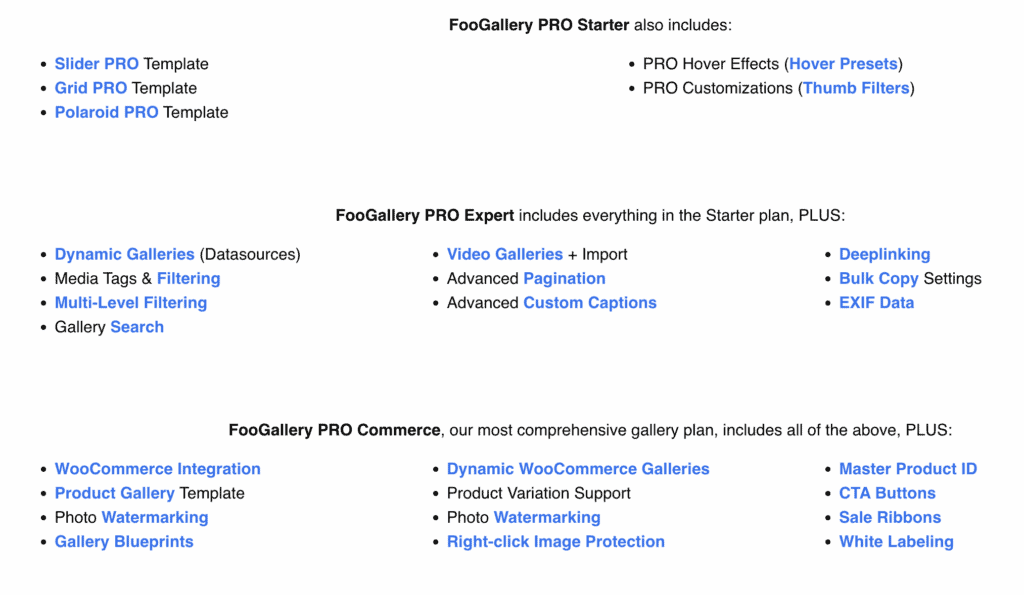
- Free: Costs $0 and is great for bloggers or anyone needing a simple, beautiful gallery. It includes the core plugin, multiple layouts, and a basic lightbox.
- PRO Starter: Starts at $33.99/year for one site. This is ideal for users who want more design flexibility with additional templates and style presets.
- PRO Expert: Around $89/year for one site. This plan is built for professionals who need advanced features like video support, gallery filtering, and dynamic galleries.
- PRO Commerce: From $99.99/year for one site. This is the top-tier plan for photographers and businesses selling images, offering deep WooCommerce integration, watermarking, and right-click protection.
- Flexible Payment Options: In addition to annual plans, FooGallery also offers monthly subscriptions and one-time lifetime payment options, which can be very cost-effective in the long run. You can also get discounted packages for 5 or 25 sites.
Alternatives to FooGallery Plugin
No plugin is perfect for everyone. While testing FooGallery, we saw some user complaints about the software occasionally being buggy, frustration over needing to upgrade. or conflicts with other plugins. If FooGallery doesn’t feel like the right fit for you, here are a couple of other excellent plugins:
- Envira Gallery: Known for being both powerful and easy to use, Envira is a popular alternative that offers a wide range of features and addons.
- NextGEN Gallery: This is one of the oldest and most robust gallery plugins available. It’s a powerhouse for professional photographers who need advanced features like client proofing and print fulfillment, though it can have a steeper learning curve.
Final Thoughts
After extensive testing, FooGallery stands out as an exceptional choice, especially for its user-friendly interface. Beginners and anyone who wants a beautiful gallery without a technical headache will love how intuitive it is. The free version is impressively capable for basic needs and the Pro plans are affordable.
However, in all our testing, we noticed how slow our sites got with all those images. If you’re a photographer or building a portfolio site, your website is likely loaded with high-resolution images, which can significantly drain your performance. In our experience, a performance plugin like Airlift can be a life changer.
Airlift handles complex optimizations behind the scenes to ensure your pages load lightning-fast, giving your visitors the smooth, professional experience they expect. So, once you’ve built your stunning new gallery, consider installing a plugin like Airlift to make sure your entire site runs at peak performance.
FAQs
Is Foo Gallery free?
Yes, FooGallery has a free version available in the WordPress plugin repository. It’s very capable and includes multiple responsive layouts, a basic lightbox, and an intuitive drag-and-drop builder, making it a great option for beginners and users with basic gallery needs. For more advanced features like video support, e-commerce integration, and image protection, you would need to upgrade to one of their paid “Pro” plans.
Which plugin is best for image optimization?
There isn’t one single “best” plugin for everyone, as needs can vary. However, some of the most popular and highly-regarded image optimization plugins are:
ShortPixel: Known for its excellent compression quality and features like WebP image conversion.
Imagify: Praised for its user-friendly interface and different levels of compression.
Smush: A very popular option that offers lossless compression and lazy loading in its free version.
These plugins automatically compress your images upon upload, reducing their file size without sacrificing quality, which helps your website load much faster.
What is the best gallery plugin for WordPress?
The “best” gallery plugin really depends on your specific needs:
For ease of use and beginners: FooGallery is a top contender due to its intuitive interface and live previews.
For professional photographers: NextGEN Gallery is often the go-to choice because of its robust, specialized features for client proofing, print sales, and extensive gallery management.
For a great all-around balance: Envira Gallery is another excellent option known for being both powerful and user-friendly.
What is the best WordPress plugin?
The best WordPress plugin is an all rounder plugin like BlogVault. It offers a whole maintenance features essential for any website. Backups, security, updates, staging, performance, and monitoring on one dashboard.
For SEO: Yoast SEO or Rank Math.
For Security: MalCare.
For Backups: BlogVault.
For Performance/Speed: Airlift or WP Rocket.
For Page Building: Elementor or Divi.
October 27, 2025 12:35 PM

Shreya has been a writer for as long as she can remember. Now, she writes articles that help WordPress users manage the sites that they're proud of, with little to no coding


