If you’re searching for a directory plugin for WordPress, you know the promises are always big. But what about the reality? You’re worried about hidden costs and a frustrating learning curve.
Let’s not forget the fear that a new plugin might cause conflicts. This balanced GeoDirectory Plugin review is designed to cut through the noise.
We’ll give you the practical breakdown you need to decide if this is the right tool for your project.
GeoDirectory is a powerful and scalable framework for serious directory sites. However, its steep learning curve is not ideal for beginners. With so many settings, always use a backup plugin to avoid potential mishaps and protect your site.
GeoDirectory plugin review in a nutshell
Here’s a quick glance at GeoDirectory:
| Aspect | Key Takeaway |
|---|---|
| Features & Flexibility | A powerful framework with high customization. Its strengths are custom listing types, front-end submissions, and deep map/page builder integration. |
| Ease of Use & Learning Curve | The initial setup is easy, but the backend has a steep learning curve. It is powerful but can be overwhelming for beginners; not a simple “install-and-go” solution. |
| Performance & Scalability | Excellent. It is built to handle massive directories without slowing down your site, but performance is highly dependent on quality hosting and caching. |
| Cost & Value | Freemium model. The core plugin is free and functional, but professional features for monetization and large-scale maps require paid premium add-ons. |
Core features and flexibility
GeoDirectory’s strength is its role as a framework. It gives you the control to build a directory tailored to your specific needs, rather than forcing you into a pre-built box.
The ability to create completely custom listing types (Custom Post Types) is its most important feature. This lets you define exactly what information your directory will contain.
Here are the key features that provide this flexibility:
- Front-end forms: It includes a drag-and-drop form builder. This allows users to submit and manage their listings from the front end of your site.
- Map integration: It integrates deeply with both Google Maps (Free with credits) and OpenStreetMap. This makes location a core component of the directory.
- Page builder support: The plugin works seamlessly with major page builders, especially Elementor. It offers native widgets to design your listing and archive pages. With that said, it’s always wise to know how to diagnose plugin conflicts just in case.
- Extensive custom fields: You get over forty custom field types to collect the precise data you need for each listing.
- Broad display options: With over 40 widgets, shortcodes, and native Gutenberg blocks. You can display directory information almost anywhere on your site.
- Built-in SEO: The plugin automatically adds SEO schema to your listings. This can improve how they appear in search results.
- Review system: A native review and rating system is included. With advanced multi-category rating options available in the Pro version.
Ease of use and the learning curve
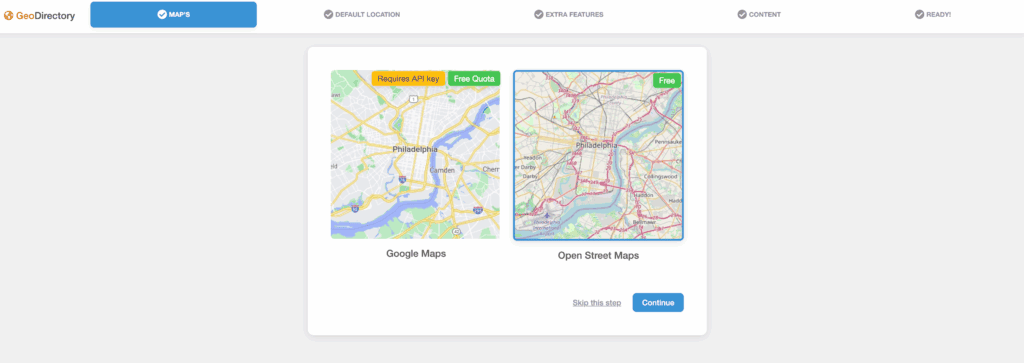
When you first activate the plugin, a setup wizard guides you through the initial configuration. This process is straightforward and helps you add locations, create necessary pages, and even import demo content.
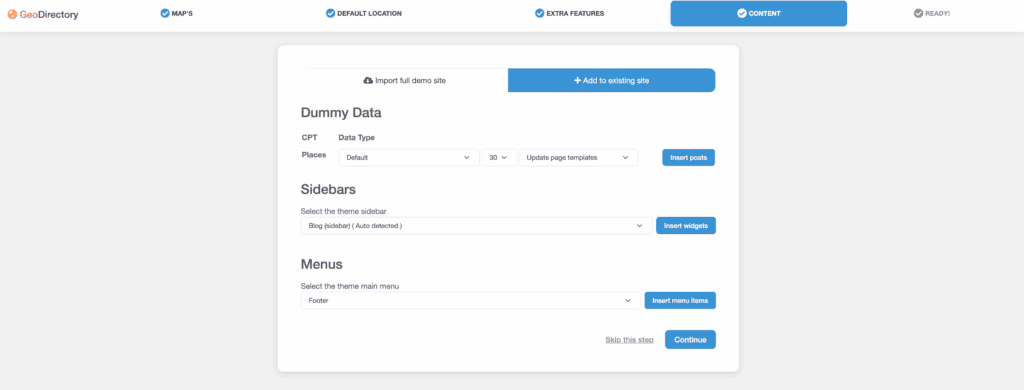
After the setup, you will find that the backend is comprehensive. The sheer number of settings menus can be overwhelming for a new user. This is not a simple, “install-and-go” plugin; it requires a real-time investment to master.
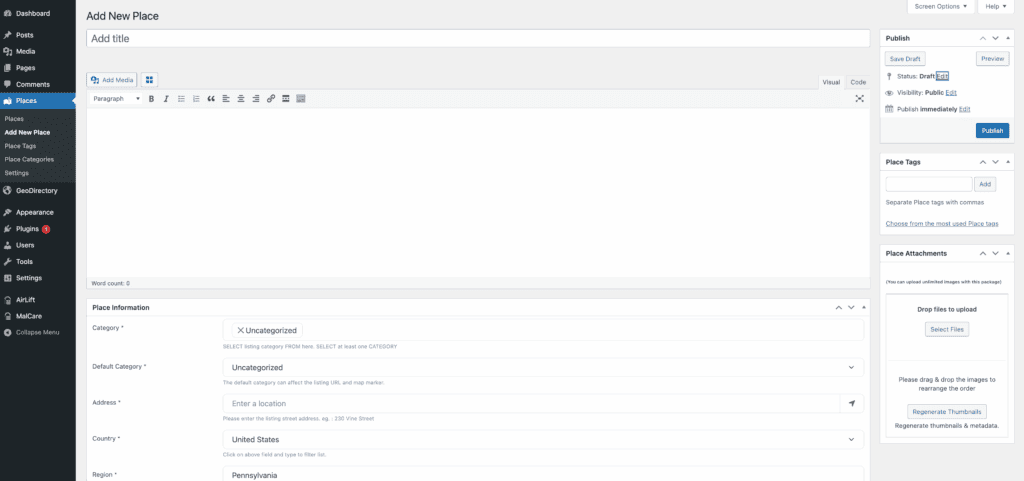
Styling your directory pages will often rely on your skills with a page builder. While the documentation is extensive, beginners may find it dense. The most effective way to learn is by doing.
The plugin’s power is directly linked to its complexity, but its integration with familiar tools like Elementor helps soften the learning curve.
Performance and scalability
Website speed is a major concern, and GeoDirectory is built with performance in mind. It uses a highly efficient structure to manage its data separately from your standard WordPress content. This design prevents the slowdowns that can occur on sites with thousands of listings.
The core code is lightweight, which helps maintain good Core Web Vitals. The plugin scales efficiently from a small local site to a massive global directory. However, performance also relies on your specific setup. Some add-ons are heavier than others.

For example, if your map has thousands of listings, the PRO server-side marker clustering is essential for fast load times.
Your hosting environment is also critical. A serious directory site requires quality managed hosting to perform well. Using a caching plugin is also highly recommended, especially for your primary directory pages.
Pricing and the true cost of ownership
The core GeoDirectory plugin is free on WordPress.org. You can install it to build a basic directory and test its core functionality. This is a great way to see if the system is right for you without any financial commitment.
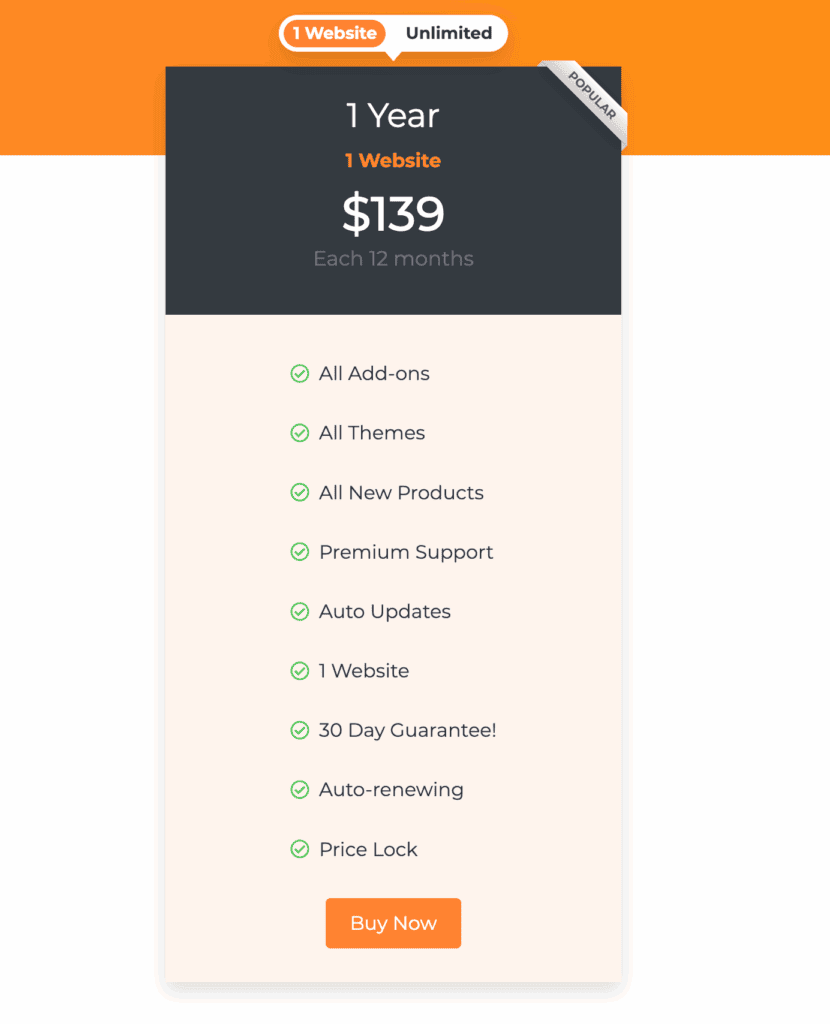
To build a professional, monetized directory, you will need premium add-ons for features like paid listings and advanced search. While you can buy these individually, the membership bundles offer the best value.
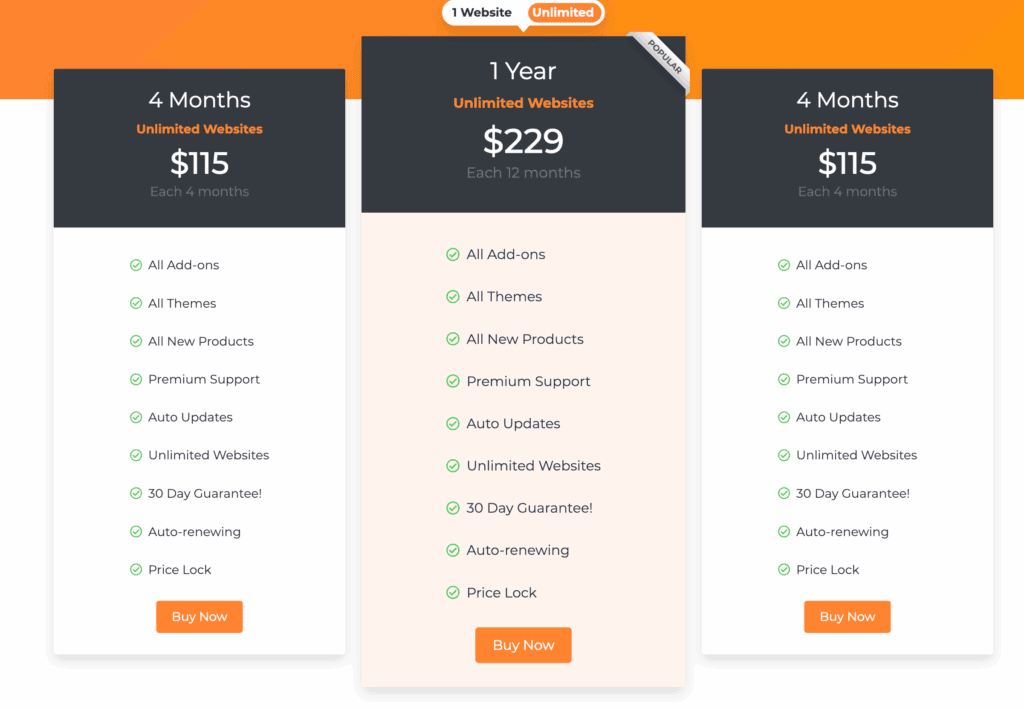
They provide access to all premium features for a single yearly fee, which is the true cost you should budget for a full-featured site.
Pros and cons breakdown
Here is a straightforward look at the plugin’s main strengths and weaknesses.
Pros:
- Infinite scalability: Built to handle massive directories without performance degradation.
- Best-in-class integration: Works exceptionally well with Elementor and other major page builders.
- “Location-less” options (Pro): Supports directories for online-only businesses or digital services.
Cons:
- High cost: A fully featured site requires a paid membership, which is a significant investment.
- Overwhelming interface: The number of options can be too much for users who only need a simple list.
- Steep learning curve: It requires a dedicated time investment to learn, especially for non-technical users.
Ideal use cases and who it’s for
- GeoDirectory is best suited for large, complex, and serious directory projects. Think of a regional business portal, a detailed real estate listings site, or a feature-rich service directory similar to Yelp or TripAdvisor.
- It is for users who need deep customization options and plan to grow their site into a major platform. It is a strong choice for those who are comfortable in the WordPress environment, know how to restore WordPress from a backup, and are willing to learn a robust system.
- This plugin is not the best fit for absolute beginners or anyone who just needs to add a simple list of locations to their website. The complexity would be unnecessary.
Alternatives to look at
If GeoDirectory doesn’t seem like the right match, consider these well-regarded alternatives:
Directorist: A popular freemium plugin with a powerful feature set and a different user interface.

Business Directory Plugin: A long-standing option that is excellent for simpler, traditional business directories.

HivePress: A lightweight, modern, and free plugin built for specific niches using themes and extensions.

Parting thoughts
For large, custom directories, GeoDirectory is an excellent choice. Though it requires a significant time and budget investment for its premium features.
Always test the free version to see if its workflow suits you, and maintain regular backups to protect your site during the setup.
FAQs
How much does GeoDirectory cost?
The core GeoDirectory plugin is free. Premium features require a membership, which starts at $229 per year. This membership provides access to all add-ons and is the most practical option for building a professional site.
What is the best free directory plugin?
The best free plugin depends on your needs. Top contenders are GeoDirectory, HivePress, and Business Directory Plugin. GeoDirectory is ideal for scalability, while HivePress is great for modern simplicity and specific niches.
What is the GeoDirectory plugin?
GeoDirectory is a powerful WordPress plugin used to build scalable, location-aware online directories. It provides the framework to create highly customized listing sites for businesses, real estate, events, and more.
How much to charge for a directory listing?
Directory listing prices vary widely, from $10 to over $300 per month. Your pricing should depend on your industry and the site’s traffic. It should reflect the value you provide, including lead generation, featured placements, and overall visibility.
Is GeoDirectory worth it?
Yes, GeoDirectory is worth it for users building large-scale or highly customized directory websites that need to be scalable. However, for simple projects or users wanting a solution with a minimal learning curve, a lighter alternative may be a better fit.

Shivani enjoys crafting guides that make every aspect of using WordPress simple and easy to follow. When she's not glued to her laptop, you can find her buried in a good book or occasionally, painting.