

A WordPress analytics plugin is a must-have for any website, and this Google Site Kit WordPress review will help you decide if it’s the right one for you. Tired of guessing who visits your site or feeling overwhelmed by trying to connect Google’s tools to WordPress? You’re not alone.
Understanding your website traffic is crucial for growth, but the setup can be a headache. Google Site Kit promises to simplify everything by bringing key data directly into your dashboard.
This article breaks down exactly what Site Kit does well, where it falls short, and if it’s the best choice for your needs. We’ll give you a clear, honest verdict to help you make the right decision.
Backup your site before you get started with this plugin. It will make changes to your site files and restoring a backup is an easy way to reverse those changes. I didn’t like my experience with Google site Kit because it didn’t do a great job at reporting. I had better experiences with Analytify and MonsterInsights,
Setting the Scene for the Google Site Kit WordPress Review
Google Site Kit is an official analytics plugin from Google itself. It connects your WordPress site to a suite of essential Google services all from a single, unified dashboard. The goal is to eliminate the need to switch between multiple tabs and bring your most important performance metrics directly into your WordPress admin area.
When evaluating any official plugin like Site Kit, we focus on a few critical areas:
- Ease of Use: How simple is the setup? Is the dashboard intuitive?
- Data & Integrations: Does it provide useful data from all its connected services?
- Reporting: Are the reports clear, actionable, and accessible?
- Privacy & Compliance: Does it help with GDPR and other privacy laws?
- Performance Impact: Will it slow my site down?
- Overall Value: As a free tool, does it deliver enough value or are its limitations too restrictive?
Here’s what we found after putting Google Site Kit to the test.
What Does Site Kit Track?
A good analytics plugin does more than just count visitors; it tells you a story about how people interact with your website. It should answer questions like: What buttons are they clicking? Are they downloading your resources? Are they buying your products? This is where tracking capabilities become crucial. Let’s look at what data Google Site Kit provides out of the box and where its limitations lie.
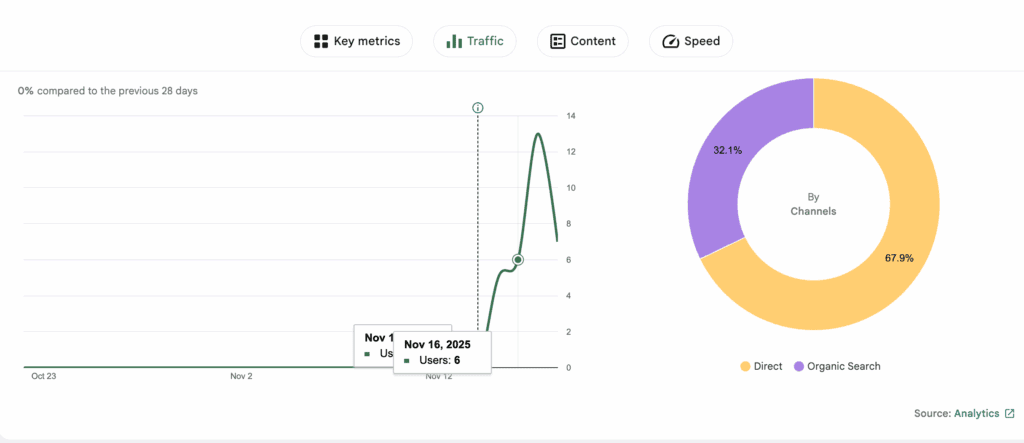
- Core Website Metrics: Site Kit excels at displaying the fundamentals from Google Analytics. You can easily see your total visitors, which pages are most popular, where your traffic comes from (e.g., Google search, social media), and which search terms people use to find you.
- Automatic Event Tracking (Clicks & Downloads): This is a significant limitation. Site Kit does not automatically track user interactions like outbound link clicks, affiliate link clicks, or file downloads. To get this data, you would need to manually configure it using Google Tag Manager, which is complex for most beginners.
- eCommerce Tracking: Site Kit has no built-in eCommerce tracking. If you run a WooCommerce store or any other online shop, you won’t be able to see crucial sales data like conversion rates, top-selling products, or average order value within your WordPress dashboard. This is a dealbreaker for most online businesses.
- Custom Event Tracking: Similar to the points above, Site Kit doesn’t offer an easy way to track custom events like form submissions, video plays, or scroll depth. This level of detailed tracking requires a more specialized analytics plugin.
Understanding the Reports
Data is useless without clear reports to help you understand it. The main appeal of an analytics plugin is having these reports directly inside your WordPress dashboard, saving you from navigating the complex Google Analytics interface. A good plugin presents this data in a way that is easy to digest and act upon. Here’s how Google Site Kit handles reporting.
- Traffic Overview: Site Kit provides a top-level summary of your traffic, showing you where your visitors are coming from (e.g., Organic Search, Social, Direct).
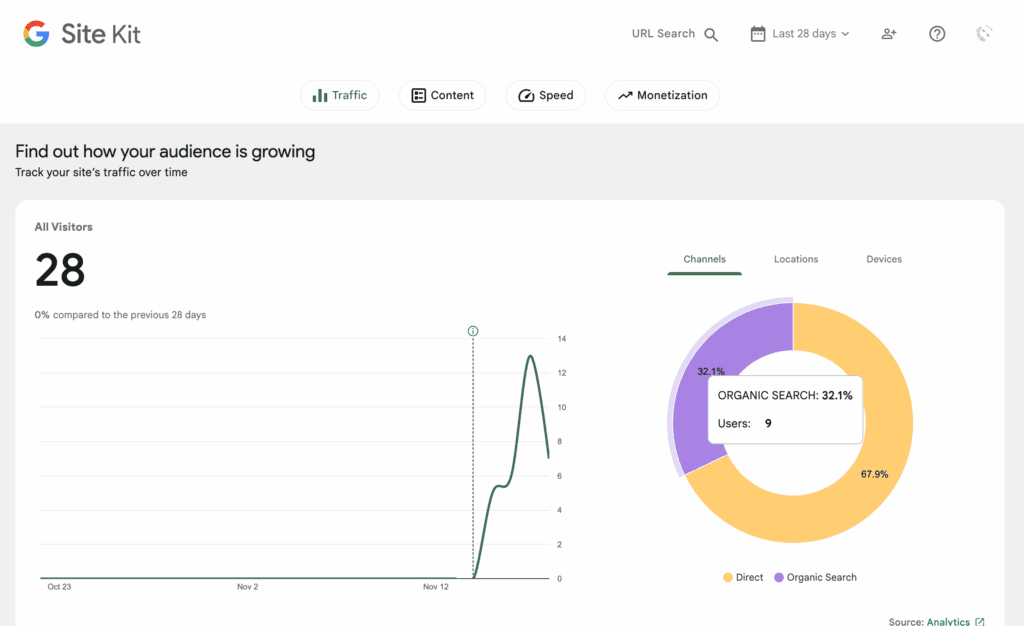
- Content Drilldown: You can quickly see your most popular pages and posts, helping you understand what content resonates with your audience.
- Search Funnel: This is a key strength. By integrating Search Console, Site Kit shows you how many people see your site in Google (impressions), how many click, and what search terms they used to find you.
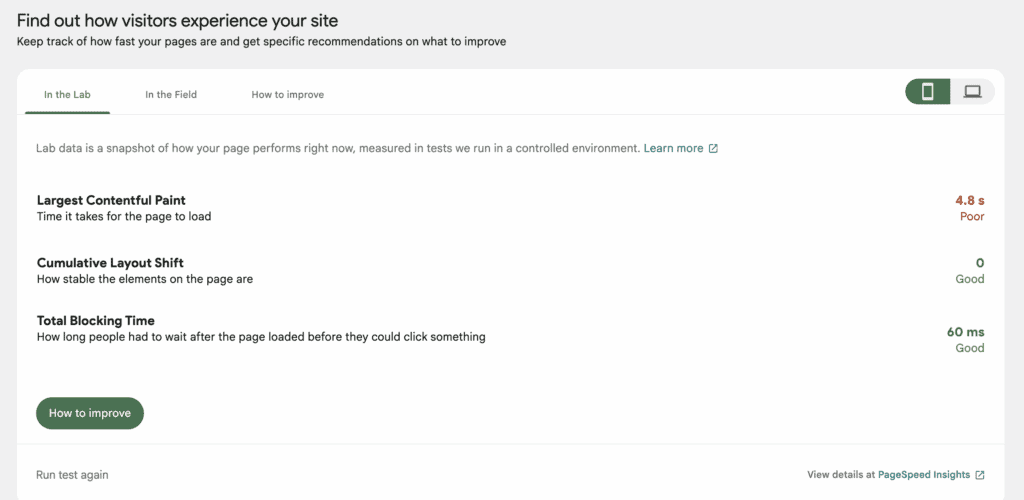
- AdSense & PageSpeed: If connected, you get simple report cards showing your AdSense earnings and a summary of your site’s performance based on Google PageSpeed Insights.
- Limitation: The reports are high-level overviews. You won’t find in-depth, customizable reports for things like real-time traffic, form conversions, or author performance within the Site Kit dashboard.
Privacy and GDPR Compliance
In today’s world, respecting user privacy isn’t just good practice—it’s often a legal requirement. Regulations like GDPR in Europe mean you need to be transparent about data collection and get user consent. An analytics plugin should help you meet these obligations, not make them harder.
- IP Anonymization: Site Kit includes a simple toggle switch to anonymize IP addresses, which is a key requirement for GDPR compliance.
- Consent Mode: You can toggle on the consent mode and it will only gather data about users that explicitly give consent. You will need to install WP-Consent.

- No Built-in Opt-Out: The plugin lacks features for users to easily opt out of tracking, which is another aspect that must be handled by a different tool.
Will Site Kit Slow You Down?
Every plugin you add to your site has the potential to affect its performance. Website speed is critical for both user experience and SEO, so it’s important to know if your analytics plugin will become a bottleneck. We look at whether a plugin is lightweight or adds unnecessary “bloat.”
- Frontend Performance: The impact on your live site (what visitors see) is generally minimal. Site Kit loads the necessary tracking script directly from Google’s highly-optimized servers.
- Backend (Admin) Performance: Some users report that the WordPress admin area can feel slower after installing Site Kit. This is because the dashboard has to fetch data from multiple Google services every time you load it.
- No Local Hosting: Site Kit does not offer advanced features like hosting the analytics script locally on your own server, a technique sometimes used to gain minor performance.
- Performance monitoring: On the dashboard, it also tells you your current page speed. It integrates with PageSpeed Insights and tells you recommendations as well.
Marketing and SEO Tools
The ultimate goal of analytics is to make smarter marketing decisions. A great analytics plugin should offer tools that bridge the gap between data and action, helping you track campaigns and understand how your SEO efforts are paying off.
- SEO Insights: The integration with Google Search Console is the plugin’s strongest marketing feature. Seeing your top-performing search queries directly in WordPress is incredibly valuable for planning new content.
- No UTM Builder: Site Kit does not include a built-in UTM builder. To track your marketing campaigns (e.g., from emails or social media), you will need to create your UTM-tagged URLs manually using an external tool.
- No Content Optimization Tools: Site Kit is purely a reporting tool. It does not provide any on-page SEO suggestions, headline analyzers, or other features designed to help you actively optimize your content.
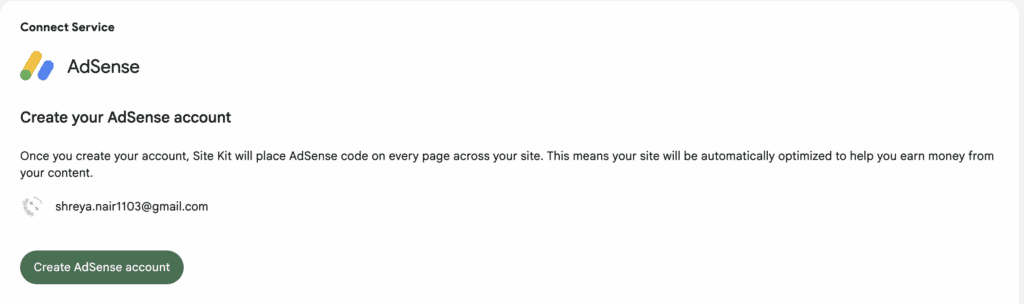
- Integrate AdSense: You can easily integrate with other Google services like AdSense and monitor all that data on the same dashboard,
Tracking Custom Data
As your site grows, you might want to track data that is unique to your setup, such as which blog author is the most popular, which post category gets the most views, or how many times a specific button was clicked. This is handled through “custom dimensions.”
- No Dashboard Support: Google Site Kit does not have a user-friendly interface for setting up or viewing reports based on custom dimensions. You cannot, for example, easily create a report to compare the performance of your blog authors.
- Requires Manual Setup: While you can still track this data by configuring it manually within your Google Analytics and Google Tag Manager accounts, Site Kit provides no tools to simplify this process.
Security and Access Control
Controlling who can see your website data is crucial, especially if you have a team of writers, editors, or marketers. We also need to be clear about where your data is stored.
- Data Storage: Like all Google Analytics integrations, Site Kit sends your website’s traffic data to be stored and processed on Google’s servers, not on your own website’s hosting.
- Role-Based Access: By default, the full Google Site Kit dashboard and its reports are only visible to users with an “Administrator” role in WordPress. It lacks the advanced controls found in other plugins that allow you to show specific, limited reports to other user roles like “Editors” or “Authors.”
How Easy is Site Kit to Use?
The biggest promise of Google Site Kit is simplicity. It’s designed to take the headache out of connecting your site to complex Google services. But while it succeeds in some areas, the overall user experience is a bit of a mixed bag.
The setup process walks you through connecting each Google service one by one. You’ll have to connect to your Google account to authorize Site Kit itself, then do it again for Search Console, again for Google Analytics, and again for PageSpeed Insights. It’s not a difficult process, but it is repetitive.

The only problem I discovered was thar I frequently got logged out of my Google account. So, had to reconnect the two, setup permissions, etc. Mildly annoying.
Alternatives to Google Site Kit
You might find that you need more powerful features than Site Kit offers. Perhaps you run an eCommerce store and need detailed sales reports, or you want to move away from Google entirely for privacy reasons. Whatever your reason for needing an alternative, here are two excellent plugins to consider:
- MonsterInsights: As the most popular analytics plugin for WordPress, MonsterInsights is the logical next step up from Site Kit. We tested its free version and found its reports to be more detailed and user-friendly right out of the box. If you need more advanced tracking and reporting but aren’t ready to pay, MonsterInsights’ free plugin is a fantastic alternative.
- WP Statistics: If your main goal is to “de-Google” your website for privacy, WP Statistics is the perfect choice. It’s a self-hosted analytics plugin, meaning it stores all of your website data directly on your own server, not Google’s. If you want a simple, official connection to Google’s ecosystem, stick with Site Kit. If you want to own your data and prioritize privacy, choose WP Statistics.
Final Thoughts
So, here’s my final take on Google Site Kit. We love that it’s an official, free, and incredibly simple way to get vital Google data into your WordPress dashboard. It completely removes the technical headache of connecting your site to essential services like Analytics and Search Console. If you’re a blogger, a small business owner, or anyone who just wants to see the basics without any complexity, this plugin is the perfect starting point.
It lives up to its promise of simplifying Google’s tools, and for that, it gets a strong recommendation from us as the best no-cost solution for basic integration.
Now, before you rush off to install it, let’s talk about a crucial first step: taking a backup. While Site Kit is an official and well-built plugin, adding any new software to your site introduces a small risk of conflicts with your theme or other plugins. A reliable backup plugin ensures that if you run into any unexpected issues, you can restore your site to its previous state in minutes, giving you complete peace of mind.
FAQs
Is Google Site Kit worth it?
Yes, for most WordPress users, Google Site Kit is absolutely worth it. It’s a free, official plugin from Google that makes it incredibly easy to connect your site to essential tools like Google Analytics and Search Console without touching any code. If you want a simple, no-cost way to see basic performance data directly in your dashboard, it’s an excellent choice.
Which is better, Google Sites or WordPress?
This is a common point of confusion, but they are very different things. WordPress is a powerful and flexible content management system used to build all types of websites, from blogs to large online stores. Google Sites is a very simple, free website builder with limited features, best for basic portfolio pages or internal wikis. For almost any serious website project, WordPress is the better and more scalable choice. Google Site Kit is a plugin for WordPress; it is not used with Google Sites.
Is a Google site kit necessary?
No, Google Site Kit is not strictly necessary. You can connect your website to Google services manually by adding the tracking code to your theme’s files or by using another analytics plugin. However, Site Kit automates this process, making it much easier and safer for beginners who aren’t comfortable editing code.
How to use Google Site Kit on WordPress?
Using Google Site Kit is a straightforward process guided by a setup wizard:
Install and Activate: From your WordPress dashboard, go to Plugins > Add New, search for “Google Site Kit,” and install and activate it.
Start Setup: Click the “Start Setup” button that appears.
Connect Your Google Account: You will be prompted to sign in with your Google account. Use the same account you use for Google Analytics and Search Console.
Grant Permissions: Grant the necessary permissions so Site Kit can access your data and display it in WordPress.
Connect Services: Once the initial setup is done, you can navigate to the Site Kit dashboard in WordPress to connect other services like AdSense or PageSpeed Insights.

Shreya has been a writer for as long as she can remember. Now, she writes articles that help WordPress users manage the sites that they're proud of, with little to no coding


