A membership management plugin should be your most reliable business partner. If you’re deep into a MemberMouse review, however, it likely feels like you’re trying to fire an old one. Maybe you’ve outgrown your current plugin? Maybe you’re tired of its limitations and patching things together. Or perhaps you’re starting fresh, determined to avoid the frustrating tech headaches you’ve seen others endure.
MemberMouse promises the power and data to solve all that, but its reputation for complexity is just as strong. But, a quick look at the good reviews and you realise that they’re older and outdated. The plugin has changed ownership since then. Is it still just as good?
This guide will give you the clarity you need. We’ll explore whether MemberMouse is the right plugin for you.
We used a test site with fake users and membership plans to see how MemberMouse performs in a real-world scenario, and we found it to be a powerful tool that, unfortunately, comes with a significantly steeper learning curve than its competitors.
As far as membership plugins go, Membermouse has been a favourite for over a decade. Launched in 2009 by Eric Turnnessen, MemberMouse emerged as one of the first enterprise-level membership solutions for WordPress. It was built for serious marketers needing deep, built-in functionality beyond basic content restriction.
I was immediately intrigued by this plugin. I was curious to see how it handled the following things that I deemed important in any membership plugin:
- Membership plan management
- Member management
- Content restriction and dripping
- Design and customization
- Privacy and Security
- Pricing
- Usability
I tested the plugin on a small test site with a few fake users and memberships plans. But, here is everything I learnt:
Manage Membership Plans and Access Control
The core function of any membership plugin is to control who can see your content. MemberMouse offers a highly granular and flexible system that goes beyond simple page protection, allowing you to create complex offerings with bundles, special pricing, and dynamic content that adapts to each user.
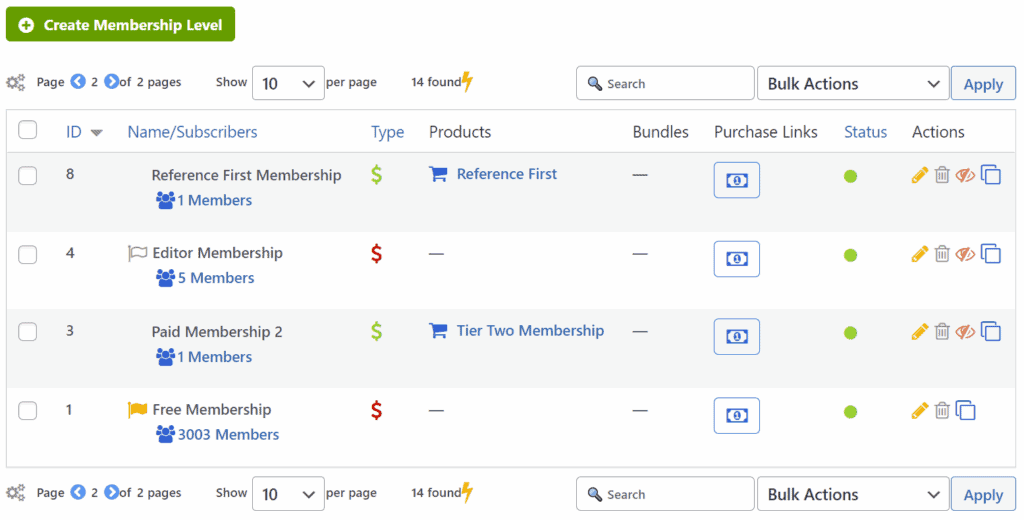
- Unlimited Membership Levels: Create any number of free, trial, or paid membership levels to structure access to your content.
- Content Protection: Easily restrict access to posts, pages, custom post types, categories, and even specific parts of a page.
- Content Bundles: Sell one-off “bundles” of content (like a course or a resource library) that members can purchase in addition to their primary membership level.
- Flexible Access Rules: Grant content access based on a member’s level, which bundles they’ve purchased, or how long they’ve been a member.
- SmartTags for Dynamic Content: Use special shortcodes called “SmartTags” to show or hide content on a single page based on who is viewing it. For example, you can show a “Buy Now” button to non-members and a personalized “Welcome Back” message to logged-in members.
- Custom Error Pages: When an unauthorized user tries to access protected content, you can redirect them to a custom page with teaser content or a sales pitch.
- Member-Only Pricing: Create special pricing for products that are only available to your existing members.
Manage Members
MemberMouse provides a comprehensive suite of tools for managing the people who sign up for your site. It balances powerful administrative controls with self-service options for your members, which helps reduce your support workload significantly.
- Member Database: Access a central dashboard with member information, complete order history, and activity logs.
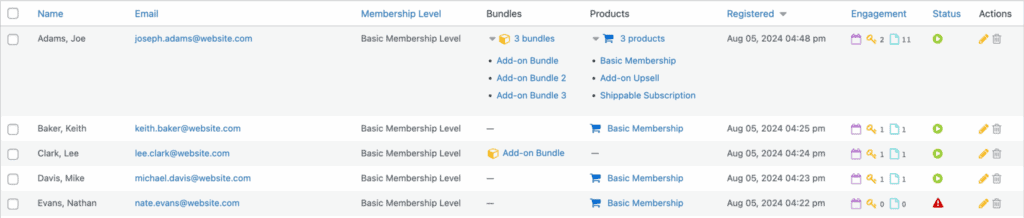
- Manual Management: Manually add, edit, pause, or cancel member accounts directly from the backend.
- Self-Service Member Area: Give members a “My Account” page where they can update their profile, change their password, manage their billing information, and view their transaction history.
- Upgrades & Downgrades: Allow members to upgrade or downgrade their own plans, with the system automatically handling prorated payments.
- Employee Accounts: Create limited-access employee accounts for staff who need to manage members or view reports without having full admin rights.
- Social Sign-On: Let members register and log in using their social media accounts, including Facebook, Twitter, and Google.
- Import/Export: Import members from a previous system using a CSV file and export transaction data for your records.
Content Dripping
If you offer a course or a timed program, dripping content is essential. MemberMouse allows you to schedule the release of your content over time, ensuring members get access to new material according to a predefined schedule.
- Scheduled Content Release: Automatically make content available to members based on the number of days since they registered or on a specific calendar date.
- Drip Content Schedule: Manage your entire time-release content schedule from a centralized, easy-to-read interface.
- Flexible Timing: Drip content based on each member’s individual join date (e.g., “Module 2 unlocks 7 days after signup”) or on a fixed date for everyone (e.g., “Module 2 unlocks on October 1st”).
- Admin Preview: A unique feature that lets you preview the site as if you were a specific member on a future date, so you can verify that your drip schedule works as intended.
Payments and Subscriptions
Getting paid is critical, and MemberMouse includes a robust, built-in system for handling transactions, subscriptions, and sales funnels without needing a separate e-commerce plugin.
- Multiple Payment Options: Integrates with major payment gateways like Stripe, PayPal, Authorize.net, and ClickBank.
- Recurring Subscriptions: Set up automated recurring billing for daily, weekly, monthly, or annual membership plans.
- One-Time Purchases: Sell individual digital products or content bundles alongside your recurring memberships.
- Trials & Coupons: Attract new members by offering free or paid trial periods, and create powerful coupon codes for promotions.
- Overdue Payment Handling: Automatically manages failed payments by notifying the customer and, if necessary, changing their account status.
- 1-Click Upsells/Downsells: A powerful marketing feature that allows existing members with a card on file to purchase additional products with a single click.
- Prorated Billing: Automatically calculates and applies prorated charges when members upgrade or downgrade their plans mid-cycle.
Design and Customization
MemberMouse is designed to integrate with your existing website’s look and feel, rather than forcing you into a specific design. It works with any standard theme and provides tools for both non-coders and advanced developers to customize the user experience.
- Theme Agnostic: Works with virtually any standard WordPress theme, allowing your theme to control the site’s overall design.
- Customizable Core Pages: The essential plugin pages (Checkout, Login, My Account) can be styled with CSS to match your brand.
- SmartTags for Personalization: Use SmartTags to dynamically insert member information (like their first name) or purchase links into any page, personalizing the design and content.
- Developer Tools: For advanced customization, MemberMouse offers an API, PHP interface, and WordPress action/filter hooks.
- Page Builder Compatibility: Integrates well with popular page builders like Elementor, allowing you to visually design your core pages.
Privacy, Security, and Compliance
Protecting your business and your members’ data is a top priority. MemberMouse includes several features aimed at securing your site and preventing unauthorized access.
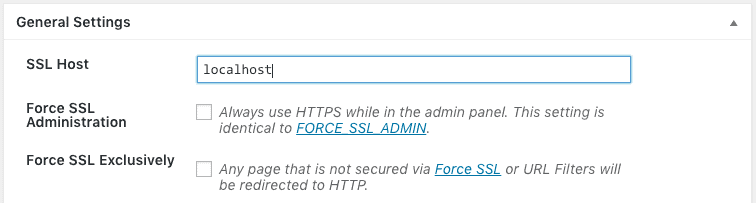
- SSL Support: Requires an SSL certificate for secure onsite payment processing, protecting sensitive customer data.
- Limit Login Attempts: Helps prevent brute-force attacks by locking out users after a set number of failed login attempts.
- Auto-lock Shared Accounts: A unique security feature that can detect and automatically lock accounts that are suspected of being shared among multiple users.
- GDPR & Privacy: Provides the necessary tools, such as self-service account management and custom fields, to help you build a GDPR-compliant membership site.
Price
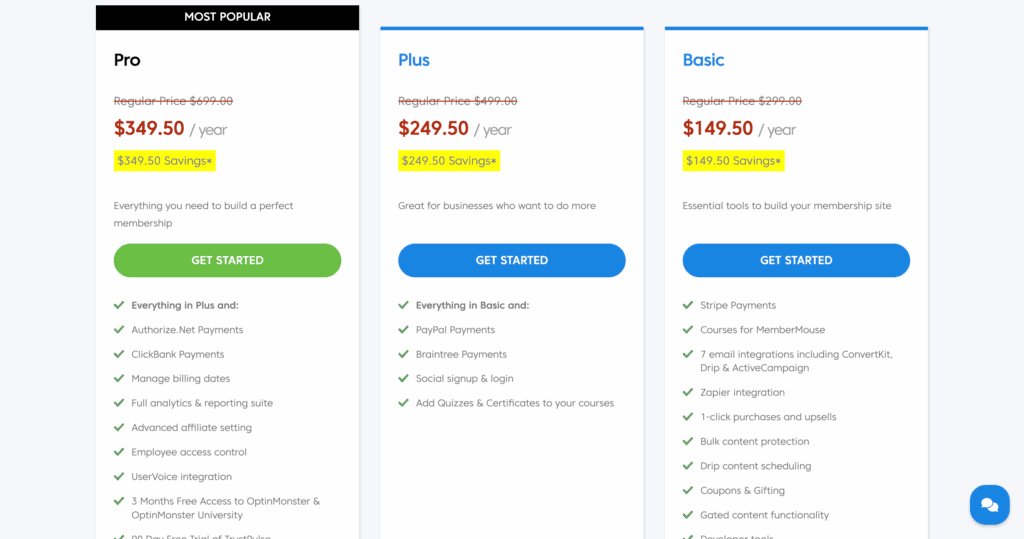
MemberMouse pricing operates on a SaaS-style (Software as a Service) subscription model. This means you pay a recurring monthly fee to continue using the software and receive support and updates.
Pricing is offered in multiple tiers (Basic, Plus, Pro, etc.) that unlock different features. Higher tiers include more payment gateway options, advanced analytics like churn reporting, and priority support.
Usability
Usability is where MemberMouse shows two very different sides: the experience for your members is excellent, but the experience for you as the administrator can be challenging.
Members can easily manage profiles, subscriptions, and billing without needing to contact you for help. they have an easy to navigate dashboard on the front-end.
On the admin side, it was easy to setup new membership level. But, I need to go through their documentation to figure out how to restrict my content. It was a little unecessarily compliacted. Even complex features like sales funnels with bundles and SmartTags can be overwhelming for beginners. There is a lot of resources to parse through.
The bottomline is that there are a lot of features and the front-end dashboard is great. Admins have a hard time navigating it though.
Alternatives to MemberMouse
While powerful, MemberMouse isn’t the right fit for everyone. Its laser focus on sales metrics, coupled with its SaaS-style pricing and steep learning curve, means many users will find it either too complex or too expensive for their needs. I tested the top membership plugins and here’s what I found:
Ultimate Member
Ultimate Member is the go-to choice if your primary goal is building a community, not just a content paywall. It specializes in creating beautiful front-end user profiles, member directories, and registration forms, making it ideal for sites where member interaction is key.
- Free Core Plugin: The main plugin is free, allowing you to set up basic memberships and user profiles without any initial investment. Paid add-ons are available for more advanced features.
- Advanced User Profiles: Create highly customizable and beautiful user profiles that serve as the heart of your community.
- Member Directories: Easily create searchable directories of your members, which is perfect for networking sites or professional organizations.
- Custom User Roles: Go beyond the standard WordPress roles to create custom permissions for different types of members.
- Focus on Community: Features are geared towards member interaction, making it a stronger choice for social networks or community hubs than MemberMouse.
Who it’s for: Anyone building a community-focused site, a professional directory, or a social network where user profiles and interaction are more important than complex payment funnels.
ARMember
ARMember is a strong contender for users who want a feature-packed, all-in-one solution but prefer a one-time payment over a recurring subscription. It offers a surprisingly robust feature set that rivals premium plugins, all wrapped in a modern, user-friendly interface.
- One-Time Payment Model: ARMember is famously available for a lifetime, one-time fee on marketplaces like CodeCanyon, making it an incredibly budget-friendly option.
- Modern User Interface: The admin dashboard is clean, intuitive, and generally considered much easier to navigate than MemberMouse’s backend.
- Built-in Form Builder: Design stylish, custom registration and login forms without needing another plugin.
- All-Inclusive Features: Many features that cost extra elsewhere are included out of the box, such as social logins, drip content, coupons, and pay-per-post options.
- Flexible Content Restriction: Offers unique restriction options, like restricting content based on a user’s IP address or for only a portion of a page.
Who it’s for: Solopreneurs, startups, and business owners on a budget who want a powerful, feature-rich plugin without being locked into a monthly subscription.
Final Thoughts: Powerful, But Not for the Faint of Heart
There’s no question that MemberMouse is a serious, enterprise-level tool. For an established business that needs to dive deep into analytics like Lifetime Customer Value and churn, its powerful, all-in-one engine is a compelling choice. It’s reliable, secure, and packed with features designed to help you optimize and scale a profitable membership site. However, that power comes at the cost of simplicity. The learning curve is steep, the admin interface feels dated, and its core concepts require a genuine time investment to master.
However, we recommend you test it on a staging site. A staging environment provides a safe, private clone of your website where you can experiment without any risk to your live traffic or reputation. You can wrestle with its complex settings, configure payment gateways, and fully understand its workflow.
FAQs
What is the difference between MemberMouse and MemberPress?
Both are top-tier WordPress membership plugins, but they are built for different types of users. Think of it this way:
MemberMouse is like a high-performance race car. It comes with powerful, built-in analytics (like Lifetime Customer Value and churn reporting) and complex sales funnel tools right out of the box. However, it has a steeper learning curve and a recurring monthly fee. It’s best for established businesses that are highly data-driven.
MemberPress is like a versatile and reliable all-terrain vehicle. It is known for being incredibly easy to set up and use, allowing you to get your membership site running in minutes. While its core is simpler, it can be extended with a huge library of add-ons. It’s the better choice for beginners and most users who prioritize ease of use and flexibility.
Is WordPress really worth it?
Yes, absolutely. Using WordPress is the difference between owning your own house and renting an apartment. With platforms like Kajabi or Teachable, you’re renting space—you’re limited by their rules, features, and pricing. With WordPress, you own your website and all your content completely. This gives you unlimited freedom to customize, grow, and control your business and brand exactly how you want, making it a powerful long-term asset.
Are WordPress plugins worth it?
While there are thousands of great free plugins for simple tasks, premium (paid) plugins are essential for any serious business function. For something as critical as a membership site that handles payments and customer data, a premium plugin is a non-negotiable investment. You aren’t just paying for features; you’re paying for reliability, regular security updates, and professional customer support to help you when things go wrong.
Is WordPress legit?
Yes, WordPress is 100% legit and is the most popular website-building platform in the world. It powers over 43% of all websites on the internet, from small personal blogs to massive global corporations like The Walt Disney Company, Sony Music, and The New Yorker. Its reputation is built on over two decades of being a secure, flexible, and powerful open-source platform trusted by millions.

Shreya has been a writer for as long as she can remember. Now, she writes articles that help WordPress users manage the sites that they're proud of, with little to no coding