

When comparing membership plugins like Paid Memberships Pro vs MemberPress, you’re looking at two completely different approaches to building your membership site. You’re likely here because you’re deciding between a flexible, open-source foundation and a polished, all-in-one solution. This decision will impact everything from your initial costs to how much customization you can achieve.
We’ve tested both plugins extensively and wrote this article to help you make that choice. We compare features, pricing, and usability in an honest review of both platforms.
We tested the top membership plugin and were impressed by how MemberPress and Paid Membership Pro works. We found that MemberPress is a streamlined, user-friendly solution that can get expensive. In contrast, Paid Memberships Pro offers incredible flexibility and a robust free version, but often requires add-ons to match MemberPress’s feature set.
Before we dive into the detailed comparison, here is a quick look at both plugins:
Paid Memberships Pro Summary
Paid Memberships Pro has been a trusted name in the WordPress membership space for over a decade. It’s famous for being an open-source, highly customizable solution that puts power in the hands of developers and site owners who want complete control. Its claim to fame is the robust free version that lets you build a fully functional membership site without spending a dime.

In our testing of Paid Membership Pro, I loved the flexibility and the fact that I could start for free. The extensive payment gateway options and large library of add-ons were significant pluses. The only trade-off is that the interface feels somewhat dated, and some advanced features require additional plugins.
MemberPress Summary
MemberPress has positioned itself as the premium, all-in-one membership solution for WordPress. It’s designed to be the only plugin you need to handle memberships, courses, and digital downloads. The focus is on user-friendliness and providing a complete package without needing multiple extensions.
In my experience with MemberPress, the intuitive interface and built-in course builder made setup incredibly straightforward. The ReadyLaunch™ feature that creates beautiful membership pages instantly was a huge time-saver. However, this convenience comes at a higher price point, and there’s no free version to test the waters.
Membership Plans and Access Control
The core of any membership plugin is locking down content. I tested how easily each plugin handles content restriction and membership level creation.
Paid Memberships Pro:
Setting up membership levels was straightforward, and I appreciated that I could create unlimited free or paid levels right from the start. The flexible pricing options stood out—I could easily configure one-time payments, recurring subscriptions, or even trial periods without needing extra plugins.

What impressed me most was the granular control. Using shortcodes or block editor blocks, I could protect specific content within a page or post, creating effective paywalls. The group membership feature would be perfect for corporate accounts or team plans where one payment covers multiple users.
MemberPress:
Getting started with MemberPress felt more polished. The interface guided me through creating membership levels, and I could immediately see how to set up free, one-time, or recurring options. The rule-based system for content protection was intuitive—I could protect entire categories or tags with a single rule, saving significant time.

The partial content protection feature worked seamlessly, allowing me to create teaser content that entices visitors to upgrade. Like PMPro, it also offers content expiration, which is perfect for time-sensitive offers or serial content.
Manage Members
Once you have members, you need tools to manage them effectively. I looked beyond simple user lists to see which plugin offered better member experience and administrative control.
Paid Memberships Pro:
The member management in PMPro is functional and gets the job done. Members get a front-end account area where they can update profiles, view invoices, and manage subscriptions. From the admin side, I could manually manage memberships and export data as needed.
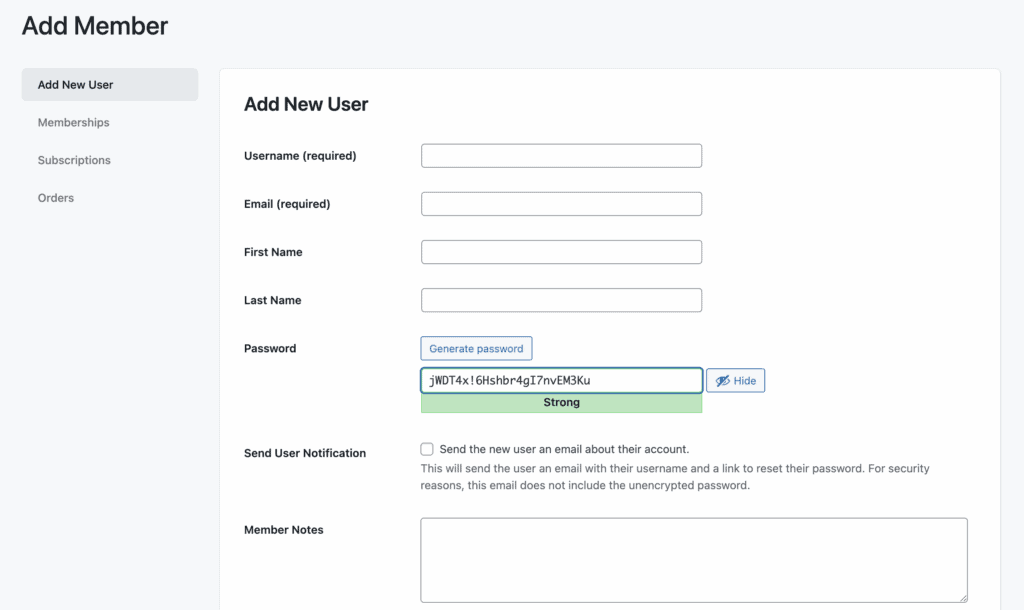
What stood out was the user role flexibility—I could link membership levels to specific WordPress roles, which is great for complex sites. The ability to create a “membership manager” role without full admin access is perfect for delegating tasks.
MemberPress:
MemberPress provides a much more polished experience overall. The self-serve member dashboard is visually appealing and intuitive, allowing members to easily update their profiles, billing information, and view payment history without needing help.
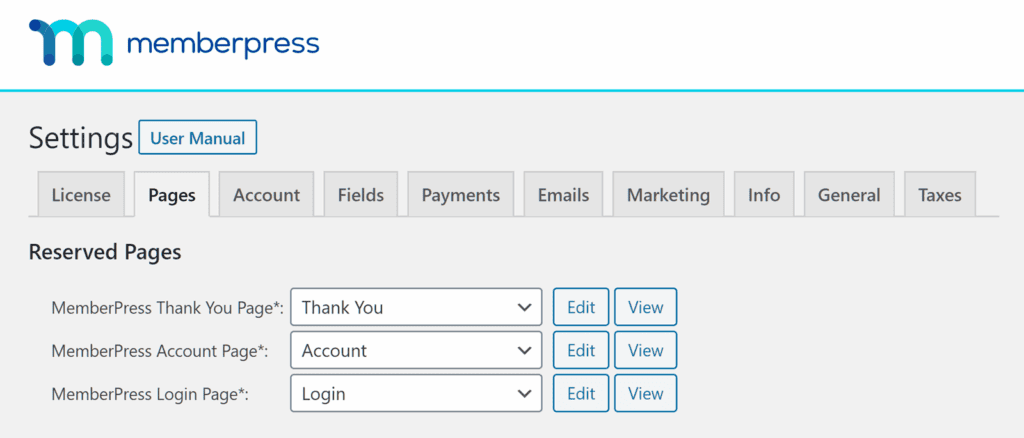
From the backend, the built-in reporting gave me immediate insights into my business health—sales trends, member growth, and revenue statistics were all visible without extra plugins. The ability to manually manage subscriptions and export data felt more streamlined than PMPro.
Content Dripping
Dripping content is essential for course creators and membership sites that release material over time. I tested how easily each plugin schedules content release to keep members engaged.
Paid Memberships Pro:
Content dripping requires the separate “Series Add On,” which adds to the cost but gets the job done. Once installed, I could schedule content to release a specific number of days after membership begins. The system works reliably, though the setup isn’t as intuitive as MemberPress.
For more advanced dripping needs, the plugin supports custom code solutions, which appeals to developers who want complete control over the timing and conditions of content release.
MemberPress:
MemberPress includes content dripping in its core functionality, making it accessible right out of the box. The interface is user-friendly—I could easily set up rules to release content based on when members joined specific levels.
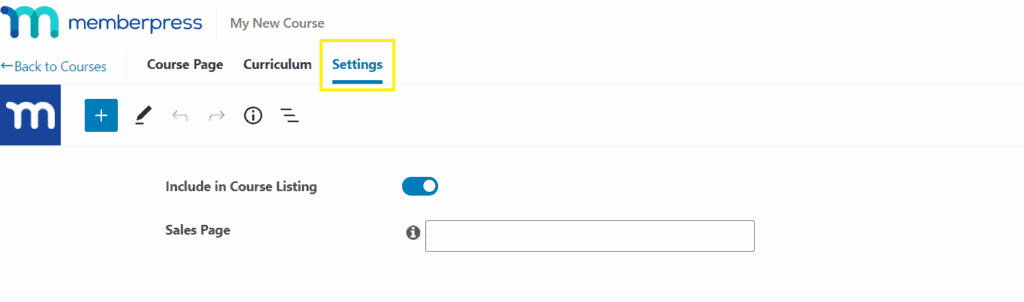
The granular control stood out: I could drip entire sections or individual items on their own schedules. Combined with content expiration, this creates powerful possibilities for limited-time access and structured learning paths.
Payments and Subscriptions
How a plugin handles payments can make or break your membership business. I tested the payment options and subscription management in both platforms.
Paid Memberships Pro:
The payment gateway support in PMPro is impressive. It supports Stripe, PayPal, Authorize.net, and even manual/offline payments right out of the gate. The fact that there are no platform fees (beyond standard payment processor fees) means you keep more of your revenue.
The proration system handles upgrades and downgrades smoothly, automatically calculating credits when members change plans. Automatic renewal and retry logic help reduce involuntary churn from failed payments.
MemberPress:
MemberPress keeps payments simple with built-in support for Stripe, PayPal, and Square (depending on your plan). The setup is streamlined—I connected my payment gateways in minutes without needing additional plugins.
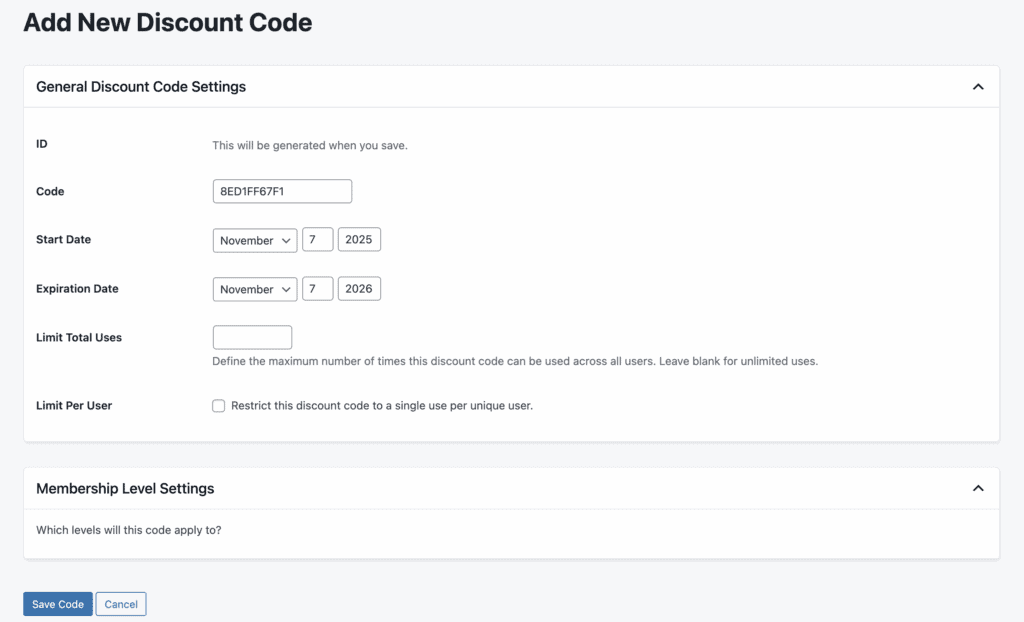
The automated billing and reminder system helps maintain recurring revenue, and the coupon code system is robust and easy to use. One caveat: the entry-level “Launch” plan includes a 4.9% transaction fee, which can add up quickly for growing businesses.
Design and Customization
Your membership pages need to look professional and match your brand. I tested how easily each plugin handles design customization without coding.
Paid Memberships Pro:
PMPro provides solid front-end templates that work with most themes. The real strength lies in customization options—I could use built-in design settings, custom CSS, or completely override templates with custom PHP for complete design control.
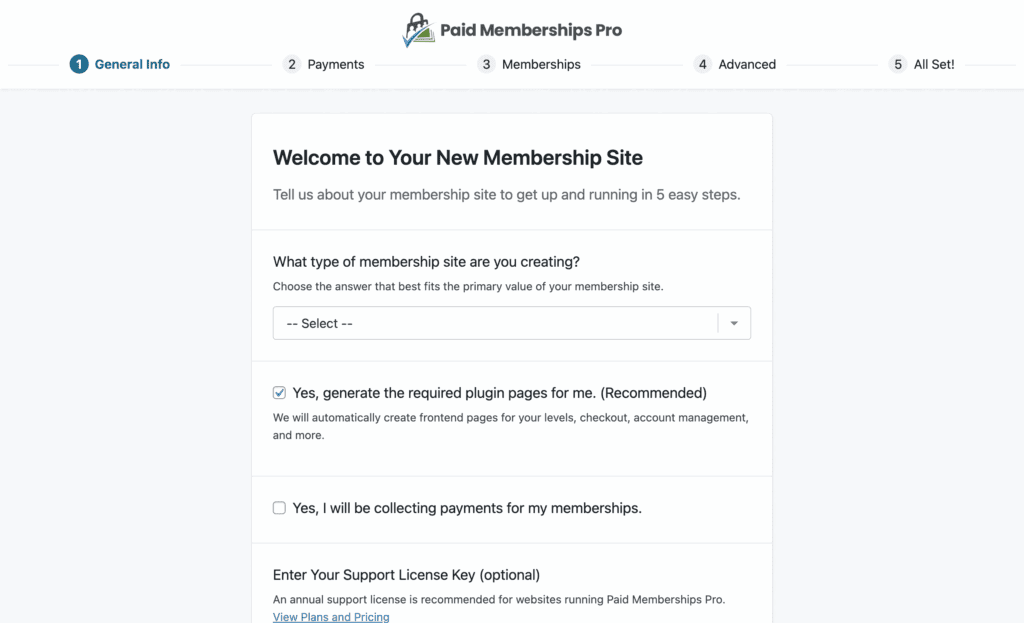
The integration with page builders like Elementor and the availability of 15 core membership blocks for the block editor make it flexible for different workflows. However, achieving a polished look often requires more technical knowledge.
MemberPress:
MemberPress shines with its ReadyLaunch™ feature, which instantly creates beautiful, mobile-responsive membership pages that are guaranteed to work with any theme. I had professional-looking login, registration, and account pages running in minutes.
The ability to add custom fields to registration forms and customize all email templates provides good design flexibility without touching code. The pages integrate seamlessly with popular page builders for further customization.
Privacy, Security and Compliance
Protecting member data and your content is non-negotiable. I examined the security and compliance features of both platforms.
Paid Memberships Pro:
PMPro takes security seriously with built-in integration for Cloudflare Turnstile, providing strong spam protection without needing additional plugins. The GDPR compliance features include tools for handling “Right to be Forgotten” requests, and the plugin’s data collection is opt-in by default.

Content and file protection is robust, ensuring that only authorized members can access protected materials. The focus on privacy and data security feels comprehensive.
MemberPress:
MemberPress includes solid GDPR compliance tools, including consent checkboxes on registration forms and logging of user agreements. The secure file protection ensures that digital downloads remain accessible only to paying members.
While MemberPress doesn’t include built-in brute force protection, it works well with third-party security plugins to handle this. The recommendation to use HTTPS on all membership pages shows good security practices.
Usability
How easy a plugin is to use can determine whether you actually launch your membership site or get stuck in setup hell.
Paid Memberships Pro:
The free version is surprisingly capable and user-friendly for basic membership sites. The interface is functional though somewhat dated, and the learning curve increases as you add more advanced features through add-ons.
The member-focused approach reduces administrative overhead by letting members manage their own accounts. While it lacks the polish of MemberPress, the extensive documentation and community support help bridge the gap.
MemberPress:
MemberPress feels like a premium product from the moment you install it. The setup wizard guides beginners through the process, and the intuitive interface makes complex tasks feel simple.
The built-in drag-and-drop course builder is a standout feature for educators, and the comprehensive documentation with video tutorials (WP101) provides excellent support for users of all skill levels.
Pricing and Value
Let’s talk numbers, because this is often the deciding factor. I compared not just the sticker price, but the long-term value and what you get for your money.
Paid Memberships Pro:
The game-changer here is the free version. You can build a complete membership site without spending anything, which is perfect for testing ideas or bootstrapped businesses.

Paid Membership Pro’s pricing plans start at $347/year for the Standard plan, which includes advanced add-ons and priority support.
The absence of platform fees (except a 2% Stripe fee on the free plan that can be avoided) means your costs are predictable. For developers or agencies, the ability to use PMPro on unlimited sites with the free version is incredible value.
MemberPress:
MemberPress’ pricing is a tiered annual model that starts at approximately $199.50 for the first year (Launch plan). However, the 4.9% transaction fee on this plan can quickly eat into your profits. To remove this fee, you need the Growth plan at $349.50/year.
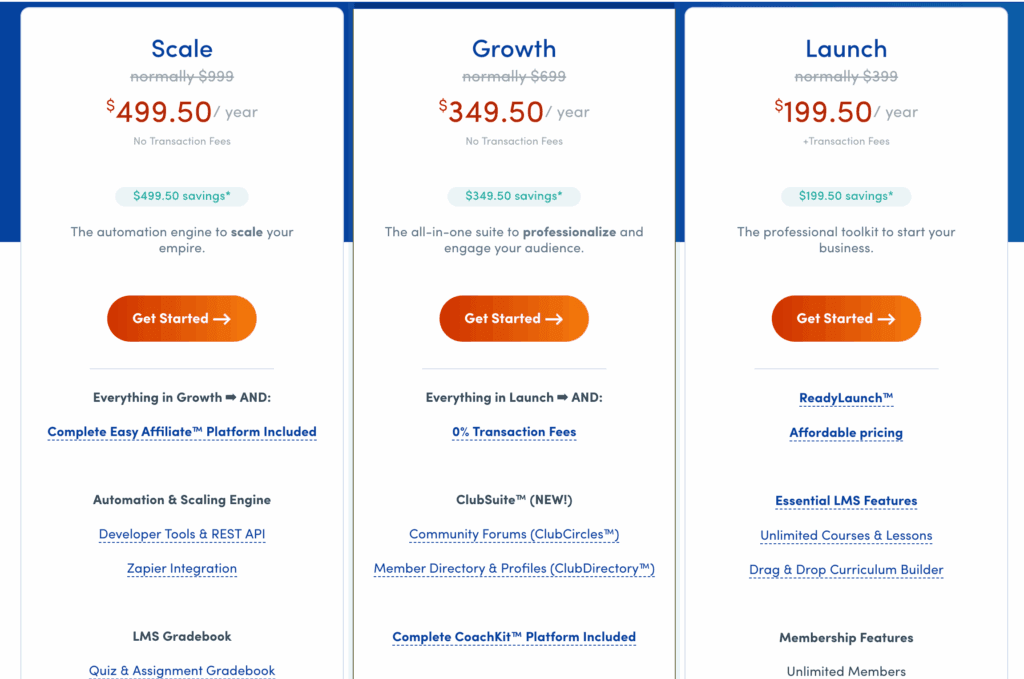
The higher tiers (Scale at $499.50/year and Elite at $999/year) add significant features like corporate accounts, gifting, and the full Easy Affiliate platform. While expensive, these plans bundle features that would cost much more if purchased separately.
Alternatives to Paid Memberships Pro and MemberPress
While both plugins are excellent choices, they’re not the only players in the game. If neither feels perfect, here are other popular options with different strengths:
- MemberMouse: An enterprise-grade solution geared toward established businesses that need advanced features like one-click upsells, split-testing, and detailed conversion analytics. It’s a significant investment but offers powerful marketing tools.
- ARMember: A feature-packed freemium plugin that offers an astonishing number of tools in a single package, including form builders, social logins, and pop-ups. It’s excellent for budget-conscious users who want extensive features without high costs.
Final Thoughts
Paid Memberships Pro offers a powerful free starting point and extensive customization options. It’s designed for those who don’t mind piecing together their ideal setup.
MemberPress, in contrast, will deliver a premium experience out of the box. It’s ideal for entrepreneurs, educators, and creators who want to launch quickly without technical headaches. You just need to pay for convenience.
Regardless of your choice, we strongly recommend testing your selected plugin on a staging site first. This lets you explore all features and ensure compatibility with your theme and other plugins before going live with your business.
FAQs
Is there really a free version of Paid Memberships Pro?
Yes! This is one of PMPro’s biggest advantages. The core plugin is completely free and includes unlimited membership levels, content restriction, and over 30 free add-ons. You can build a fully functional membership site without spending anything.
Which plugin is better for selling online courses?
MemberPress has the edge for course creation with its built-in drag-and-drop course builder and integrated content dripping. While Paid Memberships Pro can handle courses, it often requires additional plugins and more setup to achieve similar functionality.
Is MemberPress really easier to use than Paid Memberships Pro?
Generally, yes. MemberPress is designed with user-friendliness as a core principle, featuring a guided setup wizard and intuitive interface. Paid Memberships Pro is powerful but has a steeper learning curve, especially when adding advanced features through add-ons.
Can I avoid transaction fees with both plugins?
With Paid Memberships Pro, you can avoid all platform fees, even on the free plan (by using Restricted API Keys with Stripe). With MemberPress, you need at least the Growth plan ($349.50/year) to avoid the 4.9% transaction fee that applies to the entry-level Launch plan.
Which plugin is better for a nonprofit organization?
Paid Memberships Pro is often the better choice for nonprofits due to its free version and flexible pricing. The ability to start without upfront costs and the support for multiple payment gateways (including offline donations) make it ideal for organizations with limited budgets.

Shreya has been a writer for as long as she can remember. Now, she writes articles that help WordPress users manage the sites that they're proud of, with little to no coding


