

Plugins for quizzes often promise flashy features but deliver a bloated, slow experience. You just want to create a simple exam or survey that works, without the headache. That’s likely why you’re searching for a Watu Quiz review.
Watu is known for being a free, lightweight, and functional workhorse. But is it powerful enough for your needs, or is its outdated interface a deal-breaker?
This hands-on review gets straight to the point. We’ll cover the good, the bad, and the ugly, showing you exactly what this plugin is like to use. By the end, you’ll know for sure if Watu Quiz is the simple, no-fuss solution your WordPress site has been waiting for.
TL;DR: Watu Quiz is a reliable and lightweight workhorse, perfect for creating functional exams and assessments. We tested Thrive Quiz Builder and found it to be a much more powerful and feature-rich alternative if your needs are more marketing-related.
Setting the Stage for the Watu Quiz Review
Before we get into the details, it’s important to understand what Watu Quiz is famous for.
Unlike newer plugins that focus on flashy animations and modern designs, Watu has built its reputation over 12 years as a reliable, no-frills workhorse. It’s known for its clean, lightweight code that won’t slow your site down and its surprisingly robust grading system, making it a favorite for academic, training, and certification websites. Essentially, users choose Watu for function over form.
To give you an honest, hands-on look, we installed Watu Quiz on a WordPress staging site. Our goal was to see if its reputation holds up and to test its performance on the features that matter most, including:
- Ease of Use: How quickly can a total beginner set up a functional quiz?
- Grading & Scoring Power: How flexible and detailed is the grading system?
- Design Flexibility: Can you style the quizzes to match your site, or are you stuck with a dated look?
- Result Tracking: What kind of data can you collect on user performance?
- User Management: How well does it handle results for logged-in users?
- Free vs. Pro Value: Is the free version generous enough, or is an upgrade necessary for core features?
We built several types of quizzes, tweaked every setting, and experienced it as both an admin and a user. Here’s our honest breakdown of where Watu Quiz excels and where it falls short.
Types of Quizzes You Can Build with Watu Quiz
Before you install a free plugin, you need to be sure it can handle the type of quiz you want to create. Is it just for basic tests, or can it do something more? We explored Watu Quiz to see exactly what you can create with the free version and what requires an upgrade. Here’s a breakdown of what Watu supports.
- Multiple-Choice Questions (MCQs): Yes, this is Watu’s core strength and it’s fully supported in the free version. It’s the primary format you’ll use for building exams, knowledge tests, and simple surveys.
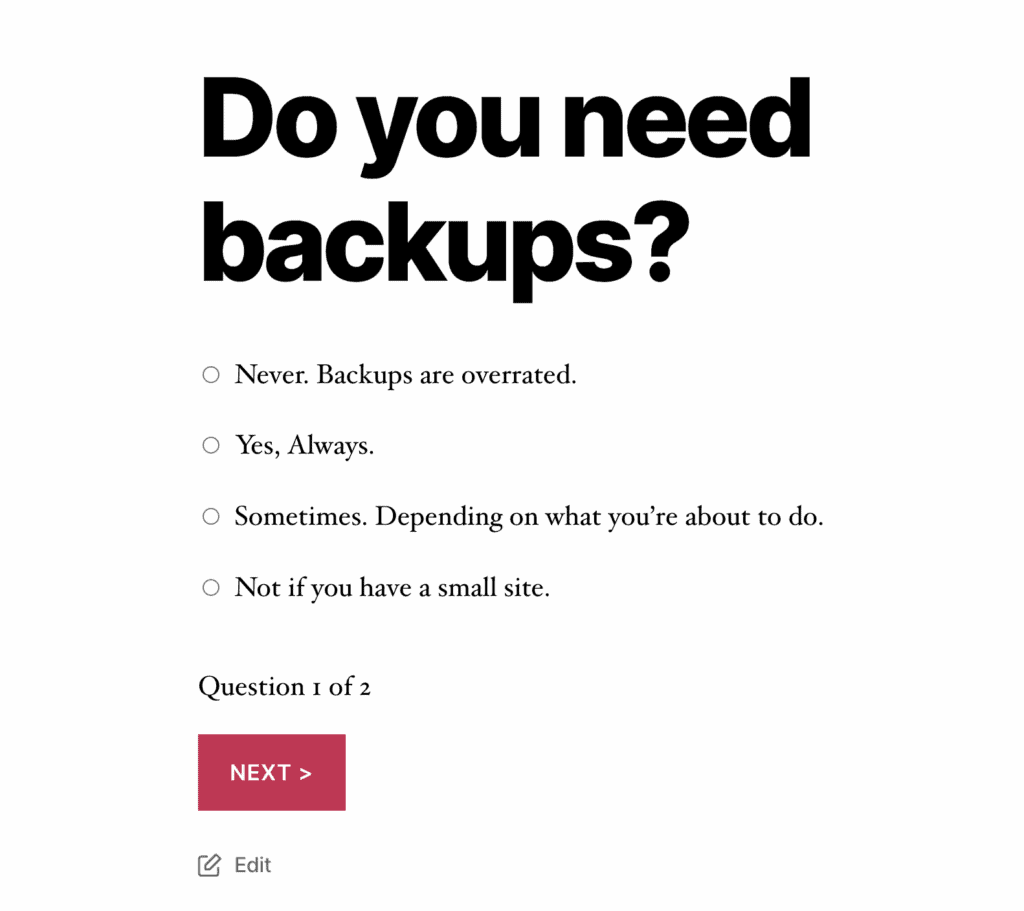
- True/False Quizzes: Absolutely. Since a true/false question is just a multiple-choice question with two options, Watu handles this perfectly right out of the box.
- Personality Quizzes: This is a premium feature. The free version is designed around assigning points for correct/incorrect answers, not assigning outcomes or “personalities.” To create a “Which character are you?” style quiz, you will need to upgrade to Watu Pro.
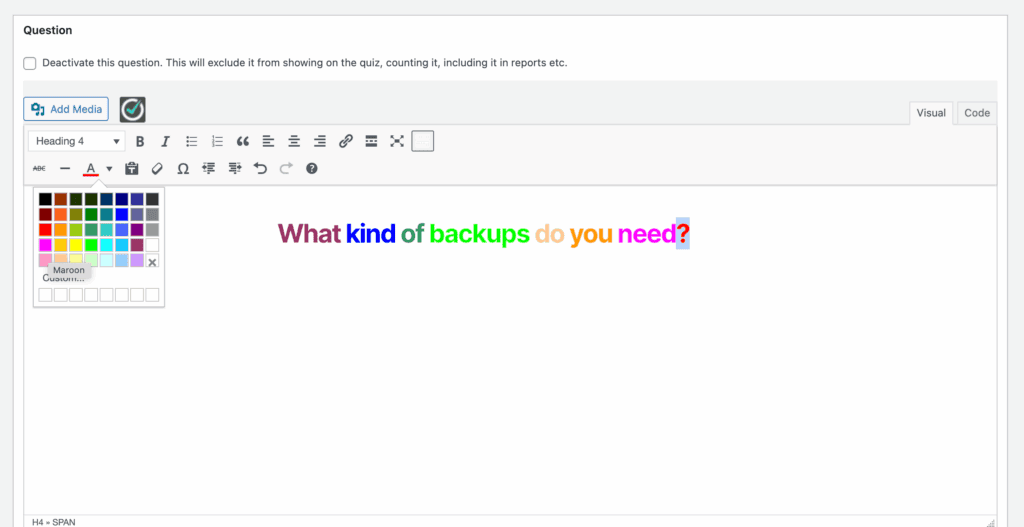
- Image-Based Questions: Yes, this is supported. Watu uses the standard WordPress editor, so you can easily add images to both the question area and within the individual answer options. This is great for making your quizzes more visual.
- Timed Quizzes: This is a premium feature. The ability to set a time limit for the entire quiz or on a per-question basis is reserved for Watu Pro. The free version does not include a timer.
- Branching/Conditional Logic: No, this is not a feature. Watu Quiz is built for linear quizzes where every user sees the questions in the same order. It does not have the functionality to show different questions based on a user’s previous answers. If you need complex, branching paths, you’ll be better served by a different plugin.
Frontend Design & Customization
The look and feel of your quiz directly impact user engagement. A clunky, poorly designed quiz can turn people away before they even start. We tested Watu to see how much control you have over its appearance and whether you can make it blend seamlessly with your website’s branding.
- Mobile Responsiveness: Yes. Watu quizzes are designed to be responsive, meaning they adapt well to different screen sizes and are easy to use on both desktops and mobile devices.
- Layouts & Colors: Yes, but it’s basic. The settings page provides simple controls to adjust the quiz width, background color, and font styles. It’s functional but lacks the advanced visual builders found in other plugins.
- Custom CSS/Branding: Absolutely. This is a key feature for developers or users with specific branding needs. Watu allows you to add your own custom CSS to override the default styles. For complete control, you can even override the theme view files.
Scoring, Logic, and Flow Control
The real power of a quiz plugin lies beneath the surface. How does it grade answers, manage the user’s path, and ensure a fair testing environment? We dug into Watu’s logic and flow-control features to see how sophisticated it is.
- Scoring Rules: The free version offers a flexible point-based system for each answer. For more complex needs, WatuPRO introduces an elaborate grading system based on points, percentages, or personality/category outcomes.

- Pass/Fail Conditions: Yes, this is a core feature in both versions. You can easily set a minimum score or percentage a user must achieve to pass the quiz.
- Randomization: Yes. To help reduce cheating, you can set Watu to randomize the order of the questions and also randomize the order of the answers for each question.
- Progress Bars: This is a WatuPRO feature. For longer, multi-page quizzes, you can display a progress bar to show users how far they’ve come.
- Timers: Yes, a timer is available in the free version, allowing you to set a time limit for completing the quiz.
- Conditional Redirects: This is a WatuPRO feature. You can automatically send users to different URLs after they complete the quiz based on their final score or grade.
Analytics & Reporting
A quiz is only useful if you can learn from the results. Whether you’re assessing student knowledge or gathering customer data, clear reporting is crucial. We checked to see how well Watu tracks user performance and presents the data.
- User Tracking: Yes. Both the free and pro versions track all user attempts, scores, and final results in your WordPress dashboard.
- Export Reports: Yes, this is a very useful feature in the free version. You can export all quiz results into a standard CSV file, which can be opened in Excel or Google Sheets for deeper analysis.
- Advanced Analytics: This is exclusive to WatuPRO. The premium version provides detailed charts, cumulative statistics across all users, and advanced reports like time spent per question.
User Management
Controlling who can take your quiz and how many times they can attempt it is vital for exams, certifications, and paid courses. We looked into Watu’s user management features to see how much control you have over access.
- User Attempt Limits: This is a WatuPRO feature. You can limit how many times a single user is allowed to take a quiz.
- Logged-In Restrictions: Yes, this is available in the free version. You can easily make any quiz accessible only to registered and logged-in users on your site.
- Progress Resetting: In WatuPRO, an administrator has the ability to reset a user’s progress or results for a specific quiz, allowing them to take it again.
Security & Anti-Cheating Options
For any serious assessment, maintaining the integrity of your quiz is a top priority. We investigated Watu’s features to see how it helps prevent users from cheating.
- Timer Enforcement: Yes. When the timer is active, it can be strictly enforced to automatically submit the quiz when time runs out, preventing users from taking extra time.
- Randomization: Yes. As one of its primary anti-cheating tools, Watu allows you to shuffle the order of both questions and their corresponding answers for each user.
- IP Tracking: This is an option in WatuPRO. It can help identify if multiple attempts are coming from the same location. This can also be disabled to comply with GDPR.
- Anti-spam measures: The plugin offers some solutions with features like CAPTCHA and honeypot. It’s easy to setup. Just choose the features in the quiz settings.

Monetization Options
Want to turn your knowledge into revenue? Selling access to premium quizzes, exams, or certification tests is a great business model. We checked if Watu could help you monetize your content.
- Selling Quizzes: This is a WatuPRO-only feature. The premium version integrates directly with PayPal and Stripe, allowing you to charge users a fee to take a quiz.
- WooCommerce/Membership Integration: For WatuPRO users, the developers offer a free bridge module. This allows you to sell your quizzes as products through WooCommerce or restrict access via popular membership plugins.
Certificates & Completion Features
Rewarding users for their hard work can dramatically boost engagement and provide a valuable sense of accomplishment. We looked at what Watu offers after a user submits their final answer.
- Downloadable Certificates: This is a key feature of WatuPRO. You can design and automatically issue printable PDF certificates to users who successfully pass a quiz.
- Badges/Gamification: For users looking to add gamification, the “Intelligence module” add-on for WatuPRO allows you to award badges and assign levels as users complete quizzes, encouraging them to keep learning.
Pricing
Bottom Line: Watu Quiz offers a capable free version for basic needs, while its premium upgrades (WatuPRO) are sold as affordable one-time payments, not recurring subscriptions. You can buy the core plugin or get a bundle with more advanced modules.
Watu Quiz’s pricing model is simple. There is a genuinely useful free version available on WordPress.org. When you need more power, you can choose from several premium packages that you buy once and own forever.
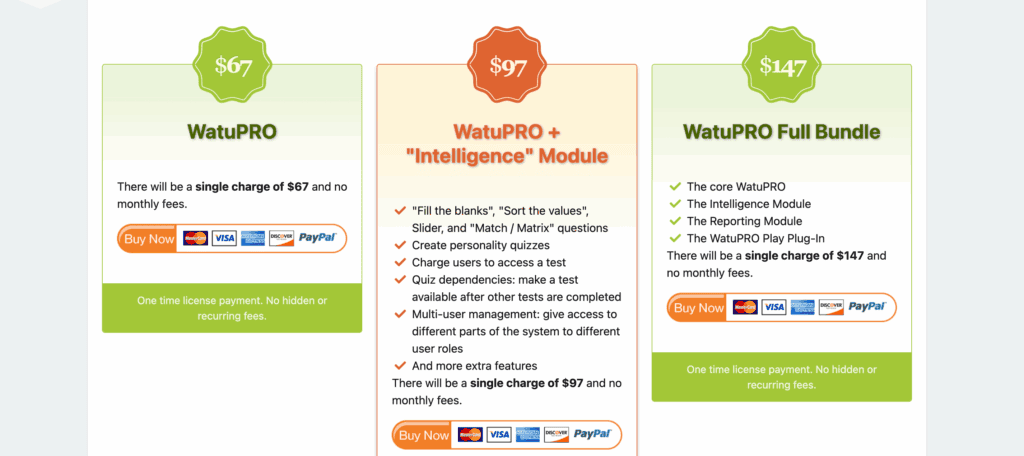
- WatuPRO (Core Plugin): This plan costs a one-time payment of $67. It’s the best choice if you need to level up from the free version with professional features like issuing PDF certificates, creating advanced grading systems, limiting user attempts, and enabling conditional redirects after a quiz.
- WatuPRO + “Intelligence” Module: This bundle costs a one-time payment of $97. It includes everything in the core plugin plus the powerful Intelligence Module. This is the ideal tier for marketers and educators who want to create more engaging quizzes, including personality quizzes, “fill in the blank” questions, and monetize their quizzes with PayPal/Stripe integration.
- WatuPRO Full Bundle: This is the all-in-one package for a single charge of $147. It gives you the core plugin and all available modules, including the Intelligence Module, an advanced Reporting Module, and the Play Plug-In for gamification. This is the best value for power users who need every feature at their disposal.
Ease of Use: My Hands-On Experience
After installing Watu Quiz, the first thing I appreciated was how it integrates directly into the WordPress dashboard. There was no complicated setup wizard or new interface to learn; it just added a new menu item, and I was ready to go.
Honestly, the design is pretty basic. But this is its strength. There are no distracting elements or confusing menus. Navigating the settings to create my first quiz felt completely intuitive.
Adding questions, assigning points, and modifying answers was incredibly straightforward. Everything is laid out in a clear, logical way, and despite the sheer number of customization options available, I never felt overwhelmed.
Once my quiz was built, getting it live was the easiest part. The plugin provides a simple shortcode for each quiz. I just copied it, pasted it onto a new page, and clicked “Publish.”
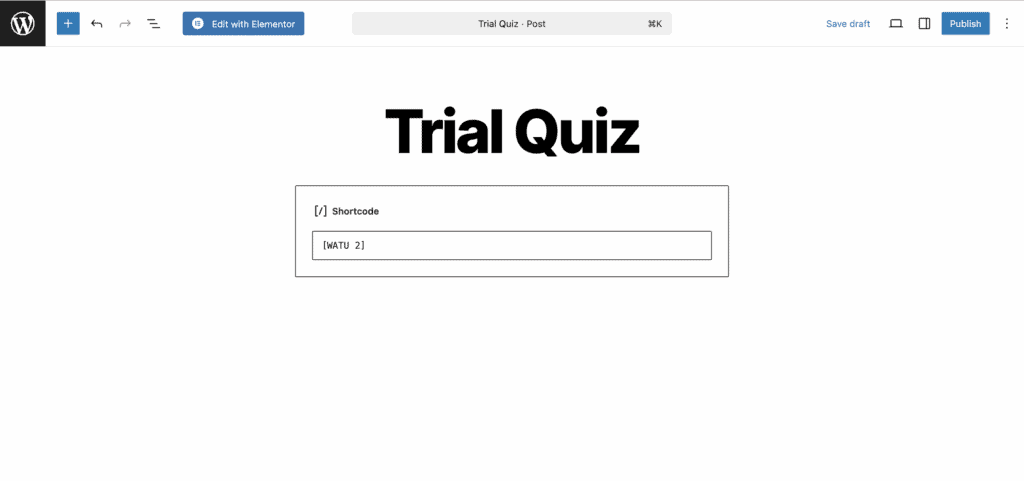
Just like that, the quiz was live on my site. For anyone who values function over frills, the simplicity is a huge win.
Alternatives to Watu Quiz Review
While Watu Quiz is incredibly reliable and lightweight, that functional focus can be its biggest drawback. The user interface is dated, it lacks built-in marketing features, and its design options are basic. If you’re looking for something with more visual polish or powerful lead-generation tools, you might find these alternatives are a better fit.
- Thrive Quiz Builder: If Watu feels too academic and you need a powerful marketing tool, Thrive Quiz Builder is the answer. It is built from the ground up for lead generation and creating dynamic, branching quizzes where the next question changes based on a user’s answer. If your goal is to build a viral personality quiz, segment your email list, or guide users to a specific product, Thrive offers a far more advanced, conversion-focused toolset.
- Quiz Cat: Quiz Cat is the perfect antidote if Watu feels too old-fashioned and Thrive feels too complex. It is built for simplicity and modern design. For anyone who just wants to create a clean, visually appealing quiz without getting lost in settings, Quiz Cat is an excellent choice. Its free version is perfect for getting started, offering a user-friendly experience that lets you create beautiful quizzes in minutes.
Final Thoughts
Watu Quiz is much more than just another free plugin; it’s a dedicated assessment tool designed for reliability and function above all else. For educators, trainers, and website owners who need to create straightforward exams, tests, or surveys without bogging down their site, there are few tools that offer this level of no-nonsense functionality. Its lightweight code, robust grading system, and simple, intuitive backend give you everything you need to build a reliable assessment tool without the complexity of a marketing-focused plugin.
We always recommend using a staging site to test any new plugin. This allows you to configure the grading rules, test the user experience, and ensure the basic styling fits your needs without any risk to your live website.
FAQs
Is Watu Quiz really free, and what’s limited in the free version?
Yes, the core Watu Quiz plugin is 100% free and available on the WordPress repository. The free version is quite capable for creating standard exams, knowledge tests, and surveys with multiple-choice questions. The main limitations are the more advanced, professional features, which are reserved for the premium WatuPRO version. These include issuing PDF certificates, creating personality quizzes, advanced monetization (selling quizzes), and detailed user management like setting attempt limits.
Can I style my quizzes to match my website’s design?
Yes, to a degree. The free version provides basic settings to change the quiz width and some colors. However, its real power for customization comes from its support for custom CSS. If you or your developer are comfortable with CSS, you can style almost every element of the quiz to perfectly match your site’s branding. It does not, however, come with modern visual templates or a drag-and-drop builder.
Does it work well on mobile phones?
Absolutely. The output of Watu Quiz is designed to be fully responsive. This means the quizzes will automatically adjust to fit the screen of any device, whether it’s a desktop computer, tablet, or smartphone, ensuring a smooth and user-friendly experience for everyone.
Can I use it to collect email addresses from participants?
Not as a built-in lead generation feature. Watu Quiz is designed primarily as an assessment tool, not a marketing tool. It can track results for users who are already logged into your WordPress site, but it does not have a native “email gate” function that requires users to enter their email to see their results. For that functionality, you would be better served by a marketing-focused plugin like Thrive Quiz Builder or Quiz Cat.
Is Watu Quiz suitable for advanced, branching logic quizzes?
No, it is not. Watu Quiz is built to create linear quizzes, where every user sees the same set of questions (though the order can be randomized). It does not have the functionality to show a user a different question based on their previous answer. For complex, conditional paths and branching logic, you would need a more specialized tool like Thrive Quiz Builder.

Shreya has been a writer for as long as she can remember. Now, she writes articles that help WordPress users manage the sites that they're proud of, with little to no coding


