We love WordPress. We believe that there’s nothing it can’t do. But we get it if you’ve grown out of it and want to explore other options.
You might be here because managing your WordPress site is becoming time-consuming, or you’re tired of juggling multiple plugin subscriptions. You want something simpler or more specialized to meet your goals.
That’s why we’ve compared 10 solid WordPress alternatives. We’ll discuss their features, strengths, weaknesses, and real costs. By the end, you’ll know exactly which platform matches your workflow, budget, and goals.
We’ve put together 10 WordPress alternatives, that range from from beginner-friendly builders like Wix to specialized platforms like Shopify. The best choice depends on your needs, budget, and technical skills. Start by trying free trials of 1-2 platforms that interest you.
WordPress alternatives ranked at a glance

1. Wix
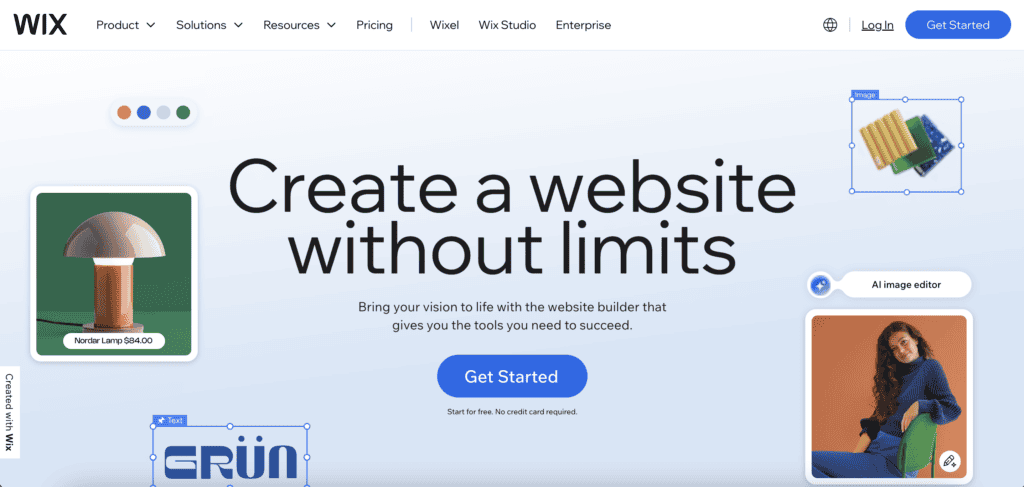
What it is: An all-in-one website builder that handles everything from design to hosting.
This platform operates entirely in your browser. No software downloads, no server management, no late-night panic attacks about security updates. You just log in and start building.
Wix, when compared with WordPress, trades flexibility for simplicity. Where WordPress gives you endless customization options, Wix gives you guardrails that help you get things done faster.
Its drag-and-drop editor lets you precisely position elements, achieving a neat and professional look without needing a design background.
What Wix brings to the table
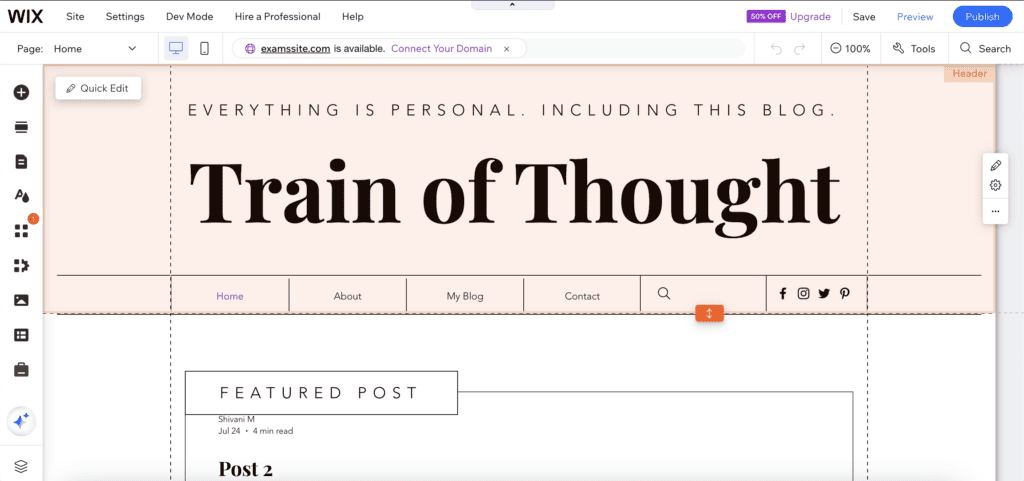
- Easy website building: Point and click to add text, images, and buttons; choose from over 1,000 designs; launch in a short amount of time.
- Smart helper tools: AI builds a basic site and suggests Google visibility improvements.
- Online store features: Sell products with a built-in cart, send cart abandonment emails, and create discount codes.
- Online visibility: Basic SEO tools, mobile optimization.
- Useful extras: Restore older site versions, customize mobile view.
Strengths and weaknesses
What works well:
- Wix handles everything for you. Security, hosting, backups, and routine maintenance are all managed behind the scenes. You never have to worry about plugin updates breaking your site or hackers finding vulnerabilities.
- The visual design freedom is impressive. You can create layouts that would require custom coding on other platforms. If you can imagine it, you can often build it in Wix within its structured environment.
- For small sites, it’s incredibly efficient. You can have a professional-looking website live in a few hours, not weeks.
Where it falls short:
- Vendor lock-in with Wix is a real challenge. When we tested a move from Wix to WordPress, we spent hours rebuilding the site. While you can export your content, transferring your design and functionality is much more difficult.
- You also can’t switch templates once your site is live. Choose carefully because you’re stuck with that foundation.
- Custom code options are limited. If you need specific functionality that isn’t available through their app market, you’re out of luck.
- Scalability becomes an issue as your business grows. High-traffic sites or complex e-commerce operations might outgrow what Wix can handle.
Pricing
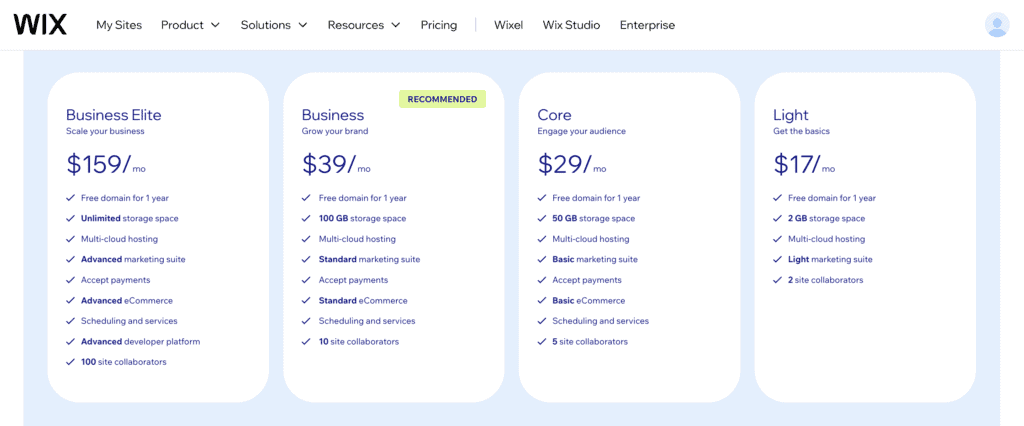
Free: Start for free with custom domain and hosting.
Light plan ($17/month): Basics with 2 GB storage and light marketing suite.
Core plan ($29/month): Adds 50 GB storage and basic eCommerce.
Business plan ($39/month): 100 GB storage, standard eCommerce, recommended for growth.
Business elite plan ($159/month): Unlimited storage, advanced eCommerce, ideal for scaling.
2. HubSpot
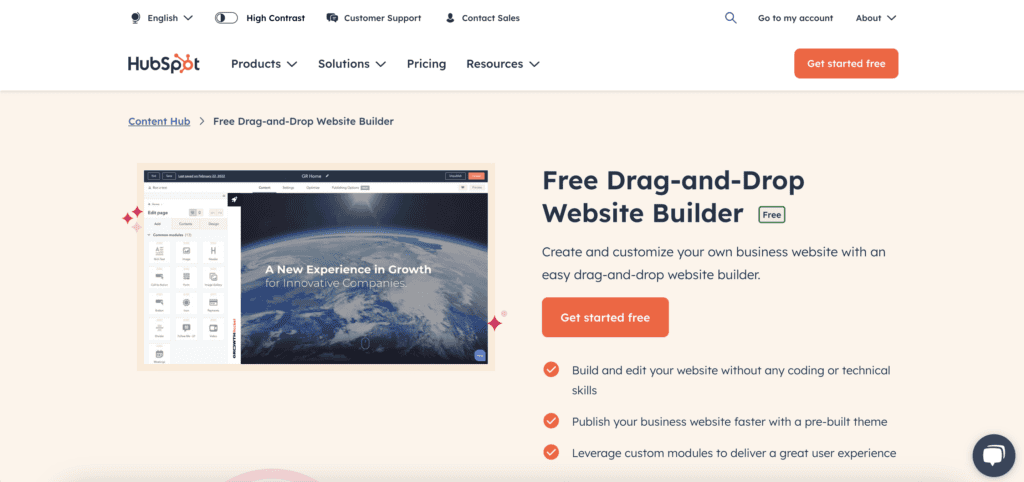
What it is: A business growth platform that happens to build websites really well.
Most people think of it as a CRM or marketing tool, but it’s become a solid website builder that connects directly to your sales and marketing efforts.
Comparing HubSpot with WordPress shows a difference in approach. WordPress gives you individual tools that you connect yourself through plugins and integrations. HubSpot gives you everything integrated from day one. Your website, customer data, email campaigns, and sales pipeline all talk to each other automatically.
What HubSpot brings to the table
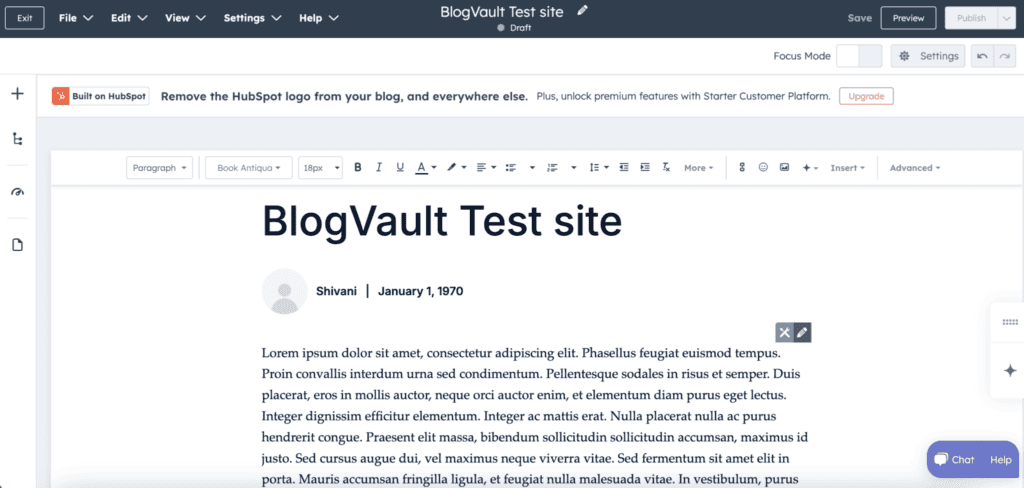
- Simple website building: Drag-and-drop editor, pre-made themes, global styling changes, mobile editing tools.
- Smart business tools: Forms auto-connect to CRM, live chat links to the sales team, and meeting schedulers sync with calendars.
- Content that converts: AI writing help, SEO optimization, version history, and content scheduling.
- Performance insights: Track which pages convert visitors, see lead sources, and get actionable reports.
- E-commerce integration: Connects with Shopify, includes HubSpot Payments for simple transactions.
Strengths and weaknesses
What works well:
- The CRM integration changes everything. When someone fills out a form on your website, they’re instantly in your system with their entire history.
- Marketing tools are built right in. Email campaigns, social media scheduling, lead scoring, and more. It all works together instead of requiring separate subscriptions.
- The platform grows with you. Start simple, add features as your business expands. No need to migrate to different tools as you scale.
- SEO happens automatically. The system suggests improvements, tracks your rankings, and helps optimize content without requiring deep technical knowledge.
Where it falls short:
- The cost adds up quickly. HubSpot starts free but becomes costly rapidly when advanced features or a larger contact base (e.g., more than a few hundred contacts) are needed.
- You’re pretty much locked into the HubSpot ecosystem. Moving your data and processes elsewhere later becomes a major project.
- E-commerce capabilities lag behind dedicated platforms. If selling products online is your main thing, Shopify or WooCommerce might serve you better.
- Custom development requires learning HubL (their coding language). It’s not as widely known as WordPress’s PHP.
Pricing
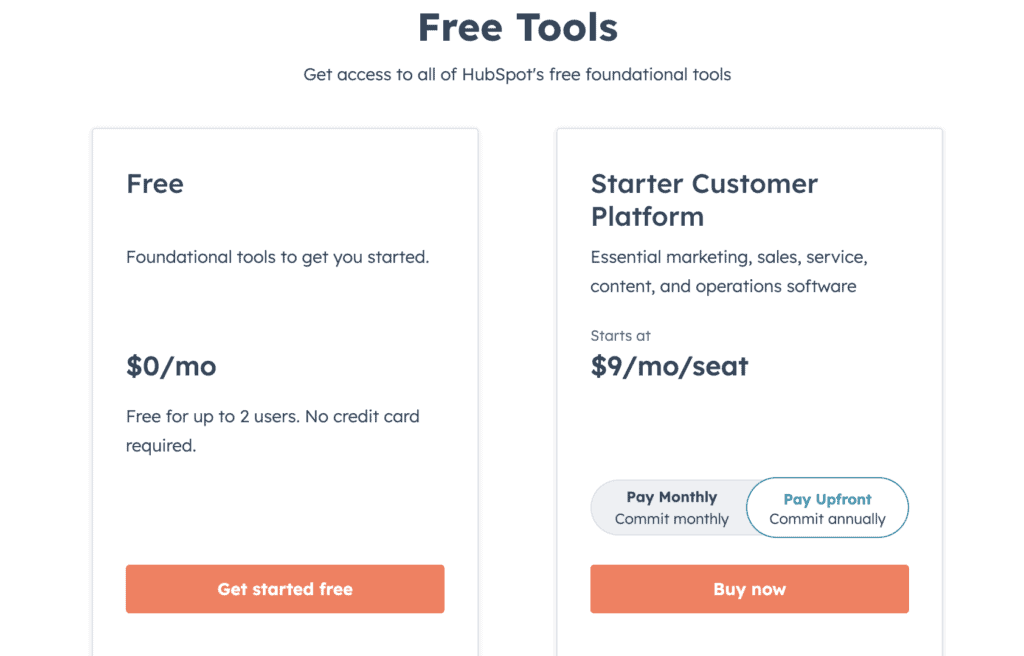
Free version: Basic website and CRM with HubSpot branding and contact limits.
Starter plans: Starts at $9/month, removes branding, and adds more features.
3. Squarespace
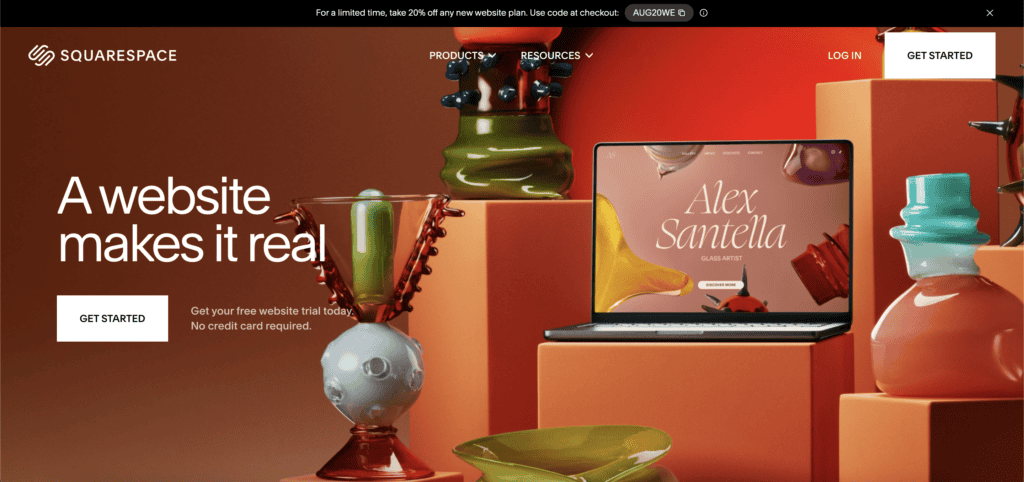
What it is: An all-in-one platform that makes stunning websites without the technical headaches.
Squarespace has mastered one thing well. Making websites that look like they cost five figures to design.
If you’ve ever looked at a website and thought “I wish mine looked that good,” there’s a decent chance you were looking at a Squarespace site. They’ve built their reputation on visual appeal and keeping things simple.
If you compare Squarespace with WordPress, you’ll see that WordPress gives you endless possibilities. Squarespace gives you fewer choices, but every option looks professionally designed and works seamlessly together.
What Squarespace brings to the table

- Built for creatives: Portfolio galleries, image optimization, integrated blogging, and appointment scheduling for service businesses.
- Simple E-commerce: Sell products with built-in payment processing, inventory management, and order tracking.
- Marketing tools: Email campaigns, SEO basics, social media integration, analytics dashboard.
- Everything is managed: Hosting, security, updates, and customer support are all handled for you.
Strengths and weaknesses
What works well:
- The templates genuinely look professional. The platform’s design constraints effectively prevent unsightly websites.
- Everything’s integrated from day one. No hunting for compatible plugins or worrying about updates breaking your site.
- The learning curve is gentle. Most people can figure out the basics in an afternoon.
Where it falls short:
- Design flexibility hits walls quickly. You can customize colors and fonts, but the overall layout structure is pretty fixed, depending on your template.
- The app ecosystem is small. If you need specific functionality that isn’t built in, your options are limited.
- E-commerce features are solid but not advanced. If you’re planning a complex online store, you might outgrow it.
- Moving your content is possible, but not seamless. When transitioning from Squarespace to WordPress, we could export the content, but had to completely recreate the design.
Pricing
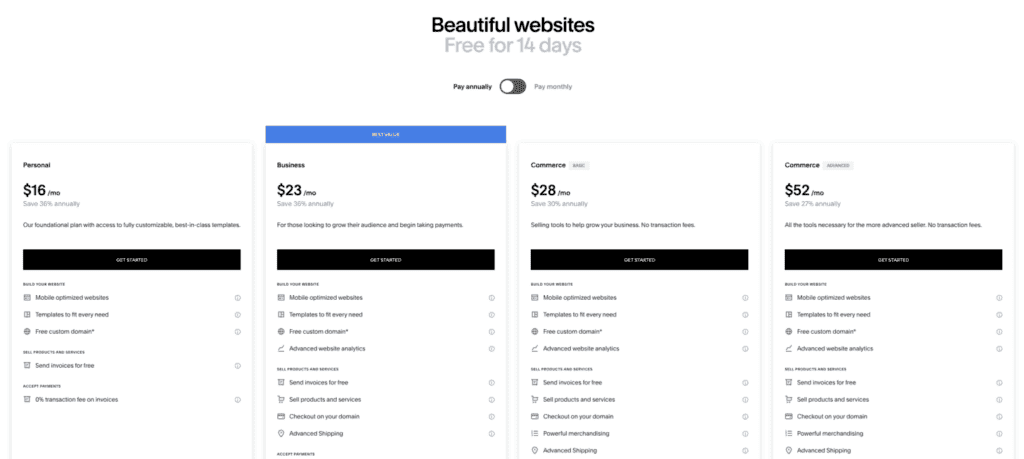
Basic plans: Start at $16/month for basic websites with no e-commerce.
Core plans: $23/month, includes e-commerce but charges 3% transaction fees.
Advanced plans: $99/month with no Squarespace transaction fees (you still pay standard credit card processing fees).
4. Shopify

What it is: An e-commerce platform built specifically for online stores.
Here’s the thing about Shopify: it does one thing exceptionally well, and that’s helping you sell products online.
WordPress gives you complete control and endless customization possibilities through WooCommerce and its ecosystem. Shopify provides a more streamlined, all-in-one approach where e-commerce features are built into the core platform.
What Shopify brings to the table
- Store building made simple: Drag-and-drop editor, mobile-responsive themes, customizable checkout process.
- Product management: Inventory tracking, variant management (size, color, etc.), digital and physical products, automated stock alerts.
- Payment & shipping: Built-in payment processing, shipping calculators, label printing, multiple payment gateway options.
- Marketing tools: Discount codes, abandoned cart recovery, email marketing, SEO tools, and social media integration.
- Analytics & reporting: Sales reports, customer analytics, inventory reports, and profit tracking.
- Selling everywhere: Point-of-sale system for physical stores, social media selling, and marketplace integration.
Strengths and weaknesses
What works well:
- E-commerce is in its DNA. Features like abandoned cart recovery, inventory management, and payment processing work flawlessly because they’re not afterthoughts. They’re the main event.
- Scaling is smooth. Whether you’re selling 10 products or 10,000, the platform grows with you without requiring technical migrations.
- The app ecosystem is massive. Need subscription billing? There’s an app. Want better reviews? There’s an app. Most e-commerce problems have been solved by someone.
- Security and compliance are handled automatically. PCI compliance, SSL certificates, and fraud protection come standard.
Where it falls short:
- Transaction fees bite if you don’t use Shopify Payments. Using other payment gateways costs an extra 0.5-2% per transaction.
- Monthly costs add up when you factor in apps. That $29 base plan quickly becomes $100+ when you add the tools you need.
- Non-e-commerce content feels clunky. The blogging features are basic, and creating complex content pages isn’t Shopify’s strength.
- Design customization has boundaries. You can change colors and fonts, but major layout changes require coding skills or expensive custom themes.
Pricing
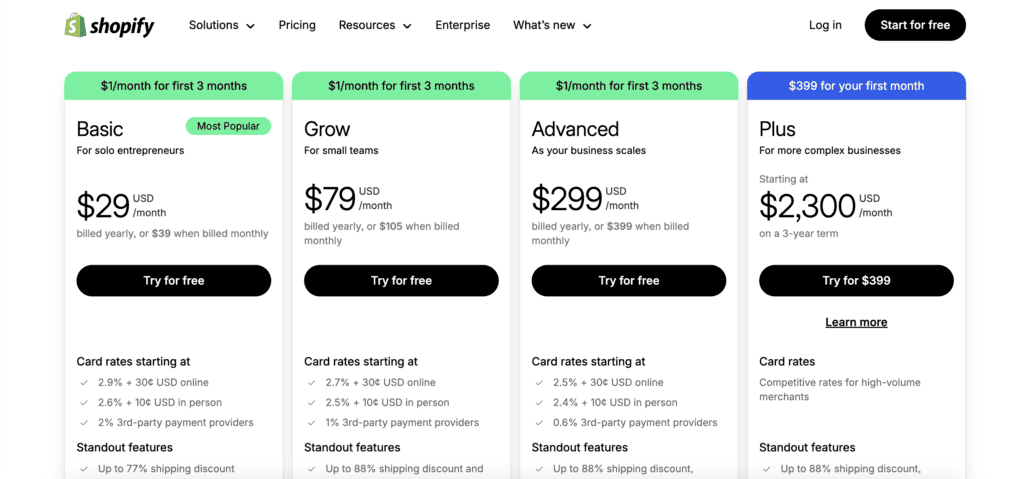
Basic: $29/month covers the essentials: unlimited products, 24/7 support, and manual order creation.
Grow: $79/month adds professional reports, lower credit card rates, and gift cards.
Advanced Shopify: $299/month includes advanced report building, third-party calculated shipping rates, and the lowest transaction fees.
Plus: $2300/month for complex sites
5. Ghost
What it is: A publishing platform built specifically for content creators who want to focus on writing.
Ghost is a publishing platform that strips away everything except what writers need. No complicated page builders, no endless plugin options, no design widgets cluttering your dashboard.
The platform focuses on two main things: helping you write and helping you build an audience that pays for your content. That’s it.
WordPress offers incredible flexibility for any type of website you can imagine. Ghost deliberately limits itself to publishing and does it exceptionally well, with built-in membership features that would require multiple plugins on other platforms.
Using Ghost is similar to WordPress.com and WordPress.org:
- Self-hosted: Like WordPress.org, you download Ghost, handle hosting and technical maintenance yourself, offering full control.
- Ghost Pro: Similar to WordPress.com, Ghost manages hosting, updates, and technical aspects so you can focus on writing.
What Ghost brings to the table
- Writing experience: Clean, distraction-free editor. Real-time preview. Simple formatting options that don’t get in your way.
- Membership features: Built-in paid subscriptions, member-only content, email newsletters, and payment processing through Stripe.
- Performance: Lightning-fast loading times. Clean code. Minimal bloat from unnecessary features.
- Built-in SEO: Automatic sitemaps, structured data, social media previews, fast loading speeds that Google loves.
- Publishing tools: Content scheduling, multiple author support, basic analytics, and modern responsive themes.
Strengths and weaknesses
What works well:
- Speed is genuinely impressive. Sites load fast because there’s no extra weight from features you’re not using.
- The writing experience feels professional. No clutter, no distractions, just you and your content.
- Membership features work seamlessly together. Paid subscriptions, email newsletters, and member management all integrate without plugins.
- SEO happens automatically. You don’t need to configure dozens of settings. Ghost handles the technical stuff.
Where it falls short:
- It’s designed just for publishing. If you need complex pages, custom forms, or e-commerce beyond simple memberships, you’ll hit walls quickly.
- Design customization requires coding knowledge. There’s no drag-and-drop builder. You work with themes and modify them with code.
- The app ecosystem is tiny compared to WordPress. What you see is mostly what you get.
- Self-hosting requires technical skills. The managed option (Ghost Pro) removes this complexity but costs more.
Pricing
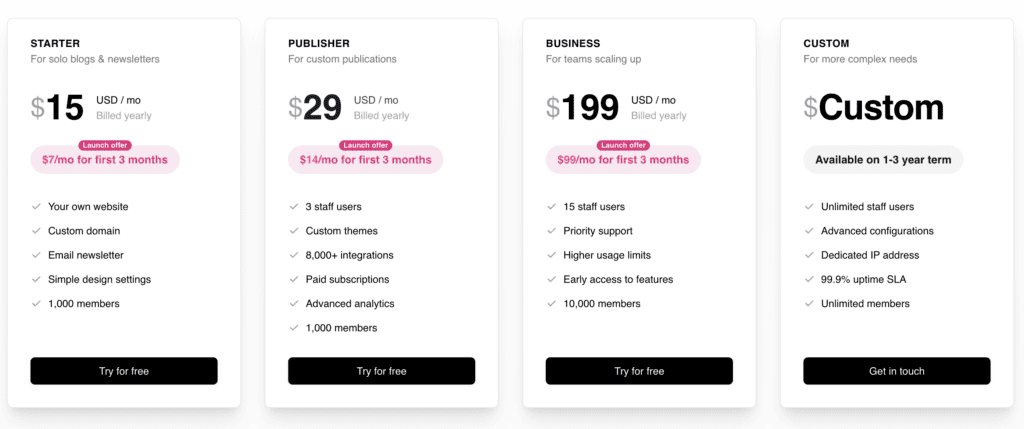
Starter: $15/month for basic blogs and newsletters
Publisher: $29/month for custom themes and advanced features
Business: $199/month for scaling publications
6. Webflow
What it is: A visual web design platform that lets you customise and build a site without requiring programming skills.
Webflow sits in an interesting space between simple website builders and full custom development. You design visually, but you’re building real HTML, CSS, and JavaScript behind the scenes.
It’s like having a professional web developer who translates your visual ideas into clean code instantly. You drag, drop, and style elements, while Webflow handles the technical implementation.
Comparing Webflow with WordPress presents different approaches to website creation. WordPress offers flexibility through themes, plugins, and custom code, but requires piecing together multiple components.
What Webflow brings to the table
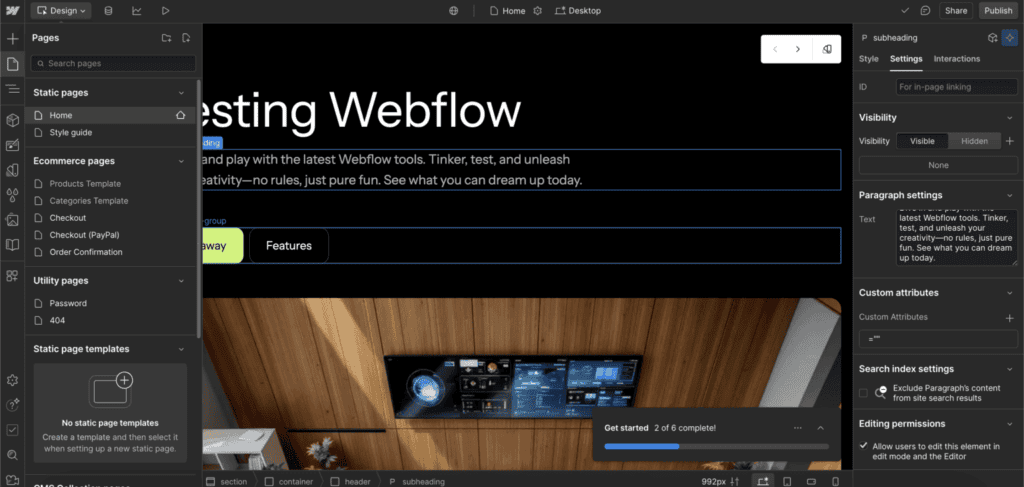
- Visual design tools: Drag-and-drop editor with precise control over layout, typography, spacing, and responsive breakpoints.
- Built-in CMS: Manage blog posts, portfolios, and product collections without leaving the platform.
- Advanced Interactions: Create animations, hover effects, and micro-interactions without writing JavaScript.
- E-commerce features: Product catalogs, shopping carts, checkout process, and inventory management.
- Clean code output: Generates semantic HTML and optimized CSS that loads fast and follows web standards.
- Everything is managed: Hosting, security, backups, and CDN are all handled automatically.
Strengths and weaknesses
What works well:
- Design freedom is genuinely impressive. You can create layouts that would require custom CSS on other platforms, all through visual controls.
- The code it generates is clean and fast. No bloated HTML or unnecessary styling, just efficient, semantic markup.
- CMS functionality works seamlessly with your designs. Create custom layouts for blog posts or product pages that match your exact vision.
- Responsive design tools let you fine-tune how your site looks on every screen size. You’re not stuck with preset breakpoints.
Where it falls short:
- The learning curve is steeper than expected. Webflow markets itself as “no-code,” but you’ll need to understand web design concepts like flexbox, grid, and responsive design.
- Pricing gets expensive quickly, especially for multiple sites or high-traffic projects.
- The ecosystem is smaller than WordPress. Custom functionality often requires custom code or third-party integrations.
- Migration is challenging. When we tested moving our Webflow site to WordPress, it required significant effort. While you can export your Webflow content, you would have to rebuild your design using themes and page builders.
Pricing
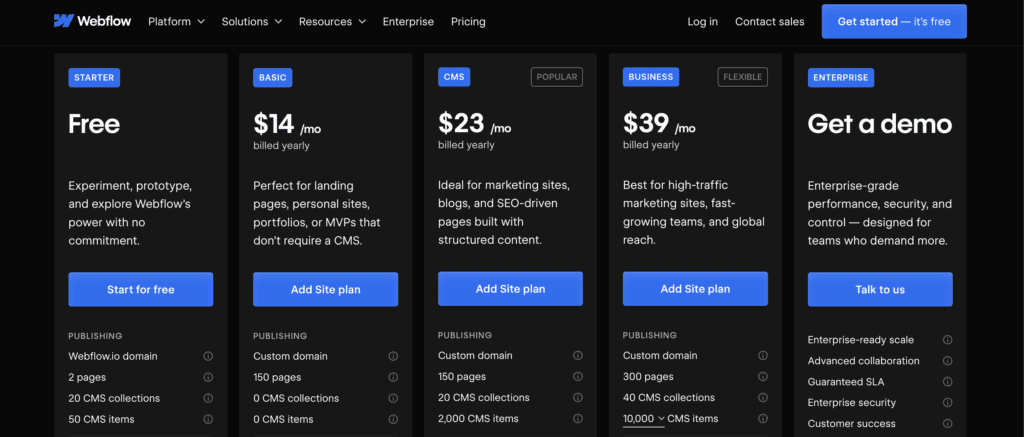
Site Plans (for hosting your website):
Basic: $14/month for simple sites with a custom domain
CMS: $23/month adds content management features
Business: $39/month includes form submissions and advanced features
E-commerce: $29-$212/month depending on annual sales volume
You also have Workspace plans for collaborations.
7. Weebly
What it is: A straightforward website builder that prioritizes ease of use over advanced features.
Weebly (now part of Square) takes the “keep it simple” approach seriously. Compared to the other options, it does fewer things, but what it does, it does well.
This platform targets people who need a website but don’t want to become website experts. Small business owners, hobby bloggers, and anyone who just wants something online without the learning curve.
Comparing Weebly with WordPress highlights different priorities. WordPress offers incredible depth and customization possibilities, but requires time to master. Weebly deliberately limits options to make decisions easier, though this means less flexibility for complex projects.
What Weebly brings to the table
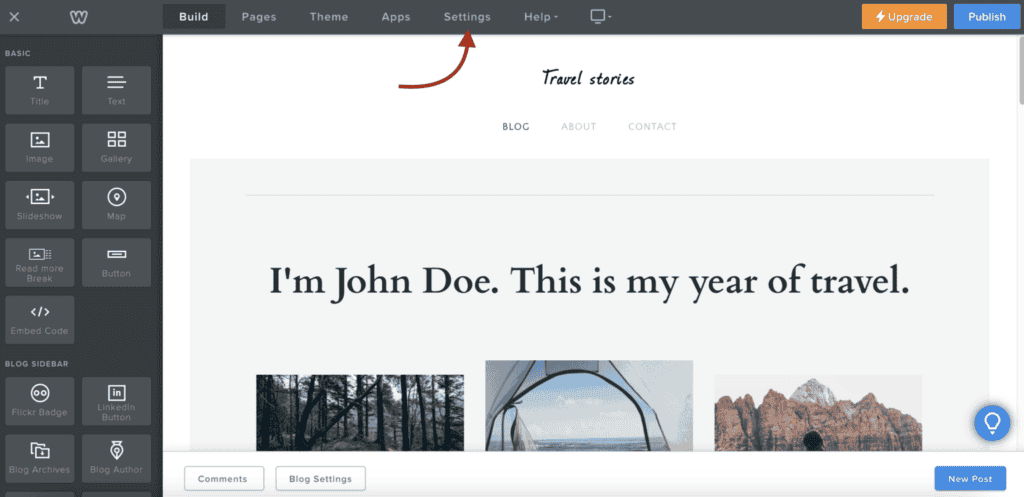
- Beginner-friendly building: Drag-and-drop editing with no learning curve; move text, images, and elements visually.
- E-commerce integration: Basic online store features via Square, including product management, payment processing, and shipping tools.
- Simple blogging: Basic functionality with easy post creation and management.
- Mobile-ready themes: Responsive designs that work on phones and tablets automatically.
- Everything is managed: Hosting, security, updates, and backups are handled behind the scenes.
Strengths and weaknesses
What works well:
- The interface is genuinely simple. Most people can build a basic website in a few hours without any tutorials.
- Pricing is competitive, especially for small businesses that need basic functionality.
- Integration with Square’s payment system makes sense if you’re already using Square for in-person sales.
Where it falls short:
- Design flexibility hits limits quickly. You’re working within predefined templates with limited customization options.
- The app ecosystem is small. Advanced functionality often isn’t available, and workarounds are limited.
- SEO features are basic. You get the essentials, but advanced optimization requires moving to a more powerful platform.
- Content management feels restrictive for anything beyond simple blogs or product catalogs.
- Migrating a Weebly site can be challenging. When we attempted to migrate our Weebly site to WordPress, a complete site rebuild was necessary.
Pricing
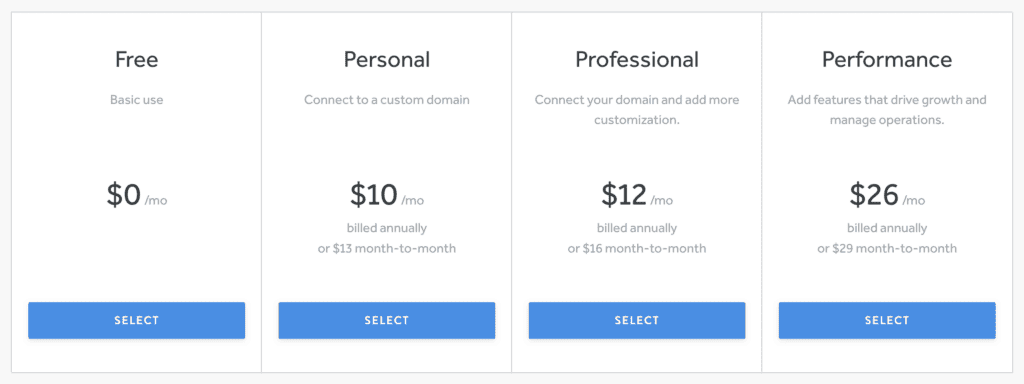
Free plan: Includes Weebly branding and subdomain. Good for testing, not great for businesses.
Personal: Around $10/month removes branding and adds a custom domain.
Professional: Roughly $12/month includes basic e-commerce with transaction fees.
Performance: About $26/month removes transaction fees and adds advanced e-commerce features.
8. Blogger

What it is: Google’s completely free blogging platform that’s been around since the early days of the internet.
Blogger is like that reliable old car in your driveway. It’s not fancy, it doesn’t have all the latest features, but it starts every time and gets you where you need to go without costing you anything.
If you have a Google account, you can have a blog running in under a minute. That’s both Blogger’s biggest strength and, in some ways, its limitation.
Comparing Blogger with WordPress shows how different priorities create different platforms. WordPress offers incredible flexibility, customization, and growth potential, but requires more investment in learning and maintenance.
What Blogger brings to the table
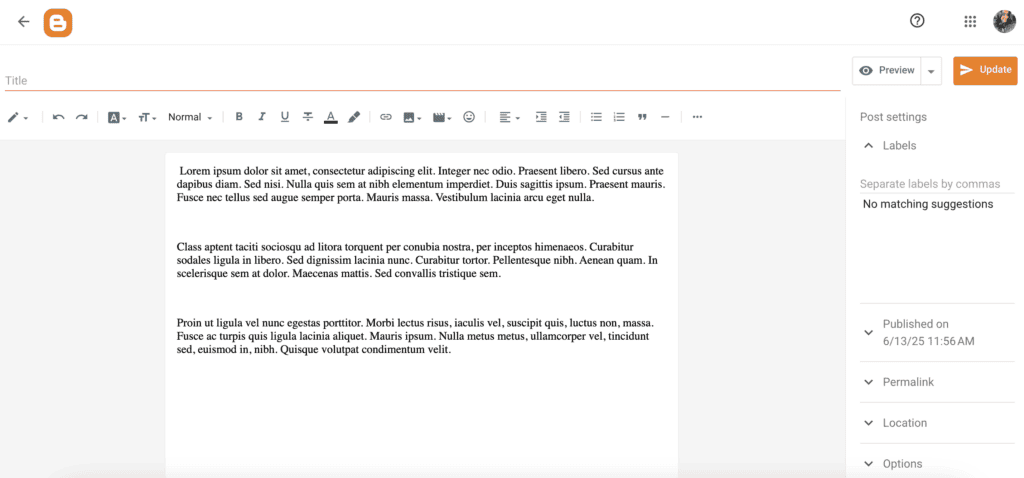
- Simple publishing: Basic text editor with essential formatting options. Write, format, publish, and that’s about it.
- Everything is free: Hosting, domain (blogspot subdomain), templates, and Google’s infrastructure at zero cost.
- Google integration: Seamless connection with Google Photos, YouTube, AdSense, and Analytics.
- Basic customization: Limited template selection with minimal design modification options.
- Commenting system: Built-in reader comments and engagement features.
Strengths and weaknesses
What works well:
- It’s genuinely free with no hidden costs. Google absorbs hosting, security, and maintenance completely.
- Setup is instant if you have a Google account. No complicated installations or configuration steps.
- Reliability is solid. It’s backed by Google’s infrastructure, so downtime is rare.
- Google typically indexes Blogger posts quickly, which can help with search visibility.
- Zero technical maintenance means you never worry about updates, security patches, or backups.
- Migrating the site is easy if your needs evolve beyond Blogger’s capabilities. We tested a Blogger to WordPress migration recently, and unlike some other platforms, getting your content out of Blogger and into WordPress is straightforward.
Where it falls short:
- Customization options are extremely basic. You’re working with preset templates and minimal styling control.
- Functionality is bare-bones. No plugins, no advanced features, no e-commerce capabilities.
- The interface feels dated compared to modern blogging platforms.
- SEO control is limited to basic title tags and descriptions. There are no advanced optimization tools.
- Content ownership sits with Google, which means platform dependency and potential uncertainty about long-term availability.
Pricing
Everything’s free: The core platform, hosting, and basic features cost nothing.
Custom domain: Optional upgrade if you want your domain instead of blogspot.com. You’ll pay normal domain registration fees (usually $10-15 annually).
9. Joomla!
What it is: A free, open-source CMS that goes beyond WordPress’s simplicity.
Joomla occupies an interesting middle ground in the CMS world. It’s more powerful than WordPress out of the box, but less intimidating than CMS platforms like Drupal or visual development tools like Webflow.
If you’ve used WordPress and felt limited by its structure, Joomla might feel like breathing room. It handles complex content relationships, user permissions, and multilingual sites more naturally than WordPress, though it requires more technical knowledge to set up properly.
Comparing Joomla with WordPress reveals their different strengths. WordPress excels at content publishing and has a massive ecosystem of themes and plugins. Joomla provides stronger built-in user management, better multilingual support, and more flexible content organization, though with a steeper learning curve and smaller community.
What Joomla! brings to the table
- Advanced content management: Complex content structures, custom fields, and flexible categorization systems built into the core.
- User management: Sophisticated permission systems that let you control exactly who can see and edit what content.
- Multilingual support: Native support for multiple languages without requiring additional plugins.
- Extensible platform: Templates, components, modules, and plugins for customization, though fewer options than WordPress.
- Security focus: Strong built-in security features and access controls.
Strengths and weaknesses
What works well:
- Content organization is more flexible than WordPress. You can create complex content relationships without wrestling with plugins.
- User permissions are granular and powerful. Perfect for sites with multiple editors, contributors, and content approval workflows.
- Multilingual sites work naturally. No need to cobble together translation plugins and hope they play nice.
- The platform scales well for medium to large websites that need structure but aren’t quite enterprise-level.
Where it falls short:
- Learning curve is steeper than WordPress. The admin interface has more options, which means more complexity.
- Theme and extension selection are smaller. You’ll find fewer ready-made solutions compared to WordPress’s ecosystem.
- Self-hosting is required, plus all the maintenance that comes with it. Updates, security, backups, and server management fall upon you.
- Finding developers who know Joomla well can be harder than finding WordPress experts.
Pricing
Free software: Download and use Joomla without paying for the software itself.
Hosting costs: Expect to pay for domain registration, and potentially premium extensions or templates.
Development investment: You’ll likely need professional help for setup and customization, which costs more than WordPress due to the smaller pool of developers.
10. Drupal
What it is: An open-source CMS built for complex, large-scale websites that need custom functionality.
Drupal is the platform that governments, universities, and Fortune 500 companies use when they need something that can handle massive complexity, high traffic, and custom requirements that other platforms simply can’t manage.
This isn’t a platform you casually try out on a weekend. Drupal requires serious technical expertise and significant investment, but it can build things that would be impossible on other platforms.
What Drupal brings to the table
- Unlimited flexibility: Custom content types, complex data relationships, and virtually any functionality you can imagine through its modular architecture.
- Enterprise security: Built for organizations where security breaches have serious consequences.
- Performance at scale: Handles high traffic and complex functionality without breaking down.
- API-First design: Works as a headless CMS, feeding content to mobile apps, multiple websites, or any other system.
- Advanced user management: Granular permissions and role-based access control for complex organizational structures.
Strengths and weaknesses
What works well:
- Power and flexibility are genuinely unlimited. If you can imagine it, Drupal can probably build it.
- Security is enterprise-grade. Used by organizations where downtime or data breaches have major consequences.
- Scalability handles whatever you throw at it. Sites with millions of pages and complex functionality run smoothly.
- Multilingual support is sophisticated and built into the core platform.
Where it falls short:
- Learning curve is extremely steep. Even experienced web developers need time to become proficient with Drupal.
- Development costs are high. You need skilled Drupal developers, and they don’t come cheap.
- Hosting requirements are more demanding. You’ll need a robust hosting infrastructure.
- It’s complete overkill for most websites. Using Drupal for a simple business site is like using a forklift to move a coffee cup.
Pricing
Free software: Drupal itself costs nothing to download and use.
Enterprise costs: Hosting, development, and maintenance costs typically run into thousands of dollars monthly for serious Drupal implementations.
Developer expertise: Essential and expensive. Budget significantly for skilled development help.
How to pick the best WordPress alternative?
Selecting the right platform depends on your needs. Here’s a quick guide:
Consider the total cost: Evaluate all expenses, including hidden fees like themes and maintenance.
Ease of use matters: Platforms like Wix and Squarespace are beginner-friendly. Others, like Webflow, may require learning.
Balance customization and simplicity: Decide if you need deep customization or prefer an easier setup with templates.
Plan for future growth: Ensure the platform can scale with increased traffic and your evolving needs.
Prioritize performance and SEO: A fast platform with solid SEO tools is crucial for visibility and user experience.
Think about support and security: Managed platforms handle updates and offer support. Check your comfort with troubleshooting.
Consider data portability: Ensure you can easily migrate your content if needed.
Choose based on your budget, technical comfort, and long-term goals.
Parting thoughts
We’ve covered a lot of ground here, and the truth is simple: the right platform is the one that matches your specific needs and budget, not the one with the most features.
Pick one or two options that caught your attention and try them. Most offer free trials or demos that let you experience how they work.
FAQs
What is the best WordPress alternative?
The best WordPress alternative depends on your needs. For e-commerce, Shopify excels, while Squarespace offers stunning design options. Consider Wix for ease of use if you’re a beginner.
Is Wix better than WordPress?
Wix is better for beginners wanting a simple drag-and-drop interface. WordPress offers more customization and flexibility for advanced users and developers.
How many CMS like WordPress?
There are many CMS options like WordPress, including Joomla, Drupal, and Ghost. Each has unique features suited to different types of projects.
Is there anything easier than WordPress?
Yes, platforms like Wix and Weebly are easier than WordPress for beginners. They offer intuitive interfaces and require no coding knowledge.
Is WordPress outdated?
No, WordPress is not outdated and continues to be updated with new features. It’s highly versatile and maintains a large community of developers and users.
What’s the best website builder?
The best website builder depends on your specific needs. Wix and Squarespace are great for ease of design, while Shopify is excellent for e-commerce.

Shivani enjoys crafting guides that make every aspect of using WordPress simple and easy to follow. When she's not glued to her laptop, you can find her buried in a good book or occasionally, painting.