

When you’re looking for a plugin for analytics, a popular comparison to consider is MonsterInsights vs Google Site Kit. They both connect your site to Google Analytics, but the real question is: which one actually delivers the information better.
Analytics about your site is only useful if it’s accurate, easy to understand and helps you make decisions about your website. Both MonsterInishgts and Site Kit are accurate. But, they differ in the way they handle crucial features like e-commerce tracking, reporting clarity, and ease of use. We’ve tested both plugins and this article is everything we’ve learnt.
We installed and tested MonsterInsights and Google Site Kit on our site and preferred the latter. It provides deep, user-friendly reports and advanced tracking features that Google Site Kit’s basic dashboard simply can’t offer.
Quick Look at MonsterInsights
MonsterInsights is the most popular Google Analytics plugin for WordPress, designed to make analytics easy for everyone. Its entire purpose is to bridge the gap between your website and the complex Google Analytics platform. It installs the tracking code for you and, more importantly, transforms the overwhelming data into beautiful, easy-to-understand reports directly within your WordPress dashboard, so you never have to leave your site to see how it’s performing.
Our experience with MonsterInsights was exactly what we hoped for. The setup wizard made connecting to Google Analytics a simple, code-free process that took just a few minutes. Once running, the dashboard immediately gave us the key insights we needed: top pages, traffic sources, and audience demographics. It felt like having a data analyst built into our site, highlighting what mattered most.
Quick Look at Google Site Kit
Google Site Kit is the official WordPress plugin developed by Google itself. It was designed to be an all-in-one solution, acting as a central hub that seamlessly connects your website to essential Google services like Google Analytics, Search Console, AdSense, and PageSpeed Insights. Its popularity stems from its core promise: providing a simple, free, and authoritative way for site owners to view high-level performance data from multiple sources.
Our review of Google Site Kit confirmed that its biggest strength is its effortless setup. As an official plugin, the guided process was flawless. However, once we started using it, we found the dashboard to be quite basic. It successfully pulls in key metrics, but it functions more like a simple data container than an analytical tool. It showed us our top pages, but it didn’t help us understand the story behind the numbers.
Tracking Capabilities
Verdict: MonsterInsights is the decisive winner for its powerful and automatic tracking features that work right out of the box.
Tracking capabilities refer to a plugin’s ability to measure more than just page views. We’re looking at how well it can track specific user interactions like clicks, downloads, form submissions, and sales. This deeper data is essential for understanding what’s working on your site and what isn’t.
MonsterInsights
For me, this is where MonsterInsights completely blew Site Kit out of the water. Without any complex setup, it started tracking crucial events automatically, like file downloads, affiliate link clicks, and even video plays. The premium e-commerce addon was the real game-changer. Seeing my WooCommerce sales data and top products appear in my dashboard without having to touch Google Tag Manager was a huge relief.
Google Site Kit
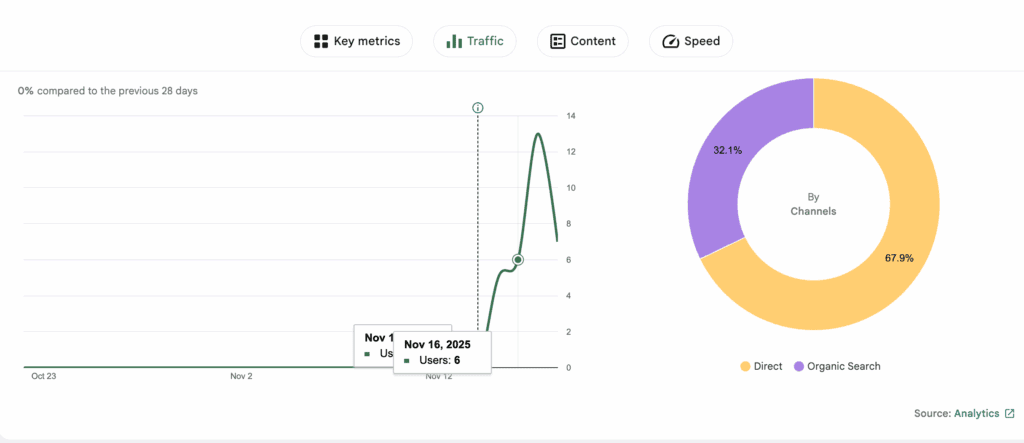
I was frustrated to see that Site Kit wasn’t tracking basic things like file downloads or form submissions automatically. To get that data, I would have had to learn and manually configure Google Tag Manager, a separate and complicated tool. Most importantly, the complete lack of built-in e-commerce tracking made it unsuitable for my business needs and any online store.
Reporting Capabilities
Verdict: MonsterInsights is the clear winner for its in-depth, user-friendly reports that make complex data easy to understand.
A plugin’s reporting capability determines how well it translates raw data into useful information. We’re looking for clear, detailed, and actionable reports that help you understand your audience and content performance without ever leaving your WordPress dashboard.
MonsterInsights
I loved the reporting in MonsterInsights because it’s designed for website owners, not data analysts. The main dashboard gave me a perfect overview, and I could even see real-time stats on who was on my site. The dedicated reports for top landing pages, Search Console keywords, and form conversions were incredibly useful and easy to find. It felt like the plugin was answering the questions I actually had about my site’s performance.

Google Site Kit
My experience with Site Kit’s reporting was that it’s designed to be a very high-level summary. It was convenient to have a single dashboard to glance at my traffic from Analytics and keywords from Search Console. However, the reports are basic and not as robust as MonsterInsights.
GDPR/Privacy keepFeatures
Verdict: MonsterInsights is better equipped for privacy compliance with its dedicated EU Compliance add-on and seamless integrations.
Respecting user privacy and complying with regulations like GDPR is crucial. This section evaluates how each plugin helps you handle user consent and data anonymization.
MonsterInsights
As a site owner, I appreciated how MonsterInsights simplified GDPR compliance. The premium EU Compliance add-on was a lifesaver, allowing me to automatically anonymize IPs and integrate with my cookie consent plugin with just a few clicks.
Google Site Kit
While Site Kit is an official Google product, I found its built-in privacy features to be pretty basic. It supports IP anonymization, but it lacked the robust consent management features I needed.

You will need a cookie consent plugin to handle user opt-ins, which felt like an extra, necessary step that MonsterInsights already had covered.
Ease of Use
Verdict: It’s a tie for setup, but MonsterInsights wins for overall ease of use thanks to its intuitive dashboard.
A tool is only useful if you can actually use it. We’re evaluating the setup process and how easy it is for a non-technical person to navigate the interface and understand the data.
MonsterInsights
The experience with MonsterInsights was incredibly smooth from start to finish. The setup wizard held my hand through the entire process, connecting my site to Google Analytics in minutes without me having to see or touch a single line of code. The dashboard is intuitive, clean, and built for clarity, making it the perfect tool for anyone who wants to understand their data easily.

Google Site Kit
From my own experience, getting Google Site Kit set up is also incredibly easy. As an official Google plugin, the guided process is seamless. You have to repeat the process to connect to other Google products like Search Console, PageSpeed Insights, etc. My site also got disconnected in betwee, and I had to repeat the process again.
Once you’re all setup, the dashboard feels like ana overview of all the products you’ve connected. For further information, you will need to use the individual products.
Pricing & Value for Money
Verdict: Site Kit provides unbeatable value for beginners on a budget since it’s free. MonsterInsights offers superior value for businesses that need actionable data to grow.
Value isn’t just about the price tag; it’s about what you get for your money. This section breaks down the cost and features to help you decide which plugin is a better investment.
MonsterInsights
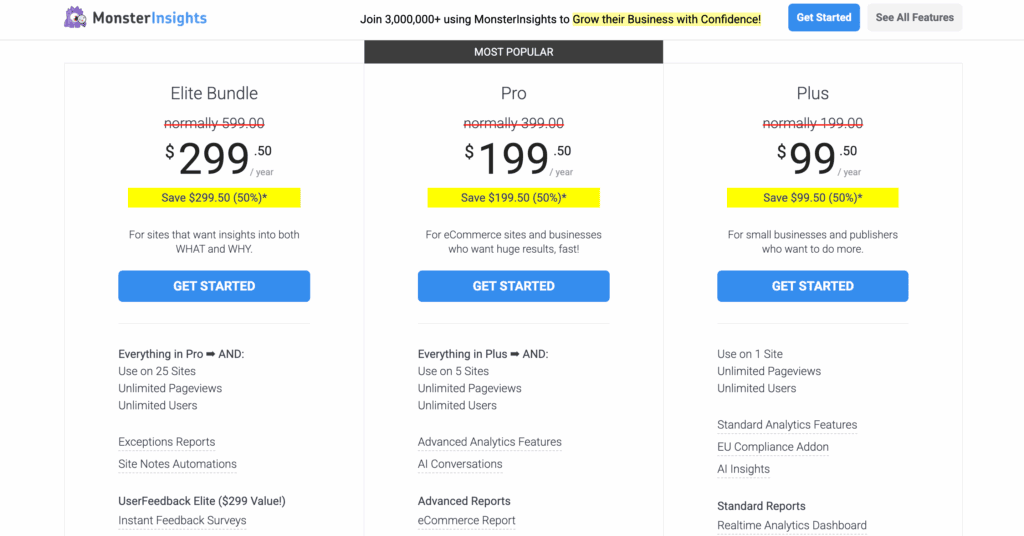
MonsterInsights pricing is a freemium model. The free version is excellent and already more powerful than Site Kit for analytics reporting. However, the true value for any business comes from the premium plans. Paying for features like e-commerce tracking and form conversion reports saved me countless hours and gave me data that directly helps me increase revenue. For me, it was an investment that paid for itself.
Google Site Kit
Site Kit is a 100% free, which is incredible. For that price, you get a unified dashboard for four major Google services. If you’re a blogger or a small business just starting out, the value here is unbeatable. The trade-off is its limitations—you’ll quickly outgrow it if you’re serious about growth.
Alternatives to MonsterInsights vs Site Kit
You might find Site Kit is too basic, lacking the detailed e-commerce or event tracking you need to make critical business decisions. On the other hand, perhaps the premium features of MonsterInsights are outside your budget. Or, more importantly, you have privacy concerns and want an analytics solution that doesn’t rely on Google’s ecosystem at all. If you find yourself in either of these camps, here are our top picks:
- Analytify: Our review of Analytify very strong direct competitor to MonsterInsights, Analytify also focuses on making Google Analytics data beautiful and easy to understand within WordPress. It is known for its clean interface and robust e-commerce and event-tracking features.
- SlimStat Analytics: If you want to move away from Google’s ecosystem entirely due to privacy concerns, SlimStat is the perfect solution. It’s a self-hosted analytics plugin that stores all your visitor data on your own server, giving you full control and ensuring GDPR compliance by design.
Final Thoughts
Google Site Kit is a starting point for anyone new to WordPress. It’s free, official, and does an excellent job of putting your basic vitals in one convenient place. However, if you’re serious about using data to make decisions, MonsterInsights transformed our confusing metrics into a clear strategy with actionable insights that Site Kit simply couldn’t offer.
Before you install any new plugin, we strongly recommend taking a full backup of your website with a tool like BlogVault. The WordPress environment can be unpredictable, and a plugin conflict could cause serious issues.
FAQs
Why use MonsterInsights?
You should use MonsterInsights to save time and eliminate the complexity of Google Analytics. It automates setup, provides clear reports in your WordPress dashboard, and enables advanced tracking (like e-commerce and forms) with just a few clicks, empowering you to make data-driven decisions without needing to be a data expert.
Is MonsterInsights Pro worth it?
Yes, for any serious business or publisher, MonsterInsights Pro is absolutely worth it. The Pro version unlocks the most valuable features, such as e-commerce tracking, conversion tracking, custom dimensions, and detailed audience reports. These tools provide the actionable insights that directly help you increase revenue and engagement.
Is Google Site Kit good enough?
Google Site Kit is good enough for beginners, bloggers, or anyone who just wants a simple, free, high-level overview of their site’s traffic and search performance. However, it is not powerful enough for businesses that need to track conversions, sales, or specific user interactions to grow.
What is the difference between Site Kit and MonsterInsights?
The main difference is depth and focus. Site Kit is a free, all-in-one plugin for a basic overview of multiple Google services (Analytics, Search Console, etc.). MonsterInsights is a dedicated, freemium analytics plugin focused on providing deep, actionable, and user-friendly reports specifically from Google Analytics, with powerful tracking features for businesses.

Shreya has been a writer for as long as she can remember. Now, she writes articles that help WordPress users manage the sites that they're proud of, with little to no coding


