

Choosing between Livechat vs Crisp often comes down to a single dilemma: power versus simplicity. One platform is a robust support suite, while the other is an all-in-one messaging hub, and your choice directly impacts your team’s workflow and budget.
When evaluating chat plugins, the right fit depends entirely on your business size and goals. This comparison will cut through the clutter, analyzing pricing, features, and usability to give you a clear verdict for your specific needs.
In our testing od LiveChat, we found that it is the superior choice for teams needing deep analytics, AI-driven automation, and high-volume support. Choose Crisp if you’re a solopreneur or small business seeking a straightforward, affordable all-in-one inbox for chats, emails, and social messages.
To move beyond spec sheets, we installed both LiveChat and Crisp on a live test site. We evaluated them on the practical criteria that determine real-world success for a business owner:
- Core Philosophy: Is it a powerful support suite or a unified communication hub?
- Pricing & Scalability: How do the free/trial plans and pricing scales compare as your team grows?
- AI & Automation: Which platform offers more effective chatbots and workflow automation?
- Interface & Ease of Use: How quickly can a new team member get up to speed?
- Integrations: How well do they connect to critical tools like CRM, email marketing, or e-commerce platforms?
- Reporting & Insights: Which provides more actionable data to improve your support?
- Mobile Experience: Is the mobile app reliable for managing conversations on the go?
- Real User Sentiment: What are the consistent praises and complaints from user communities?
Here is our clear breakdown based on this hands-on comparison.
AI & Automation
Verdict: LiveChat offers a more powerful and cohesive AI ecosystem, while Crisp provides a solid set of foundational automation tools.
AI is the biggest buzzword in customer service, but what does it actually do to help your business? We tested how each platform uses automation to reduce agent workload and provide smarter, faster answers—a key function for modern customer support tools.
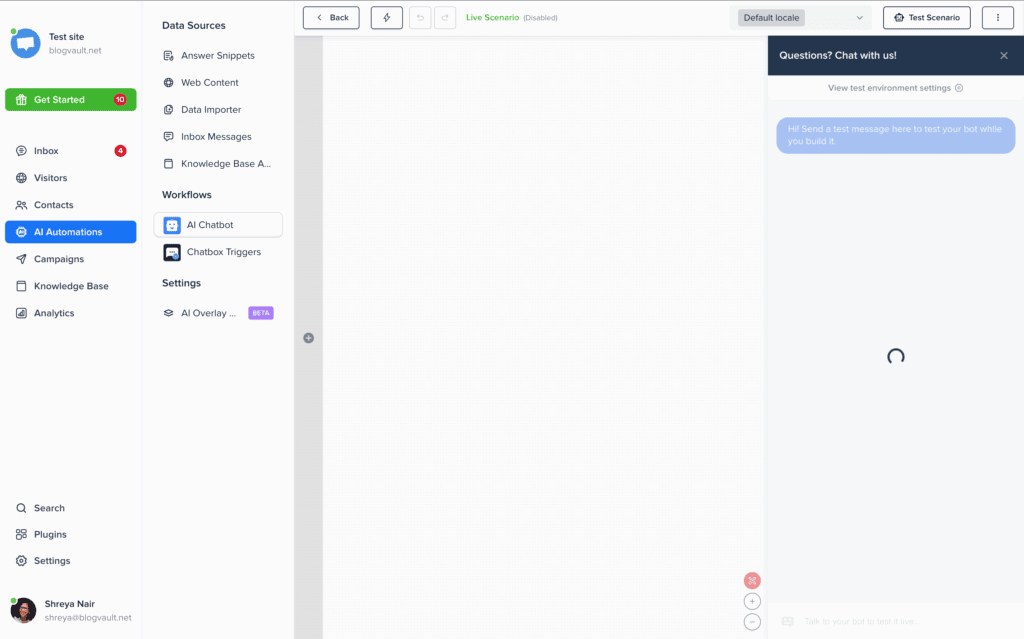
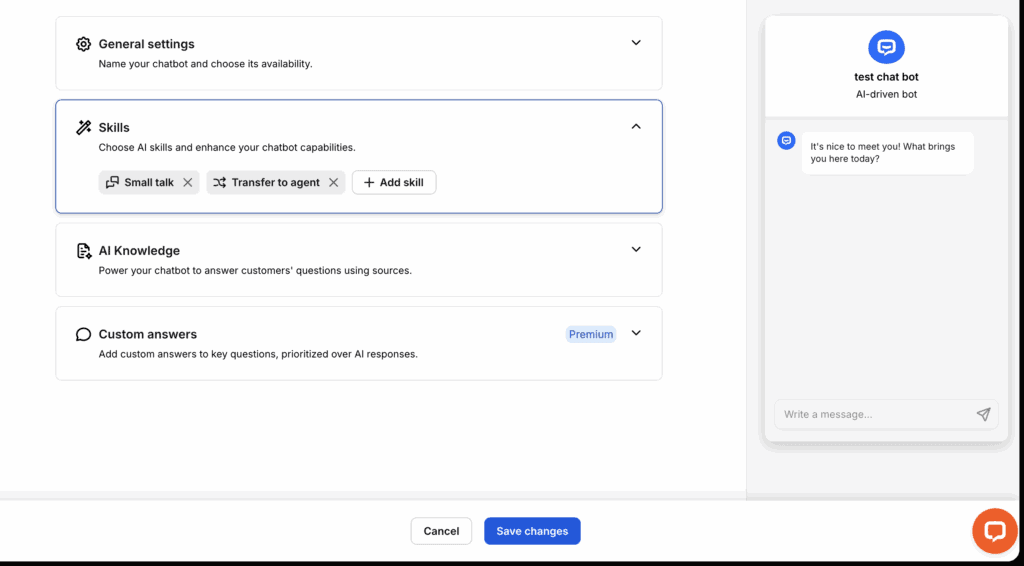
Crisp: Crisp delivers practical AI through several distinct features. Its no-code bot builder can qualify leads and book meetings, while the Knowledge Assistant bot can answer questions from your help center. MagicReply speeds up agent responses with smart suggestions, and live translation breaks down language barriers.
LiveChat: LiveChat’s strength is its integrated AI. The built-in Copilot assistant works alongside agents to suggest replies, summarize conversations, and adjust text tone. For 24/7 support, it connects to its sister product, ChatBot, for full automation. Smart features like automatic chat tagging and AI-generated reports turn conversation data into actionable insights.
Third-Party Integrations
Verdict: Crisp excels at unifying social media and messaging channels, while LiveChat offers deeper connections to e-commerce and CRM platforms.
A customer conversation rarely stays in one place. It connects to your sales funnel, social media, and marketing stack. We evaluated how well each live chat software integrates with the other tools you use to create a seamless customer journey.
Crisp: Crisp’s standout feature is its omnichannel shared inbox, which consolidates messages from WhatsApp, Instagram, Messenger, and more. It syncs natively with major CRMs like HubSpot and Salesforce and connects to Shopify, making it a powerful central hub for all customer communication.
LiveChat: LiveChat focuses on deep, robust integrations. It offers superior native connections for e-commerce stores using Shopify, WooCommerce, or Wix. It also links seamlessly with CRMs like Salesforce and productivity tools like Google Analytics, all supported by a massive library of over 1,000 apps via Zapier.

Performance & Speed
Verdict: Both platforms are fast, but Crisp has a slight edge with its exceptionally lightweight and optimized code.
Your chat plugin should never be the reason your site loads slowly. We analyzed the technical impact of each widget to see which one delivers a fast experience for your visitors without harming your Google PageSpeed scores, a crucial factor for any live chat for small business.
Crisp: Crisp is engineered for speed. Its script is incredibly lightweight and loads asynchronously (after your main content), so it never blocks your page from rendering. Hosted on a global CDN, it ensures the widget appears quickly for every visitor, regardless of their location.
LiveChat: LiveChat is also a high-performance, cloud-based solution. Its scripts load from its own servers and won’t slow down your WordPress site’s initial load. It is known for being extremely stable and fast, though its script can become slightly heavier than Crisp’s once you enable multiple third-party integrations.
Compliance & Data Security
Verdict: Both are excellent for GDPR, but LiveChat is the mandatory choice for businesses needing HIPAA compliance.
Handling customer data is a massive responsibility. We checked which platform provides the necessary tools to help you comply with strict privacy regulations and protect sensitive information.
Crisp: Crisp is fully GDPR-ready, providing a dedicated privacy dashboard, IP address masking, and tools for data deletion and consent management. It offers a secure and compliant environment suitable for the vast majority of businesses.
LiveChat: LiveChat also meets all GDPR requirements, including the option to host data in EU data centers. Its critical advantage is offering HIPAA compliance on its Enterprise plan, which requires a Business Associate Agreement (BAA). This makes it the only viable option for organizations in healthcare, legal, or other highly regulated industries.
Agent Management & Experience
Verdict: Crisp is more intuitive for small teams with its straightforward interface, while LiveChat’s advanced features are built for high-volume support agents.
The best tools make your team’s job easier, not harder. We looked at the day-to-day workflow features that reduce friction and help agents solve problems faster with their live chat software.
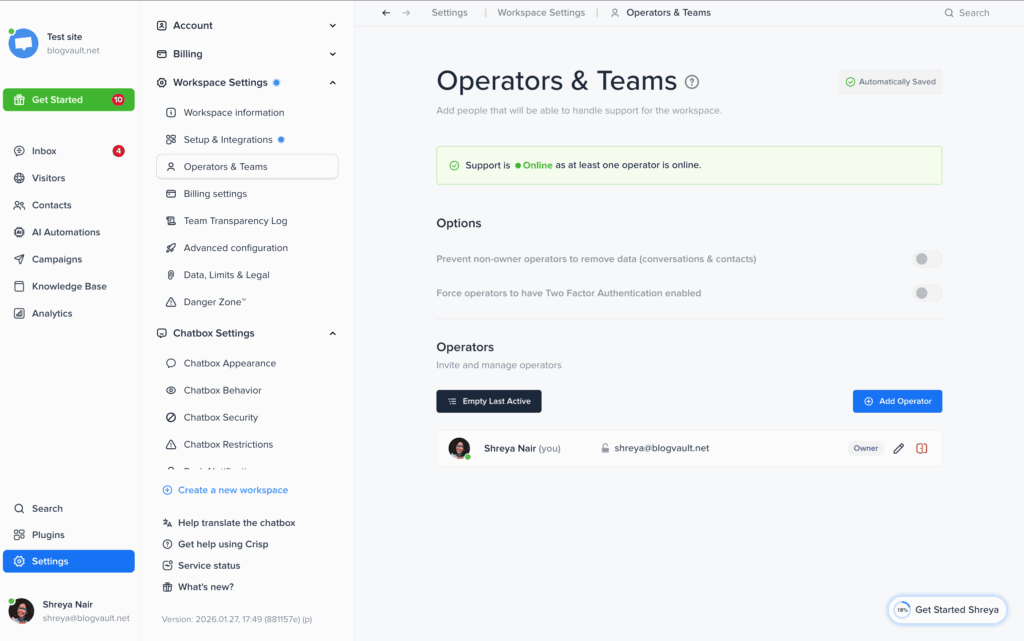
Crisp: Crisp’s experience is built around a clean interface and proactive alerts across desktop, mobile, and email. Features like automatic routing to departments, offline lead capture forms, and internal notes for team collaboration make for an organized and efficient workflow.
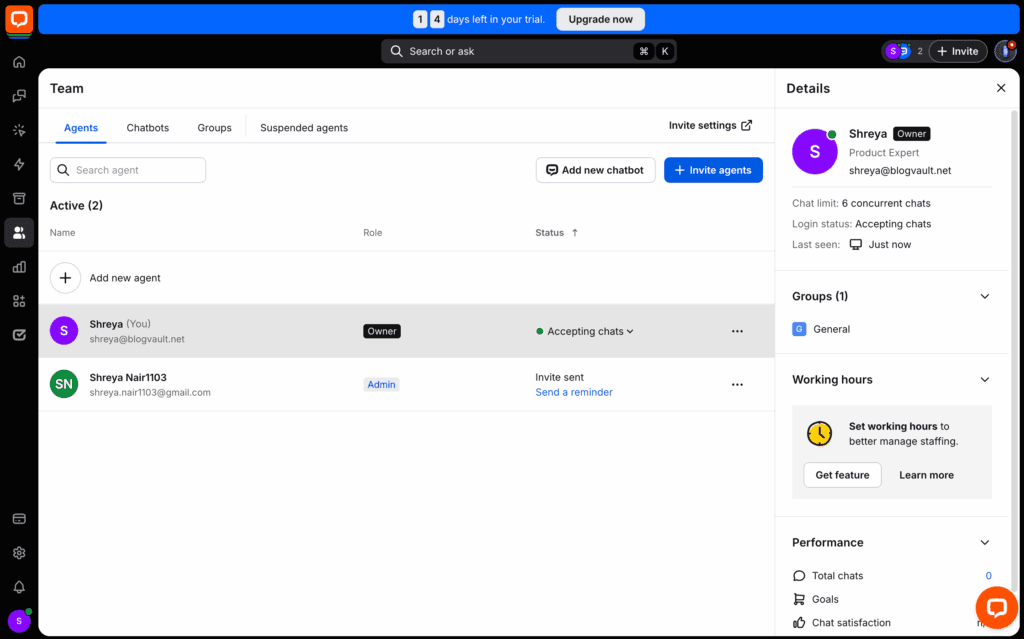
LiveChat: LiveChat equips agents with powerful productivity tools. “Message Sneak Peek” lets agents see what customers are typing in real-time, allowing them to prepare answers faster. It also offers advanced routing based on the page a visitor is on and can use its AI chatbot to manage conversations after hours.
Storage & Data Management
Verdict: Crisp offers a far more generous data retention policy on its lower-priced plans.
Your conversation history is a valuable asset full of customer insights. We checked which platform lets you keep that data indefinitely without forcing you into an expensive plan.
Crisp: Crisp stands out by offering unlimited storage of all chat transcripts and contact information on every paid plan, including its most affordable tier. Its database is easily searchable, and transcripts can be automatically emailed to customers.
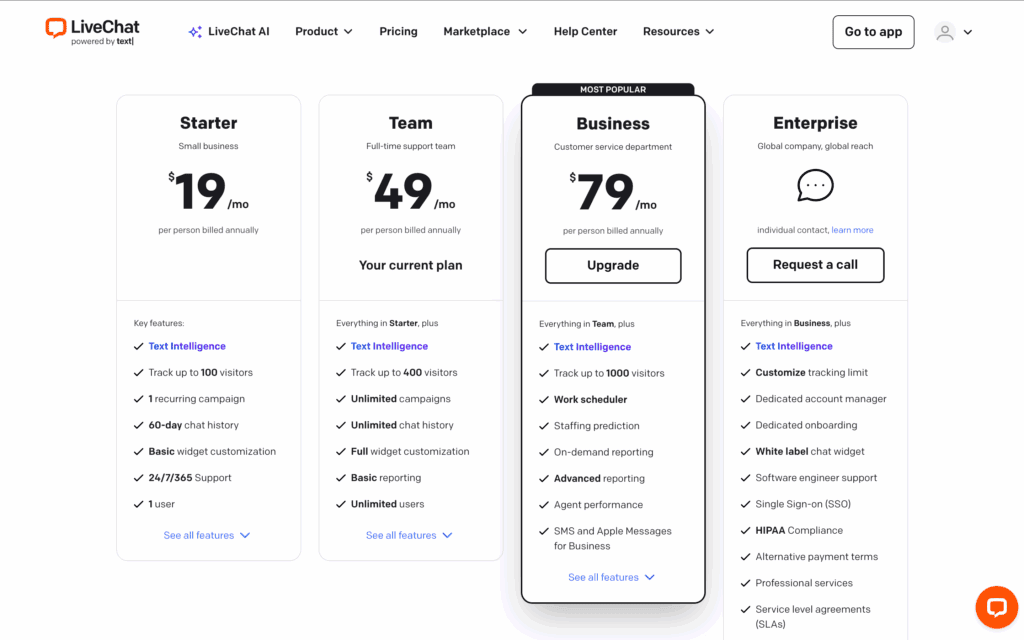
LiveChat: LiveChat archives all conversations, but its entry-level Starter plan limits your access to the last 60 days of chat history. To get unlimited history, you must upgrade to the Team plan or higher, which can be a significant limitation for businesses needing to reference older conversations.
Pricing & Value
Verdict: Crisp offers better upfront value with a free plan and lower entry costs; LiveChat is a premium investment for teams that need its advanced features.
The pricing model—per agent vs. per workspace—dramatically affects your total cost. We analyzed the fine print to see which live chat for small business platforms offers better value as you grow.
Crisp: This plugin is highly accessible, with a useful free plan for two agents. Crisp’s paid plans use a per-workspace model, which is cost-effective for a single website but gets expensive if you manage several. The price jump to unlock its full AI suite is also substantial.
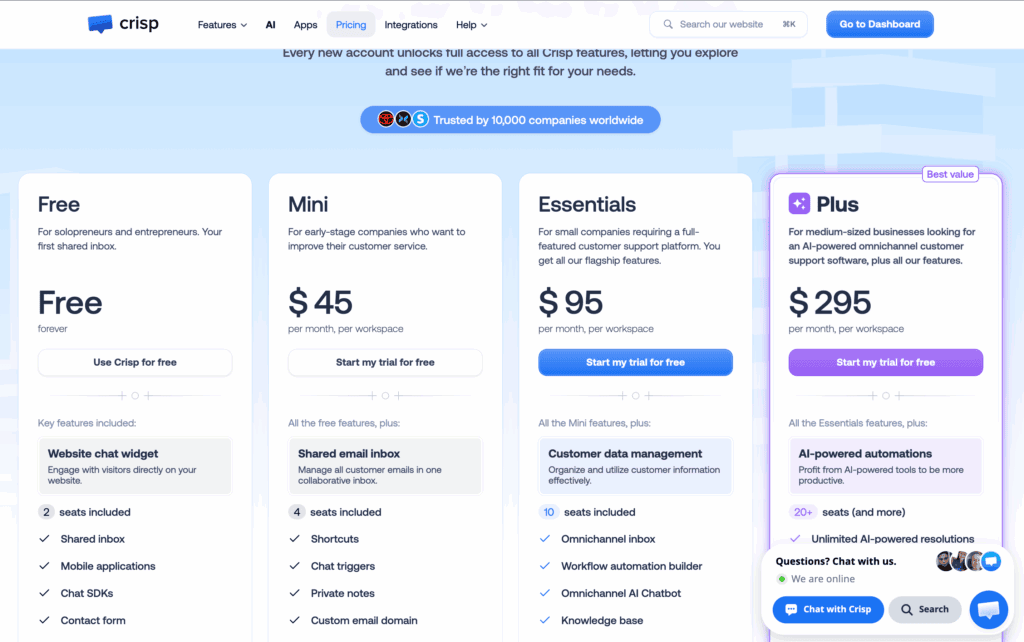
LiveChat: LiveChat’s pricing operates on a per-agent pricing model with no free plan, only a trial. This means costs scale directly with your team size. It is a premium service, and users should be aware that key features like the full ChatBot or HelpDesk are separate, paid add-on products.
What Real Users Complain About
Verdict: Frustrations with Crisp center on its pricing jumps, while LiveChat’s are about its high base cost and add-on fees.
No software is perfect. We scoured Reddit, G2, and other forums to find the most consistent complaints about these customer support tools, revealing the potential frustrations you might face.
Crisp: The most common complaints from Crisp users involve the significant price increase between the Pro and Essentials/Plus plans, the lack of a multi-site discount (making it expensive for agencies), and occasional confusion from frequent UI updates.
LiveChat: LiveChat users most frequently cite its high overall cost, especially for teams needing more than one agent. Many also express frustration with the “hidden fees” of needing to pay for separate products like ChatBot or HelpDesk to unlock full functionality.
Alternatives to LiveChat and Crisp
If neither LiveChat’s premium power nor Crisp’s all-in-one inbox feels like the perfect fit, here are three other excellent live chat plugins worth considering.
- Tidio: Tidio is a top competitor known for its powerful free plan and a strong focus on AI-driven sales and support automation. It’s particularly popular with e-commerce stores on platforms like Shopify. Its visual chatbot builder is one of the easiest to use, allowing you to create complex automated workflows without any code. If your primary goal is to use chatbots to capture leads and boost sales, Tidio is an outstanding choice.
- JivoChat: JivoChat is a true omnichannel communication suite that consolidates live chat, phone calls, email, and social media messaging into a single application. It’s an excellent alternative to Crisp if you need to integrate business phone calls (including callbacks) into your support workflow. It’s known for being affordable and feature-rich, making it a great option for small businesses that want to manage all customer communication in one place.
- Olark: Olark is one of the original live chat platforms, known for its simplicity, reliability, and focus on gathering customer data. While it’s less focused on AI and complex automation, it excels at providing a straightforward, effective live chat experience. It offers unique features like real-time co-browsing and detailed visitor insights that can be invaluable for sales and support teams. Olark is ideal for businesses that want a simple, stable chat solution without a steep learning curve.
Final Thoughts
Ultimately, the choice between LiveChat vs. Crisp comes down to a clear trade-off: premium power versus all-in-one simplicity. LiveChat is the definitive winner for growing businesses and established teams that need robust analytics, advanced AI features, and the scalability to handle high volumes of customer conversations. Crisp is the better choice for startups and small businesses seeking an affordable, user-friendly platform that unifies website chat, email, and social media into a single, simple inbox.
Before you commit, we strongly recommend you use both platforms’ free trials to test them in a real-world environment. If possible, install them on a staging site first. This private copy of your website lets you explore each dashboard and configure the chat widget without interrupting your live customer experience. A little hands-on testing is the best way to determine which interface feels more natural for your team and which tool will truly support your business as it grows.
FAQs
What is a Crisp chat?
Crisp is an all-in-one customer communication platform. It goes beyond simple live chat by combining website chat, email, social media messages (like Facebook Messenger and Instagram), and a knowledge base into a single shared inbox. This allows teams to manage all customer conversations in one place.
Is Crisp LiveChat free?
Yes, Crisp offers a free plan called “Basic.” It is designed for personal websites or very small teams and includes live chat for up to 2 agents. However, more advanced features like chatbot automation, integrations, and unlimited history require upgrading to one of their paid subscription plans.
Which app is best for LiveChat for free?
Both Crisp and Tidio are widely considered to have the best free plans available. Crisp’s free plan is excellent if you want a simple live chat for two people. Tidio’s free plan is often preferred for its powerful chatbot capabilities, allowing you to build automated workflows to capture leads and answer common questions, even when you’re offline.
Is Crisp chat legit?
Yes, Crisp is a legitimate, secure, and widely used software company based in France. It serves thousands of businesses worldwide and is fully compliant with data privacy regulations like GDPR. It is a well-regarded and trusted tool in the customer communication industry.

Shreya has been a writer for as long as she can remember. Now, she writes articles that help WordPress users manage the sites that they're proud of, with little to no coding


