

Lost a customer because you couldn’t answer their question fast enough? The LiveChat vs Olark debate is about choosing the right tool to prevent that from happening. Both connect you with website visitors instantly, but one is a feature-packed powerhouse for growing teams, while the other is a simple, effective solution for startups. We’ll help you decide which one is right for your business and your budget.
A good WP chat plugin should integrate seamlessly without slowing down your site or causing technical headaches. While both LiveChat and Olark offer WordPress solutions, their setup, features, and overall feel are very different. Understanding this is key to adding powerful chat functionality to your website without the fuss.
In our experience of LiveChat, is the better choice for growing businesses. It is a powerful, feature-rich platform with advanced AI and deep integrations.
To determine the best chat plugin between LiveChat vs. Olark debate, we analyzed both platforms to assess their performance. We were looking to see if businesses can connect with customers easily and efficiently.
Here’s exactly what we’re comparing:
- Ease of Use: Which one is faster to set up and easier for your team to learn?
- Core Features: Who has the better toolkit for analytics, ticketing, and automation?
- Integrations: Do they connect seamlessly with essential tools like your CRM or helpdesk?
- Performance: Will either of these plugins slow down your website?
- Scalability: Which platform is built to handle a growing team?
- True Cost: What’s the real value you get for your money?
- User Complaints: What are the actual downsides and frustrations users report?
Expert Advice: Build a test site and explore the plugin there first. Make sure the chatbot is smart and actually helpful before you push it to the live site.
AI & Automation: Proactive Support and Lead Generation
AI is no longer a futuristic buzzword; it’s a core part of modern live chat support software. We looked at how each platform uses automation to help agents work faster, answer questions 24/7, and proactively engage visitors before they even ask for help.
LiveChat: LiveChat embeds AI directly into the agent workflow. Its system is designed to make human agents more efficient rather than just replacing them.
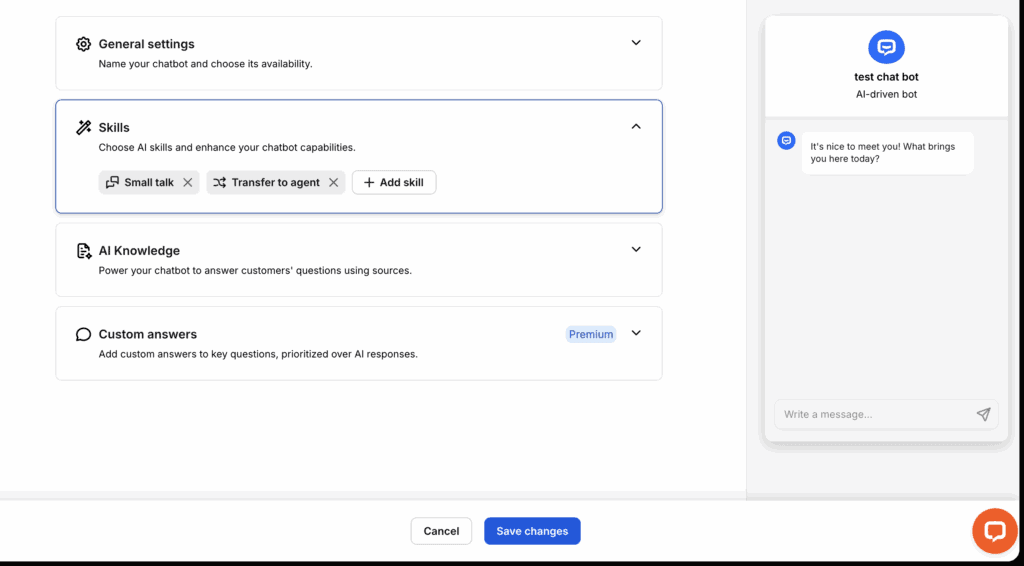
- Copilot Assistant: Provides agents with real-time reply suggestions, helps adjust message tone, and can summarize long chats for quick handovers.
- ChatBot Integration: For full automation, it integrates with a separate (but related) ChatBot product to handle routine questions and qualify leads around the clock.
- Smart Features: Automatically tags chats based on content and generates weekly reports with AI-powered insights into customer trends.
Olark: Olark reserves its most powerful AI for its top-tier plan, making automation less accessible for the average user. Its standard features are rule-based rather than generative.
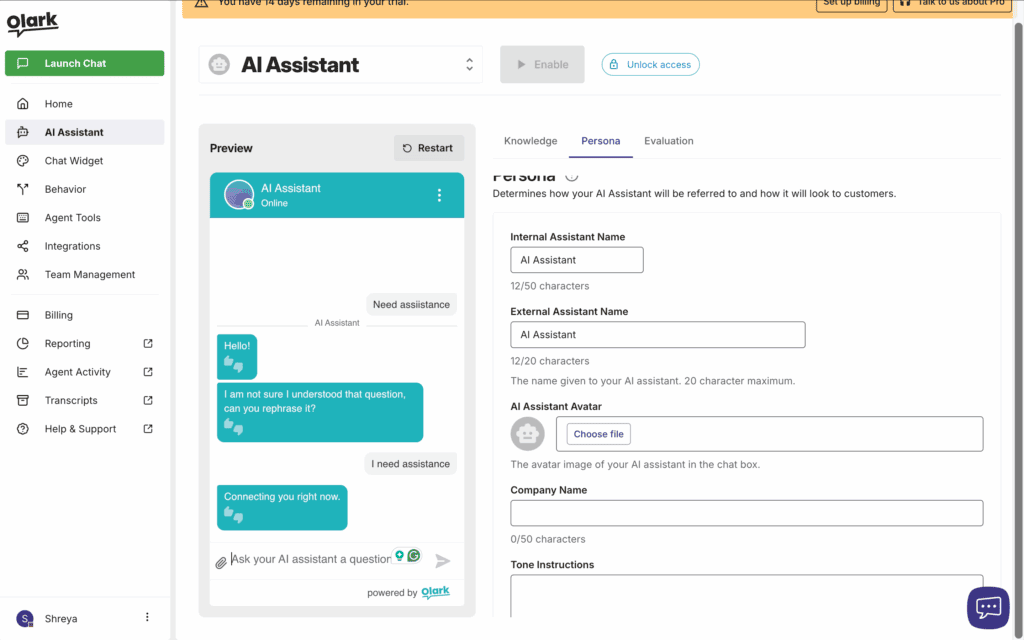
- Limited Core AI: The standard plan relies on “Targeted Chat”—automated greetings triggered by visitor behavior (like time on page or location), not true AI conversation.
- Pro-Level AI: True AI chatbots and “CoPilot” automation for answering questions are only available on the expensive, custom-priced Pro plan.
Integrations: Connecting to Your Business Tools
A customer chat tool must connect with your existing workflow, not create a new one. We evaluated how well each platform syncs with essential business software like CRMs, helpdesks, and e-commerce platforms.
LiveChat: LiveChat acts as a central communication hub, pulling in conversations from multiple channels.

- Massive Marketplace: Offers over 200 native integrations with major players like Salesforce, HubSpot, Zendesk, and Mailchimp.
- Omnichannel Support: Uniquely centralizes messages from WhatsApp, Facebook Messenger, Instagram, and Apple Business Chat into the same dashboard as your website chats.
Expert Advice: Crisp and LiveChat offer distinct integration philosophies; LiveChat provides a massive marketplace of over 200 pre-built apps for popular tools, whereas Crisp focuses on a more developer-friendly API and all-in-one features to create a self-contained ecosystem.
Olark: Olark focuses on deep, high-quality integrations with a curated list of popular sales and support tools.
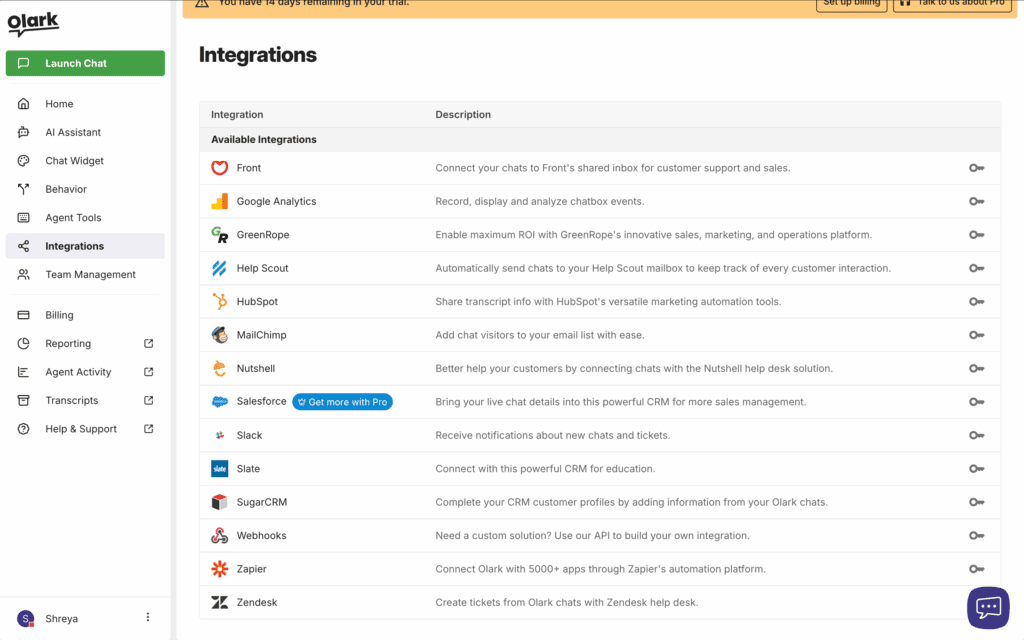
- Native CRM & Sales Tools: Provides excellent, seamless connections with Salesforce, HubSpot, and Pipedrive to sync chat data.
- Help Desk & Marketing: Integrates with Zendesk and Help Scout to create support tickets, and Mailchimp for capturing leads.
- E-commerce: Offers powerful integrations for Shopify, WooCommerce, and BigCommerce that let agents see a visitor’s shopping cart contents in real-time.
Performance & Speed: Will It Slow Down Your Website?
No one wants to find the best live chat for their website only to discover it slows everything down and hurts their SEO. We examined the technical architecture of each widget to see how it affects site performance.
LiveChat: LiveChat is built with performance as a top priority, ensuring the widget script doesn’t interfere with your site’s loading.
- Off-Site Loading: As a cloud-based service, all chat scripts load asynchronously from LiveChat’s own servers, so they don’t block your core website content from appearing.
- Lightweight Impact: The widget is highly optimized and widely considered one of the fastest in the industry.
Olark: Olark also operates as a cloud-based service, handling all the heavy lifting on its servers to keep your site running smoothly and quickly.
- Cloud-Based Hosting: Chat processing occurs on Olark’s infrastructure, preventing your WordPress server from getting bogged down by chat activity.
- Minimal Speed Impact: The script is lightweight and loads externally, adding only a small number of requests that have a negligible effect on Core Web Vitals.
Expert Advice: Our review of Airlift shows how its automatic optimization of code and images can significantly improve site performance, making it an excellent solution if you feel a third-party script from a tool like Olark is slowing your website down.
Mobile Apps: Managing Chats On the Go
Your business doesn’t stop when you step away from the computer. We assessed the mobile experience to see which tool lets your team provide excellent support from anywhere, turning any smartphone into a customer service desk.
LiveChat: LiveChat offers a best-in-class mobile experience that mirrors the functionality of its desktop app.
- Native Apps: Provides high-quality, fully functional apps for both iOS and Android.
- On-the-Go Features: Agents get instant push notifications and can manage multiple chats, use canned responses, and see visitor details just as they would on a desktop.
Olark: Olark provides functional mobile support, though its unique third-party option may appeal to tech-savvy users. The experience of its simple live chat widget on mobile sites is excellent for visitors.
- Native Apps: Offers dedicated apps for iOS and Android for managing chats.
- Third-Party Support: Uniquely supports the XMPP (Jabber) protocol, allowing agents to use third-party mobile clients like Trillian or Xabber if they prefer.
Security & Compliance: Is Your Customer Data Safe?
Handling customer data requires strict security and adherence to regulations like GDPR. We’re looking at which platform provides the necessary tools to keep your data, and your business, safe and compliant.
LiveChat: LiveChat provides robust compliance features tailored for businesses of all sizes, especially those in regulated industries.
- GDPR: Fully compliant, offering consent forms, IP masking, and the option to host data in EU data centers.
- HIPAA: Offers a HIPAA-compliant solution on its Enterprise plan, which includes a signed Business Associate Agreement (BAA).
Olark: Olark focuses on strong foundational security and accessibility.
- GDPR: Is GDPR-compliant with tools for data deletion and privacy consent.
- Accessibility: Is certified to meet WCAG 2.1 AA standards, making its chat box usable for visitors with disabilities.
- Security: Encrypts all chats and includes security features like IP address banning.
Agent Experience: Tools for Your Support Team
The best tools make your team’s job easier. For a live chat for a small business, agent efficiency is key. We compared the features that directly impact agent workflow, speed, and management.
LiveChat: LiveChat is packed with features designed to give agents an edge in every conversation.
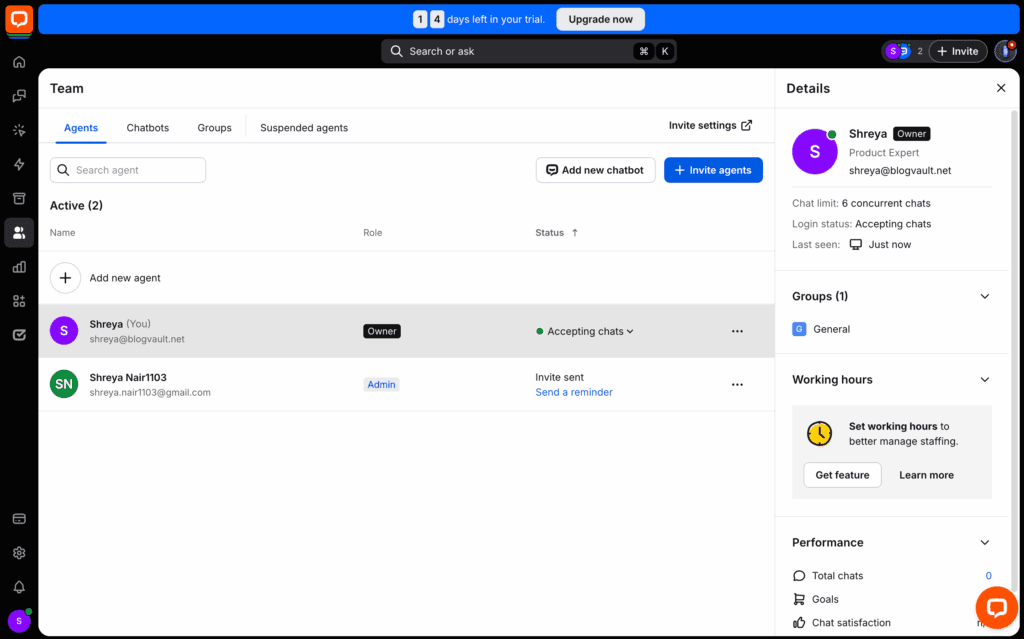
- Real-Time Engagement: Its “Message Sneak Peek” feature lets agents see what a customer is typing in real-time, allowing them to prepare an answer before the question is even sent.
- Advanced Routing: Automatically routes chats to specific agent groups (e.g., Sales or Support) based on rules you set.
- Offline Functionality: The widget automatically converts to a contact form or can be handled by an AI chatbot when agents are unavailable.
Olark: Olark provides solid, fundamental tools for managing conversations and agent workload.
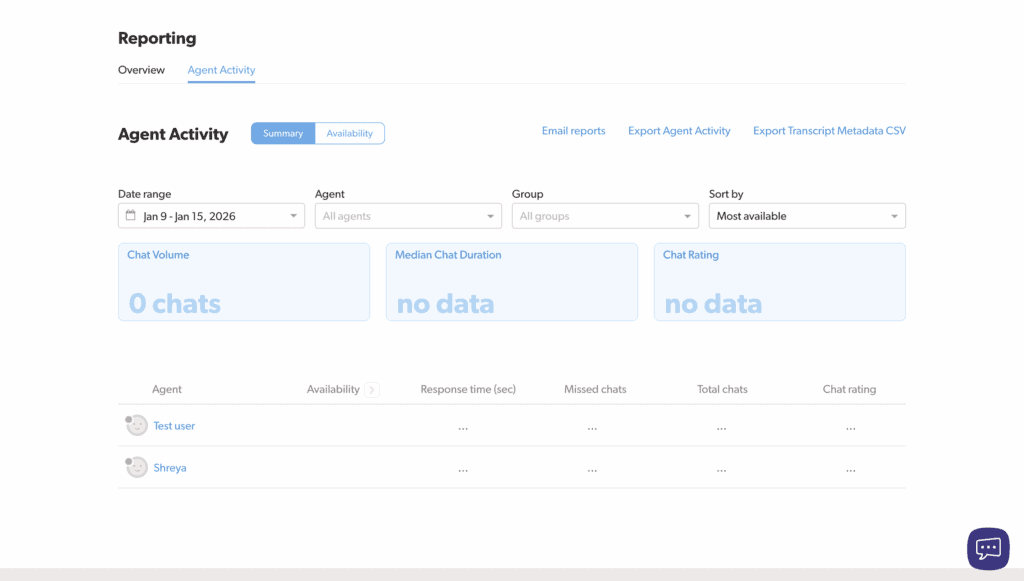
- Real-Time Notifications: Agents receive instant desktop, browser, or mobile notifications for new chats.
- Assignment & Routing: Includes Agent Groups and Round-Robin distribution to route chats to the right department.
- Unavailability: Automatically sets agents to “Away” if they hit their pre-set chat limit, preventing them from becoming overwhelmed.
Pricing & True Cost: What’s the Real Value?
The sticker price is just the beginning. We’re breaking down the true Olark pricing structure versus LiveChat’s plans to see what you actually get for your money.
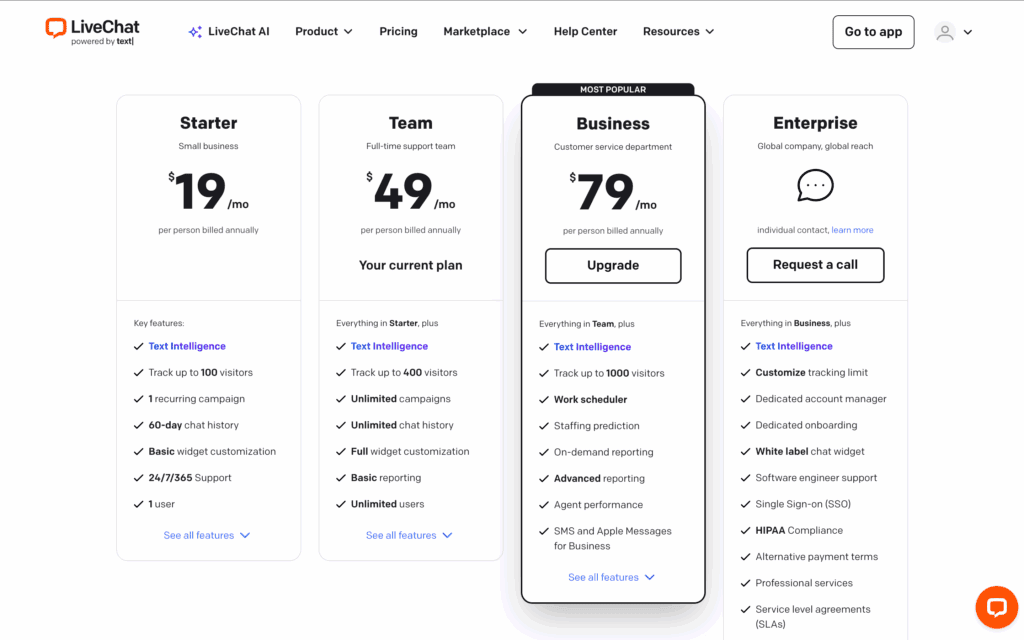
LiveChat: LiveChat’s pricing is straightforward, with features scaling up at each tier. It does not have a free plan.
- Starter: ~$20–$24/agent/month for basic tools and a 60-day chat history.
- Team: ~$41–$49/agent/month for unlimited history and reporting.
- Business: ~$59–$69/agent/month for advanced features like staffing predictions.
- Enterprise: Custom pricing, required for HIPAA compliance.
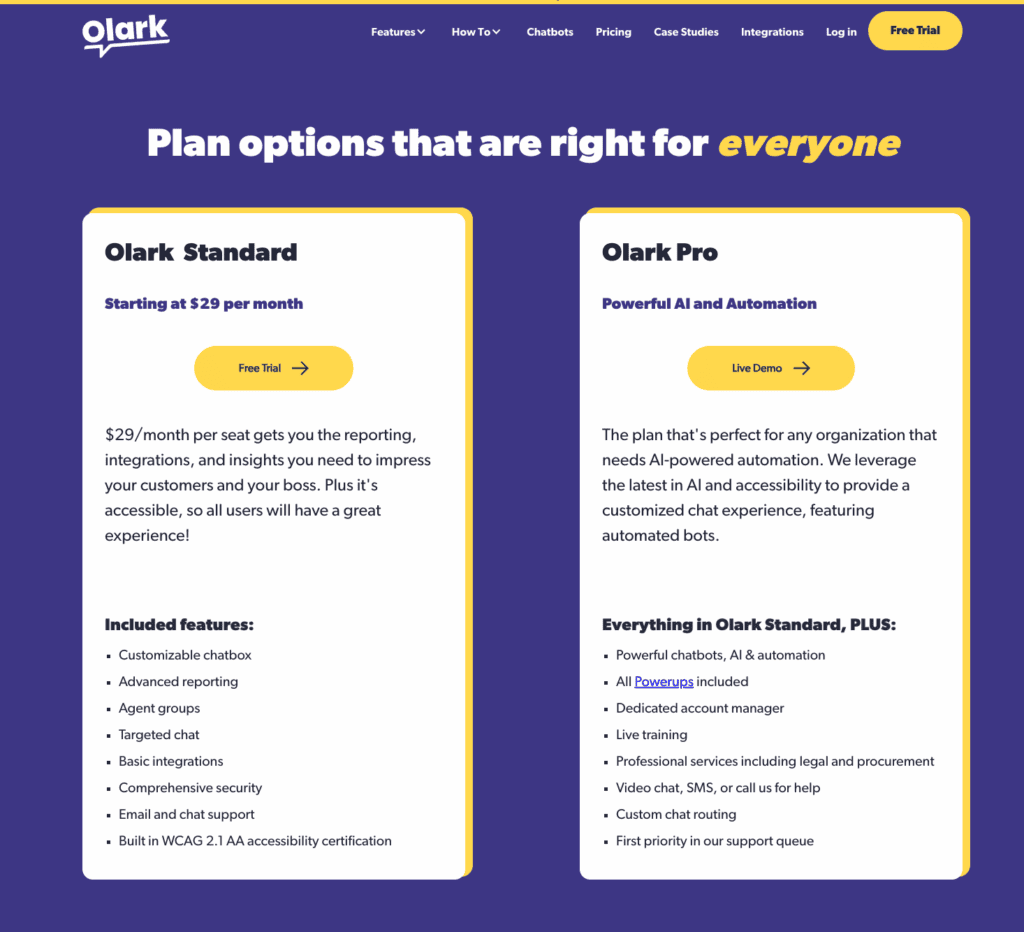
Olark: Olark’s pricing appears cheaper at first, but essential features are locked behind expensive monthly add-ons.
- Free Plan: Extremely limited to just one agent and 20 chats per month.
- Standard Plan: Approx. $29/agent/month.
- PowerUps: This is the hidden cost. Add-ons like Co-browsing or removing Olark branding cost an extra $29–$99 each per month, which can quickly double or triple your bill.
- Pro Plan: Custom enterprise pricing that bundles all PowerUps and AI features.
Common Complaints: What Do Real Users Say?
Verdict: Both have clear downsides. Users complain that LiveChat is expensive, while Olark’s “PowerUp” model feels like a hidden tax.
Feature lists don’t tell the whole story. We dug through LiveChat reviews and Olark user forums to find the most common real-world frustrations with each platform.
LiveChat: Users of LiveChat love the features but are often concerned about the total cost of ownership.
- High Cost: Frequently cited as one of the more expensive options, especially for teams needing multiple agent seats.
- Hidden Fees: Frustration that key products like ChatBot and the HelpDesk ticketing system are now separate, paid platforms.
- Billing Practices: Some complaints online mention aggressive automatic renewals and price increases without sufficient warning.
Olark: Users of Olark praise its simplicity but are often caught off guard by the cost of add-ons.
- The “PowerUp” Tax: The top complaint is that basic features (like pre-chat surveys or removing Olark branding) require expensive monthly add-ons.
- Dated Interface: Some users feel the agent dashboard and chat widget look less modern than competitors.
- Feature Gap: The lack of a built-in ticketing system means businesses must integrate and pay for a separate service like Zendesk for long-term issue tracking.
Alternatives to LiveChat and Olark
If neither LiveChat nor Olark feels like the perfect fit, the market has other strong contenders. Here are three popular alternatives worth considering:
- Tidio: The best all-in-one for AI and automation. Tidio combines live chat, powerful AI chatbots, and a multichannel inbox into one platform. Its generous free plan makes it a fantastic starting point for small businesses that want to automate support and lead generation.
- tawk.to: The best option if your budget is zero. Tawk.to is a 100% free live chat plugin that offers surprisingly robust features, including ticketing and a knowledge base. It’s the go-to choice for startups that need powerful chat functionality without any monthly fees.
- JivoChat: The true omnichannel powerhouse. JivoChat consolidates messages from your website, Facebook, Instagram, WhatsApp, and even phone calls into a single, unified inbox. If your goal is to manage all customer communication from one dashboard, JivoChat is an excellent choice.
Final Thoughts
In the LiveChat vs Olark showdown, LiveChat is the clear winner for growing businesses needing a powerful, scalable platform with deep features. Olark excels for small teams that prioritize simplicity, affordability, and core chat functionality. If neither is a fit, consider the AI-driven Tidio for its automation, the completely free tawk.to for budget-conscious users, or the omnichannel JivoChat for managing all communications in one place.
Whichever tool you choose, we recommend that you explore the plugin on a staging site first. This gives you a safe space to set the plugin up before customers are impacted.
FAQs
How much does Olark cost?
Olark’s main plan costs approximately $29 per agent per month. However, many essential features, such as removing Olark’s branding or adding co-browsing, require expensive monthly “PowerUp” add-ons that can significantly increase the total cost.
What is the best LiveChat platform?
There is no single “best” platform. LiveChat is a top choice for established teams needing power and scalability. Tidio is excellent for small businesses that want advanced AI and a great free plan. Tawk.to is the best option for anyone who needs a completely free solution.
What is LiveChat used for?
LiveChat is used for real-time customer communication on a website. Businesses use it to provide instant customer support, generate sales leads by engaging prospective buyers, and increase conversions by answering questions at the exact moment a customer needs help.
Is LiveChat legit?
Yes, LiveChat is absolutely a legitimate and highly respected company. Founded in 2002, it is one of the most established platforms in the industry and is trusted by over 37,000 businesses worldwide, including major brands like IKEA and Mercedes-Benz.Yes, LiveChat is absolutely a legitimate and highly respected company. Founded in 2002, it is one of the most established platforms in the industry and is trusted by over 37,000 businesses worldwide, including major brands like IKEA and Mercedes-Benz.

Shreya has been a writer for as long as she can remember. Now, she writes articles that help WordPress users manage the sites that they're proud of, with little to no coding


